Step-by-Step Guide: Knives Out Top Up for Vouchers
Getting your Knives Out Vouchers on ArcTopup takes only a few simple steps. The system processes direct recharges using your player information so you never have to share login passwords.
- Select the Knives Out Vouchers package that matches your needs.
- Enter your Knives Out Character UID and choose your active Server.
- Verify that your UID and Server selection are accurate to avoid delivery delays.
- Click buy now and choose your preferred payment option at checkout.
- Complete your transaction. Your vouchers will transfer directly to your in-game balance.
After payment confirmation, launch Knives Out on your mobile device or PC to verify that your updated voucher balance reflects in your account wallet.
How to Find Your Knives Out Character UID and Server
To ensure your recharge reaches the correct account, you need your unique Character User ID (UID) and the server your account is hosted on. Finding this information takes seconds inside the game client.
- Open Knives Out and log in to your account.
- Tap your player avatar located in the top-left corner of the main lobby screen.
- In your personal profile overview, locate the numerical Character UID shown beside your avatar name.
- Tap the copy icon next to your UID to copy the exact string of numbers to your clipboard.
- Check the top or bottom of your main screen before entering matchmaking to confirm your current Server region (such as Global or Japan Server).
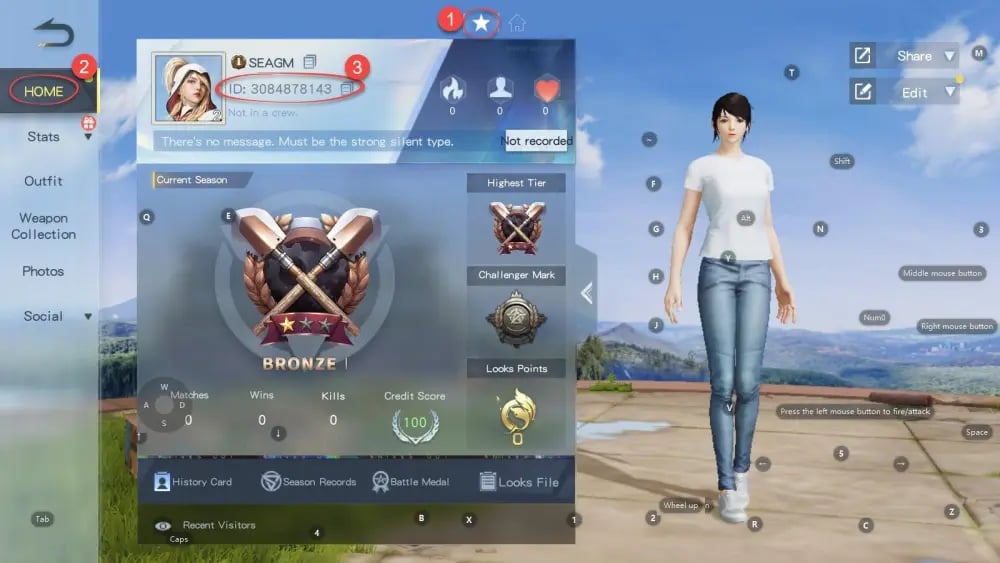
Always double-check that you select the exact server assigned to your account. Top-up systems route voucher delivery based on the combination of UID and Server.
| Account Field | Description | Where to Find |
|---|---|---|
| Character UID | Unique multi-digit numerical identifier | Main profile page next to character name |
| Server Name | Regional cluster hosting your account data | Login screen banner or main lobby settings |
| Character Name | In-game display handle | Profile screen and squad overview |
What Are Knives Out Vouchers and How to Use Them
Knives Out Vouchers represent the primary premium currency in Knives Out. Vouchers allow players to access premium content, seasonal rewards, and customization options across all gameplay modes in 2026.
Season Battle Pass
Each 2026 season introduces an updated Battle Pass packed with exclusive rewards. Spending vouchers unlocks the elite tier, granting access to premium character costumes, parachute skins, weapon camos, and bonus profile decorations as you level up your pass.
Exclusive Vehicle Skins and Crates
Knives Out features detailed vehicle customizations, including high-end sports cars, armored trucks, and off-road buggies. Vouchers are required to draw from limited-time vehicle gachas and unlock rare vehicle audio and visual effects.
Premium Firearm Weapon Camouflages
Upgrade your arsenal with animated and kill-counter firearm skins. Vouchers can be spent on specialized weapon crates and direct cosmetic purchases in the in-game mall.
Account Utility Items
Vouchers also purchase utility items such as Character Rename Cards, Custom Room Cards for private tournament hosting, and gift packs for squad members.
Safe Knives Out Recharge: Protecting Your Account with UID-Only Top-Up
Account safety is critical when purchasing game currencies online. ArcTopup uses a direct UID-only top-up model, meaning you only submit your public player UID and Server.
- No Passwords Required: You never share your game account password, Apple ID, Google Play credentials, or social media logins.
- No Account Sharing: Third parties never log into your profile, eliminating the risk of unauthorized access or inventory tampering.
- Secure Payment Gateways: Checkout processes through verified payment channels with real-time billing transparency.
Keeping your credentials private ensures your account remains secure while receiving legitimate in-game vouchers.
Troubleshooting Knives Out Voucher Delivery and Server Selection Issues
Most recharge delays result from minor input mistakes. Here is how to prevent and resolve common issues:
- Server Mismatch: Knives Out operates separate regional servers. If your account was created on the Japan server but you select Global at checkout, the voucher dispatch cannot find your profile. Always verify your server before completing payment.
- UID Typo: Manually typing digits can lead to errors. Use the copy button in your Knives Out profile to paste your exact ID into the top-up field.
- Refreshing the Game Client: If you were logged in during the recharge, your client might not update the balance immediately. Close Knives Out completely from your background applications and restart it to refresh your server sync.
- Order Status Check: You can track your purchase on ArcTopup using your order details. If your vouchers have not appeared after restarting the game, contact ArcTopup customer assistance with your order number and UID for prompt resolution.
Frequently Asked Questions About Knives Out Vouchers Top-Up
How to recharge in Knives Out?
To recharge, select your voucher pack on ArcTopup, input your Knives Out Character UID and Server, and complete the payment. The vouchers will be delivered directly to your account balance.
How to get ID and server in Knives Out?
Open Knives Out, tap your avatar in the upper-left corner of the lobby screen, and locate the numerical UID next to your player name. Your server is visible on the main login screen or top-level settings.
Do I need to provide my Knives Out password to buy vouchers?
No. ArcTopup only requires your public Character UID and Server. You should never share your account password or verification codes with any top-up service.
What can I purchase with Knives Out Vouchers in-game?
You can spend vouchers on the 2026 Season Battle Pass, vehicle gacha pulls, exclusive firearm finishes, character costumes, custom room cards, and rename cards.
What should I do if my Knives Out Vouchers are delayed?
First, restart your game app completely to refresh your wallet balance. If the balance has not updated, check your ArcTopup order status and provide your order ID to ArcTopup support for assistance.
Can I buy Knives Out Vouchers for a friend?
Yes. Enter your friend's Character UID and correct Server at checkout. Once the payment finishes, the vouchers will be credited straight to your friend's Knives Out balance.
Current packages and prices
Current base prices exclude Tax. Tax, payment fees and coupon adjustments are shown at checkout.
| Package | Price |
|---|---|
| 60 + 5 Vouchers | USD 0.87 |
| 180 + 10 Vouchers | USD 2.63 |
| 300 + 16 Vouchers | USD 4.38 |
| 680 + 36 Vouchers | USD 8.71 |
| 1280 + 110 Vouchers | USD 17.43 |
| 1980 + 180 Vouchers | USD 26.15 |
| 3280 + 320 Vouchers | USD 43.58 |
| 6480 + 550 Vouchers | USD 87.17 |