
GHANNY Top Up: Direct In-App Recharge with Player ID
GHANNY is a popular mobile karaoke and live audio entertainment application that connects vocalists, music fans, and content creators. Users join interactive singing rooms, participate in live audio broadcasts, challenge friends in PK singing battles, and build community channels. To participate fully in live events, send animated gifts, and support performers, users need in-app coins and diamonds.
ArcTopup provides a direct GHANNY top up service designed for quick processing and complete account security. You only need to enter your GHANNY Player ID to credit your account balance. With no account passwords required, your login credentials and personal recordings remain protected throughout the checkout process.
How to Locate Your GHANNY Player ID in the App
To ensure your recharge reaches the correct account, retrieve your unique Player ID directly from the mobile application before placing your order.
- Open the GHANNY app on your mobile device.
- Tap the Profile or Me icon located in the bottom navigation bar.
- Look beneath your avatar and display name to find your numerical Player ID.
- Tap the copy icon next to your ID number to copy it to your clipboard.
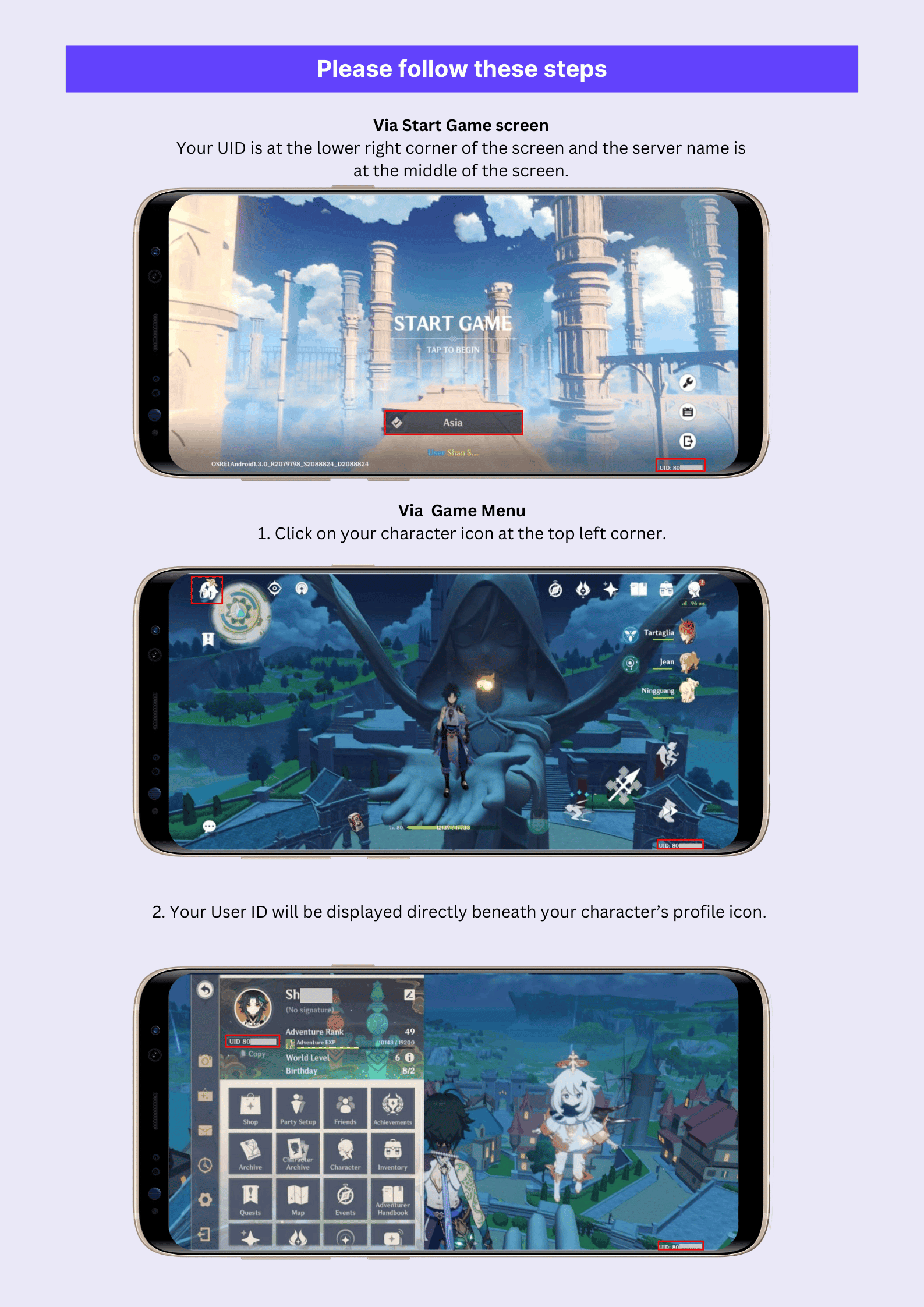
Double-check the copied numerical string before entering it on ArcTopup to prevent delivery delays or sending funds to an incorrect user.
Step-by-Step Guide to Recharge GHANNY on ArcTopup
Recharging your GHANNY balance takes only a few simple steps:
- Select Your Pack: Browse the denomination list on this page and choose the coin or diamond package you want. Current pack pricing and available units are displayed directly on the live checkout menu.
- Enter Your Player ID: Paste your numerical GHANNY Player ID into the required account input field.
- Select a Payment Method: Choose your preferred regional or international payment option from the available payment gateway list.
- Confirm Your Order: Review your details and complete the secure payment.
- Check Your In-App Balance: Open GHANNY to verify your updated wallet balance and start using your credits in live rooms.
Benefits of In-App Coin Recharges for GHANNY Users
Maintaining an active balance of GHANNY coins unlocks core interactive features across the platform:
| Feature | Coin Utility | Benefit to User |
|---|---|---|
| Live Virtual Gifts | Send special effects and animated items | Support favorite singers and highlight your profile in chat |
| PK Battle Backing | Boost host scores during time-limited PK events | Help your preferred creator win competitive singing duels |
| Themed Audio Rooms | Unlock room styling and audio enhancement tools | Host professional-sounding karaoke parties with friends |
| VIP Badges & Entry | Activate exclusive chat frames and room entry animations | Stand out in high-traffic live broadcast rooms |
Using credits during live singing sessions encourages hosts to take song requests, creates engaging interactions, and raises your ranking on community leaderboards.
Safe and Password-Free Top-Up Protection
Account safety is essential when purchasing digital credits online. Traditional top-up methods that require sharing your login email, phone number, or social media credentials expose your account to unauthorized access and security risks.
ArcTopup operates exclusively through direct Player ID processing:
- No Passwords Needed: You never share your account login, temporary codes, or personal credentials.
- Protected Privacy: Your recorded songs, personal messages, and payment records remain private within your personal device.
- Direct Wallet Delivery: Credits are sent directly to the public user identifier provided during checkout.
Never share your password or one-time verification codes with anyone offering top-up assistance.
Troubleshooting and Verifying Your Account Balance
If your coins do not appear in your balance immediately after completing your order, follow these troubleshooting steps:
- Restart the Application: Close the GHANNY app completely and reopen it to force a fresh data sync with the server.
- Check Your In-App Wallet: Go to your Profile > Wallet or Coins page to check if the total has updated.
- Confirm Order Details: Check your ArcTopup receipt to verify that the Player ID entered matches your current account profile ID.
- Allow Brief Processing Time: During peak network hours, processing can occasionally take a few extra minutes.
- Contact Customer Support: If your balance does not update, reach out to ArcTopup support with your order number and GHANNY Player ID for prompt verification.
Why Choose ArcTopup for GHANNY Top Up
ArcTopup focuses on providing a transparent, reliable, and secure top-up service for karaoke enthusiasts worldwide. With direct ID processing, transparent pricing visible directly at checkout, and dedicated customer support, managing your GHANNY in-app balance is straightforward and secure.
Frequently Asked Questions
Where can I find my GHANNY Player ID?
Open the GHANNY app and navigate to the Profile or Me tab in the bottom menu. Your numerical Player ID is located directly under your avatar and display name. Use the copy button to capture the exact number.
Do I need to share my GHANNY password for top up?
No. ArcTopup only requires your numerical Player ID. You should never share your account password, SMS verification code, or social login credentials.
How quickly will the credits arrive in my GHANNY account?
Top-ups are processed directly via your Player ID. In most instances, your coins or diamonds are delivered immediately after payment confirmation. Restart the app to view the updated total.
Can I top up GHANNY for a friend using their Player ID?
Yes. You can recharge an account for a friend or favorite creator by entering their GHANNY Player ID in the account field on the checkout page.
What should I do if my GHANNY recharge does not show up?
First, restart the GHANNY application and check your in-app wallet balance. If the balance remains unchanged, verify the Player ID on your order receipt and contact ArcTopup customer support with your order number.
Which payment options can I use to recharge GHANNY on ArcTopup?
ArcTopup supports a wide range of secure international and local payment methods. You can review all available options and active denominations directly on the checkout section of this page.
Current packages and prices
Current base prices exclude Tax. Tax, payment fees and coupon adjustments are shown at checkout.
| Package | Price |
|---|---|
| GHANNY - GHANNY*10000 | USD 100.99 |
| GHANNY - GHANNY*30000 | USD 302.96 |






























































