Heroes Evolved Top Up Guide and Direct Token Recharge
Heroes Evolved is a competitive 5v5 MOBA where strategy, tactical coordination, and individual hero mastery determine victory on the battlefield. Tokens serve as the primary premium currency in Heroes Evolved, allowing players to unlock powerful heroes, purchase exclusive skins, activate seasonal battle passes, and acquire rare cosmetic items.
ArcTopup provides a direct recharge system designed to credit Tokens straight to your game account without requiring sensitive credentials. By selecting your token bundle, entering your unique Player ID, and picking your exact regional server, you receive your currency directly in your account balance.
How to Top Up Heroes Evolved Tokens on ArcTopup
Recharging your balance on ArcTopup takes only a few straightforward steps:
- Select the Token Pack: Browse the available Heroes Evolved Token packages on this page and choose the amount you need. Current prices and package options are displayed live on the selection menu.
- Enter Your Player ID: Input your numeric Player ID into the designated account field.
- Select Your Server: Open the server dropdown list and pick the exact server where your character resides (for example, North America - LOST TEMPLE or Europe - ASGARD).
- Proceed to Checkout: Select your preferred payment method from the available local and international options.
- Complete the Transaction: Finalize the payment. Once the transaction is confirmed, the Tokens will be credited directly to your Heroes Evolved character balance.
How to Find Your Heroes Evolved Player ID and Server
To ensure your top-up processes correctly, you must supply your numeric Player ID rather than your in-game display name. Finding this information inside the game takes only a few seconds:
- Open Heroes Evolved on your mobile device or emulator.
- Tap your Avatar/Profile icon located in the top-left corner of the main lobby screen.
- On your Personal Info or profile overview screen, locate your numeric Player ID listed under your avatar and account name.
- Note your active Server Name, which is shown on the login screen or within your profile details.
- Copy or write down the numeric ID exactly as shown, without any spaces or special characters.
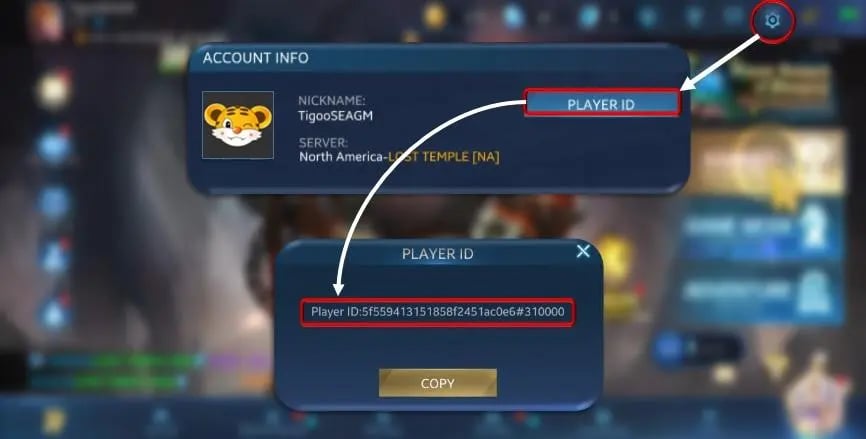
Note: Do not enter your character nickname or guild tag. ArcTopup uses the exact numeric Player ID to route Tokens directly to your profile.
Supported Regional Servers for Heroes Evolved Top-Up
Heroes Evolved operates multiple distinct servers across North America, Europe, South America, and Asia. Account data and currency balances are server-locked, meaning Tokens purchased for one server cannot be transferred to another. Always verify your server code before completing an order.
| Region | Server Name | Server Code |
|---|---|---|
| North America | North America - LOST TEMPLE [NA] | 100 |
| North America | North America - NEW ORDER [NA] | 101 |
| Europe | Europe - ASGARD[EU] | 111 |
| Europe | Europe - OLYMPUS[EU] | 112 |
| South America | South America - AMAZON [SA] | 121 |
| South America | South America - EL DORADO [SA] | 122 |
| Asia | ASIA - S1.ANGKOR [AS] | 131 |
| Asia | ASIA - S2.EL NIDO [AS] | 133 |
| Asia | ASIA - SHANGRI-LA [AS] | 132 |
| Asia | ASIA - ไทย[TH] | 134 |
| Asia | ASIA - ไทยแลนด์[TH] | 135 |
If you play on multiple servers under the same account, ensure you select the specific server where you want the Tokens credited.
What In-Game Items Can You Buy with Heroes Evolved Tokens?
Tokens provide immediate purchasing power for a wide range of content in the Heroes Evolved in-game store:
- Hero Unlocks: Expand your roster by purchasing agility, strength, and intelligence heroes without spending accumulated Gold or waiting for free weekly rotations.
- Exclusive Skins and Chromas: Acquire Epic, Legendary, and limited-edition event skins that alter character models, visual skill animations, recall effects, and voice lines.
- Evolved Pass / Seasonal Passes: Unlock premium reward tracks during active 2026 seasons to earn exclusive hero outfits, talent points, avatar frames, and upgrade items.
- Lucky Wheel and Gacha Draws: Spend Tokens to spin seasonal prize wheels, opening rare cosmetic chests and limited-time collectible items.
- Account Utilities: Purchase Name Change Cards, EXP Boosters, Gold Boosters, and custom in-game chat bubbles.
Direct and Secure Top-Up: Zero Password Requirement
Security is a fundamental priority for mobile gamers. ArcTopup uses a direct ID-based fulfillment process designed to keep your account safe:
- No Password Needed: You never have to provide your game password, social login credentials, or security question answers.
- No Account Sharing: Your account remains strictly in your hands. There is no need to log out or give temporary access to external parties.
- Protection Against Fraud: Direct UID top-ups eliminate the risks associated with unauthorized login attempts, accidental data overwrites, or credential leaks.
All transactions are processed through encrypted payment channels, protecting your financial data while ensuring accurate in-game delivery.
Heroes Evolved Tokens Delivery Troubleshooting and Support
If your Tokens do not appear in your balance immediately after payment, follow this checklist:
- Restart the Game App: Close Heroes Evolved completely from your device task manager and relaunch it. This forces the client to synchronize your currency balance with the game servers.
- Check the In-Game Mailbox: Certain promotional bonuses or bundle items are delivered directly to your in-game mailbox rather than auto-credited to your diamond counter.
- Review Your ArcTopup Receipt: Confirm that the Player ID and Server selected in your order confirmation match your active game profile.
- Verify Payment Status: Ensure the funds were deducted from your payment provider and that your order shows as completed in your ArcTopup account history.
- Contact Support: If you verified your details and your balance has not updated after restarting, contact the 24/7 ArcTopup customer service team with your Order Number, Player ID, and server details for prompt assistance.
Frequently Asked Questions
How do I find my Heroes Evolved Player ID?
Open Heroes Evolved, tap your avatar in the upper-left corner of the home lobby, and view your profile page. Your numeric Player ID is displayed right below your avatar and nickname.
Which server should I select when topping up Heroes Evolved Tokens?
Select the exact server where your active character is hosted. You can confirm your server name on the game's start-up screen or on your personal info page. Refer to the server table above to match your region and server name correctly.
Do I need to share my account password to top up Heroes Evolved?
No. ArcTopup only requires your numeric Player ID and server selection. You should never share your account password or email verification codes with anyone.
What can I purchase with Heroes Evolved Tokens?
Tokens can be used to unlock heroes, buy regular and legendary skins, activate Evolved Battle Passes, buy lottery and gacha draws, and purchase account utility items like name changes and boosters.
How long does it take for Tokens to appear in my Heroes Evolved balance?
Once your payment is processed, the system automatically routes the Tokens to your account. In most cases, the balance updates shortly after transaction confirmation. Relaunching the game helps refresh the balance display.
What should I do if my Tokens do not reflect after completing payment?
First, restart your game to refresh server data. Check your in-game mail tab to see if any items were sent as attachments. If the currency still does not reflect, contact ArcTopup customer support with your Order ID and Player ID for verification.
Current packages and prices
Current base prices exclude Tax. Tax, payment fees and coupon adjustments are shown at checkout.
| Package | Price |
|---|---|
| 100 Tokens | USD 0.86 |
| 240 Tokens | USD 2.34 |
| 500 Tokens | USD 4.83 |
| 1,200 Tokens | USD 9.67 |
| 2,500 Tokens | USD 19.31 |
| 6,500 Tokens | USD 48.25 |
| 14,000 Tokens | USD 96.50 |






























































