ZEPETO Zems & Coins Top Up: Direct and Instant Account Recharge
ZEPETO is a leading 3D virtual avatar platform where customization, creative expression, and social interaction meet. To customize your avatar with the latest fashion, designer accessories, custom poses, and room items, you need in-game currencies: Zems and Coins.
ArcTopup provides a direct, secure method to purchase both currencies instantly. You do not need to share your account login or password. By submitting your unique Zepeto ID, your selected Zem and Coin packages are sent directly to your account balance, allowing you to get right back to building your virtual identity and creating content.
Step-by-Step Guide: How to Top Up ZEPETO Zems & Coins
To complete your top up on ArcTopup, follow these simple steps:
- Enter Your Zepeto ID: Input your exact Zepeto ID in the field provided at the top of this page.
- Select Your Currency Pack: Choose the bundle of Zems, Coins, or combo packages that matches your styling and customization goals.
- Select Your Payment Method: Choose your preferred local or international payment option supported at checkout.
- Confirm Your Order: Review your details, including your Zepeto ID and package size, then complete the transaction.
- Receive Your Currencies: Once payment confirmation is complete, the Zems and Coins are automatically delivered directly to your ZEPETO account.
How to Find Your Zepeto ID in the App
Your Zepeto ID is the public identifier linked to your profile. You must enter this ID correctly to ensure your currencies are credited to the right account.
Here is how to locate and copy your Zepeto ID:
- Open the ZEPETO application on your smartphone or tablet.
- Tap the Profile icon located in the bottom-right navigation bar of the screen.
- Look directly beneath your avatar's display name on your main profile card.
- You will see your unique Zepeto ID (often displayed as a handle or custom alphanumeric tag).
- Tap the ID or the small copy icon beside it to copy the text to your clipboard.
- Paste the copied ID directly into the Zepeto ID field on ArcTopup.
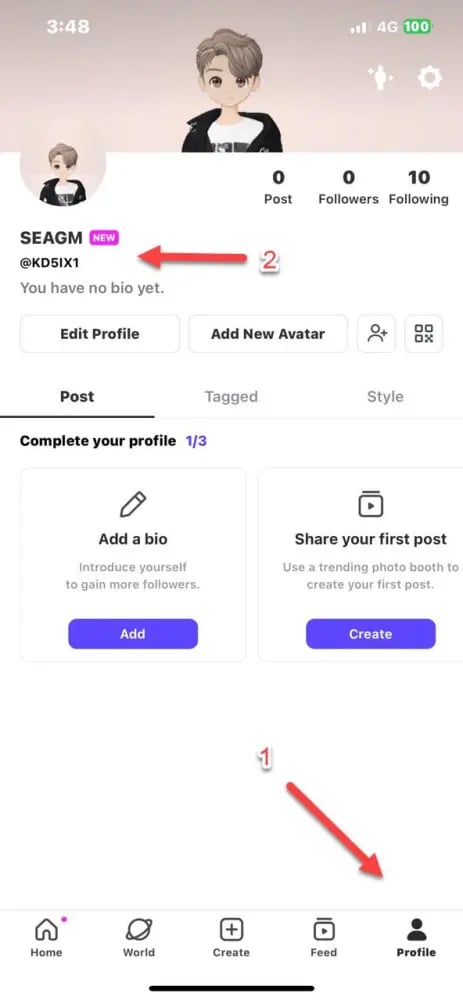
Tip: Do not confuse your display name with your Zepeto ID. Your display name can be changed freely, while your Zepeto ID is the unique handle used by the system for direct top-up delivery.
Understanding ZEPETO Currencies: Zems vs. Coins
ZEPETO operates on a dual-currency system. Both currencies serve specific roles in the marketplace, and understanding their differences helps you decide which pack to purchase.
ZEPETO Coins
Coins are the standard currency in ZEPETO. You use Coins to purchase foundational avatar clothing, standard shoes, everyday accessories, basic hairstyles, and classic furniture for your virtual room. Coins can be earned through daily quests and mini-games, but buying Coin packs on ArcTopup gives you immediate purchasing power for larger catalog shopping sprees.
ZEPETO Zems
Zems are the premium currency required for exclusive, high-tier virtual goods. Zems allow you to unlock items created by independent ZEPETO Studio creators, brand collaborations, premium animations, dances, special photo booth poses, exclusive pets, and high-tier world access passes. Creator fashion items and trending community designs almost exclusively require Zems.
| Item Category | ZEPETO Coins | ZEPETO Zems |
|---|---|---|
| Standard Catalog Outfits | Yes (Primary Currency) | Selected Items Only |
| Creator & Studio Items | Rarely Available | Yes (Primary Currency) |
| Premium Dance & Poses | Basic Poses Only | Exclusive Dances & Custom Gestures |
| Room & World Decor | Standard Furniture | Premium & Interactive Items |
| Designer Collaborations | No | Yes |
| Acquisition Methods | Quests, Mini-Games, ArcTopup | Direct ArcTopup Top Up, Studio Sales |
How to Gift ZEPETO Zems and Coins to Friends
You can surprise your friends, creators, or community members with Zems and Coins using ArcTopup without logging into their accounts.
To send a gift top up:1. Ask the recipient for their public Zepeto ID.2. Paste their Zepeto ID into the player field on ArcTopup.3. Pick the Zem or Coin package you want to gift them.4. Complete the checkout process.5. The currencies will be delivered straight into your friend's balance instantly, with no login sharing or account linking required.
This makes ArcTopup a practical option for running community giveaways, celebrating birthdays, or rewarding content creators.
Safe & Fast Checkout: Top Up Using Only Your Zepeto ID
Account safety is essential when purchasing digital goods. ArcTopup uses a direct ID recharge model designed to keep your personal data secure:
- No Passwords Required: You never need to provide your password, social login (Google, Apple, Facebook), or two-factor authentication codes.
- Zero Risk of Account Takeover: Because top-ups only require a public Zepeto ID, your account credentials remain completely private.
- Transparent Pricing: Current package prices, local currency conversions, and available payment channels are displayed clearly on the live checkout screen.
- Secure Payment Processing: Every transaction is encrypted to protect your payment details.
Troubleshooting ZEPETO Balance Updates and Order Issues
If your Zems or Coins do not show up immediately after completing your order, use the following troubleshooting steps:
- Restart the ZEPETO App: Completely close the ZEPETO app from your device's recent apps switcher and reopen it. This forces the client to sync your updated wallet balance from the servers.
- Trigger a Balance Refresh: Open the in-game Shop or visit your avatar closet. Loading the shop catalog forces an account balance update.
- Verify Your Submitted ID: Check your ArcTopup payment confirmation receipt to ensure there was no typo in the Zepeto ID you entered.
- Check Server Status: During major app updates or high-traffic events, in-game wallet updates can occasionally experience minor server processing delays.
- Contact Support: If your balance does not update after restarting the app, contact ArcTopup customer support with your order number and transaction details for fast resolution.
Frequently Asked Questions
How do I find my Zepeto ID for top up?
Open the ZEPETO app and tap your Profile icon in the lower-right corner. Your Zepeto ID is listed directly beneath your avatar display name. Tap the ID or copy icon to copy it to your clipboard.
What is the difference between ZEPETO Zems and Coins?
Coins are the standard currency used for default shop items, basic clothing, and room decor. Zems are the premium currency used for purchasing exclusive creator-made clothes, brand collaborations, custom dance gestures, and VIP world items.
Do I need to share my ZEPETO password to top up?
No. ArcTopup only requires your public Zepeto ID. You never have to share your password, email address, or login credentials to recharge your account.
Can I buy ZEPETO Zems and Coins for a friend?
Yes. Enter your friend's Zepeto ID in the order field instead of your own. Once payment is completed, the selected Zems or Coins will be credited directly to their account.
Where can I buy cheap ZEPETO Zems and Coins safely in 2026?
You can purchase ZEPETO Zems and Coins directly on ArcTopup in 2026. ArcTopup offers competitive live rates, direct ID delivery, and secure payment processing.
What should I do if my ZEPETO Zems do not appear after purchase?
First, force-close and restart your ZEPETO app to refresh your wallet balance. If the currency still does not appear, verify the Zepeto ID on your order receipt and reach out to ArcTopup support with your order ID for immediate assistance.
Current packages and prices
Current base prices exclude Tax. Tax, payment fees and coupon adjustments are shown at checkout.
| Package | Price |
|---|---|
| 7 ZEMS | USD 0.22 |
| 4680 Coins | USD 0.45 |
| 14 ZEMS | USD 0.45 |
| 9700 Coins | USD 0.88 |
| 28 ZEMS | USD 0.88 |
| 58 ZEMS | USD 1.76 |
| Premium 1M | USD 2.44 |
| 25200 Coins | USD 3.30 |
| 40700 Coins | USD 3.40 |
| 128 ZEMS | USD 3.62 |
| 110000 Coins | USD 8.93 |
| 323 ZEMS | USD 9.15 |
| 300000 Coins | USD 23.77 |
| 1000 ZEMS | USD 27.51 |






























































