Snowbreak: Containment Zone Bit Gold Top Up: Quick UID Recharge
Acquiring Bit Gold in Snowbreak: Containment Zone gives you immediate access to premium in-game items, Operative Recruitment Chits, weapon banners, and exclusive character outfits. ArcTopup provides direct UID top-up processing for Snowbreak players on PC, Android, and iOS across all official game servers.
By using your unique User ID and selecting your designated server, you can recharge Bit Gold directly into your account balance without sharing passwords or granting third-party access to your personal login credentials. Check current package prices and active denominations on the live ArcTopup checkout screen.
How to Top Up Snowbreak: Containment Zone Bit Gold Using User ID
Completing a Snowbreak recharge on ArcTopup requires only a few clear steps:
- Select the Bit Gold denomination you want to purchase from the product catalog. The live ArcTopup checkout displays current package amounts and updated pricing.
- Enter your numeric Snowbreak: Containment Zone User ID into the designated field.
- Choose your correct game server from the dropdown menu (Asia, Southeast Asia, Americas, or Europe).
- Double-check your User ID and server to prevent misdirected credits.
- Proceed to payment and complete your transaction through the available payment options.
- Launch or restart Snowbreak: Containment Zone to see your newly credited Bit Gold balance in your inventory.
How to Find Your Snowbreak: Containment Zone User ID and Server
To ensure your order processes without delay, you must provide your exact in-game numeric User ID and server name.
- Launch the Snowbreak: Containment Zone client on your mobile device or PC.
- On the main login screen, note the server region selected before entering the game (Asia, Southeast Asia, Americas, or Europe).
- Enter the main lobby (Heimdall Force Command Center).
- Tap or click on your profile avatar located in the top-left corner of the screen.
- In the personal info overview, locate your numeric User ID directly beneath your player nickname.
- Click the copy icon next to your User ID to copy the digits directly to your clipboard.
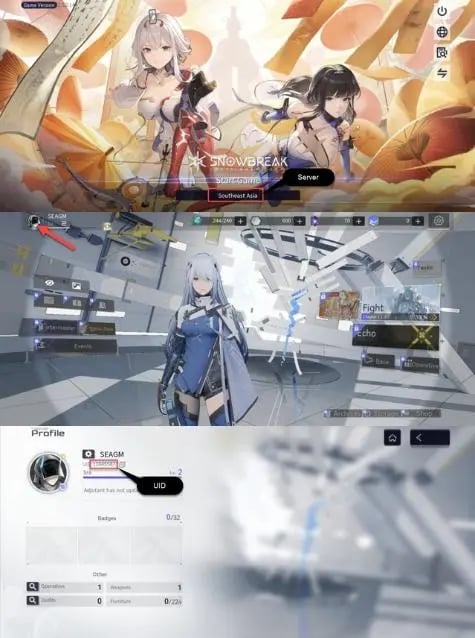
Paste the copied numeric string directly into the ArcTopup User ID input field before submitting your order.
What Is Bit Gold and How to Convert It into In-Game DigiCash
Bit Gold serves as the primary premium currency in Snowbreak: Containment Zone. Once credited to your account, you can use Bit Gold for multiple in-game systems:
- Direct DigiCash Conversion: Convert Bit Gold into DigiCash at a direct 1:1 ratio. DigiCash is used to purchase Operative Recruitment Chits and Weapon Customization Chits for limited-time banner pulls.
- Premium Operative Outfits: Unlock seasonal skins, interactive outfits, and weapon appearances from the in-game Supply Station.
- Battle Pass Access: Unlock the advanced reward track for the active Battle Pass season using Bit Gold to obtain exclusive weapon blueprints, enhancement materials, and extra summon currency.
- Daily and Weekly Bundles: Purchase discounted resource packs, logistic officer supplies, and stamina refills to accelerate Operative progression.
Because Bit Gold does not expire, you can store it on your account until your preferred Operatives or weapon banners rotate into the gacha pool.
Supported Regional Servers: Asia, Southeast Asia, Americas, and Europe
Snowbreak: Containment Zone operates dedicated regional server infrastructure with cross-play support across PC, iOS, and Android. ArcTopup processes direct UID top-ups for all four global servers.
| Regional Server | Supported Platforms | UID Verification | Cross-Progression |
|---|---|---|---|
| Asia | PC, Android, iOS | Numeric UID | Cross-platform on same server |
| Southeast Asia | PC, Android, iOS | Numeric UID | Cross-platform on same server |
| Americas | PC, Android, iOS | Numeric UID | Cross-platform on same server |
| Europe | PC, Android, iOS | Numeric UID | Cross-platform on same server |
Make sure the server you choose during checkout matches the region displayed on your Snowbreak login title screen. Top-up orders sent to an incorrect server cannot be redirected once delivered.
UID Top-Up Security vs Account Sharing Login Services
Account safety is a major priority when buying premium game currencies. Many risky third-party services ask players to submit their email, password, or social login credentials so a seller can log into their account manually. This introduces severe account security threats:
- Risk of unauthorized password or email changes by untrusted sellers.
- Potential loss of linked accounts or stored payment methods.
- Triggering security flags or game suspensions caused by IP location mismatches.
ArcTopup operates entirely via direct UID top-up. You never share your login credentials, password, verification codes, or personal account data. Entering your public numeric User ID allows our system to route your Bit Gold order directly to the server database without accessing your game profile.
Troubleshooting Missing or Delayed Bit Gold Deliveries
If your Bit Gold balance has not updated after completing payment on ArcTopup, follow these troubleshooting steps:
- Restart the Game Client: Fully close Snowbreak: Containment Zone on PC or mobile and relaunch the application. This forces the client to sync with the central server and refresh your currency counters.
- Check the In-Game Shop Tab: Open the Supply Station in-game to verify your total Bit Gold balance, as the main lobby interface may take a moment to update display numbers.
- Verify Your Receipt Data: Review your ArcTopup order confirmation to confirm that the User ID and server you submitted match your profile details exactly.
- Contact Customer Support: If your order status shows completed but your currency is not visible after restarting, reach out to ArcTopup support with your order number and in-game profile screenshot for quick verification.
Frequently Asked Questions
What is Bit Gold used for in Snowbreak: Containment Zone?
Bit Gold is the premium currency in Snowbreak: Containment Zone. It converts directly into DigiCash at a 1:1 ratio for summoning Operatives and weapons on recruitment banners. You can also spend Bit Gold to purchase exclusive Operative outfits, cosmetics, stamina packs, and Battle Pass upgrades.
How do I find my Snowbreak: Containment Zone User ID and Server?
Log into the game and check the server name shown on the title screen. Once in the main lobby, click your avatar in the upper-left corner. Your numeric User ID appears directly beneath your player name. Use the copy button beside it to copy the numbers accurately.
Do I need to provide my account login password to buy Bit Gold on ArcTopup?
No. ArcTopup uses a direct UID top-up system. You only provide your numeric User ID and select your server. You never need to share your password, login tokens, or account access codes.
Can Bit Gold purchased on PC or mobile be shared across all platforms?
Yes. Snowbreak: Containment Zone features cross-progression within the same server region. Bit Gold purchased through ArcTopup is tied to your account profile on that server and remains accessible whether you log in on PC, Android, or iOS.
Can I top up Bit Gold for a friend using their User ID?
Yes. You can purchase Bit Gold for friends by entering their numeric User ID and choosing their correct regional server during checkout on ArcTopup. The Bit Gold will be credited directly to their game account.
What should I do if my Bit Gold does not reflect in my account balance?
First, restart your Snowbreak: Containment Zone game client to force an inventory sync. If the currency still does not appear, check your order confirmation on ArcTopup to confirm the UID and server entered were accurate, then contact ArcTopup customer support with your order ID.
Current packages and prices
Current base prices exclude Tax. Tax, payment fees and coupon adjustments are shown at checkout.
| Package | Price |
|---|---|
| 6 Bit Gold | USD 0.67 |
| 30 Bit Gold | USD 3.43 |
| 98 Bit Gold | USD 10.22 |
| 198 Bit Gold | USD 20.48 |
| 328 Bit Gold | USD 34.19 |
| 648 Bit Gold | USD 66.71 |