Honkai Impact 3 Top Up: Crystals, B-Chips & Monthly Cards
Honkai Impact 3 features fast action combat, competitive endgame modes like the Superstring Dimension and Memorial Arena, and an expanding roster of Part 2 battlesuits. To recruit new characters, pull for signature AstralOp partners, secure signature equipment sets, and obtain premium outfits, captains require a steady flow of in-game currencies. ArcTopup provides a straightforward Honkai Impact 3 top up service that credits your account directly using only your User ID (UID).
With zero account sharing or login credentials required, you can top up Crystals, B-Chips, and Monthly Cards safely across supported servers.
What Are Crystals, B-Chips, and Monthly Cards in Honkai Impact 3
Honkai Impact 3 utilizes two primary paid currencies alongside subscription passes. Each serves a distinct purpose in your account progression:
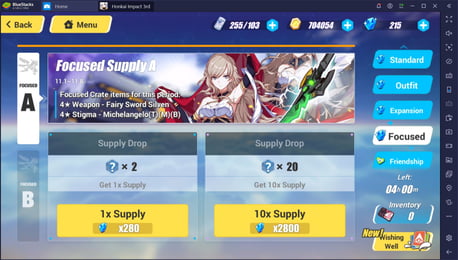
- Crystals: The primary summoning currency. You use Crystals to pull on Battlesuit Supplies, Equipment Supplies, AstralOp Supplies, and focused banners. Crystals can also be spent on stamina refreshes and select shop items.
- B-Chips: The direct cash-equivalent premium currency. B-Chips cannot be obtained through gameplay. They are used specifically to purchase time-limited character outfits, discounted expansion supply ticket packages, level-up resource crates, and Battle Pass level upgrades.
- Monthly Card (Monthly Pass): An efficient long-term resource investment. Upon purchase, it grants an immediate lump sum of Crystals followed by daily Crystals sent directly to your in-game mailbox every day you log in for 30 days.
In-Game Currency Comparison
| Currency / Item | Primary Use Case | Acquisition Type | ArcTopup Delivery |
|---|---|---|---|
| Crystals | Gacha Supplies (Battlesuits, AstralOps, Weapons, Stigmata) | Earnable in-game or purchased | Direct UID Credit |
| B-Chips | Outfits, Special Bundle Boxes, Growth Materials, BP Ranks | Paid purchase only | Direct UID Credit |
| Monthly Card | 300 Crystals upfront + 60 daily Crystals for 30 days | Paid subscription pack | Direct UID Credit |
Differences Between B-Chips and Crystals Usage in 2026
Understanding when to purchase B-Chips versus direct Crystals helps you maximize your spending efficiency in Honkai Impact 3:
- Gacha Supply Pulls: Direct supply pulls require Crystals (or Supply Cards). If your goal is hitting pity on a newly released Valkyrie or Astral Ring enabler, direct Crystal packs or Monthly Cards provide the raw summoning currency you need.
- Special Store Bundles: In every version update, HoYoverse introduces discounted supply ticket packages (such as Expansion Supply Card packs or Focused Supply Card bundles) inside the Mall. These bundles are priced in B-Chips, not Crystals. Purchasing B-Chips to buy these bundles often gives you more pulls per dollar than converting raw Crystals at standard rates.
- Cosmetics and Outfits: Premium battle outfits and event-exclusive skins are frequently sold directly for B-Chips in the dressing room shop. Crystals cannot be used to purchase B-Chip-exclusive cosmetics.
Check your in-game Mall prior to topping up so you select the exact currency type required for your planned purchase.
Honkai Impact 3 Monthly Card Benefits and Top-Up Process
For active captains, the Monthly Card remains the highest-value option for steady Crystal accumulation:
- Immediate Reward: 300 Crystals credited directly upon successful order processing.
- Daily Distribution: 60 Crystals claimed every day via the daily login screen for 30 days (totaling 1,800 daily Crystals per 30-day cycle).
- Milestone Bonuses: Logging in consistently throughout the month awards additional Crystal milestone bonuses at specific day marks.
- Stacking Duration: You can purchase multiple Monthly Cards to extend your active duration. The remaining days will stack up to the maximum allowable limit, and the 300 instant Crystals are credited immediately with each purchase.
To purchase your Monthly Card, select the Monthly Card denomination on ArcTopup, input your UID, and complete the transaction. The card activates on your account instantly without manual code redemption.
How to Locate Your Honkai Impact 3 UID
Your Honkai Impact 3 User ID (UID) is a numerical identifier unique to your account and server. You do not need to give out your login email or HoYoverse password to receive your order.
Follow these steps to find your UID on both Mobile and PC clients:
- Launch Honkai Impact 3 and log in to the game.
- Stay on the main Bridge screen.
- Look at the top-left corner of the screen where your Captain Level, avatar, and username are displayed.
- Locate the numeric string labeled UID directly beneath your Captain name.
- Alternatively, click on your Captain profile banner in the top-left to open the full Captain Information screen, where your UID is displayed with a quick-copy function.
- Copy or write down the exact numbers without extra spaces.
Note: Ensure your account is connected to the correct region server before placing your order, as UIDs are server-bound.
How to Top Up Honkai Impact 3 Crystals & B-Chips on ArcTopup
To complete a direct recharge on ArcTopup, follow this simple process:
- Select Your Package: Choose the denomination of Crystals, B-Chips, or Monthly Cards you wish to purchase from the product catalog.
- Enter Your Account Information: Type your Honkai Impact 3 UID into the required field.
- Review Live Pricing: Check your selected pack and verify the final live checkout price and payment options.
- Complete the Payment: Choose your preferred payment method on the checkout screen and complete the transaction.
- Receive Your Items: Once payment confirmation is received, your Crystals or B-Chips are sent directly to your in-game account. Restart or refresh your game client to see your updated balance.
Account Safety: Safe Top-Up with Zero Password Sharing
Account integrity is crucial. Unlike unauthorized sellers who request your HoYoverse account login, email verifications, or social credentials, ArcTopup operates on a strict UID-only delivery model.
- Zero Password Requests: You will never be asked for your login passwords, secondary passwords, or two-factor authentication (2FA) codes.
- Direct Delivery: Resources are credited through verified backend channels directly to your player profile ID.
- No Risk of Account Takeover: Because your login credentials remain solely in your hands, your account is protected against unauthorized access, credential stuffing, and session theft.
Why Recharge Honkai Impact 3 on ArcTopup
- UID-Only Processing: Keep your HoYoverse credentials completely private.
- Live Transparent Pricing: Real-time checkout shows exact pricing without hidden processing markups.
- Automated Flow: No waiting for third-party sellers to manually log in or chat with you in peer-to-peer messaging queues.
- Global Support: Optimized interface and checkout support for international Honkai Impact 3 captains across various regions.
Frequently Asked Questions About Honkai Impact 3 Top Up
How do I find my Honkai Impact 3 UID?
Open Honkai Impact 3 and look at the top-left corner of the Bridge screen. Your UID is the series of numbers displayed under your Captain name. You can also tap your avatar to open your Captain profile and copy the UID directly from there.
What is the difference between Crystals and B-Chips in Honkai Impact 3?
Crystals are primarily used for pulling on gacha supplies (Battlesuits, AstralOps, Equipment) and refilling stamina. B-Chips are a paid-only currency used to purchase special store bundles, expansion card packages, Valkyrie outfits, and Battle Pass levels.
Do I need to provide my HoYoverse password to top up Honkai Impact 3?
No. ArcTopup only requires your numeric UID to process your Honkai Impact 3 recharge. Never share your HoYoverse password or email verification codes with anyone.
Can I purchase the Honkai Impact 3 Monthly Card with just my UID?
Yes. When you purchase a Monthly Card using your UID, the 300 base Crystals are added to your balance immediately, and your 30-day daily Crystal claim cycle begins automatically in-game.
How long does it take for Crystals or B-Chips to arrive in my account?
Orders are processed automatically upon payment confirmation. Once the transaction is finalized, the currency is credited directly to your UID. If you are currently logged in, restart the game client to refresh your balance.
What should I do if I entered an incorrect UID during top-up?
Because top-up deliveries are automated and credited immediately to the submitted UID, please verify your numeric ID carefully before completing your payment. If you realize you entered the wrong UID, contact customer support immediately with your order details.
Current packages and prices
Current base prices exclude Tax. Tax, payment fees and coupon adjustments are shown at checkout.
| Package | Price |
|---|---|
| 30 B-Chips | USD 0.38 |
| 65 Crystals | USD 0.74 |
| 65 B-Chips | USD 0.74 |
| 330 Crystals | USD 3.76 |
| 330 B-Chips | USD 3.77 |
| Monthly Card | USD 3.77 |
| 660 Crystals | USD 7.55 |
| 990 B-Chips | USD 11.13 |
| 1320 B-Chips | USD 14.89 |
| 1320 Crystals | USD 14.89 |
| 1980 B-Chips | USD 22.51 |
| 3300 B-Chips | USD 37.56 |
| 3300 Crystals | USD 37.75 |
| 6600 B-Chips | USD 73.78 |
| 6600 Crystals | USD 73.78 |