Wuthering Waves Top Up: What is Lunite and How to Use It in 2026
Lunite is the premium currency in Wuthering Waves, developed by Kuro Games. Players use Lunite to convert directly into Astrite at a 1:1 ratio. Astrite is the central resource required to purchase Convene items, including Radiant Tides for limited character banners, Forging Tides for limited weapon banners, and Lustrous Tides for standard banners.
In 2026, managing your Lunite balance allows you to plan your banner pulls for new 5-star Resonators and signature 5-star weapons. Beyond gacha banners, Lunite can also purchase exclusive in-game bundles, level-up supply packs, and stamina refreshes (Waveplates) to speed up your Echo farming, weapon ascension, and Forte skill upgrades.
ArcTopup provides a direct, secure channel to purchase Lunite bundles without logging into your personal gaming account. All transactions credit your game profile directly through your unique User ID.
How to Top Up Wuthering Waves Lunite with ArcTopup (UID Only)
To top up your Wuthering Waves Lunite balance on ArcTopup, follow these steps:
- Select your desired Lunite bundle from the catalog. Current live pricing is displayed directly on the selection interface.
- Enter your 9-digit Wuthering Waves User ID (UID) in the required field.
- Select your exact game server region from the dropdown menu (Asia, SEA, Europe, America, or HMT).
- Confirm your order details and proceed to the checkout screen.
- Complete your transaction. Your Lunite is automatically credited to your in-game balance without needing manual redemption codes.
How to Find Your Wuthering Waves User ID (UID) and Server Region
Your User ID (UID) is a unique numeric identifier tied to your Kuro Games profile. Finding your UID and verifying your active server takes only a few seconds.
- Launch Wuthering Waves on your PC, mobile device, or console and log into your account.
- Look at the bottom-right corner of your screen during gameplay. Your 9-digit UID is visible on the HUD at all times.
- Alternatively, open the main game menu (Terminal) by pressing Esc on PC or tapping the icon in the upper-right corner. Your UID appears on the left side, directly beneath your profile avatar and account name.
- Check your server region on the initial login title screen before loading into Solaris-3, or confirm it in your account profile screen.
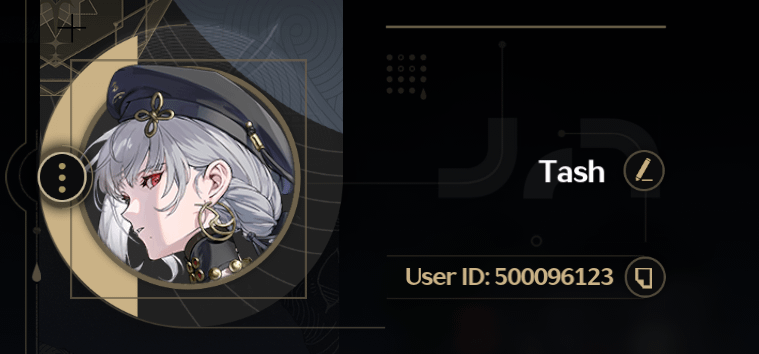
Ensure you double-check your UID and server selection before submitting your order to prevent any delivery delays.
Wuthering Waves Currency Guide: Lunite to Astrite Conversion and Pull Calculations
Wuthering Waves uses a straightforward currency conversion model. Lunite converts to Astrite at a fixed 1:1 ratio. Each Convene pull costs 160 Astrite (or 160 Lunite).
| Target Convene Objective | Required Astrite / Lunite | Single Pull Equivalent |
|---|---|---|
| 1 Single Convene Pull | 160 Lunite | 1 Tide |
| 10-Pull (Guaranteed 4-Star+) | 1,600 Lunite | 10 Tides |
| 5-Star Soft Pity Estimate (~65–70 pulls) | 10,400 – 11,200 Lunite | 65 – 70 Tides |
| 5-Star Character Hard Pity (80 pulls) | 12,800 Lunite | 80 Tides |
| Guaranteed Featured Resonator (160 pulls max) | 25,600 Lunite | 160 Tides |
| 5-Star Signature Weapon (80 pulls, 100% Rate) | 12,800 Lunite | 80 Tides |
First-Time Purchase Bonus Details
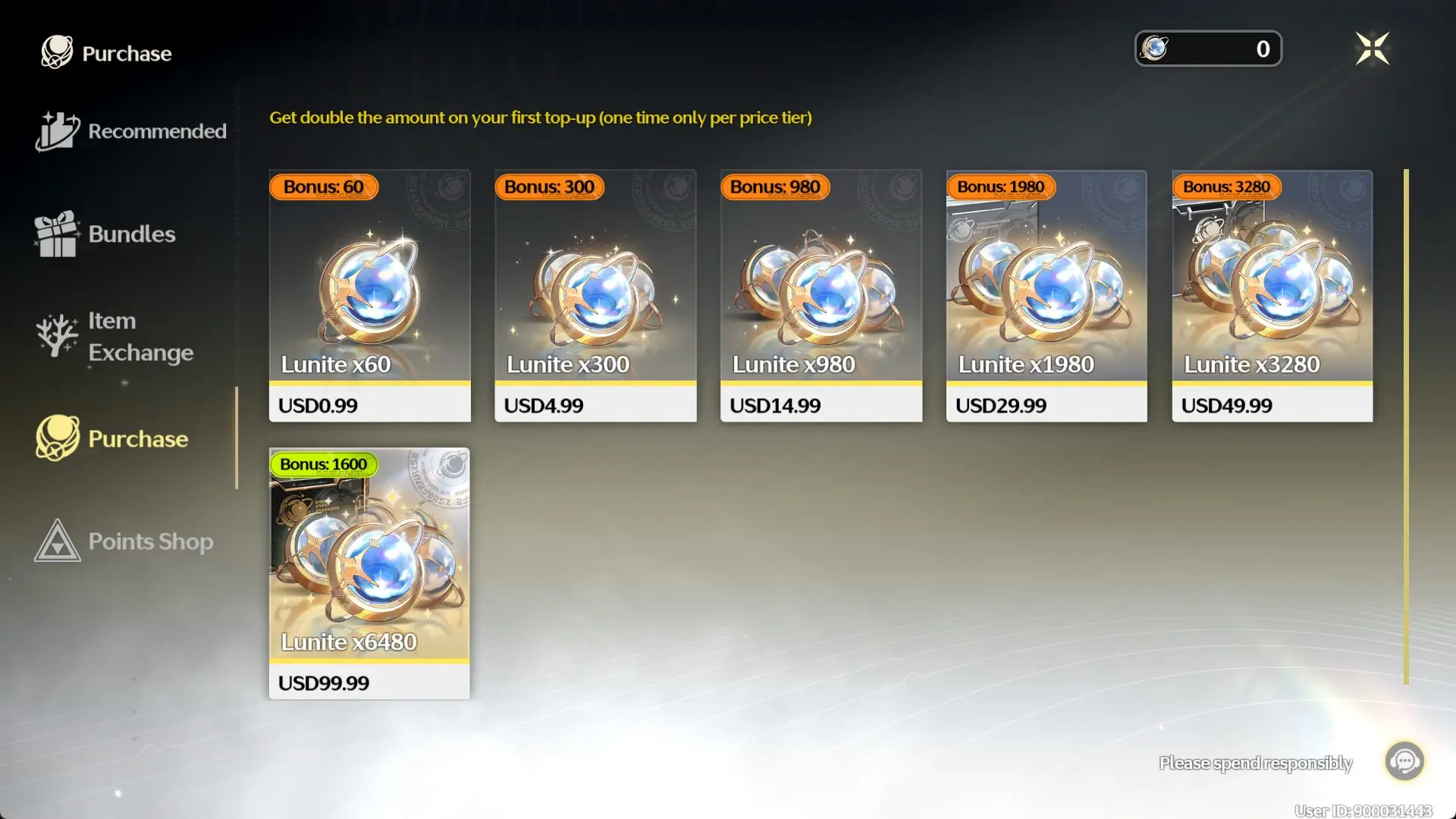
Kuro Games provides a first-time top-up bonus on Lunite purchases. The first time you purchase a specific Lunite denomination, you receive double base Lunite. Once a specific pack tier has been purchased once, subsequent recharges provide the standard fixed bonus amount indicated in-game. When topping up via ArcTopup, first-time double bonus eligibility is honored automatically if your account qualifies on that specific tier.
Account Safety Guide: UID Top-Up vs Account Sharing Services
Account safety is essential when purchasing in-game currency. ArcTopup uses a direct UID top-up system, eliminating the severe security risks associated with credential-sharing methods.
- No Passwords Required: You never share your Kuro Games login email, password, social media logins, or two-factor verification codes. Your login credentials remain strictly in your own hands.
- Protection Against Account Bans: Kuro Games terms of service prohibit account sharing, remote logins, and proxy piloting. Account-sharing services require third parties to log in from unfamiliar IP addresses and hardware IDs, which can trigger automated fraud detection and permanent bans. ArcTopup delivers Lunite directly to your account ID via standard external recharge pathways without triggering account security flags.
- Zero Risk of Account Hijacking or Data Loss: Because no third party gains access to your login session, your inventory, Resonators, weapon collections, and Echo sets remain protected against unauthorized alterations or accidental deletions.
Supported Wuthering Waves Server Regions: Asia, SEA, Europe, America, and HMT
ArcTopup supports all official live server regions for Wuthering Waves. Your UID is unique to your specific server, meaning you must choose the server where your character data resides.
| Server Display Name | Server System ID | Regional Coverage |
|---|---|---|
| Asia | os_asia | Japan, South Korea, and adjacent territories |
| SEA | os_sea | Southeast Asia (Philippines, Indonesia, Malaysia, Singapore, Thailand, Vietnam) |
| Europe | os_euro | United Kingdom, European Union countries, and nearby regions |
| America | os_usa | North America, Latin America, and South America |
| HMT (HK, MO, TW) | os_cht | Hong Kong, Macau, and Taiwan |
Selecting the correct server ensures your Lunite is credited instantly to your active character profile.
Frequently Asked Questions About Wuthering Waves Lunite Top Up
How do I find my Wuthering Waves User ID and Server?
Your 9-digit User ID (UID) is permanently displayed in the bottom-right corner of your screen during active gameplay. You can also view it by opening the in-game Terminal (main menu), where it appears directly under your username and avatar. Your server name appears on the initial game start screen before entering Solaris-3.
How much Lunite is needed for a 10-pull in Wuthering Waves?
A single 10-pull on any character or weapon banner costs 1,600 Astrite, which equals exactly 1,600 Lunite. Each single pull costs 160 Lunite.
Do I need to provide my Kuro Games account password to top up on ArcTopup?
No. ArcTopup requires only your 9-digit User ID (UID) and your server region. You should never share your account password, email credentials, or verification codes.
What is the difference between Lunite and Astrite in Wuthering Waves?
Lunite is the direct-purchase paid currency. Astrite is the functional in-game currency earned through exploration, quests, events, and Lunite conversion. You convert Lunite to Astrite inside the game interface at a 1:1 ratio to buy Convene Tides and supply packs.
Which server regions are supported for Wuthering Waves top-ups?
ArcTopup supports all 5 official global server regions: Asia (os_asia), SEA (os_sea), Europe (os_euro), America (os_usa), and HMT (os_cht).
What can I spend my Lunite on in Wuthering Waves?
You can convert Lunite into Astrite to purchase Radiant Tides, Forging Tides, and Lustrous Tides for character and weapon event banners. You can also use Lunite directly in the in-game store to buy special resource bundles, development material packs, and stamina refreshes.
Current packages and prices
Current base prices exclude Tax. Tax, payment fees and coupon adjustments are shown at checkout.
| Package | Price |
|---|---|
| Lunite Subscription | USD 3.73 |
| 60 Lunites | USD 0.81 |
| 300+30 Lunites | USD 3.73 |
| 980+110 Lunites | USD 11.03 |
| 1980+260 Lunites | USD 21.85 |
| 3280+600 Lunites | USD 36.21 |
| 6480+1600 Lunites | USD 71.23 |