Genshin Impact Top Up: Genesis Crystals and Blessing of the Welkin Moon
Recharging your account on ArcTopup gives you direct access to Genesis Crystals and Blessing of the Welkin Moon without sharing account credentials. Genesis Crystals are the premium currency in Genshin Impact, exchangeable 1:1 for Primogems to pull event characters and weapons from Limited Wishes, purchase in-game character outfits, or refill Original Resin.
ArcTopup processes orders directly using your User ID (UID) and server region. Your login credentials, email address, and passwords are never requested, keeping your HoYoverse account secure while ensuring items reach your in-game inventory quickly. Current pricing, available denominations, and live checkout options are listed in the selection menu above.
How to Top Up Genshin Impact with UID and Server on ArcTopup
Completing a recharge takes less than a minute. Follow these steps to submit your order:
- Select Your Desired Item: Choose between Blessing of the Welkin Moon or your preferred Genesis Crystals package.
- Enter Your UID: Type your 9-digit Genshin Impact User ID into the UID input field.
- Select Your Server: Choose your active game server from the dropdown list (America, Europe, Asia, or TW, HK, MO).
- Proceed to Checkout: Review your selected package and server details, then choose your preferred payment method on ArcTopup.
- Receive Items In-Game: Once payment succeeds, Genesis Crystals and Welkin Moon rewards are credited directly to your character profile.
How to Find Your Genshin Impact UID and In-Game Server
Your Genshin Impact UID is a unique 9-digit number permanently assigned to your account profile on a specific regional server.
- Launch Genshin Impact on PC, mobile, or console and log into your game account.
- Look at the bottom-right corner of your screen during gameplay. Your 9-digit UID is permanently displayed there.
- Alternatively, open the Paimon Menu (press Esc on PC or tap the Paimon icon in the top-left corner on mobile). Your UID is printed right below your avatar and nickname.
- To confirm your server, look at the server name shown on the game's start screen before clicking to enter the world.
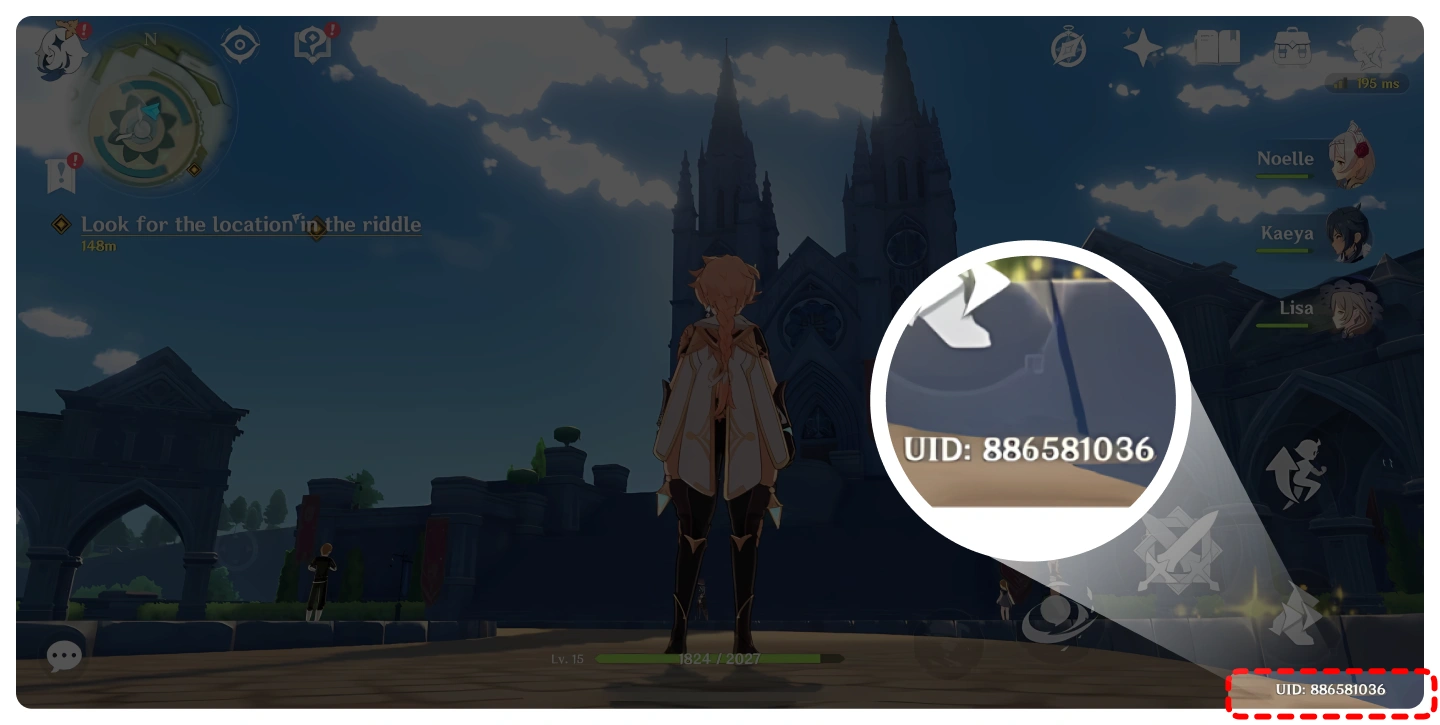
You can also verify your server region by checking the first digit of your 9-digit UID:
| Server Region | UID First Digit | Regional Notes |
|---|---|---|
| America | 6 | Covers North America, Central America, and South America |
| Europe | 7 | Covers European region players |
| Asia | 8, 18 | Covers Japan, Korea, Southeast Asia, and Oceania |
| TW, HK, MO | 9 | Covers Taiwan, Hong Kong, and Macau accounts |
Note: Entering an incorrect UID or mismatched server will cause your delivery to fail or credit another account. Double-check both fields before completing checkout on ArcTopup.
Genesis Crystals Packages and First-Time Top-Up Bonus Guide 2026
Genesis Crystals come in fixed standard tiers. Each tier contains a base crystal amount plus an extra bonus value:
- 60 Genesis Crystals
- 300 + 30 Genesis Crystals
- 980 + 110 Genesis Crystals
- 1,980 + 260 Genesis Crystals
- 3,280 + 600 Genesis Crystals
- 6,480 + 1,600 Genesis Crystals
First-Time Top-Up Double Bonus Rules
Every individual crystal tier qualifies for a 2x First-Time Top-Up Bonus on its very first purchase. When eligible, buying a package grants double the base amount instead of the standard bonus (for example, purchasing the 6,480 tier yields 12,960 Genesis Crystals total).
Key rules regarding the first-time bonus in 2026:* Each tier's double bonus is tracked independently. Claiming the double bonus on the 300 tier does not consume the double bonus on the 6,480 tier.* HoYoverse periodically resets first-time top-up bonuses during major annual version updates. When a reset occurs, all tiers regain their 2x multiplier.* If your account has already consumed the double bonus for a tier, future purchases of that tier award the standard extra crystal bonus shown on the package.
Blessing of the Welkin Moon Rules: Stacking Limit and Daily Primogems
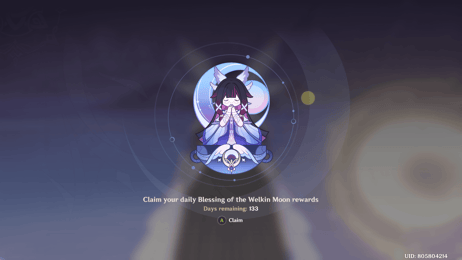
Blessing of the Welkin Moon is a 30-day subscription pack that offers high long-term value for Primogem accumulation:
- Instant Reward: 300 Genesis Crystals upon purchase.
- Daily Reward: 90 Primogems credited upon your first login each day for 30 days.
- Total Yield per Welkin: 300 Genesis Crystals + 2,700 Primogems (3,000 total currency equivalent).
Stacking Limits (180-Day Maximum Cap)
You can purchase multiple Blessing of the Welkin Moon passes to extend your active subscription duration. However, strict stacking limits apply:* You can only extend your Welkin Moon duration up to a maximum of 180 days (6 active Welkin passes).* If you purchase a Welkin Moon pass when your remaining active duration is greater than 180 days, the duration will not be extended.* Instead, the purchase will convert directly into 330 Genesis Crystals, and the daily 30-day login extension will be forfeited. Always verify your remaining days in the in-game Blessing menu before buying additional passes.
Daily Claim Mechanics
Daily Primogems reset according to your regional server reset time (04:00 server time). You must log into the game during that 24-hour cycle to claim your 90 Primogems. Any missed daily login rewards are permanently lost and cannot be reclaimed later.
Why Safe UID-Only Top-Ups Protect Your Account Without Logins
Account safety is critical when purchasing game currencies online. ArcTopup uses a direct UID fulfillment system that eliminates common security risks:
- No Passwords or Verification Codes: You never share login credentials, third-party linked accounts, or one-time verification passwords (OTPs).
- Zero Risk of Account Hijacking: Because third parties never access your account directly, your inventory, artifacts, weapons, and account settings remain completely untouched.
- Direct System Fulfillment: Currencies are routed straight to your account UID across the official game network, ensuring safe and legitimate item crediting.
Supported Server Regions: America, Europe, Asia, and TW/HK/MO
Genshin Impact operates on distinct regional servers. Player databases are isolated by region, meaning a UID on the America server does not share data with the same numerical space on the Europe or Asia servers.
ArcTopup supports all four major global servers:* America Server (NA/SA)* Europe Server (EU)* Asia Server (SEA/JP/KR/OCE)* TW, HK, MO Server (Taiwan, Hong Kong, Macau)
Ensure that the server selected in the ArcTopup server field matches the exact server region you select when launching your game client.
Troubleshooting Delivery Status and In-Game Refresh Steps
If your Genesis Crystals or Welkin Moon do not appear immediately after completing payment, follow these troubleshooting steps:
- Allow Server Synchronization: Network latency between game servers can occasionally take 2 to 5 minutes to synchronize.
- Trigger a Scene Refresh: Teleport to a waypoint in a different zone or enter a Domain. This forces your client to refresh account currency balances.
- Restart the Game Client: Completely close Genshin Impact and relaunch the application to establish a fresh connection to the game server.
- Check the Paimon Menu: Verify both your Genesis Crystal balance and your Blessing of the Welkin Moon remaining calendar days in the in-game shop tab.
- Verify Order Details: Check your ArcTopup order confirmation to ensure the UID and Server entered match your active profile. If an error occurred, reach out to ArcTopup customer support with your order ID.
Frequently Asked Questions
How do I top up Genshin Impact using my UID?
To top up using your UID, choose your desired Genesis Crystals package or Blessing of the Welkin Moon on ArcTopup, input your 9-digit in-game UID, select your regional server (America, Europe, Asia, or TW, HK, MO), and complete your payment on the checkout screen. Items will be credited directly to your in-game profile without requiring your account password.
What is the maximum duration I can stack Blessing of the Welkin Moon?
The maximum stackable duration for Blessing of the Welkin Moon is 180 days (6 passes). If you buy a Welkin pass while your remaining duration is already over 180 days, your subscription duration will not increase. Instead, your account will receive 330 Genesis Crystals without the daily Primogem feature.
Do I qualify for the double Genesis Crystals first top-up bonus?
You qualify for the 2x double bonus if you have never purchased that specific Genesis Crystal tier before, or if HoYoverse has reset the first-time top-up bonuses across all accounts during an annual update. Each tier's bonus eligibility is tracked independently.
Do I need to share my Genshin Impact password to recharge on ArcTopup?
No. ArcTopup operates exclusively through UID-based direct top-ups. You only need to provide your in-game User ID and your active server. Never share your game password or login verification codes with anyone.
Which server regions are available for Genshin Impact top-ups?
ArcTopup supports all four major global server regions: America, Europe, Asia, and TW, HK, MO. Make sure the server you choose during checkout matches the server displayed on your Genshin Impact login title screen.
What happens if I miss claiming daily Primogems from Welkin Moon?
If you do not log into Genshin Impact on a given day before the daily server reset (04:00 server time), that day's 90 Primogems are forfeit. Unclaimed daily Primogems do not accumulate in the mailbox and cannot be recovered on subsequent days.
Current packages and prices
Current base prices exclude Tax. Tax, payment fees and coupon adjustments are shown at checkout.
| Package | Price |
|---|---|
| Genshin Impact-60 Genesis Crystals | USD 0.91 |
| Genshin Impact-Blessing of the W-Moon | USD 4.51 |
| Genshin Impact-300+30 Genesis Crystals | USD 4.51 |
| Genshin Impact-980+110 Genesis Crystals | USD 13.51 |
| Genshin Impact-1980+260 Genesis Crystals | USD 27.01 |
| Genshin Impact-3280+600 Genesis Crystals | USD 47.88 |
| Genshin Impact-6480+1600 Genesis Crystals | USD 90.03 |
| Genshin Impact-All-In-One Bundle | USD 183.94 |