Chamet Diamonds Top Up: Direct In-App Recharge by UID
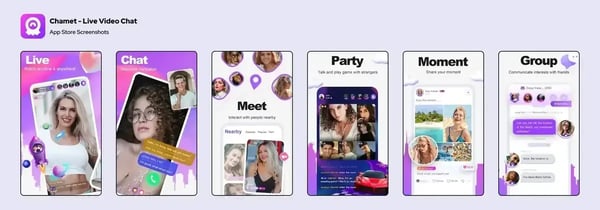
Chamet is one of the most popular global live video chat platforms, connecting millions of users worldwide through 1-on-1 private video calls, multi-guest audio and video party rooms, and interactive broadcasts. To start private calls, send virtual gifts to your favorite broadcasters, and stand out in community rooms, you need Chamet Diamonds—the primary virtual currency powering the entire ecosystem.
ArcTopup provides a direct Chamet Diamonds top up service designed for speed, security, and convenience. By using only your numeric Chamet User ID (UID), you can top up your account balance without sharing your password, linking private social media profiles, or dealing with complex payment approvals. Select your diamond bundle, provide your UID, and enjoy uninterrupted live entertainment.
What Are Chamet Diamonds and What Can You Use Them For?
Diamonds represent the core spending currency inside the Chamet app. Whether you use the platform on Android or iOS, having a ready balance of diamonds allows you to interact freely with hosts and access premium entertainment features.
1. 1-on-1 Private Video Calling
Private video calls are the defining feature of Chamet. Broadcasters and creators set a per-minute diamond rate for direct calls. When you initiate or receive private connections, your diamond balance is deducted on a per-minute basis. A sufficient diamond balance ensures your conversations continue without sudden disconnects.
2. Sending Animated Virtual Gifts
During live streams or in multi-person party rooms, viewers can send animated gifts to broadcasters. These gifts range from simple roses and hearts to elaborate full-screen animations like luxury cars, yachts, and crowns. Sending gifts increases your profile level, catches the host's attention, and boosts the broadcaster's leaderboard ranking.
3. Interactive Room Games and Lucky Gifts
Party rooms feature interactive activities and lucky gift wheels where users can participate using diamonds. Lucky gifts offer a chance to return diamond rewards or trigger special room-wide celebrations.
4. VIP Status and Profile Customization
Active spenders unlock dynamic profile frames, special entrance visual effects when entering popular live rooms, and exclusive chat badges that display prestige among other community members.
How to Find Your Chamet User ID (UID)
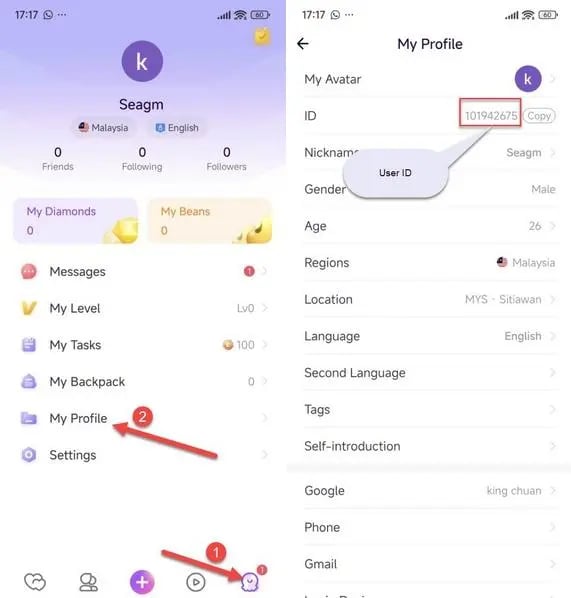
To ensure your Chamet diamond recharge reaches your specific account, you only need to provide your unique numeric User ID. Finding your UID takes just a few seconds inside the app.
- Open the Chamet app on your smartphone.
- Tap the Profile icon (labeled "My") located in the bottom-right corner of the main navigation bar.
- Look directly beneath your profile picture and nickname at the top of the screen.
- Locate the line that displays ID: followed by a sequence of numbers (e.g.,
12345678). - Tap the small Copy icon next to the number to copy your exact UID to your clipboard.
Tip: Do not submit your display name, registered phone number, or email address. The top-up system identifies your account exclusively through the numeric User ID.
How to Top Up Chamet Diamonds on ArcTopup Step-by-Step
To buy Chamet Diamonds online through ArcTopup, follow this straightforward purchase guide:
- Select Your Diamond Package: Browse the live diamond denominations on the product page and choose the pack that fits your calling and gifting needs.
- Enter Your Chamet UID: Paste your numeric User ID into the designated input field. Double-check the digits to ensure precision.
- Choose Your Preferred Payment Option: Select from the secure local and international payment methods available at checkout.
- Complete the Payment: Finalize your order through the encrypted checkout gateway.
- Check Your In-App Balance: Open Chamet, visit your profile wallet, and your new diamond balance will appear ready for use.
Safe Chamet Recharge: Why You Never Need to Share Your Password
Account safety is a top priority when purchasing digital currencies. Traditional, outdated top-up methods sometimes asked players for their login credentials, exposing accounts to unauthorized access, stolen chat histories, and compromised payment methods.
ArcTopup operates strictly via direct UID injection. Here is why this method keeps your account completely secure:
- Zero Password Requirements: You will never be asked for your Chamet password, Google login, Facebook token, or phone number.
- No Verification Codes: You never need to provide SMS one-time passcodes (OTPs) or two-factor authentication prompts.
- Public Identifier Only: A Chamet User ID is a public identifier designed for receiving diamonds, gifts, and friend requests. Sharing your UID cannot compromise your account security.
- Safe for Gifting Friends: Because only the UID is needed, you can use ArcTopup to surprise friends, favorite creators, or family members with diamonds directly to their accounts without needing access to their devices.
Chamet Diamond Packages and Regional Utility
Chamet operates globally, connecting users across Southeast Asia, the Middle East, Latin America, North America, and Europe. Diamond top-ups through ArcTopup work across all supported international regions without server locks.
| Diamond Tier | Typical Platform Use | Regional Compatibility |
|---|---|---|
| Starter Packs | Short introductory calls, standard room gifts, profile unlocks | Global (All Regions) |
| Popular Packs | Extended 1-on-1 video chats, party room participation | Global (All Regions) |
| Broadcaster Packs | Large animated gifts, creator support, leaderboard ranking | Global (All Regions) |
| Elite Packs | High-frequency calling, premium animated gifts, VIP prestige | Global (All Regions) |
Note: Live diamond prices, available package sizes, and localized payment options are displayed directly on the ArcTopup checkout screen based on real-time availability in 2026.
Troubleshooting Chamet Recharge Delivery and Common Errors
While most diamond deliveries process smoothly within moments of payment completion, unexpected network delays can occasionally happen. If your balance does not reflect immediately, follow these troubleshooting steps:
1. Refresh the Chamet App Cache
Mobile apps often store wallet balances locally in cache memory. If you completed your payment while Chamet was open in the background, close the app completely (swipe it away from your recent apps screen) and reopen it. Tap into your profile wallet to force a balance sync with the central server.
2. Verify the Submitted UID on Your Receipt
Check the order confirmation sent to your email or view your order history on ArcTopup. Compare the UID listed on your receipt with the ID shown on your Chamet profile screen. If you accidentally submitted a typo or an incorrect number, reach out to customer support.
3. Check Network Connectivity
A fluctuating mobile data or Wi-Fi connection can prevent the Chamet client from updating your real-time diamond balance. Connect to a stable network, switch between Wi-Fi and mobile data if necessary, and refresh the profile tab.
4. Contact Customer Support
If your order shows as completed on ArcTopup but your balance has not updated after restarting the app, contact our dedicated customer support team with your ArcTopup Order Number and your Chamet UID. Our support staff can verify the transaction status on the network and ensure your balance is resolved.
Frequently Asked Questions
How do I find my Chamet User ID (UID)?
Open Chamet, tap the "My" profile icon in the bottom-right corner, and look right below your profile picture. Your numeric ID will be displayed next to "ID:" with a copy button.
Do I need to share my Chamet password to top up diamonds?
No. ArcTopup only requires your public Chamet UID to deliver your diamonds. You should never share your account password, SMS verification codes, or social media login details with anyone.
How long does it take for Chamet Diamonds to arrive after payment?
Diamond top-ups are processed directly via UID injection right after your payment is confirmed. In most cases, the diamonds reflect in your in-app wallet within minutes. Restarting your Chamet app helps refresh your balance immediately.
Can I get Chamet Diamonds for free?
Be cautious of third-party websites or apps claiming to offer free Chamet diamond generators or unauthorized hacks. These are often phishing scams designed to compromise your device or personal data. Legitimate diamonds must be recharged through authorized UID top-up platforms like ArcTopup or directly through in-app channels.
What should I do if I entered the wrong Chamet UID?
Because top-up deliveries are processed rapidly based on the numeric ID provided, it is critical to verify your UID before completing checkout. If you realize you entered an incorrect ID, contact ArcTopup customer support immediately with your transaction details. If the order has not yet been processed by the delivery system, support will assist in correcting the destination ID.
What in-app features can I unlock with Chamet Diamonds?
With Chamet Diamonds, you can pay for 1-on-1 private video calls with broadcasters, send animated virtual gifts in live streams and multi-guest party rooms, participate in interactive room activities, and enhance your user profile with exclusive badges and visual entrance effects.
Current packages and prices
Current base prices exclude Tax. Tax, payment fees and coupon adjustments are shown at checkout.
| Package | Price |
|---|---|
| 62,500 Diamonds | USD 9.83 |
| 187,500 Diamonds | USD 29.13 |
| 625,000 Diamonds | USD 97.28 |
| 1,875,000 Diamonds | USD 291.76 |
| 3,750,000 Diamonds | USD 583.52 |