
Dream and Lethe Record Gold Top Up via Direct Player ID
Acquiring Gold in Dream and Lethe Record allows you to access premium summons, recruit high-tier units, purchase limited-time resource giftpacks, and accelerate your account progression. ArcTopup provides a direct recharge service for players looking to top up their account balance quickly and securely.
Our direct top-up system requires only your in-game Player ID. You never have to share account credentials, email passwords, or third-party login tokens. Simply choose your preferred Gold denomination or Giftpack tier, enter your Player ID, and finalize your payment at checkout. All available denominations and real-time prices are displayed live on the checkout screen.
What Is Gold in Dream and Lethe Record and How to Use It
Gold is the primary premium currency in Dream and Lethe Record. Having an adequate reserve of Gold gives you the flexibility to participate in high-value in-game events and stay competitive in challenging PvE stages and PvP encounters.
Here are the most effective ways to spend your Gold:
- Character and Spirit Summoning: Use Gold to acquire premium recruitment tickets and pull on limited-rate banners for rare and powerful characters.
- Stamina and Dungeon Refills: Refresh your daily stamina reserves to farm ascension items, equipment materials, and character EXP.
- Growth and Upgrade Bundles: Purchase specialized giftpacks in the in-game shop containing skill books, breakthrough stones, and enhancement materials.
- Monthly Cards and Battle Passes: Unlock sustained daily rewards, login perks, and exclusive cosmetics that provide long-term account value.
Available Gold Giftpack Options and Packages
Dream and Lethe Record offers multiple recharge tiers tailored to different progression goals. Whether you need a quick Gold injection for an active summoning banner or an upgrade pack to boost your combat rating, ArcTopup supports all standard direct top-up amounts.
| Package Type | In-Game Utility | Best Used For |
|---|---|---|
| Direct Gold Packs | Adds raw premium Gold directly to your in-game wallet balance | Banner pulls, emergency stamina refreshes, direct store purchases |
| Growth Giftpacks | Bundles containing Gold along with character enhancement materials | Immediate power spikes, skill upgrades, unit rank ascension |
| Monthly Privilege Passes | Daily Gold distribution and exclusive login resource bonuses | High long-term value, daily summoning ticket accumulation |
All package availability and live rates are reflected directly on the ArcTopup product selector during your order.
How to Find Your Dream and Lethe Record Player ID
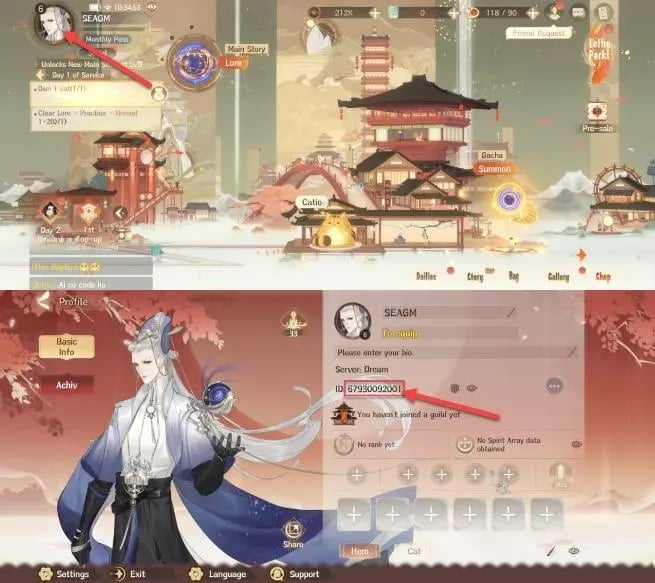
To ensure your Gold arrives instantly to the correct character, you must provide your exact numeric Player ID. Follow these steps to locate it inside the game client:
- Launch Dream and Lethe Record on your mobile device or emulator.
- Log into your account and stay on the main lobby screen.
- Tap your Avatar icon located in the top-left corner of the screen.
- Open the Personal Info or Profile tab.
- Your numeric Player ID will be displayed clearly on the profile card.
- Tap the small copy icon next to the digits, or write down the full number accurately.
Make sure to verify the digits before submitting your order on ArcTopup to prevent delivery delays.
How to Top Up Dream and Lethe Record Gold on ArcTopup
Recharging your balance through ArcTopup is straightforward and takes only a few simple steps:
- Select Your Package: Choose the Gold amount or Giftpack option you want from the product list above.
- Enter Your Player ID: Input your Dream and Lethe Record Player ID into the designated field.
- Confirm Details: Double-check your entered ID to make sure there are no typos.
- Complete Payment: Select your preferred payment option from the live checkout menu and submit your payment.
- Receive Your Gold: Once the transaction is processed, your Gold will be credited directly to your in-game account. Open or restart the game to confirm your updated balance.
Safe and Password-Free Recharge on ArcTopup
Account safety is essential when purchasing in-game currencies. ArcTopup uses a direct-to-account top-up protocol that operates strictly through your public Player ID.
- No Passwords Required: We never ask for your game password, Google account, Apple ID, or social login details.
- Zero Account Sharing: Your login credentials remain private on your own device, eliminating the risks associated with account sharing or third-party piloting.
- Broad Region Support: Our service supports players across Southeast Asia (SEA) and global servers.
- Dedicated Support: If you ever have a question regarding an order or need assistance verifying a transaction, our customer support team is available to assist you.
Frequently Asked Questions
How do I find my Dream and Lethe Record Player ID?
Open Dream and Lethe Record, tap your avatar in the upper-left corner of the main lobby, and navigate to your profile screen. Your numeric Player ID is displayed right below your character name.
Do I need to provide my game account password to top up Gold?
No. ArcTopup only requires your numeric Player ID to deliver Gold. You will never be asked for your account password, email access, or verification codes.
How long does it take for Dream and Lethe Record Gold to be credited?
Direct recharges are processed automatically once your payment is confirmed. In most cases, Gold is credited to your account balance shortly after checkout. You may need to restart the game to refresh your wallet display.
What can I buy with Gold in Dream and Lethe Record?
Gold can be spent on character banner summons, stamina refreshes, daily growth packs, monthly privilege cards, and exclusive resource bundles in the in-game shop.
What should I do if I entered the wrong Player ID during checkout?
If you realize you entered an incorrect Player ID, contact ArcTopup customer support immediately with your order reference number. If the order has not yet been processed by the automated delivery system, our team can help update the ID.
Which servers are supported for Dream and Lethe Record top ups on ArcTopup?
ArcTopup supports direct Player ID recharges across all standard operational regions, including Southeast Asia (SEA) and official global servers. Ensure your Player ID matches your active game profile before completing your purchase.
Current packages and prices
Current base prices exclude Tax. Tax, payment fees and coupon adjustments are shown at checkout.
| Package | Price |
|---|---|
| Dream of Xi Shi Pack | USD 0.85 |
| 12 GOLD | USD 1.49 |
| Pulchritudinous Pack | USD 1.67 |
| 30 GOLD | USD 3.73 |
| Nekomancy I Pack | USD 3.73 |
| Classic Monthly Card | USD 4.18 |
| Otherworldly Pack | USD 4.20 |
| Wings of Breeze Herald | USD 7.46 |
| Sinking Fish Pack | USD 8.33 |
| 90 GOLD | USD 11.19 |
| Special Monthly Card | USD 12.54 |
| Nekomancy II Pack | USD 14.92 |
| 150 GOLD | USD 18.65 |
| Beauty Pack | USD 23.18 |
| 300 GOLD | USD 37.29 |
| Illusory Silk Pack | USD 40.56 |
| 450 GOLD | USD 55.94 |
| 600 GOLD | USD 74.58 |






























































