
Silver and Blood Top Up: Moonflow and Resource Packs
Silver and Blood challenges players with tactical dark-fantasy battles, deep character progression, and high-stakes squad building. To summon top-tier heroes, secure exclusive cosmetics, and acquire vital progression bundles, you need Moonflow. A direct Silver and Blood top up on ArcTopup provides an efficient, dependable way to fund your account directly via your User ID without sharing private credentials.
Whether you are preparing for a limited-time summon banner or stocking up on essential upgrade materials, getting Moonflow directly into your profile ensures you never miss time-sensitive events.
What is Silver and Blood Moonflow and How It Works
Moonflow is the primary premium paid currency in Silver and Blood. When purchased, Moonflow is delivered straight to your game account and serves multiple critical roles:
- Direct Bundle Purchases: Moonflow can be used directly to purchase high-value daily, weekly, and monthly growth packs, weapon materials, and special stamina boxes.
- 1:1 Conversion to Moon Tears: Moonflow converts directly into Moon Tears at a fixed 1:1 ratio. Moon Tears are the standard summoning currency used to pull new characters and artifacts from rate-up banners.
- Battle Pass and Event Unlocks: Certain premium reward tracks, battle passes, and special seasonal cosmetic outfits require direct Moonflow to activate.
Because Moonflow gives you direct access to premium items while retaining the flexibility to convert into summoning pulls on demand, it is the most versatile resource to hold on your account.
Moonflow vs. Moon Tears: In-Game Packs and Currency Guide
Understanding how premium currencies interact in Silver and Blood helps you plan your spending effectively. The table below highlights the distinct roles of Moonflow and Moon Tears:
| Currency | How to Obtain | Primary In-Game Uses | Direct Conversion |
|---|---|---|---|
| Moonflow | Direct top-up via ArcTopup | Special bundles, premium event passes, skin packs, resource boxes | Converts 1:1 into Moon Tears |
| Moon Tears | Converted from Moonflow, in-game achievements, quests | Standard and limited character banner summons, stamina refreshes | Cannot be converted back to Moonflow |
By keeping a reserve of Moonflow, you maintain full control: purchase specialized packs when limited bundles appear, or convert your balance into Moon Tears whenever your desired banner goes live.
How to Find Your Silver and Blood User ID and Server
ArcTopup utilizes a direct-to-account top-up system. You only need to provide your User ID and Server name during checkout. Follow these simple steps to retrieve your details from the game client:
- Launch Silver and Blood on your mobile device or emulator.
- Tap your Player Avatar / Profile Icon located in the top-left corner of the main lobby screen.
- Open your profile information tab.
- Locate your User ID (UID) (a numeric sequence) and your active Server name displayed under your character nickname.
- Tap the copy icon next to your UID to ensure accuracy.
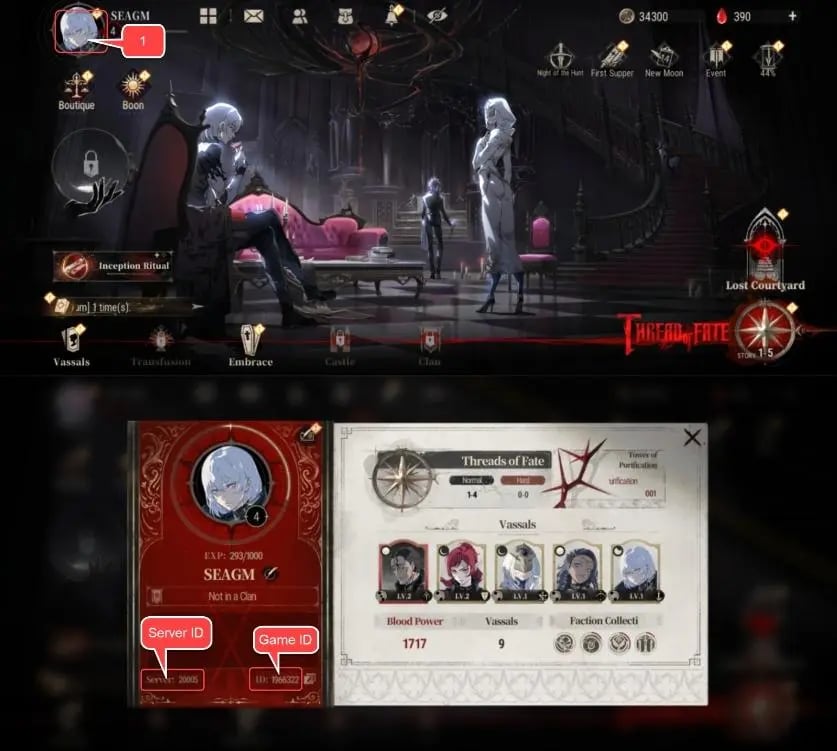
Double-check your Server selection to guarantee that your delivery is routed to your active character immediately.
Step-by-Step Guide: How to Top Up Silver and Blood on ArcTopup
Recharging your Moonflow balance on ArcTopup is straightforward and takes only a few moments:
- Select Your Package: Choose the Moonflow denomination or bundle you wish to purchase from the product options above.
- Enter Account Details: Input your Silver and Blood User ID and select your active Server in the provided fields.
- Review Order: Verify your entered credentials and check the live pricing displayed on the checkout interface.
- Complete Payment: Select your preferred payment method and finalize the transaction.
- Receive Moonflow: Once payment is confirmed, the system processes your order automatically. Launch your game client to view your updated balance.
Safe Direct UID Top-Up Without Sharing Passwords
Account safety is a top priority when purchasing in-game resources. Traditional peer-to-peer marketplaces often require buyer login credentials, exposing your account to unauthorized access, security flags, or compromised data.
ArcTopup processes transactions strictly through your public User ID and Server selection:
- Zero Password Requirements: You never need to disclose your password, email login, or third-party binding accounts (such as Google, Apple, or social logins).
- No Account Sharing: Your account remains entirely in your hands. You do not need to log out or wait for a seller to access your game profile manually.
- Direct System Fulfillment: Transactions are routed directly to the designated game ID, eliminating manual middleman delays and maintaining complete account integrity.
Supported Payment Methods and Delivery Details for 2026
ArcTopup features an automated fulfillment system designed for fast order dispatch in 2026. Live pricing is updated in real time on the checkout screen, allowing you to select your preferred package with total transparency.
- Global and Local Payment Options: Checkout securely using international credit/debit cards, digital wallets, and region-specific payment gateways.
- Automated Processing: Orders are dispatched directly upon successful payment confirmation.
- Customer Support: If you encounter an issue or enter an incorrect Server during checkout, dedicated customer support is available to assist you with order verification.
Frequently Asked Questions
What is Moonflow used for in Silver and Blood?
Moonflow is the premium currency used to purchase exclusive event bundles, growth packs, premium battle passes, and character skins. It can also be converted directly into Moon Tears at a 1:1 ratio for banner summons.
How do I find my Silver and Blood User ID and Server?
Open Silver and Blood and tap your profile avatar in the upper-left corner of the main screen. Your numeric User ID and current Server name are listed directly under your profile name. Use the built-in copy button to capture your UID accurately.
Do I need to provide my account password to top up Silver and Blood?
No. ArcTopup only requires your User ID and Server. You never have to share your password, login credentials, or verification codes.
What is the conversion rate between Moonflow and Moon Tears?
Moonflow converts into Moon Tears at a direct 1:1 ratio within the in-game shop. Note that Moon Tears cannot be converted back into Moonflow.
How fast will the Moonflow be credited to my Silver and Blood account?
Most orders are processed automatically and credited to your account shortly after payment confirmation. Simply refresh your game client or restart the application if your balance does not update instantly.
What happens if I enter the wrong User ID or Server during checkout?
Please double-check your UID and Server before submitting payment. If an incorrect UID belongs to an active account, orders fulfilled by the system cannot be reversed. If you notice an error before delivery completes, contact ArcTopup customer support immediately with your order number.
Current packages and prices
Current base prices exclude Tax. Tax, payment fees and coupon adjustments are shown at checkout.
| Package | Price |
|---|---|
| 499 + 20 Bonus Moonflow | USD 3.88 |
| 519 Moonflow | USD 5.19 |
| 999 + 40 Bonus Moonflow | USD 7.66 |
| 1039 Moonflow | USD 10.40 |
| 1999 + 80 Bonus Moonflow | USD 15.35 |
| 2079 Moonflow | USD 20.80 |
| 2999 + 135 Bonus Moonflow | USD 23.04 |
| 3134 Moonflow | USD 31.21 |
| 5499 + 275 Bonus Moonflow | USD 41.93 |
| 5774 Moonflow | USD 57.22 |
| 7999 + 400 Bonus Moonflow | USD 60.35 |
| 8399 Moonflow | USD 83.24 |
| 29999 + 1500 Bonus Moonflow | USD 232.65 |
| 59999 + 3000 Bonus Moonflow | USD 478.89 |






























































