
Dazz Live Coins Top Up: What Are Coins and How Are They Used?
Dazz Live Coins serve as the primary virtual currency within the Dazz Live interactive video streaming app. Streamers and viewers use this currency to drive engagement, support content creators, and participate in community events across the platform. When you buy Dazz Live Coins, your balance connects directly to your user account, allowing you to trigger in-app features during live broadcasts.
Animated Gifting and Special Effects
Viewers use coins to send virtual gifts during live broadcasts. These range from simple visual icons like flowers and hearts to full-screen 3D animations, luxury sports cars, and rocket launches. Sending gifts highlights your profile in the live chat room, alerts the broadcaster, and triggers special entrance animations.
PK Battles and Creator Boosts
Dazz Live creators frequently compete in head-to-head PK battles where viewer contributions determine the winner. Spending coins on gifts during a battle adds points to your chosen creator's score bar. This helps boost their leaderboard ranking, unlocks platform rewards for the broadcaster, and builds community status for top supporters.
VIP Status and Exclusive Room Access
Certain live rooms, private broadcasts, and fan clubs require coin entry or specific supporter tier levels. Accumulating and spending coins increases your supporter rank, granting custom chat bubbles, distinctive badges next to your name, and priority visibility in busy chat streams.
Step-by-Step Guide: How to Top Up Dazz Live Coins via ArcTopup
Recharging your account balance on ArcTopup requires only your User ID (UID). You never need to enter your account password or link private social profiles. Follow these simple steps to complete your purchase:
- Select Your Coin Package: Browse the catalog above and choose the Dazz Live Coins denomination that fits your needs.
- Enter Your User ID (UID): Type or paste your numeric Dazz Live UID into the input box. Double-check your numbers to ensure the coins are sent to the correct account.
- Select Your Payment Gateway: Pick your preferred payment method from the available regional checkout options displayed on the page.
- Confirm and Pay: Complete the secure checkout. The system will process your order and credit the coins directly to your Dazz Live account.
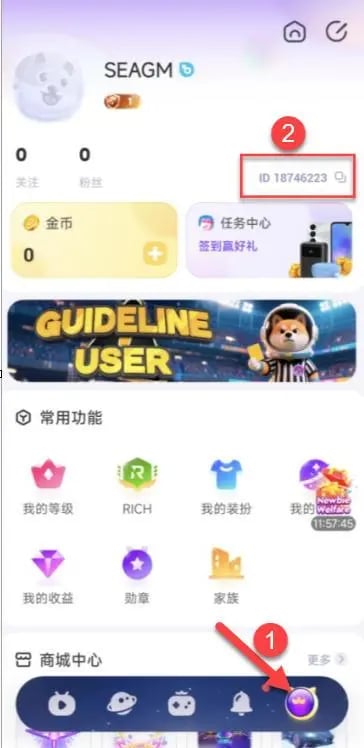
How to Find Your Dazz Live User ID (UID)
Locating your Dazz Live UID takes only a few seconds inside the mobile application. Make sure you copy the exact numeric identifier before placing your order.
- Open the Dazz Live app on your mobile phone or tablet.
- Tap the Profile (or Me) tab located in the lower-right corner of the bottom navigation bar.
- View your profile header near the top of the screen, where your avatar and display name appear.
- Locate the numeric string labeled ID or UID directly underneath your nickname.
- Tap the copy icon next to the number, or write it down carefully to paste into the ArcTopup UID field.
Benefits of UID Direct Top-Up: Keeping Your Account Secure
ArcTopup uses a direct UID recharge method. This approach offers significant security advantages over third-party services that require your account login credentials, phone verification codes, or linked social media logins.
| Security Factor | ArcTopup UID Direct Top-Up | Account Login / Password Sharing |
|---|---|---|
| Password Required | No (Never required) | Yes (High risk of compromise) |
| Personal Data Privacy | Fully protected (UID is public) | Low (Full access to private chats and account) |
| Third-Party Login Linked | Not required | Required (Google, Apple, or Social ID) |
| Gift to Friends / Hosts | Supported (Send directly using their UID) | Not supported without their private credentials |
| Account Safety | High (Legitimate platform top-up API) | Risky (Triggers suspicious IP location flags) |
Using only your UID ensures complete account protection. Because your UID is public information (visible on your user card to anyone in a stream), sharing it carries zero risk of unauthorized account access, password theft, or account lockouts.
Dazz Live Coin Denominations and Available Payment Methods
ArcTopup provides a wide selection of coin packages to match your gifting plans, whether you want a quick recharge for daily interactions or a large bundle to back a creator in an intense PK battle.
Live coin package rates and active promotional pricing are clearly displayed in the product selection panel at the top of this page. Because exchange rates and payment processor fees fluctuate, checking the live pricing table above ensures you always see the most accurate rates.
During checkout, ArcTopup supports a comprehensive range of localized and international payment options. Available methods automatically adapt to your geographic region, allowing you to pay using major debit and credit cards, e-wallets, bank transfers, and local digital payment networks.
What to Do After Your Top-Up: Delivery and Refresh Steps
Once your payment completes on ArcTopup, the system dispatches the coin package directly to your Dazz Live account. In most instances, your balance updates right away. Follow these steps to verify your new coin balance:
- Check Your In-App Wallet: Open Dazz Live, head to the Me profile section, and tap on your Wallet or Coins tab to view your current balance.
- Refresh the App: If your balance does not reflect the update immediately, pull down on your profile screen to refresh data from the server.
- Relaunch the Application: Close Dazz Live completely from your device's background app manager, clear the temporary app cache if necessary, and reopen the app.
- Join a Stream: Enter any live broadcast room and tap the Gift icon. The coin total displayed at the bottom of the gift panel will reflect your active balance.
- Contact Support if Needed: If your coins do not appear after a few minutes, copy your ArcTopup Order ID and contact the 24/7 ArcTopup customer service team for real-time tracking and delivery assistance.
Frequently Asked Questions About Dazz Live Recharge
Where can I find my Dazz Live UID for top-up?
Open the Dazz Live app and tap the Me or Profile icon in the bottom menu. Your numeric UID is displayed directly below your profile name and avatar. Tap the copy icon beside it to copy the number to your clipboard.
Do I need to share my Dazz Live password to recharge coins?
No. ArcTopup only requires your numeric Dazz Live User ID (UID). You should never share your account password, email login, or verification codes with anyone.
What are Dazz Live Coins used for on the platform?
Dazz Live Coins are used to purchase virtual gifts for live broadcasters, participate in PK battle ranking boosts, unlock exclusive VIP badges, access private stream rooms, and customize your live chat effects.
How quickly will Dazz Live Coins reflect in my balance after payment?
Coin delivery begins immediately after payment confirmation. The coins are credited straight to your Dazz Live UID. In rare cases of server congestion, allowing 2 to 5 minutes and restarting your app will display the updated total.
Can I top up Dazz Live Coins for another creator or friend?
Yes. Because the top-up process only requires a numeric UID, you can enter any friend's or streamer's Dazz Live UID into the input field on ArcTopup. Once paid, the coins will land directly in their account balance.
What should I do if my Dazz Live Coins do not appear immediately?
First, restart the Dazz Live application to clear cached data. If the balance remains unchanged, confirm that the UID entered during checkout matches your in-app profile ID. If your order shows as completed but your coins are missing, reach out to ArcTopup 24/7 customer support with your Order ID for immediate resolution.
Current packages and prices
Current base prices exclude Tax. Tax, payment fees and coupon adjustments are shown at checkout.
| Package | Price |
|---|---|
| 12,500 + 625 Bonus Coins | USD 1.25 |
| 25,000 + 1,250 Bonus Coins | USD 2.52 |
| 50,000 + 2,500 Bonus Coins | USD 5.05 |
| 100,000 + 5,000 Bonus Coins | USD 10.09 |
| 150,000 + 7,500 Bonus Coins | USD 15.14 |
| 2,500,000 + 125,000 Bonus Coins | USD 252.28 |
| 4,000,000 + 200,000 Bonus Coins | USD 403.65 |






























































