
King's Choice SEA Top Up Guide: How to Buy Diamonds with UID
Acquiring resources and currency for your medieval empire in King's Choice SEA requires a reliable and direct recharge service. ArcTopup provides an instant UID-based checkout that credits Diamonds directly to your Lord account without requiring passwords or sensitive login credentials.
Follow these quick steps to complete your purchase:
- Select your desired Diamond denomination, Weekly Card, or special bundle from the product catalog.
- Enter your King's Choice SEA UID in the account field.
- Verify that your server region corresponds to Southeast Asia (SEA).
- Choose your preferred local or digital payment method.
- Complete the checkout process. Your Diamonds will be delivered directly to your Lord profile upon payment confirmation.
All package prices and current product availability are displayed directly on the live checkout interface.
How to Locate Your King's Choice SEA UID and Lord Profile
Entering the correct User Identification (UID) is essential to ensure your Diamonds arrive in the correct account. Follow this walkthrough to find your UID inside the game client:
- Launch the King's Choice app on your mobile device.
- Look at the top-left corner of the main kingdom screen and tap your Lord Avatar.
- The Lord Profile window will open, displaying your Lord Name, Server, State Power, and Alliance information.
- Locate your numeric UID, which is listed clearly underneath your Lord Name or beside your Server tag.
- Tap the copy icon next to the number or record the exact digits accurately before pasting them into ArcTopup.
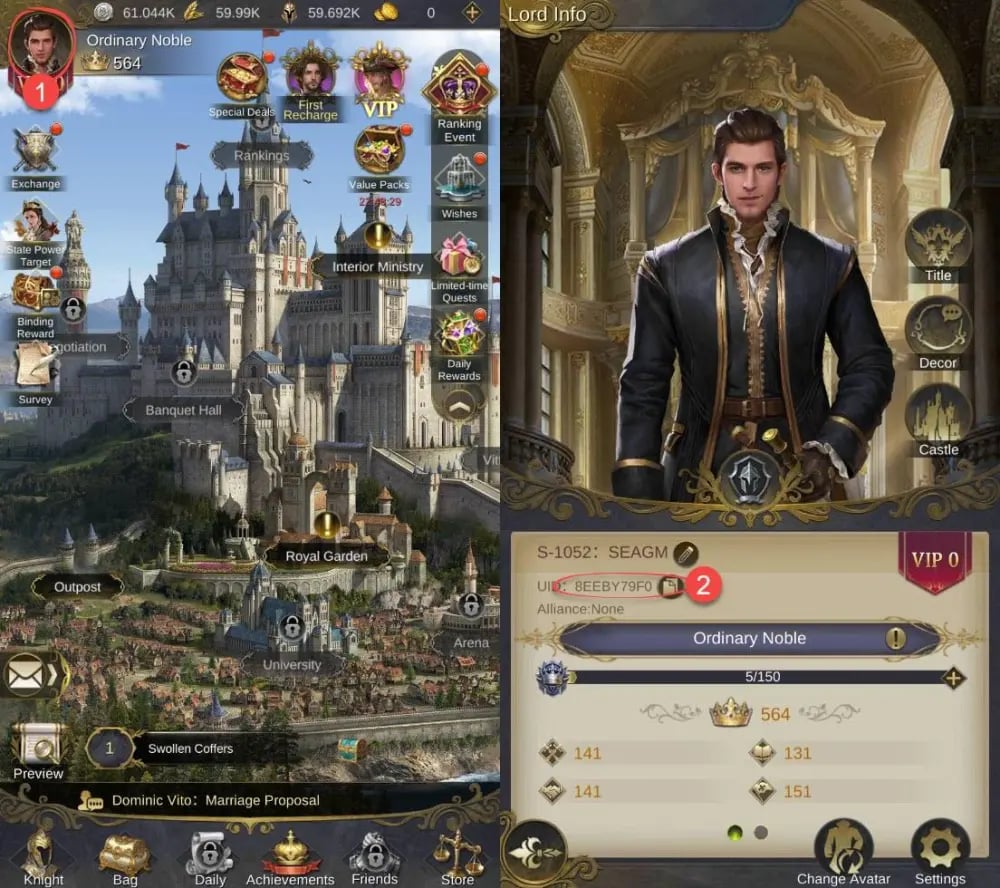
Double-check that you do not include unnecessary spaces or punctuation when inputting your UID on the order form.
King's Choice SEA vs Global Server Region Requirements
King's Choice operates separate server environments depending on geographical regions. It is critical to confirm that your account resides on the Southeast Asian server group before buying SEA products.
| Attribute / Feature | King's Choice SEA Servers | King's Choice Global / NA / EU Servers |
|---|---|---|
| Target Player Base | Southeast Asia (Indonesia, Malaysia, Thailand, Philippines, Vietnam, Singapore) | North America, Europe, Latin America, and other international regions |
| Account Identification | Numeric SEA Server UID | Region-specific Server ID and UID |
| Top-Up Compatibility | King's Choice SEA catalog on ArcTopup | Global-specific top-up packages |
| Cross-Region Delivery | Not supported across different server regions | Not supported across different server regions |
| Active Currency | SEA Diamonds and regional event tokens | Global Diamonds and localized regional tokens |
If your account is registered on an EU or NA server, purchasing an SEA Diamond package will not deliver currency to your character. Always ensure your server tag matches the SEA region prior to payment.
In-Game Benefits of King's Choice Diamonds, Weekly Cards, and VIP Points
Diamonds represent the primary premium currency in King's Choice SEA, driving progression across kingdom governance, military conquest, and royal court management. Strategic deployment of your Diamonds provides several core advantages:
- Knight Upgrades and Recruitment: Accelerate the development of top-tier 5-star and 6-star Knights by buying skill books, talent exp scrolls, and training slots in the Royal Arena.
- Lover Intimacy and Charm: Purchase intimacy gifts, silk dresses, and festival attire to increase Lover attributes, which directly amplifies your overall State Power through heir bonuses.
- Alliance and Event Milestones: Invest Diamonds in limited-time cross-server ranking events, dragon bounties, and alliance construction to secure rare titles and exclusive castle skins.
- Weekly and Monthly Privilege Cards: Activate ongoing daily Diamond allowances, speed-up boosts, and automated patrol features that simplify daily kingdom routines.
- VIP Experience and Perks: Every direct recharge on ArcTopup contributes VIP points to your Lord profile. Ascending VIP tiers unlocks prestigious Knights, exclusive Lover costumes, higher banquet capacities, and auto-clearing mechanics for campaign stages.
Safe and Password-Free Top Up Verification
ArcTopup utilizes a direct UID delivery system designed to prioritize account security. Understanding the safeguards behind this process ensures your game data remains protected at all times:
- Zero Password Sharing: You never need to supply game passwords, email credentials, Apple IDs, or Google account logins. All transactions occur purely through your public-facing numeric UID.
- Account Integrity: Direct UID crediting removes the risk of unauthorized account alterations, accidental character deletions, or security lockouts caused by third-party logins.
- Transparent Order Processing: You receive clear order summaries and status confirmations for every transaction without surprise hidden fees at checkout.
- Direct Delivery Pipeline: Orders communicate directly with server fulfillment queues, reducing human error and expediting in-game crediting.
King's Choice SEA Delivery Troubleshooting and Support
If you experience any delay in receiving your Diamonds after finishing checkout, follow these diagnostic steps to resolve the issue:
- Refresh the Game Client: Completely close the King's Choice app from your device background and restart it. This forces the client to reconnect with the server and synchronize your resource balance.
- Check In-Game Mail: Some promotional bundles or event-related top-up rewards are delivered to your in-game mailbox rather than directly to the top status bar. Inspect your inbox for claimable attachments.
- Verify Your Order Status on ArcTopup: Check your order confirmation page or transaction history to confirm that payment processing is complete.
- Review the Submitted UID: Confirm that the UID submitted during purchase matches the UID on your active Lord profile.
- Contact Customer Support: If your Diamonds have not arrived after completing these steps, reach out to the ArcTopup customer support team with your Order ID, UID, and payment confirmation receipt for quick assistance.
Frequently Asked Questions About King's Choice SEA Top Up
How do I find my King's Choice SEA UID?
Open King's Choice, tap your Lord Avatar in the top-left corner of the main screen, and look at your Lord Profile. Your numeric UID is displayed directly beneath your Lord Name. Tap the copy icon next to it to copy your ID accurately.
Do I need to provide my King's Choice account password to top up?
No. ArcTopup only requires your King's Choice SEA numeric UID. You should never share your account password, email, or third-party login credentials to complete a recharge.
Can I top up a Global server account using King's Choice SEA products?
No. King's Choice SEA products are exclusively compatible with accounts created on Southeast Asian servers. Global, North American, and European server accounts require their respective regional top-up products.
What can I buy with Diamonds in King's Choice SEA?
Diamonds can be used to recruit and upgrade Knights, purchase Lover intimacy gifts, reset daily arena attempts, contribute to Alliance development, buy limited-time event stamina, and activate privilege cards.
How quickly will the Diamonds appear in my King's Choice account?
Diamonds are typically credited directly to your Lord balance shortly after your payment is successfully verified on ArcTopup. In rare cases of high server traffic, a quick restart of the game app will update your totals.
What should I do if my King's Choice Diamonds do not arrive after payment?
First, restart the game client to refresh your balance and check your in-game mailbox. If the Diamonds still do not show up, check your ArcTopup order status and contact our support team with your Order ID and UID for immediate assistance.
Current packages and prices
Current base prices exclude Tax. Tax, payment fees and coupon adjustments are shown at checkout.
| Package | Price |
|---|---|
| 26 Diamonds | USD 0.94 |
| Weekly Diamond Card | USD 1.79 |
| Monthly Diamond Card | USD 1.81 |
| 132 Diamonds | USD 4.33 |
| Lunar Blessing | USD 7.13 |
| 268 Diamonds | USD 8.96 |
| Yearly Diamond Card | USD 16.93 |
| 810 Diamonds | USD 26.00 |
| 1360 Diamonds | USD 42.97 |
| 2750 Diamonds | USD 85.58 |






























































