Tarisland Top Up: Crystals and In-Game Utility
Crystals are the premium currency in Tarisland, functioning as the primary medium for obtaining exclusive cosmetics, convenience items, and seasonal progression assets. Unlike standard in-game gold or silver earned through dungeon grinding and daily quests, Crystals must be recharged directly. They give players access to high-value items across the Tarisland in-game store without compromising fair-play competitive mechanics.
Recharging Crystals on ArcTopup allows you to fund your character across multiple areas of progression:
- Battle Passes and Monthly Cards: Activate premium reward tracks for daily resource allocations, unique cosmetic titles, and additional dungeon entry perks.
- Cosmetic Appearances and Mounts: Unlock character outfits, weapon illusions, specialized mounts, and visual effects that customize your avatar.
- Auction House and Resource Conversion: Convert premium balance into tradeable resources to purchase crafting materials, potions, and gear enhancements directly from other players.
- Inventory and Storage Expansions: Expand your bag capacity and personal warehouse slots to store crafting reagents, raid tokens, and alternate gear sets.
ArcTopup provides direct UID recharge for Tarisland players worldwide, delivering Crystal packages straight to your account balance without requiring account passwords or third-party log-in credentials.
Supported Regional Servers for Tarisland Top-Up
Tarisland operates dedicated server clusters divided by geographic region to minimize latency for raids, battlegrounds, and open-world events. To ensure your Crystals arrive on the correct character roster, select your exact server during checkout on ArcTopup.
| Server Region | Server Name | Server Cluster ID |
|---|---|---|
| Asia | ASIA-1 | 30001 |
| Asia | ASIA-2 | 30002 |
| Asia | ASIA-3 | 30003 |
| North America | NA-1 | 35001 |
| Latin America | LATAM-1 | 40001 |
| Latin America | LATAM-2 | 40002 |
| Europe | EU-1 | 45001 |
| Europe | EU-2 | 45002 |
| Europe | EU-3 | 45003 |
| Eastern Europe | EE-1 | 50001 |
Each server cluster maintains separate character data. Always verify that the server you choose matches the server listed on your character selection screen before submitting an order.
How to Find Your Tarisland User ID and Server
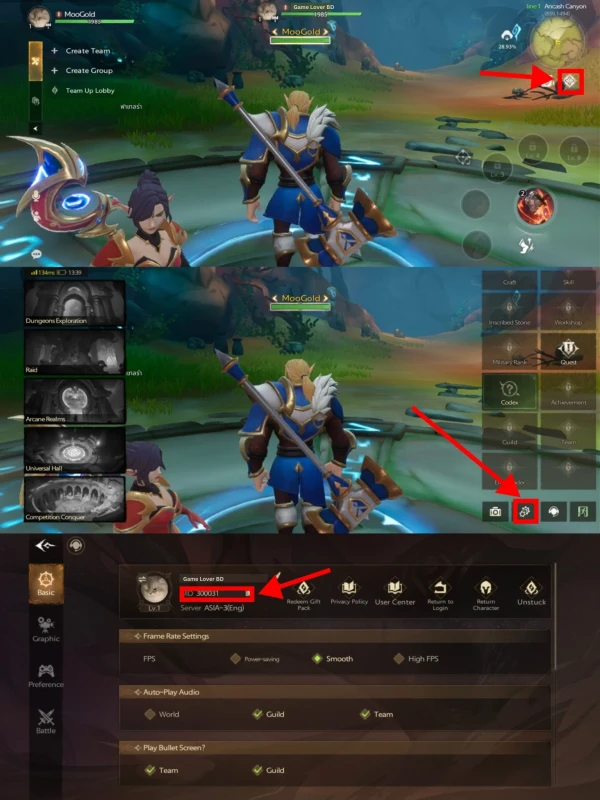
To complete an order on ArcTopup, you need your unique numeric User ID (UID) and your current Server Name. Follow these steps to find your details inside the game client:
- Open Tarisland on your PC or mobile device and log in to your active character.
- Tap or click on your Character Avatar or open the Settings menu located in the bottom-right corner of the HUD.
- In the System Settings / Basic Info tab, locate the User ID line. Your UID is a multi-digit numeric string.
- Click the Copy icon next to your User ID to prevent manual typing errors.
- Confirm your Server Name displayed at the top of your character select screen or within the basic info panel.
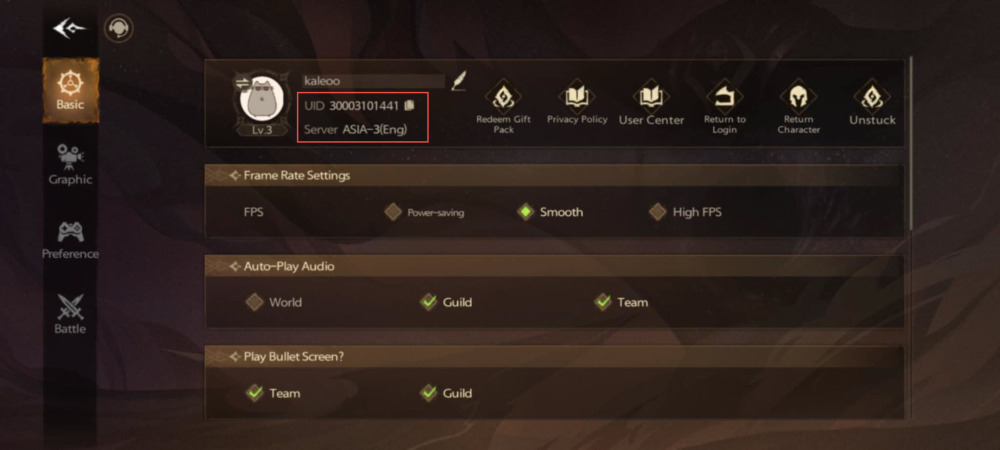
Ensure you copy the numeric User ID rather than your public character display name, as display names cannot be used to route direct UID top-ups.
Step-by-Step Guide: How to Top Up Tarisland on ArcTopup
To recharge your Tarisland balance on ArcTopup, follow this standard purchase procedure:
- Select Your Crystal Package: Browse the available Tarisland denominations on ArcTopup and pick the bundle that fits your current in-game goals.
- Enter Your User ID: Paste your numeric Tarisland User ID into the dedicated input field.
- Select Your Server: Choose your active server from the dropdown menu (such as NA-1, ASIA-1, EU-1, LATAM-1, or EE-1).
- Proceed to Checkout: Check the live checkout screen to verify your order quantity, server selection, and available payment methods.
- Complete Payment: Finalize the transaction. Once confirmed, the system processes your order and sends the Crystals directly to your Tarisland character balance.
Safety and Account Security: Direct UID Recharge vs Account Trading
Maintaining the security of your Tarisland account is essential. Third-party account pilots, unauthorized gold sellers, and credential-sharing recharge services expose players to significant risks, including permanent account bans, chargeback penalties, and stolen account credentials.
ArcTopup uses direct UID processing for all Tarisland recharges:
- No Password Required: You never provide your login password, email access, or multi-factor authentication codes. Your credentials remain private.
- Official Delivery Pipeline: Crystals are credited directly to your player account via the standard server ID routing system, preventing account red-flagging or clawbacks.
- Protection Against Black Market Gold: Buying direct Crystals eliminates the risk of dealing with illicit auction house gold transfers that often result in automated economy bans.
- Gifting Capability: Because only the User ID and Server are required, you can safely send Crystals to guild members or friends without needing access to their private accounts.
Troubleshooting Common Tarisland Recharge Issues
If you experience any issues while topping up Tarisland on ArcTopup, check the following common scenarios:
1. Crystals Not Showing Immediately
In most cases, balances update within a few moments of payment confirmation. If the balance has not reflected, close your Tarisland client completely and restart the game to force a server synchronization. Also, check your in-game mailbox to ensure the items were not delivered as a claimable mail attachment.
2. Incorrect Server Selected
If you accidentally select the wrong server from the dropdown during checkout (for example, selecting EU-1 instead of NA-1), the balance may deliver to a character on that regional server if a matching UID exists, or fail to route. Always double-check your server cluster before completing payment.
3. Typo in the User ID
If the submitted User ID does not match any registered account, the system will hold the order. Contact ArcTopup customer support with your Order Number, payment receipt, and the correct numeric User ID so the support team can assist in routing your delivery.
Frequently Asked Questions
How do I find my Tarisland User ID and Server?
Log in to Tarisland, open the main menu or character profile screen, and navigate to the System Settings / Account info tab. Your numeric User ID is listed with a copy button. Your server name appears on the character select screen and on your profile panel.
Do I need to share my Tarisland account password for top-up?
No. ArcTopup only requires your numeric User ID and your designated Server. You never need to provide your password, login tokens, or authentication credentials.
Which regional servers are supported for Tarisland crystal top-up?
All major global clusters are supported, including ASIA-1, ASIA-2, ASIA-3, NA-1, LATAM-1, LATAM-2, EU-1, EU-2, EU-3, and EE-1.
What items can I purchase in-game with Tarisland Crystals?
Crystals can be spent in the in-game shop for battle passes, monthly privilege cards, cosmetic outfits, weapon skins, mount appearances, bag expansions, and selected crafting materials through the trading post.
Can I top up Tarisland Crystals for a friend?
Yes. Enter your friend's numeric User ID and their active Server during checkout on ArcTopup. The Crystals will be credited directly to their character upon payment confirmation.
What should I do if my Tarisland crystals do not appear immediately?
Restart your game client to refresh the server connection, and verify your in-game mailbox. If the balance is still pending after several minutes, reach out to ArcTopup customer support with your order reference number and transaction details.
Current packages and prices
Current base prices exclude Tax. Tax, payment fees and coupon adjustments are shown at checkout.
| Package | Price |
|---|---|
| 60 Crystals | USD 0.70 |
| Weekly Ticket | USD 0.86 |
| Monthly Ticket | USD 2.54 |
| 330 Crystals | USD 3.40 |
| 700 Crystals | USD 6.93 |
| Semiannual Ticket | USD 14.30 |
| 1800 Crystals | USD 16.34 |
| 3600 Crystals | USD 32.73 |
| 7250 Crystals | USD 69.59 |