Hatsune Miku: Colorful Stage Crystals Top Up with Player ID
Hatsune Miku: Colorful Stage! (also known worldwide as Project Sekai) relies on Crystals as its primary currency to scout 4-star cards, participate in limited-time gacha events, unlock exclusive costumes, and recharge live boost energy for competitive event tiering. Purchasing crystals through ArcTopup allows you to reload your account balance directly using only your Player ID.
Because ArcTopup uses your public numerical Player ID, you never need to share account passwords, Google Play credentials, or Apple ID logins. Follow this guide to top up your account quickly and safely.
How to Complete Your Top-Up on ArcTopup
- Select the crystal denomination pack you wish to purchase from the product selector above.
- Enter your numerical Hatsune Miku: Colorful Stage! Player ID into the required field.
- Verify your ID carefully to make sure the balance arrives in the correct account.
- Click top up to open the live checkout page, choose your preferred payment option, and complete payment.
- Open your game app and check your in-game Gift Box to collect your newly credited crystals.
Step-by-Step Guide: How to Find Your Player ID in Colorful Stage
Your Player ID is a unique numerical sequence assigned to your Project Sekai profile upon account creation. You must provide this exact number during checkout so the automated system can direct your crystals to your account.
- Launch Hatsune Miku: Colorful Stage! on your iOS or Android device.
- On the main title lobby screen, tap the Menu icon (three horizontal lines) in the upper-right corner, or tap directly on your Profile card.
- Select Profile to open your public player information card.
- Locate your Player ID displayed under your display name and rank.
- Tap the small Copy icon next to the number sequence to copy the ID directly to your clipboard.
- Paste this ID into the ArcTopup order form.
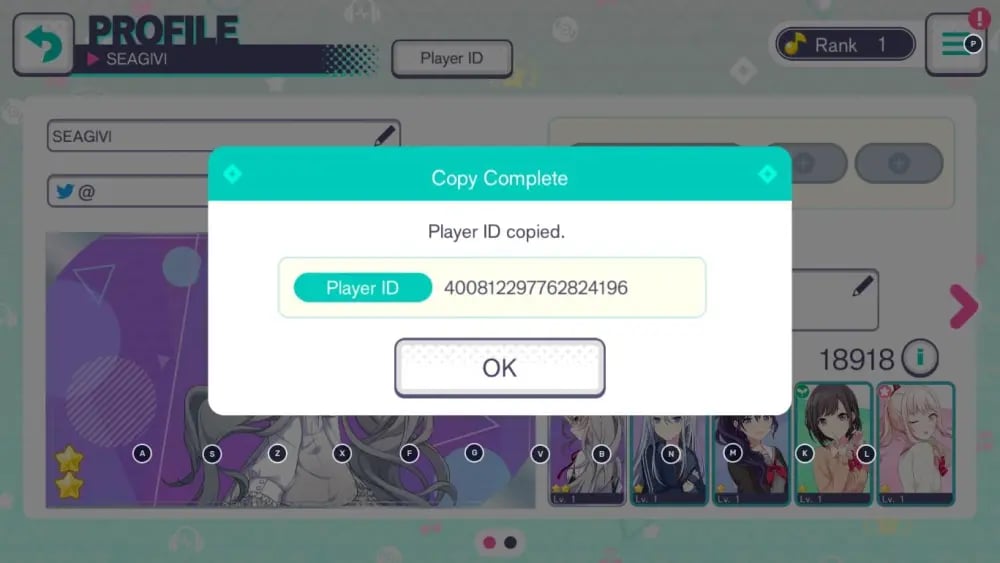
Make sure not to confuse your player username with your numerical Player ID. Usernames can change at any time, but your numerical ID remains permanently fixed to your game profile.
Paid Crystals vs Free Crystals: Key Differences and Best Uses
Project Sekai separates your crystal wallet into two distinct categories: Paid Crystals and Free Crystals. Understanding the difference helps you plan your banner spending effectively.
| Feature | Paid Crystals | Free Crystals |
|---|---|---|
| Source | Direct real-money store purchases on ArcTopup | Song clears, event stories, character ranks, login bonuses |
| Standard & Rate-Up Banners | Yes | Yes |
| Daily Discounted Solo Pull (60 Crystals) | Yes | No |
| Guaranteed 4-Star Banners | Yes | No |
| Select Member Gacha | Yes | No |
| Paid Exclusive Outfit Sets | Yes | No |
| Live Boost Energy Refills | Yes | Yes |
Best Uses for Paid Crystals
- Guaranteed 4-Star Gachas: Periodic promotional banners require paid crystals to guarantee at least one 4-star card upon a multi-pull.
- Daily 60-Crystal Single Pull: Spending 60 paid crystals once per day gives you high summon value compared to the standard 300-crystal single pull.
- Costume Shop Outfits: Exclusive 3D live performance dresses, suits, and accessories can only be purchased using paid crystal balances.
Best Uses for Free Crystals
- Color Festival (ColorFes) Banners: Save your free crystals for ColorFes events, where the base drop rate for 4-star cards doubles from 3% to 6%.
- Limited Event Banners: Free crystals work on limited collaboration and seasonal banner spark meters (300 gacha points for card pity).
What You Can Purchase with Crystals in Project Sekai
Crystals power every major progression and cosmetic system across Hatsune Miku: Colorful Stage!:
- Gacha Summons: Pull for top-tier cards from groups like Leo/need, MORE MORE JUMP!, Vivid BAD SQUAD, Wonderlands x Showtime, Nightcord at 25:00, and the Virtual Singers (Miku, Rin, Len, Luka, MEIKO, KAITO).
- Live Boost Energy Recovery: When tiering for competitive event rankings, convert crystals into Live Boost energy to repeatedly clear co-op show stages and maximize event point accumulation.
- Crystal Shop Bundles: Buy music cards, stamp exchange tickets, and practice scores to power up your card skills and master rank.
How to Claim Your Purchased Crystals from the In-Game Gift Box
When your order completes on ArcTopup, the system sends your crystal pack directly to your account. Follow these steps to collect them:
- Open Hatsune Miku: Colorful Stage! on your device.
- If the game is already running in the background, close the app completely and reopen it to trigger a server data refresh.
- From the main screen, tap the Present Box (Gift Box) icon located in the upper right.
- Switch to the Items / Crystals tab to view your delivered package.
- Tap Receive All to transfer the crystals into your active wallet.
- You can verify your updated Paid and Free balances anytime by opening the Gacha menu and checking the top status bar.
Troubleshooting Delivery Issues and Incorrect Player ID Submissions
If your crystals have not arrived within a few minutes of purchase, follow these verification steps:
- Restart the App: A full restart forces the client to reconnect with the game servers and retrieve newly added gift box items.
- Check Your Gift Box History: Tap the Gift Box and inspect the Accepted tab to see if the pack was collected automatically during a previous session.
- Verify the Submitted Player ID: Review the receipt sent to your email address. If you notice a typo in the Player ID you submitted, contact ArcTopup customer support immediately with your transaction order number.
Account Security and Overcoming Regional Store Restrictions
Many international players face difficulties purchasing crystals due to regional billing blocks on the Google Play Store or Apple App Store, or strict monthly spending caps tied to account age settings. ArcTopup provides an accessible top-up channel that bypasses app store payment errors.
Why ArcTopup Is Safe
- ID-Only Delivery: You only provide your public Player ID. We never ask for your game password, Google account, Apple login, or social media bindings.
- Zero Account Sharing: Your account stays entirely in your hands, eliminating the risk of unauthorized access or account theft.
- Flexible Payment Methods: View all available local and international payment options directly on the live ArcTopup checkout screen.
Frequently Asked Questions
How do I find my Hatsune Miku: Colorful Stage Player ID?
Open the game, tap the menu or your profile picture on the home screen, and open your Profile. Your numerical Player ID is displayed under your display name. Tap the copy icon next to it to copy your ID.
What is the difference between Paid Crystals and Free Crystals in Project Sekai?
Paid Crystals come exclusively from direct real-money purchases and can be used on guaranteed 4-star banners, daily 60-crystal discount pulls, and exclusive 3D outfits. Free Crystals are earned through in-game achievements, song clears, and events, and work for standard gacha banners and energy refills.
Do I need to provide my account login or password to top up Crystals?
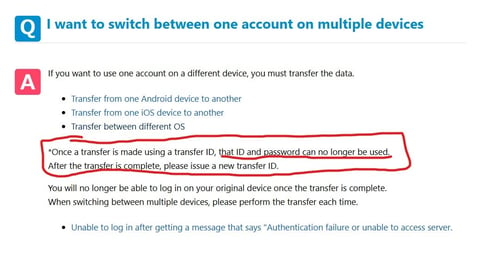
No. ArcTopup only requires your in-game Player ID. You should never share your account login, transfer codes, or passwords with anyone.
Where do my purchased Crystals appear in Hatsune Miku: Colorful Stage?
Delivered crystal packs land in your in-game Present Box (Gift Box). Tap the present icon on your home screen and hit Receive All to credit them to your balance.
What should I do if my Crystals do not appear in my Gift Box right away?
Close the game app completely, wait a minute, and relaunch it to refresh the server connection. If the crystals do not appear after restarting, check your order confirmation details and reach out to ArcTopup support with your order number.
Can I use paid crystals for guaranteed 4-star gacha pulls?
Yes. The crystals purchased on ArcTopup count as Paid Crystals, which qualify for special guaranteed 4-star banners, select gacha tickets, and daily discounted solo pulls.
Current packages and prices
Current base prices exclude Tax. Tax, payment fees and coupon adjustments are shown at checkout.
| Package | Price |
|---|---|
| 110 Crystals | USD 0.62 |
| 350 Crystals | USD 1.91 |
| 950 Crystals | USD 5.02 |
| 1,800 Crystals | USD 9.70 |
| 3,060 Crystals | USD 15.54 |
| 5,000 Crystals | USD 25.28 |
| 10,500 Crystals | USD 50.58 |