
Free Fire MAX Diamonds Top Up: Direct UID Balance Delivery
Diamonds serve as the primary premium currency in Free Fire MAX. Players use them to unlock exclusive character bundles, upgrade weapon attributes via Evo gun skins, purchase the seasonal Booyah Pass, spin the Luck Royale wheels, and acquire rare emotes. Getting a direct diamond recharge ensures that your account is always prepared for limited-time event drops and discount stores.
ArcTopup provides a direct top-up service that transfers diamonds straight to your game balance using your numeric User ID (UID). There is no requirement to share sensitive account logins or social media credentials. Select your package above, enter your UID, and complete your purchase to receive your diamonds promptly.
Shared Balance: Free Fire and Free Fire MAX Synchronization
A frequent question among survivors is whether diamond top-ups purchased for Free Fire MAX work on the standard Free Fire version. Because Garena uses Firelink technology, both game applications connect directly to the same central database.
Your account profile, inventory, unlocked characters, weapon skins, and diamond balances remain synchronized between both clients. When you purchase diamonds through ArcTopup using your User ID, the added balance updates automatically on both Free Fire MAX and the standard client. You can spend your diamonds on either app without needing separate currency wallets or transfer processes.
How to Find Your Free Fire MAX User ID
To ensure your diamonds reach the correct account, you must enter your exact in-game numeric User ID during checkout. Follow these simple steps to locate and copy your UID from inside the game:
- Launch the Free Fire MAX application on your device.
- Tap your profile banner or avatar located in the top-left corner of the main lobby screen.
- Stay on the Basic profile tab.
- Locate your numeric UID displayed beneath your in-game nickname.
- Tap the yellow Copy icon next to your UID to copy the digits directly to your clipboard.
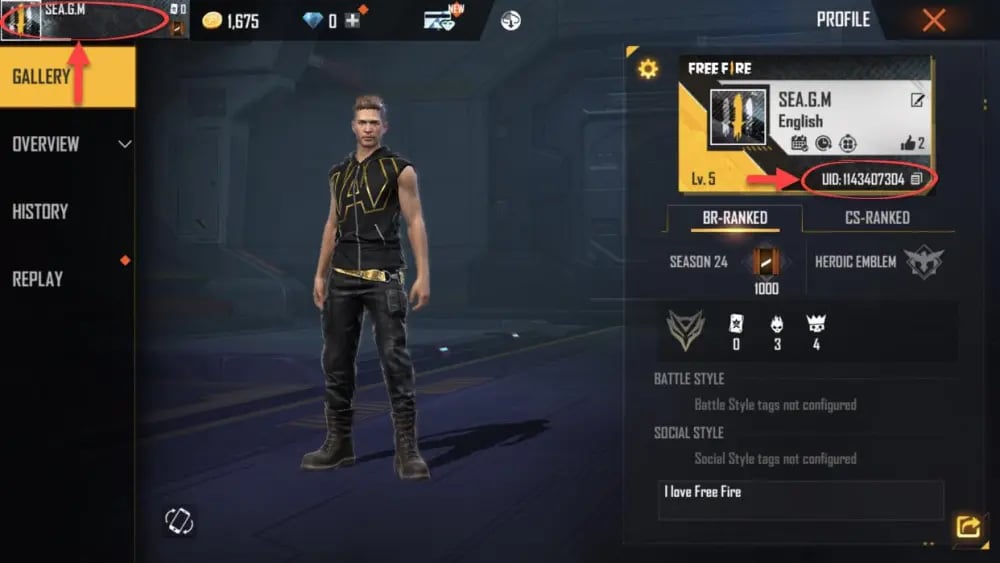
Paste the copied UID into the account input field on ArcTopup before proceeding to checkout to eliminate typing mistakes.
Step-by-Step Guide to Buy Free Fire MAX Diamonds on ArcTopup
Recharging your account balance on ArcTopup takes less than a minute. Follow this walkthrough to place your order:
- Select Your Diamond Pack: Choose the diamond denomination you need from the product selection list above. Current package rates are displayed in real time on the live checkout interface.
- Enter Your User ID: Paste your numeric Free Fire MAX UID into the player ID field.
- Select a Payment Option: Pick your preferred payment method from the available secure checkout gateways.
- Confirm and Pay: Complete the payment verification. Once the transaction processes, our automated system credits the diamonds directly to your Free Fire MAX account.
- Check In-Game Balance: Open Free Fire MAX and check the top bar in the lobby to see your updated diamond total.
In-Game Spending: Top Uses for Free Fire MAX Diamonds
Managing your diamond budget wisely helps you unlock the best combat bonuses and cosmetic upgrades. Here is an overview of the most popular diamond features in the game:
| Feature / Item | Primary Benefit | Recommended Strategy |
|---|---|---|
| Booyah Pass | Unlocks exclusive themed costumes, vehicle skins, and weapon crates across tier levels. | Purchase early in the season to maximize daily mission EXP. |
| Evo Gun Skins | Grants upgradable weapons with custom kill effects, firing rates, and reload buffs. | Save diamonds for Faded Wheel events featuring high-tier weapons like the MP40 or AK47. |
| Luck Royale / Incubator | Offers rare character bundles, legendary weapon skins, and custom emotes. | Utilize discount vouchers and daily free spin bonuses before spending full diamond amounts. |
| Characters & Pets | Provides active/passive skills and pet buffs that directly affect tactical gameplay. | Prioritize characters with survival or healing abilities to boost battle royale performance. |
| Mystery Shop | Features large discounts on bundles, name change cards, and elite items. | Hold diamond balances until rotating mystery discount events go live. |
Account Safety: Why UID-Only Top Up Protects Your Profile
Protecting your gaming account against bans and unauthorized access is essential. Traditional credential-sharing methods—where sellers ask for your Facebook, Google, Twitter, or VK login details—carry severe risks, including account hijacking, unauthorized data modification, and permanent account suspensions by Garena for suspicious IP activity.
ArcTopup operates entirely through UID-based direct balance crediting. Because you never share your passwords, two-factor authentication codes, or linked social media credentials:
- Your private login information remains in your control at all times.
- Your account does not trigger third-party login flags or security locks.
- The top-up is processed cleanly through standard player ID routing protocols.
This makes direct UID top-up the safest method to recharge your Free Fire MAX diamond balance in 2026.
Troubleshooting Delivery and Order Inquiries
While top-up orders process automatically, minor delays can occur during game maintenance periods or major patch updates. Use the following troubleshooting checklist if your balance does not update instantly:
- Restart the Game App: Close Free Fire MAX completely from your recent apps switcher and reopen it. This forces the client to pull fresh balance data from the game servers.
- Verify Network Connection: Ensure your mobile data or Wi-Fi connection is stable so the game lobby can refresh your profile wallet.
- Double-Check UID Entry: If you entered an incorrect UID during checkout, contact ArcTopup customer support immediately with your order invoice number. Note that orders delivered to another valid player ID cannot be reversed once processed.
- Contact 24/7 Support: If your payment is confirmed but your balance has not updated after several minutes, reach out to our dedicated support team with your transaction ID for prompt balance verification.
Frequently Asked Questions
How to recharge diamonds in Free Fire MAX?
To recharge diamonds, select your preferred diamond quantity on the ArcTopup catalog above, enter your Free Fire MAX User ID in the input box, select your payment method, and complete checkout. Your diamonds will be credited directly to your in-game account.
Can Free Fire MAX Diamonds be used in the standard Free Fire game?
Yes. Free Fire and Free Fire MAX share the same backend server and account database via Firelink. Any diamonds credited to your User ID are accessible and spendable regardless of which app version you log into.
Do I need to provide my password or social login to top up diamonds?
No. ArcTopup requires only your public numeric User ID (UID). You should never share your password, email, or social media login credentials to purchase diamonds.
Where can I find my Free Fire MAX User ID?
Open Free Fire MAX, tap your profile avatar in the upper-left corner of the main lobby, and locate the numeric UID listed under your nickname on the Basic tab. Tap the copy icon next to the number to copy it.
How long does it take for Free Fire MAX Diamonds to reflect in my balance?
Diamonds are processed automatically upon successful payment and typically reflect in your in-game account balance within moments. During peak game server updates, delivery may take a few minutes.
What should I do if I entered the wrong User ID during checkout?
If you realize you submitted an incorrect UID, contact ArcTopup customer support right away with your order number. If the order has already been processed by the automated top-up system to a valid account, the transaction cannot be recalled, so always verify your UID before paying.
Current packages and prices
Current base prices exclude Tax. Tax, payment fees and coupon adjustments are shown at checkout.
| Package | Price |
|---|---|
| 210 Diamonds | USD 1.93 |
| 530 Diamonds | USD 4.80 |
| 1080 Diamonds | USD 9.60 |
| 2200 Diamonds | USD 19.20 |






























































