Ragnarok M: Eternal Love Top Up: Buy Big Cat Coins Directly
Big Cat Coins (BCC) serve as the premium currency in Ragnarok M: Eternal Love. Whether you need BCC to spin the latest costume gacha, obtain monthly premium cards, or purchase vital progression packs, topping up your balance gives you direct access to the game's best items. ArcTopup provides a direct recharge system that credits Big Cat Coins to your account quickly and securely.
You do not need to share login credentials or pass account tokens. Recharging requires only your in-game User ID and your active server selection. Once confirmed, your BCC order is processed and sent straight to your character's in-game mailbox.
How to Top Up Big Cat Coins in Ragnarok M: Eternal Love
To complete your Big Cat Coin purchase on ArcTopup, follow these simple steps:
- Enter Your User ID: Type your numerical Ragnarok M User ID into the input field.
- Select Your Server: Choose your active game server from the dropdown menu (Eternal Love, Midnight Party, Memory of Faith, Valhalla Glory, or Port City).
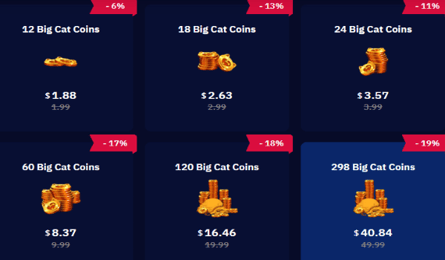
- Select Your BCC Package: Choose the amount of Big Cat Coins you wish to purchase. Live prices and denomination tiers are displayed clearly at checkout.
- Complete Payment: Select your preferred local or international payment option and complete the transaction.
- Check Your In-Game Mail: Launch Ragnarok M: Eternal Love and open your mailbox to claim your credited Big Cat Coins.
Where to Find Your Ragnarok M User ID and Server
Locating your account details in Ragnarok M: Eternal Love takes only a few seconds. Follow the exact steps below:
- Launch the Ragnarok M: Eternal Love app on your mobile device or emulator and log in to your account.
- Once in the game world, tap your character avatar located in the top-left corner of the main interface.
- In the profile window that opens, you will see your character name, level, and your numerical User ID (UID).
- Note down your numerical UID accurately. You can also tap the small copy icon next to your ID to copy it directly.
- Check the server name displayed on your login screen or character selection screen to confirm your active server.
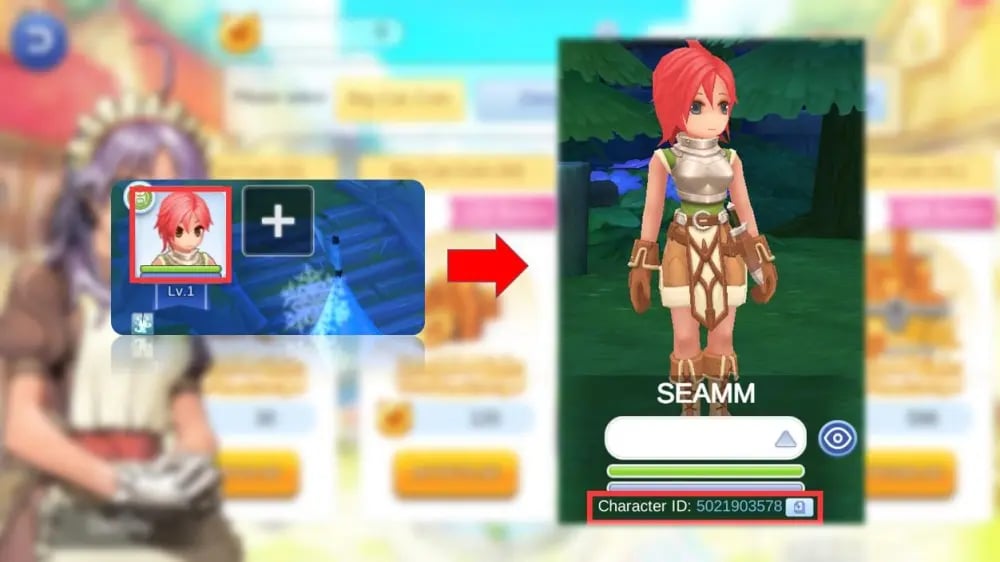
Double-check that both your User ID and Server selection match before submitting your order to prevent any delivery delays.
Supported Servers on ArcTopup
Ragnarok M: Eternal Love features multiple active servers to host its worldwide community. ArcTopup fully supports all active main servers. When placing an order, pick the corresponding server from the list below:
| Server Name | Server ID | Coverage Details |
|---|---|---|
| Eternal Love | 90001 | Original Southeast Asia / Global launch server |
| Midnight Party | 90002 | High-population server group |
| Memory of Faith | 90002003 | Expanded regional server ecosystem |
| Valhalla Glory | 90002004 | Competitive Guild vs Guild server |
| Port City | 90002005 | Active server hub |
Selecting the correct server ensures your Big Cat Coins are routed to the right character profile immediately.
Understanding Big Cat Coins (BCC) and In-Game Utility
Big Cat Coins are the core premium currency used across Midgard. Having a ready supply of BCC allows you to participate in major events and secure high-value utilities:
- Gacha Machines: Spend BCC on the Feast Gacha, Kafra Gacha, and Headwear Gacha machines in Prontera to pull exclusive costumes, deposit bonuses, and powerful stat-boosting gear.
- VIP Premium Cards: Buy monthly EP Premium cards using BCC to unlock extra combat time, increased drop rates, bonus bag slots, and exclusive monthly headwear rewards.
- Zeny and Material Conversion: Exchange BCC for Zeny or specialized refining items, mora coins, and enhancement materials to improve your character's combat power.
- Growth and Event Bundles: Purchase limited-time growth packs, skill extraction materials, and rune chests released during major seasonal updates in 2026.
First Top-Up Bonus and Double BCC Mechanics Explained
In Ragnarok M: Eternal Love, first-time recharges on specific BCC denominations often qualify for a 2x bonus reward. Here is how the mechanics work in 2026:
- Tier-by-Tier Eligibility: The double BCC bonus is tracked separately for each individual recharge tier. Recharging a specific pack for the first time grants double the listed BCC.
- Official Credit Delivery: Because ArcTopup routes purchases directly through official top-up channels, qualifying first-time top-ups will automatically trigger the in-game double reward on eligible accounts.
- Server Event Resets: During major anniversary events or major version updates, the game may reset the first-time double bonus status across all tiers. If your account has had its tiers reset, your next purchase on that tier will receive the bonus again.
If you have already claimed the double bonus for a particular pack on your account, subsequent purchases of that same pack deliver the standard BCC amount along with any regular ongoing bonus shown in-game.
Safe and Password-Free Recharges with ArcTopup
Account safety is essential when purchasing digital currencies. ArcTopup uses a direct UID top-up system designed to keep your game profile protected:
- No Passwords Required: You never need to share your account password, email login, Facebook token, or Google credentials.
- No Account Handover: Your account remains entirely in your hands. You do not need to log out or transfer access to third parties.
- Encrypted Checkout: Every transaction is handled through secure payment gateways with transparent pricing.
Using only public identifiers (User ID and Server) ensures your personal login details are never compromised.
Delivery Troubleshooting and In-Game Mailbox Claiming
Once your transaction on ArcTopup is marked as completed, Big Cat Coins are delivered directly to your character. Use the following checklist to claim your currency or resolve minor delays:
- Check the In-Game Mailbox: Look for the envelope icon on your main screen. Tap it to open your system mail and select "Claim All" to transfer the BCC into your currency bar.
- Switch Channels or Relog: If the mail icon does not appear immediately, return to the character select screen or restart the game client to refresh your server connection.
- Verify Submitted Details: Check your order confirmation receipt on ArcTopup to verify that your entered User ID and chosen Server matched your in-game profile.
- Contact Customer Support: If your BCC has not arrived after a short period, reach out to the 24/7 ArcTopup customer support team with your order number for fast resolution.
Frequently Asked Questions
How do I find my User ID and Server in Ragnarok M: Eternal Love?
Tap your character avatar in the upper-left corner of the main game screen. Your numerical User ID is listed in your profile stats next to your character name. You can check your server name on the game's initial start screen or login screen.
Do I need to share my account password to top up on ArcTopup?
No. ArcTopup only requires your in-game User ID and Server name. We never ask for your account password, social logins, or private account credentials.
What are Big Cat Coins (BCC) used for in Ragnarok M: Eternal Love?
Big Cat Coins are used to purchase premium headwear and costume gacha pulls, monthly VIP Premium cards, exclusive event growth packs, Zeny conversion packages, and refining enhancement bundles.
How does the first top-up bonus work for Big Cat Coins?
Each BCC denomination tier offers a one-time double currency bonus on your first recharge. When you top up an eligible tier on ArcTopup, the official direct delivery system automatically triggers the in-game double bonus if your account is eligible.
Which servers are available for direct top-up on ArcTopup?
ArcTopup supports all active servers, including Eternal Love (90001), Midnight Party (90002), Memory of Faith (90002003), Valhalla Glory (90002004), and Port City (90002005).
What should I do if my Big Cat Coins have not arrived in my mailbox?
First, restart your game client or switch channels to refresh your mailbox. If the mail still does not appear, verify your submitted User ID and Server on your ArcTopup receipt, then contact ArcTopup customer support with your order number for immediate assistance.
Current packages and prices
Current base prices exclude Tax. Tax, payment fees and coupon adjustments are shown at checkout.
| Package | Price |
|---|---|
| 18 + 3 Big Cat Coins | USD 2.23 |
| 24 + 4 Big Cat Coins | USD 3.01 |
| 30 + 6 Big Cat Coins | USD 3.71 |
| Limited Special Gift | USD 5.89 |
| 60 + 12 Big Cat Coins | USD 7.28 |
| 120 + 25 Big Cat Coins | USD 14.32 |
| 298 + 75 Big Cat Coins | USD 35.56 |
| 598 + 150 Big Cat Coins | USD 71.07 |
| 1196 + 300 Big Cat Coins | USD 143.02 |
| 2990 + 750 Big Cat Coins | USD 356.36 |