Lords Mobile Diamonds Top Up: Direct IGG ID Delivery
Equipping your kingdom, reinforcing your wall defenses, and training high-tier troops in Lords Mobile requires steady access to premium resources. Lords Mobile Diamonds serve as the universal external currency used to unlock Mall packs, hero chests, and seasonal bundles directly inside the game. Rather than dealing with regional payment restrictions or app store payment delays, purchasing Diamonds allows you to secure package value straight to your account.
ArcTopup provides a direct top-up system that credits Diamonds straight to your numeric IGG ID. You never have to hand over account passwords, link social credentials, or wait in manual customer support lines. Select your desired Diamond amount, enter your account ID, and your balance updates directly on the server.
What Are Lords Mobile Diamonds and How They Function in the Mall
Diamonds operate as an official alternative balance specifically designed for purchasing in-game Mall bundles. While Gems are used for immediate building upgrades, research speed-ups, and troop healing, Diamonds function as stored balance for buying bundled packs without charging a credit card or mobile store wallet every single time.
When you own Diamonds in your account, the in-game Mall automatically displays an option to pay using your Diamond balance. If a bundle costs 4.99 USD in local currency equivalents, the game lets you redeem it instantly using the corresponding Diamond value. This allows players to stock up on Diamonds in advance and quickly snap up limited-time 24-hour Flash Deals, Guild Fest preparation packs, or Hero Medal bundles during kingdom events.
Differences Between Lords Mobile Diamonds, Gems, and Special Packs
Many new and returning players confuse Diamonds with standard in-game Gems. Understanding how each asset functions helps you allocate your budget efficiently during Kingdom versus Kingdom (KvK) wars and Dragon Arena tournaments.
| Feature | Lords Mobile Diamonds | In-Game Gems | Mall Packs & Bundles |
|---|---|---|---|
| Primary Source | External direct top-up via IGG ID | In-game events, Colosseum, Treasure Trove | Purchased directly using Diamonds or Cash |
| Primary Function | Currency used to buy Mall packs | Speeds up timers, shields, VIP points | Grants heroes, crafting materials, and resources |
| Storage Location | Diamond balance in Mall interface | Main resource bar at top of screen | Bag inventory / direct activation |
| Account Sharing Required? | No, requires only IGG ID | No, earned via gameplay | No, redeemed via Diamonds directly |
| Cross-Platform Sync | Fully synced across iOS, Android, PC | Fully synced across all devices | Fully synced across all devices |
By keeping a reserve of Diamonds on your profile, you maintain the flexibility to grab critical war packs the second an enemy rally targets your guild's Wonder.
How to Top Up Lords Mobile Diamonds on ArcTopup
To complete your Lords Mobile Diamonds recharge on ArcTopup, follow these direct steps:
- Select Your Diamond Denomination: Review the available Diamond packages on the product menu and choose the amount that fits your current upgrade or Mall pack requirements.
- Enter Your IGG ID: Type your numeric IGG ID into the designated field. Double-check the numbers to prevent misdelivery.
- Proceed to Secure Checkout: Review the final total on the live checkout screen and choose your preferred payment method.
- Receive Your Diamonds: Once payment processes, the system directly delivers the Diamonds to your Lords Mobile account. Open your game client to view your updated Diamond balance in the Mall.
All pricing is calculated and displayed clearly at checkout based on current live rates, ensuring transparent transactions with no hidden processing fees.
Where to Find Your Lords Mobile IGG ID in the Game
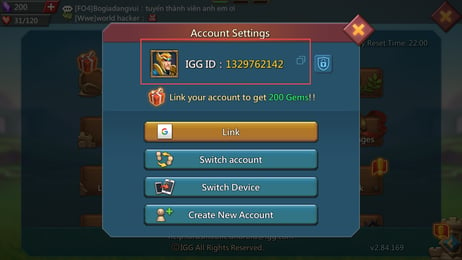
Your IGG ID is the unique account identifier tied to your Lords Mobile profile. It is the only detail required to credit your Diamonds.
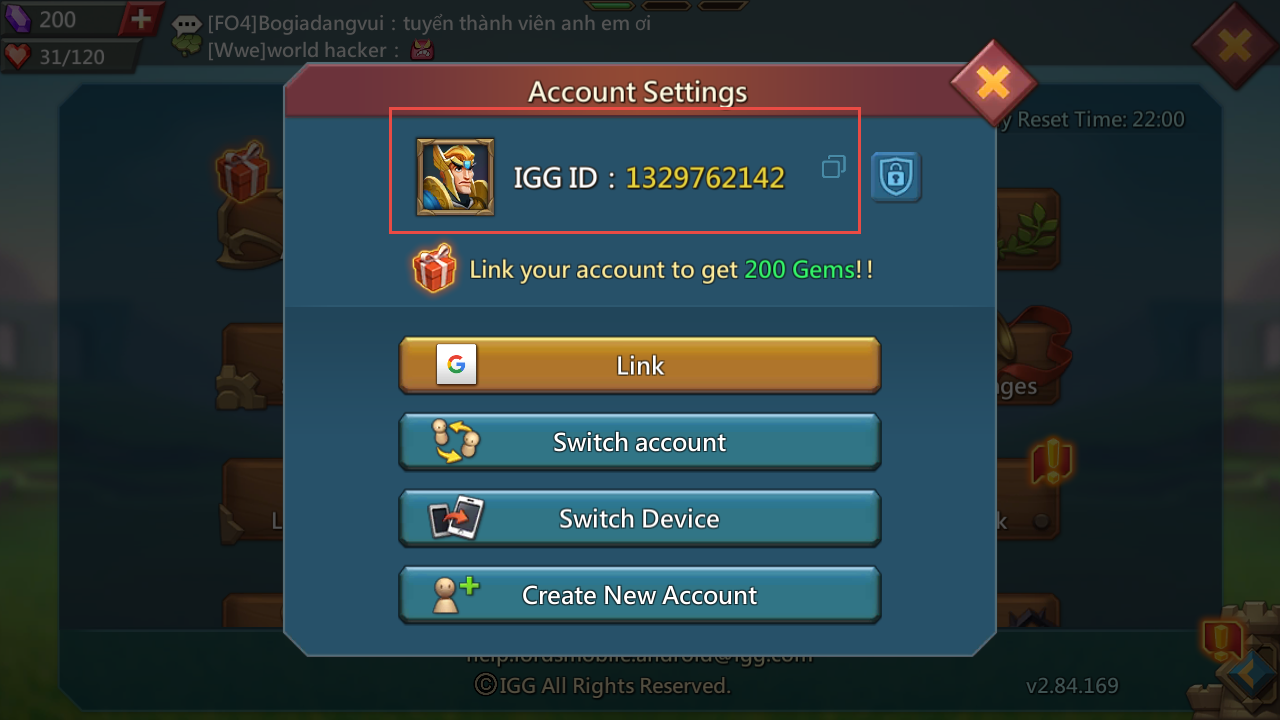
Follow these steps to locate your IGG ID:
- Open Lords Mobile on your mobile device or PC client.
- Tap the Gear icon (Settings) located at the bottom right corner of your main kingdom screen.
- Tap on the Account icon inside the settings menu.
- Your numeric IGG ID will be displayed clearly at the top of the Account window.
- Alternatively, tap your Player Avatar in the top left corner; your IGG ID is listed near your player name and kingdom coordinates.
Copy this number accurately when placing your order on ArcTopup to ensure immediate credit to your profile.
Account Safety and Password-Free Top-Up Protection
Account security is critical when managing high-might Lords Mobile profiles with years of gear crafting, research, and army investments. ArcTopup uses a direct ID-based fulfillment process:
- Zero Password Requirements: We will never ask for your IGG password, linked Gmail, Facebook, Apple ID, or verification codes.
- No Account Handover: Your profile stays strictly in your hands. You never need to log out or allow third parties to pilot your account.
- Server-Direct Delivery: Orders are fulfilled directly via your numeric IGG ID through authenticated channels, keeping your account fully compliant with standard security practices.
- Encrypted Transactions: All transactions pass through encrypted payment gateways to safeguard your personal billing details.
Cross-Platform Account Synchronization: iOS, Android, and PC Client
Lords Mobile supports multi-platform play across Android, iOS, and the official Steam / PC client. Because your Diamond balance is tied directly to your master IGG ID on the game servers, your top-up synchronizes across every device you use.
If you top up Diamonds on ArcTopup using your IGG ID, those Diamonds are immediately available whether you log in from an iPhone, an Android tablet, or your desktop computer. You can use your Diamonds to claim Mall packs on whichever platform you prefer to play on without losing balance or running into platform-specific wallet locks.
Troubleshooting Common Diamond Delivery and Balance Display Issues
If you completed an order and do not immediately see your updated balance, work through the following troubleshooting steps:
- Restart the Game Client: Completely close Lords Mobile from your device background apps and reopen it. A fresh server handshake updates cached balance numbers.
- Check the Diamond Tab in the Mall: Diamonds do not appear on your top Gem resource bar. Open the in-game Mall, tap any pack, and check if the payment toggle shows your active Diamond balance.
- Verify the Submitted IGG ID: Check your order confirmation receipt to confirm that the numeric IGG ID entered matches your current profile.
- Check Cross-Kingdom Transfers: If you recently migrated to a new Kingdom with a Migration Scroll, restart your device to ensure the game server routes your balance to your new kingdom map.
Frequently Asked Questions
What are Lords Mobile Diamonds used for?
Lords Mobile Diamonds are used to purchase in-game Mall packs, time-limited sales, and bundle offers without using direct credit card or app store payments. When you purchase a pack in the Mall, you can choose to spend your Diamond balance instead of cash.
Where can I find my Lords Mobile IGG ID?
Tap the Gear icon (Settings) in the lower-right menu of your game screen, then tap Account. Your numeric IGG ID will appear at the top. You can also view it by tapping your player profile avatar in the upper-left corner of the main interface.
Do I need to share my Lords Mobile password to top up Diamonds?
No. ArcTopup only requires your numeric IGG ID to process your Diamond recharge. You should never share your account password, email login, or two-factor authentication codes with anyone.
What is the difference between Diamonds and Gems in Lords Mobile?
Gems are standard in-game currency spent on instant building construction, research speedups, shields, VIP points, and healing injured soldiers. Diamonds are a premium external currency used exclusively to buy Mall packages and resource bundles.
Where to buy diamonds for Lords Mobile safely?
You can safely buy Lords Mobile Diamonds on ArcTopup by submitting your numeric IGG ID. The platform provides secure, password-free top-ups with live checkout pricing and direct server delivery.
How do I use Diamonds to purchase in-game Mall packs?
Open Lords Mobile and navigate to the Mall. Select the bundle or item pack you want to acquire. When the payment screen appears, select the option to complete the purchase using your available Diamond balance.
Current packages and prices
Current base prices exclude Tax. Tax, payment fees and coupon adjustments are shown at checkout.
| Package | Price |
|---|---|
| 195 Diamonds | USD 1.75 |
| Weekly Diamond Pass | USD 1.80 |
| 395 Diamonds | USD 3.61 |
| 785 Diamonds | USD 7.22 |
| 1179 Diamonds | USD 10.83 |
| 1964 Diamonds | USD 18.00 |
| Monthly Diamond Pass | USD 18.00 |
| 3928 Diamonds | USD 36.07 |
| 7857 Diamonds | USD 72.14 |
| 11785 Diamonds | USD 108.20 |
| 19642 Diamonds | USD 177.16 |