
Weplay Top Up: Instant Account Gold Recharge
Weplay has established itself as one of the most interactive social party game platforms, bringing friends and global communities together through voice chat, party games, and interactive lounges. Whether you are running intense deduction rounds in Space Werewolf, testing your artistic skills in Draw & Guess, singing your heart out in Mic Grab, or hosting private voice lounges, Weplay Gold gives you the tools to stand out and support your favorite creators.
ArcTopup provides a direct, secure pathway for your Weplay top up requirements. With direct user identification (UID) processing, you never have to provide your password or share your account credentials. Every order is credited straight to your Weplay profile through official channels, ensuring your balance is updated quickly so you can get right back into your game rooms.
Step-by-Step WePlay Gold Top-Up Guide
Recharging your Weplay balance on ArcTopup takes less than two minutes. Follow these clear steps to complete your order:
- Select Your Gold Denomination: Choose the exact quantity of Weplay Gold you want to add to your account from the available packages listed on the product page.
- Enter Your WePlay UID: Paste your unique User ID into the designated field. Ensure that the digits match your profile exactly.
- Select Your Payment Method: Choose from the available regional or global payment options listed at checkout.
- Confirm and Complete Payment: Review your order summary and finalize the transaction through our encrypted checkout gateway.
- Check Your In-Game Balance: Open the Weplay app on your mobile device. Your Gold balance will reflect the new credit automatically.
How to Locate Your WePlay UID
To ensure your Gold reaches the right account, you need to provide your exact numerical Weplay User ID. You can find this directly inside the Weplay mobile application on iOS or Android.
- Launch the Weplay app on your phone.
- Tap the Profile icon located in the bottom-right corner of the main screen.
- Look directly beneath your avatar and display name.
- Your UID is displayed as a sequence of numbers (e.g.,
12345678). - Tap the small Copy icon next to the number to copy your UID directly to your clipboard.
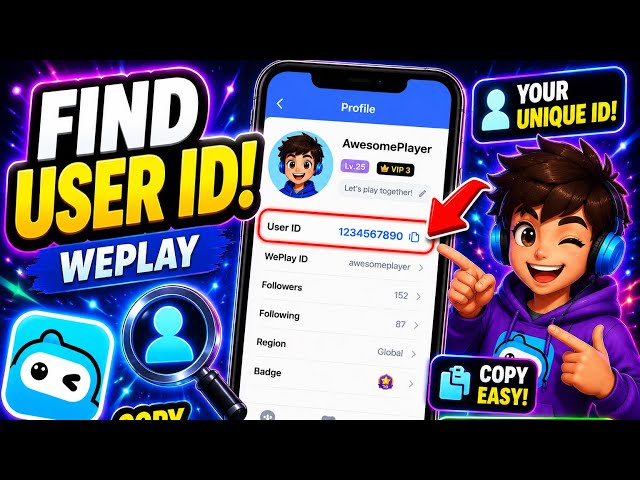
Double-check that you have copied the full numerical string before placing your order to prevent any delivery delays.
What WePlay Gold Is Used For: Gifts, Voice Rooms, and Games
Weplay operates with multiple in-game currencies, and knowing the difference between them ensures you purchase the exact item you need for your social sessions.
Weplay Gold vs. Coins vs. VIP Status
| Currency / Item | Acquisition Method | Primary Uses |
|---|---|---|
| Weplay Gold | Direct Top-Up via ArcTopup | Sending premium animated gifts, entering high-tier voice rooms, unlocking special game effects, buying store cosmetics. |
| Weplay Coins | Daily tasks, game wins, events | Standard game entries, casual board game participation, basic in-game interactions. |
| VIP Privilege | Direct purchase / Gold subscription | Exclusive profile badges, custom entrance effects, special chat bubbles, priority room seats. |
Where to Spend Your Weplay Gold
- Animated Voice Room Gifts: Send dynamic 3D gifts to room hosts, singers, and friends during live voice parties to increase room popularity and show appreciation.
- Profile Customization: Purchase limited-edition avatar frames, chat bubbles, custom entrance vehicles, and personalized profile backgrounds.
- Party Game Enhancements: Unlock special interaction tools, sound effects, and visual flares across Werewolf, Who's the Spy, and interactive board games.
- Mic Grab Support: Reward top vocalists and support competitors during live karaoke sessions.
Safe Top-Up: Why Password-Free UID Delivery Is Secure
Account safety is a core priority when buying digital game credits online. ArcTopup uses a direct UID-only delivery model that keeps your personal data safe:
- No Password Required: You never share your account login credentials, phone number, social login, or password. Your account remains completely under your personal control.
- No Account Sharing or Proxy Logins: Transactions are pushed directly through account ID routing, eliminating the risks associated with third-party account access.
- Encrypted Transactions: All checkout sessions on ArcTopup use industry-standard SSL encryption to secure your payment information.
- Gifting Capability: Because only a UID is required, you can top up an account for a friend, family member, or room host without needing access to their private device or profile.
Supported Payment Options on ArcTopup in 2026
ArcTopup supports a broad range of trusted regional and international payment methods in 2026. Available options include major credit and debit cards, e-wallets, bank transfers, and regional payment gateways depending on your billing country.
Live pricing, applicable regional currency conversions, and active payment channels are displayed in real time on the checkout screen. Simply select your package to view the final rates before completing your purchase.
Troubleshooting Missing or Delayed WePlay Gold Delivery
Most Weplay top up orders process almost immediately. If your Gold does not show up within a few moments after checkout, follow these troubleshooting steps:
- Fully Restart the Weplay App: Close the Weplay app completely from your device's recent apps switcher and reopen it. This forces the client to sync with the server.
- Check Your ArcTopup Order Status: Visit your ArcTopup order history page to verify that the payment was completed successfully and the order status shows as processed.
- Verify the UID Entered: Check the order receipt to confirm that the UID submitted matches your profile ID number without any missing or swapped digits.
- Check Different Profile Menus: In some cases, Gold displays inside the Backpack or Voice Room Wallet before updating the top-bar counter.
- Contact ArcTopup Customer Support: If your order shows as completed but your Gold remains uncredited after a short wait, reach out to ArcTopup support with your order number and Weplay UID for prompt assistance.
Frequently Asked Questions
How to top up in WePlay using UID?
Select your desired Weplay Gold package on ArcTopup, type your numerical Weplay UID into the player input box, pick your preferred payment method, and complete the checkout. The Gold is sent directly to your in-game balance.
Where can I find my WePlay User ID (UID)?
Open the Weplay mobile app, tap the Profile tab in the bottom-right corner, and find the number string displayed below your nickname and avatar. Tap the copy button beside it to copy your UID.
Do I need to share my WePlay password to complete a top up?
No. ArcTopup only requires your numerical Weplay UID. You should never share your password, verification codes, or login details with anyone.
What can I purchase with WePlay Gold?
Weplay Gold can be used to send virtual gifts in voice chat rooms, purchase avatar frames, obtain entry effects, customize your profile, and access exclusive in-game cosmetic features.
How long does it take for WePlay Gold to appear after recharge?
Orders are processed automatically upon successful payment. In most cases, Gold arrives in your account shortly after payment confirmation. A quick restart of the Weplay app will refresh your balance.
Can I buy WePlay Gold for a friend using their UID?
Yes. Because the top-up process only requires a UID, you can enter your friend's Weplay UID in the order field on ArcTopup to send Gold directly to their account as a gift.































































