Mecha Break Top Up: What Is Corite and How to Use It
Corite is the primary premium currency in Mecha Break, powering your progression across the hangar and the battlefield. Pilots use Corite to acquire new combat Strikers, unlock high-tier pilot cosmetics, purchase seasonal mission passes, and access limited-edition weapon coatings. Customizing your mecha with exclusive skins, decals, and paint schemes requires a direct supply of Corite from the in-game storefront.
Beyond visual customizations, Corite gives pilots immediate access to new Striker releases, pilot recruitments, and tactical equipment packs. By maintaining an active Corite balance, you avoid missing out on time-limited seasonal store rotations, mech drop events, and pilot gear bundles. ArcTopup provides a direct recharge pathway that sends Corite straight to your game balance using only your player credentials.
How to Top Up Mecha Break Corite on ArcTopup
Recharging your account is straightforward and takes only a few quick steps on our live checkout catalog:
- Select your Corite package: Choose the amount of Corite you wish to purchase from the product list. Live prices and package details display directly on the selection panel.
- Input your User ID: Enter your numeric Mecha Break User ID in the designated account field.
- Select your Server: Pick your active game server region from the dropdown menu (Asia-Pacific, N.America, S.America, or Europe).
- Proceed to Payment: Review your entered UID and server selection, then choose your preferred payment option.
- Confirm and Receive: Finalize your transaction. Once processed, the Corite credits directly to your in-game mailbox or main balance.
How to Find Your Mecha Break User ID and Server Region
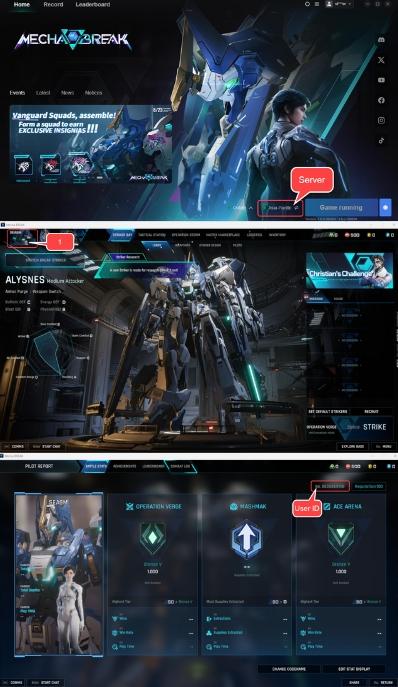
To ensure your Corite delivers to the right pilot profile without delay, copy your exact User ID directly from your game client.
- Launch Mecha Break and log into your pilot account.
- In the main hangar screen, look at the top-left corner of the interface.
- Click on your Pilot Avatar / Profile Icon to open your personal pilot record.
- Locate your User ID (UID), which appears as a series of numbers beneath your pilot callsign.
- Click the copy icon next to the number or record the digits carefully.
- Confirm which regional cluster you selected when logging into the title (Asia-Pacific, N.America, S.America, or Europe).
Always double-check your UID digits before placing an order. A correct UID paired with the matching server ensures automated delivery directly to your account.
Supported Mecha Break Game Servers: Asia-Pacific, N.America, S.America, Europe
Mecha Break operates on regional game servers to provide optimal connection speeds and matchmaking quality. ArcTopup supports direct recharges across all active global server clusters:
| Server Region | Target Coverage Area | Important Top-Up Note |
|---|---|---|
| Asia-Pacific | East Asia, Southeast Asia, Oceania | Select if your pilot operates on APAC server nodes |
| N.America | United States, Canada, Mexico | Standard cluster for North American pilot profiles |
| S.America | Brazil, Argentina, Latin America | Dedicated low-latency cluster for South America |
| Europe | Western, Central, and Eastern Europe | Primary server cluster for European pilots |
Because character profiles and premium currency wallets are tied directly to your regional server, selecting the correct server during checkout is required for successful delivery.
UID-Only Safe Checkout: Why Passwords Are Never Required
Account safety is a core priority when buying gaming currency. ArcTopup uses a direct-to-account delivery system that requires only your public User ID and server region.
- No Account Sharing: You never need to hand over your login credentials, Steam account information, or game password to anyone.
- Zero Account Takeover Risk: Because no sensitive login tokens or passwords pass through our platform, your pilot account remains fully under your control.
- Direct Delivery: Top-ups process directly through official game server routing, crediting the exact UID specified during checkout.
Never share your password with any third party. Legitimate Corite purchases require only your public pilot UID.
Troubleshooting Mecha Break Recharge Server Errors
If you run into issues while topping up or waiting for Corite to appear in-game, check the following troubleshooting steps:
- Mismatched Server Selection: If your Corite has not arrived, verify that the server selected at checkout matches the regional cluster your character actually plays on. A UID submitted under the wrong server will fail to match your character file.
- Client Cache Synchronization: Sometimes the game client needs a fresh connection to reflect updated balances. Exit Mecha Break completely, restart the game launcher, and log back in to force an inventory sync.
- Platform Billing Glitches: If you experience repeated payment failures or checkout errors on platform overlays, topping up through ArcTopup provides an independent checkout route using your UID.
- Server Maintenance Windows: During major game patches, maintenance periods, or server updates, currency delivery queues pause until the game servers come back online. Deliveries finalize automatically once server operations resume.
Mecha Break Corite Storefront Guide 2026
Throughout 2026, the Mecha Break hangar storefront features a rotating selection of heavy Strikers, experimental combat frames, pilot accessories, and customized battle passes. Keeping Corite ready allows you to take advantage of limited-run pilot gear and seasonal event supplies.
- New Striker Unlocks: Gain immediate access to newly launched mecha frames across brawler, sniper, and support classes.
- Custom Paint Schemes and Decals: Stand out on the battlefield with exclusive camouflage patterns, metallic finishes, and animated pilot emblems.
- Season Battle Passes: Unlock premium progression tracks that grant high-tier crafting components, pilot suits, and exclusive mecha cosmetics as you complete combat objectives.
- Tactical Supply Crates: Open specialized equipment caches for rare customization drops and weapon skins.
Check the live catalog on ArcTopup to choose your Corite bundle and power up your mecha hangar today.
Frequently Asked Questions
How do I find my Mecha Break User ID?
Open Mecha Break and go to the main hangar lobby. Click on your pilot avatar in the top-left corner of the screen to open your pilot profile. Your User ID is the numeric code displayed near your pilot callsign.
Which server regions are supported for Mecha Break top up?
ArcTopup supports all main Mecha Break regional servers: Asia-Pacific, N.America, S.America, and Europe. Make sure to choose the server matching your in-game character profile.
Do I need to share my Mecha Break password to top up Corite?
No. ArcTopup uses direct UID top-up. You only need to provide your User ID and your game server. You should never share your account password or login credentials.
What can I purchase with Corite in Mecha Break?
Corite can be spent in the in-game shop to unlock new Strikers, buy pilot cosmetics, activate seasonal battle passes, and acquire exclusive weapon skins, paint jobs, and customization packs.
How quickly does Corite arrive after top up?
Once your payment completes on ArcTopup, the system immediately routes the Corite to your game account via your UID and server. The currency credits directly to your in-game balance shortly after transaction confirmation.
What should I do if I get a recharge error in Mecha Break?
First, verify that your entered User ID and selected server region are accurate. If the information is correct and the balance does not appear immediately, restart your game client to refresh your balance. If game servers are currently under maintenance, delivery will complete once the servers are live again.
Current packages and prices
Current base prices exclude Tax. Tax, payment fees and coupon adjustments are shown at checkout.
| Package | Price |
|---|---|
| 100 Corite | USD 0.68 |
| 515 Corite | USD 3.38 |
| 1060 Corite | USD 6.76 |
| 2180 Corite | USD 13.53 |
| 3360 Corite | USD 20.30 |
| 5405 Corite | USD 31.79 |