
YoHo Coins Top Up: Usage in Voice Chat Rooms and Mini-Games
YoHo is a popular social group voice chat platform where users connect, host live audio rooms, share music, and participate in community activities. YoHo Coins serve as the central in-app currency required to access premium interactive features across the platform.
Acquiring YoHo Coins enables you to engage with content creators and friends in several ways:
- Virtual Gifting: Send animated digital gifts and dynamic sound effects to room owners, speakers, and performers during live broadcasts to show support and boost room popularity rankings.
- VIP Progression: Accumulate and spend coins to build your account level, granting distinctive entrance effects, special profile borders, and exclusive chat badges.
- Interactive In-Room Games: Join social party games directly within voice rooms, including classic titles like Ludo, Domino, and Lucky Wheel tournaments.
- Profile and Room Customization: Purchase customized microphone rings, dynamic chat bubble designs, and custom room themes to stand out in active discussions.
Because coin balances link directly to your account, a direct UID recharge provides access to all in-app activities regardless of your geographic location.
Step-by-Step Guide: How to Top Up YoHo Coins on ArcTopup
Recharging your YoHo wallet through ArcTopup is straightforward and requires only your public account ID. Follow these steps to complete your purchase:
- Select Coin Denomination: Review the available coin bundles listed on ArcTopup and select the package that fits your needs.
- Input Your Account UID: Enter your numeric YoHo User ID into the designated input field. Make sure the numbers match your in-app profile exactly.
- Proceed to Secure Checkout: Check the live product pricing and select your preferred payment option from the available regional checkout methods.
- Finalize Payment: Complete the payment verification steps.
- Check In-App Balance: Open your YoHo application, go to your profile wallet, and confirm the coin delivery.
Prices and local currency options are displayed directly during checkout on ArcTopup, ensuring full transparency before you complete the transaction.
How to Find Your YoHo Account UID
Your User ID (UID) is the permanent numerical identifier assigned to your YoHo account. Because ArcTopup uses direct ID routing, finding your exact UID ensures your coins land in the right account without delays.
Follow these steps on your mobile device:
- Open the YoHo app and log in to your account.
- Tap the Profile (or Me) tab situated in the bottom right corner of the main interface.
- Locate your profile avatar at the top of the screen.
- Directly below your nickname, you will see your numeric ID.
- Tap the copy icon next to the number to copy the ID directly to your clipboard.
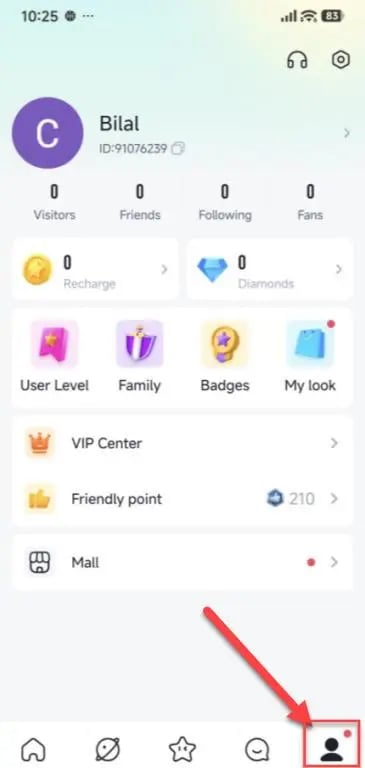
Double-check that you paste the complete series of digits into the ArcTopup UID field before confirming your order. Do not include spaces or special characters.
YoHo VIP Privileges and Room Gifting Benefits
Using YoHo Coins helps you build your social reputation within the community. When you spend coins on gifts and room features, your account gains activity points that unlock specialized perks.
| Feature Category | Primary Uses & Benefits | Coin Usage Scope |
|---|---|---|
| Audio & Visual Gifts | Send animated stickers, luxury cars, and screen effects to broadcasters | Small tips to grand room broadcasts |
| VIP Membership Levels | Unlock exclusive entry animations, noble name tags, and priority mic seating | Scales based on cumulative coin use |
| In-Room Mini-Games | Participate in interactive voice-room games like Ludo and Domino | Variable per game session |
| Profile Customization | Equip premium avatar frames, dynamic bubble styles, and mic rings | Duration-based purchases |
Higher VIP tiers also grant access to room moderation tools, stealth entry options for private browsing, and custom chat effects that make your presence recognized as soon as you enter any voice room.
Safe Top-Up Practices: Why UID-Only Checkout Protects Your Account
Account safety is essential when purchasing digital items online. ArcTopup uses a direct UID-only delivery system designed to keep your personal data secure.
- No Password Sharing: You are never asked for your YoHo login credentials, passwords, or verification codes. Your login details remain strictly in your control.
- No Third-Party Social Links: You do not need to link your Google, Facebook, Apple, or phone accounts to third-party tools to receive your coins.
- Gifting Friends Made Simple: Because only a public UID is necessary, you can top up coins for friends, family members, or your favorite room hosts by simply entering their ID during checkout.
- Protection Against Unauthorized Access: Direct account injection eliminates the risk of unauthorized login attempts, account locking, or credential exposure.
Always protect your account by keeping your private passwords confidential and using only UID-based top-up services for your transactions.
What to Do If Your YoHo Coins Have Not Arrived
Orders processed through ArcTopup are credited directly through the system. If you do not see your updated coin balance immediately after payment, follow this checklist:
- Refresh the YoHo App: Completely close the YoHo application on your mobile device and restart it. Head to your profile wallet to trigger an updated balance fetch from the server.
- Check Payment Confirmation: Verify that your payment provider completed the charge and that you received an order confirmation receipt from ArcTopup.
- Verify the Submitted UID: Check your ArcTopup order receipt to ensure the UID you provided matches your active YoHo account number. A mistyped digit can send the balance to a different profile.
- Contact Customer Assistance: If your UID was accurate and your balance has not updated, reach out to ArcTopup customer support with your order number, payment confirmation, and YoHo UID. The support team will trace the delivery status and assist you with resolving the issue.
Frequently Asked Questions About YoHo Coins Recharge
What is a YoHo UID and where do I find it in the app?
A YoHo UID is a unique number linked to your specific profile. You can find it by tapping the Me or Profile icon in the bottom right corner of the YoHo app. Your UID is displayed directly beneath your nickname and profile picture at the top of the page.
Do I need to provide my YoHo password or login credentials to top up?
No. ArcTopup requires only your public numeric UID to process your coin order. You should never share your account password, email access, or verification codes with anyone.
How quickly will YoHo Coins appear in my account after completing checkout?
Coins are delivered directly to your profile once your payment is confirmed. In most cases, restarting the YoHo app will display your new balance immediately after checkout.
Can I top up YoHo Coins for a friend using their UID?
Yes. Because the top-up process only requires a UID, you can purchase coins for any user by entering their unique ID into the order form on ArcTopup.
What should I do if I entered an incorrect UID during checkout?
Orders processed with an incorrect UID cannot be reversed once delivered to that account on the server. If you notice an error immediately after payment before processing finishes, contact ArcTopup customer support right away with your order number to check if routing can be updated.
Are there any country restrictions when purchasing YoHo Coins via UID?
YoHo UID recharges are distributed globally. As long as you provide a valid numeric UID, you can complete your top-up on ArcTopup regardless of your country or regional server settings.
Current packages and prices
Current base prices exclude Tax. Tax, payment fees and coupon adjustments are shown at checkout.
| Package | Price |
|---|---|
| Yoho Coins *20000 | USD 1.84 |
| Yoho Coins *35000 | USD 3.21 |
| Yoho Coins *70500 | USD 6.47 |
| Yoho Coins *353000 | USD 32.39 |
| Yoho Coins *708000 | USD 64.97 |






























































