
Crystalfall Top Up: In-Game Currencies and Packages
Crystalfall delivers an action-packed RPG experience centered on strategic build crafting, challenging dungeon runs, and real-time combat. Progressing through higher-tier encounters requires resources to refine gear, collect cosmetics, and acquire premium passes.
Delta Coins serve as the primary premium currency in Crystalfall. Players use Delta Coins to purchase exclusive bundles, cosmetic outfits, character customization options, and seasonal battle passes directly from the in-game shop. In addition to Delta Coins, special bundles like Founder Packs and monthly resource supplies provide progression materials, crafting boosters, and rare gear skins.
Purchasing your currency through ArcTopup allows you to top up Delta Coins directly to your account using only your game User ID. This direct method removes the need to log into secondary storefronts or share your account credentials, ensuring a smooth and clean checkout experience.
How to Locate Your Crystalfall User ID
To complete a recharge on ArcTopup, you only need to provide your unique Crystalfall User ID. Your User ID is a dedicated numeric identifier tied to your character profile. Follow these quick steps to find it:
- Launch Crystalfall on your platform and log into the main game server.
- From the main lobby or character screen, open the Settings menu (gear icon in the top corner) or click on your Player Avatar / Profile.
- Look for the User ID (UID) line displayed beneath your character name or in the Account tab.
- Click the copy icon next to the number, or write down the full numeric string accurately.
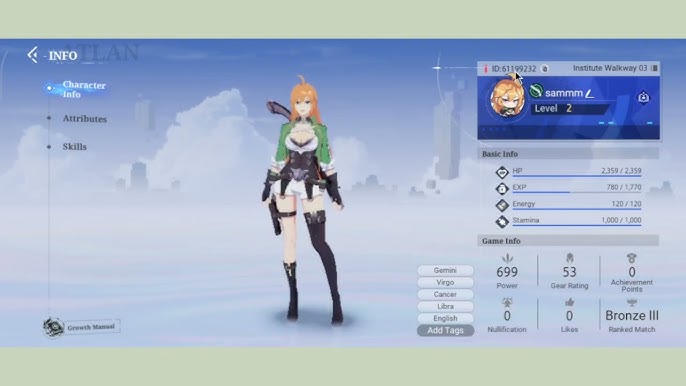
Make sure you copy the exact User ID rather than your display nickname. Display nicknames can change or share duplicate names across servers, but your User ID remains unique and ensures your Delta Coins credit directly to your specific account.
Step-by-Step Guide to Top Up Crystalfall on ArcTopup
Topping up your account on ArcTopup requires no complex registration and no manual queueing with live agents. Follow this step-by-step process:
- Select Your Item or Currency: Browse the product catalog on this page and choose the Delta Coins denomination or bundle you wish to purchase.
- Enter Your User ID: Paste your Crystalfall User ID into the required field. Double-check the digits to prevent delivery errors.
- Proceed to Checkout: Review your selected package and live checkout total.
- Select a Payment Method: Choose from the available local and international payment options presented on the live payment screen.
- Complete the Transaction: Finalize your payment. The ArcTopup automated system processes your order and sends the purchased items directly to your in-game account.
- Verify In-Game: Open Crystalfall, check your premium balance in the top menu, or collect your items from the in-game mailbox if delivered as a pack.
Supported In-Game Packages and Delta Coins Breakdown
Crystalfall offers several tiers of Delta Coins alongside specialty progression packs. Depending on your current in-game goals, you can select individual currency top-ups or specific item bundles.
| Package Type | In-Game Use & Contents | Delivery Method |
|---|---|---|
| Delta Coins Tier 1 - Small | Quick boost for daily stamina resets or small shop items | Direct UID Credit |
| Delta Coins Tier 2 - Medium | Sufficient for monthly passes, event tokens, and mid-tier cosmetics | Direct UID Credit |
| Delta Coins Tier 3 - Large | Ideal for premium battle passes, rare weapon skins, and gacha pulls | Direct UID Credit |
| Founder Packs / Special Bundles | Exclusive character skins, unique titles, and starter resource crates | In-Game Mail / Direct Credit |
| Monthly Supply Pass | Daily login Delta Coins and active account progression buffs | Direct Account Activation |
Live prices, currency conversions, and active bundle availability are displayed dynamically at the top of this page during checkout. Choose the tier that matches your upgrade strategy.
Security and Account Safety with User ID Only Recharges
Account security is critical when purchasing digital items. ArcTopup uses a direct-to-account top-up protocol that eliminates the risks associated with third-party account handling.
- Zero Password Sharing: You will never be asked for your Steam credentials, email logins, or game account passwords. You only provide your public User ID.
- No Manual Account Logins: Unlike unauthorized services that require a third party to log into your character to buy packs, ArcTopup credits your account via standard top-up routing without accessing your private inventory or account data.
- Automated Processing: Your request is processed through direct digital fulfillment channels, preventing human error and eliminating the need to wait in live-chat queues.
- Data Privacy: Your payment information and personal data are processed through secure, encrypted checkout gateways that meet global security standards.
Troubleshooting Crystalfall Top Up and Delivery Questions
If you run into any questions or unexpected delays with your Crystalfall order, use the following troubleshooting checklist:
- Restart Your Game Client: Most currency updates appear immediately, but sometimes the game client needs a fresh session to sync with the server database. Close Crystalfall completely and relaunch it.
- Check the In-Game Mailbox: Certain packages, such as Founder Packs or promotional crates, arrive as items attached to your in-game mail rather than directly altering your top-bar balance. Open your system mail and click "Claim All".
- Verify the User ID Entered: Check your ArcTopup order confirmation email. Verify that the User ID you entered matches your in-game profile ID.
- Check Payment Status: Ensure your payment provider completed the charge. If a payment is pending review on your banking side, the order processes as soon as the gateway clears the transaction.
- Contact ArcTopup Support: If your order status shows complete on ArcTopup but your items do not appear after relaunching the game, reach out to ArcTopup customer support with your Order ID and character User ID for immediate assistance.
Frequently Asked Questions
What information do I need to provide to top up Crystalfall?
You only need to provide your Crystalfall User ID and select the package you want to purchase. ArcTopup does not require your login password, email access, or Steam account credentials.
Where can I find my Crystalfall User ID?
Open Crystalfall, click on your Player Profile or open the Settings menu from the main lobby. Your User ID is displayed under your character name as a numeric string. You can use the copy button to capture it accurately.
Do I need to share my Steam login or game password to recharge Crystalfall?
No. ArcTopup recharges your account solely through your public User ID. You never need to share your password, Steam Guard codes, or account access with anyone.
What items and currencies can I buy with a Crystalfall top up?
You can purchase Delta Coins in multiple denominations, as well as seasonal passes, monthly supply packs, and special bundle tiers available on the live catalog.
How long does it take for Delta Coins to reflect in my Crystalfall account?
Once your payment is confirmed at checkout, the automated system delivers the Delta Coins directly to your account. You can see the updated balance as soon as you refresh or log into the game.
What should I do if my Crystalfall top up does not appear after checkout?
First, fully restart your game client to refresh your server connection and check your in-game mailbox. If the balance has not updated, verify your Order ID and User ID on your ArcTopup receipt, then contact ArcTopup customer support for rapid resolution.
Current packages and prices
Current base prices exclude Tax. Tax, payment fees and coupon adjustments are shown at checkout.
| Package | Price |
|---|---|
| 100 Crystalfall Credits | USD 8.11 |
| 200 Crystalfall Credits | USD 16.21 |
| Iron Founder Pack | USD 24.31 |
| Bronze Founder Pack | USD 48.61 |
| Silver Founder Pack | USD 81.01 |
| Gold Founder Pack | USD 194.42 |






























































