Jujutsu Kaisen: Phantom Parade Top Up on ArcTopup
Power up your Jujutsu Sorcerers and exorcise high-grade curses with a direct Jujutsu Kaisen: Phantom Parade top up on ArcTopup. Whether you are summoning rate-up SSR characters like Satoru Gojo, Yuji Itadori, and Megumi Fushiguro, or unlocking premium Recollection Bits to boost your party stats, purchasing Paid Cubes gives you the direct edge needed for endgame content and domain battles.
ArcTopup provides a direct top-up system that requires only your in-game Player ID and Server selection. You do not need to provide passwords, login credentials, or account linking details. Select your desired Paid Cube package or game pass, complete your payment, and receive your items directly in your in-game account.
How to Top Up Jujutsu Kaisen: Phantom Parade Paid Cubes
Recharging your account on ArcTopup takes only a few moments. Follow these straightforward steps to complete your order:
- Select Your Package: Choose the amount of Paid Cubes, Weekly Pass, or bundle pack you want to purchase from the product catalog.
- Enter Your Player ID: Type or paste your numerical Player ID into the required field.
- Select Your Game Server: Choose your active regional server (North America, Europe, Southeast Asia, Korea, or TW,HK,MO) from the server dropdown list.
- Proceed to Checkout: Review your order summary and live pricing on the checkout screen.
- Complete the Payment: Pick your preferred payment method and finalize the transaction.
- Receive Your In-Game Items: Once payment is confirmed, the Paid Cubes or passes will credit directly to your Jujutsu Kaisen: Phantom Parade account automatically.
How to Find Your Phantom Parade Player ID and Server
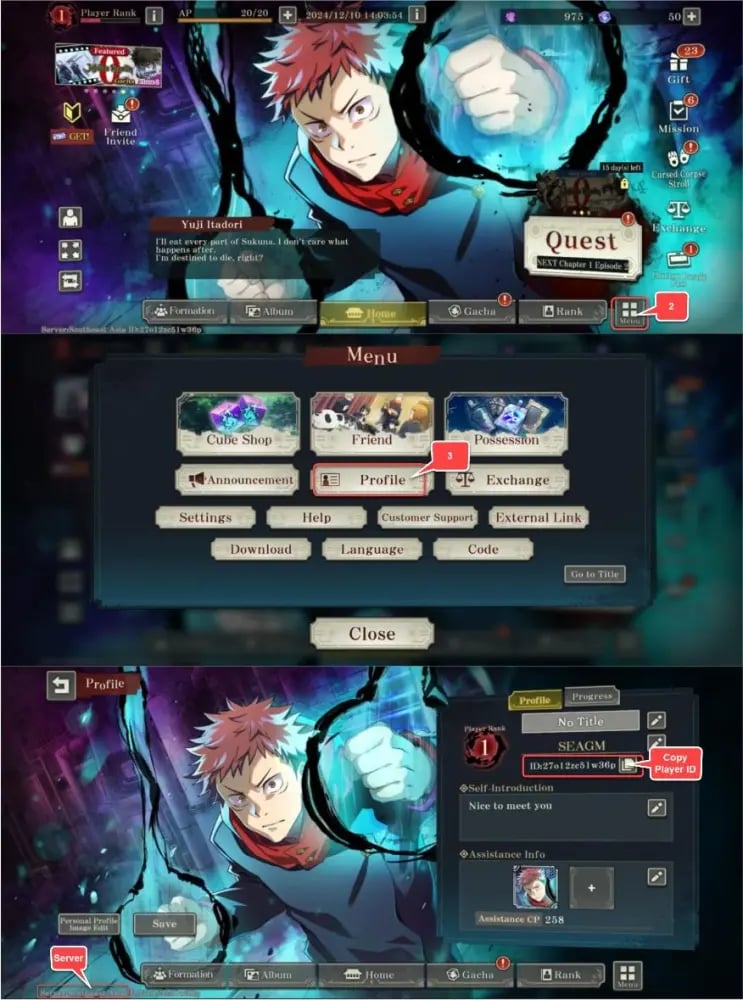
To ensure your order is credited accurately without delays, you must copy your exact Player ID from the in-game interface. Follow these steps:
- Launch Jujutsu Kaisen: Phantom Parade on your mobile device or official client.
- Tap the Menu icon (represented by three horizontal lines) located in the upper-right corner of the main home screen.
- Tap on Profile (or Player Info).
- Locate your Player ID, which is a numerical sequence displayed on your player card.
- Tap the Copy icon next to your Player ID to copy it to your device clipboard, then paste it into the ArcTopup order form.
- Check your server region shown on the game start screen or account settings to match it on ArcTopup.
Supported Regional Servers (NA, EU, SEA, Korea, TW/HK/MO)
Jujutsu Kaisen: Phantom Parade operates multiple regional game clusters. ArcTopup supports direct UID top-ups across all official global servers. Ensure you select the exact server your character was created on to prevent order misdirection.
| Server Option on ArcTopup | In-Game Region | Target Countries / Regions Covered |
|---|---|---|
| North America | NA Server | United States, Canada, Mexico, Latin America |
| Europe | EU Server | United Kingdom, Germany, France, Spain, Rest of Europe |
| Southeast Asia | SEA Server | Singapore, Malaysia, Philippines, Thailand, Indonesia, Vietnam |
| Korea | KR Server | South Korea |
| TW,HK,MO | Traditional Chinese | Taiwan, Hong Kong, Macau |
Note: Game data is separate across servers. Paid Cubes cannot be transferred between different regional servers once delivered.
Difference Between Paid Cubes and Free Cubes
Understanding the currency split in Jujutsu Kaisen: Phantom Parade is essential for planning your gacha strategy and maximizing your return on banners.
Paid Cubes
- Exclusive Banners: Paid Cubes are required to pull on guaranteed SSR banners, paid-only step-up summon events, and special character release campaigns.
- Daily Discount Summons: Allows you to pull on standard or rate-up banners once per day at a heavily discounted rate (typically 100 Paid Cubes per summon).
- Premium Shop Bundles: Used to purchase stamina recharge packs, character upgrade resources, skill leveling materials, and exclusive Recollection Bit selector boxes.
- Battle Pass / Special Packs: Direct access to unlock premium reward tracks for event milestones.
Free Cubes
- Acquired through story stage completion, daily missions, login bonuses, event rewards, and domain exploration.
- Usable for standard summons and regular rate-up banner pools.
- Cannot be used for guaranteed SSR paid banners or daily 100-Cube discount single pulls.
Top-ups on ArcTopup credit Paid Cubes directly to your balance, giving you complete freedom to access both regular and paid-exclusive summons.
Safe and Secure UID Top-Up Without Password Sharing
Account safety is a core priority when buying game items online. ArcTopup uses an ID-direct delivery method for Jujutsu Kaisen: Phantom Parade:
- No Password Required: You never need to share your Google, Apple ID, Facebook, or game account password.
- No Account Handover: Your login session stays active on your device with zero risk of account theft, unauthorized access, or personal data leaks.
- Official Delivery Pipeline: Credits arrive through the standard direct player ID injection protocol, keeping your account compliant with game rules.
- Encrypted Checkout: All checkout transactions on ArcTopup are protected by industry-standard encryption protocols.
Why Top Up Jujutsu Kaisen: Phantom Parade on ArcTopup?
ArcTopup is built to deliver a clean, dependable recharge experience for players worldwide:
- Instant Order Processing: Orders are handled automatically by our system upon payment confirmation.
- Competitive Pricing: Live checkout rates ensure you get transparent prices on all Paid Cube tiers and special bundle passes.
- Full Region Compatibility: Complete coverage for NA, EU, SEA, Korea, and TW/HK/MO game instances.
- Dedicated Support Team: Our customer service team is available around the clock to assist you with order status verification and questions.
What to Do If Your Top-Up Does Not Arrive Immediately
While top-ups usually process within moments, network latency or server maintenance can occasionally cause a brief delay. If your Paid Cubes do not show up right away, follow this troubleshooting checklist:
- Restart the Game Application: Fully close Jujutsu Kaisen: Phantom Parade and relaunch it to refresh your server connection and currency balances.
- Check the In-Game Mailbox / Present Box: Some promotional items and bonus cubes are sent directly to your in-game mailbox instead of modifying the top currency bar directly.
- Verify Your Order Details on ArcTopup: Check your ArcTopup order confirmation to ensure you provided the correct Player ID and selected the proper regional server.
- Check Maintenance Status: If the game servers are undergoing maintenance, deliveries will finalize as soon as servers come back online.
- Contact Support: If 15 minutes have passed and your currency has not arrived, contact ArcTopup customer support with your Order ID, Player ID, and Server Name for instant investigation.
Frequently Asked Questions
How do I find my Player ID and Server in Jujutsu Kaisen: Phantom Parade?
Tap the Menu icon in the top-right corner of the game screen, select Profile, and locate your numerical Player ID. Use the copy button next to the ID to prevent typing mistakes. Your server name appears on the initial game launch screen.
Do I need to share my account password to top up Jujutsu Kaisen: Phantom Parade?
No. ArcTopup only requires your in-game Player ID and Server selection. We will never ask for your account password, email login, or verification codes.
Which servers are supported for Jujutsu Kaisen: Phantom Parade top-ups?
ArcTopup supports all official game servers: North America, Europe, Southeast Asia, Korea, and TW/HK/MO.
What can I purchase with Paid Cubes in Jujutsu Kaisen: Phantom Parade?
Paid Cubes allow you to pull on guaranteed SSR banners, use discounted daily single summons, purchase monthly and weekly event passes, and buy exclusive upgrade bundles in the in-game shop.
How fast will the Paid Cubes be credited to my Phantom Parade account?
Once your payment is verified on ArcTopup, delivery processes automatically and items typically appear in your account within a few minutes.
What should I do if I selected the wrong server during checkout?
If your order has not yet been processed by the system, contact ArcTopup customer support immediately with your Order ID and correct server details so our team can update your order information.
Current packages and prices
Current base prices exclude Tax. Tax, payment fees and coupon adjustments are shown at checkout.
| Package | Price |
|---|---|
| Satoru Gojo Celebration Pack A | USD 0.83 |
| 140 Paid Cubes | USD 1.05 |
| Starter Favorable Pack | USD 1.05 |
| Weekly Pass | USD 1.05 |
| Satoru Gojo Celebration Pack B | USD 2.49 |
| 430 Paid Cubes | USD 3.18 |
| Monthly Pass | USD 3.18 |
| Starter Gift Cube Pack A | USD 3.18 |
| Satoru Gojo Celebration Pack C | USD 6.73 |
| Cube & Premium Pass Bundle | USD 6.86 |
| 930 Paid Cubes | USD 8.57 |
| 1430 Paid Cubes | USD 12.37 |
| Starter Gacha Pack | USD 12.37 |
| 3000 Paid Cubes | USD 26.31 |
| 5000 Paid Cubes | USD 44.06 |
| Crystal of Rec. Bits SSR Pack | USD 44.06 |
| Cube & Chaotic Crystal Pack | USD 44.06 |
| Monthly Favorable Cube Pack | USD 44.06 |
| Resonant Soul Shard SSR Pack | USD 44.06 |
| Starter Gift Cube Pack B | USD 44.06 |
| Jujutsu 10,000 G | USD 85.25 |
| Starter Gift Cube Pack C | USD 85.25 |