
Habi Coins Top Up: Instant Voice Chat Balance
Habi is a popular interactive voice chat and social entertainment platform where users join dynamic audio rooms, meet friends worldwide, host live discussions, and share digital entertainment. To participate fully in the community and show appreciation to your favorite room hosts or broadcasters, you need Habi Coins.
A Habi Coins top up provides you with the direct in-app currency required to access premium room features, send animated virtual gifts, and customize your profile presence. On ArcTopup, you can top up your balance directly by submitting your numeric User ID (UID) without sharing your personal password or login credentials.
What Are Habi Coins and Their Key In-App Uses
Habi Coins function as the central currency across the entire Habi ecosystem. Holding an active coin balance allows you to interact with hosts, support group broadcasts, and customize your identity across every voice room.
Virtual Gifting in Live Voice Rooms
Broadcasters and room admins keep voice rooms engaging and entertaining. By spending Habi Coins, you can send various virtual gifts ranging from basic animated tokens (such as roses and claps) to premium luxury visual effects (including sports cars, rockets, and custom room animations). Gifting boosts your fan ranking, catches the host's attention, and increases your intimacy level with other community members.
Profile Customization and Entrance Effects
Standing out in high-occupancy voice channels is easier when your account is customized. Habi Coins allow you to obtain dynamic avatar frames, customized chat speech bubbles, exclusive profile badges, and high-tier room entrance animations that announce your arrival the moment you step onto a microphone seat.
Lucky Coin Bags and Room Interaction
If you manage your own voice room or want to spark lively discussions in a friend's channel, you can distribute Lucky Bags (red packets) filled with Habi Coins. Room members tap to claim randomized portions of the coins, generating immediate engagement and drawing higher room traffic during peak 2026 events.
| Feature | Primary Purpose | User Experience Benefit |
|---|---|---|
| Virtual Gifts | Reward room hosts and top speakers | Unlocks special animations and climbs room leaderboard rankings |
| Mic & Audio Tools | Gain priority speaking spots and audio effects | Enhances voice clarity and personal presence on stage |
| Profile Badges | Purchase frames, titles, and entrance vehicles | Distinguishes your account across all voice channels |
| Lucky Bags | Drop coin packets into open chat rooms | Boosts room activity, viewer retention, and community fun |
How to Find Your Numeric Habi UID in the App
ArcTopup requires only your official numeric Habi UID to deliver your coins. Entering the correct numeric sequence ensures your funds arrive in your account without manual delays.
- Open the Habi application on your mobile device.
- Tap the Profile or Me icon located in the bottom-right corner of the main screen.
- Look directly beneath your profile picture and display nickname to locate your ID.
- Note the numeric sequence (for example,
10293847). - Important Formatting Rule: Copy or enter only the digits. Do not include the alphabetical prefix "ID:", spaces, or special characters. Pasting "ID:10293847" instead of "10293847" can cause the system to reject the transaction.
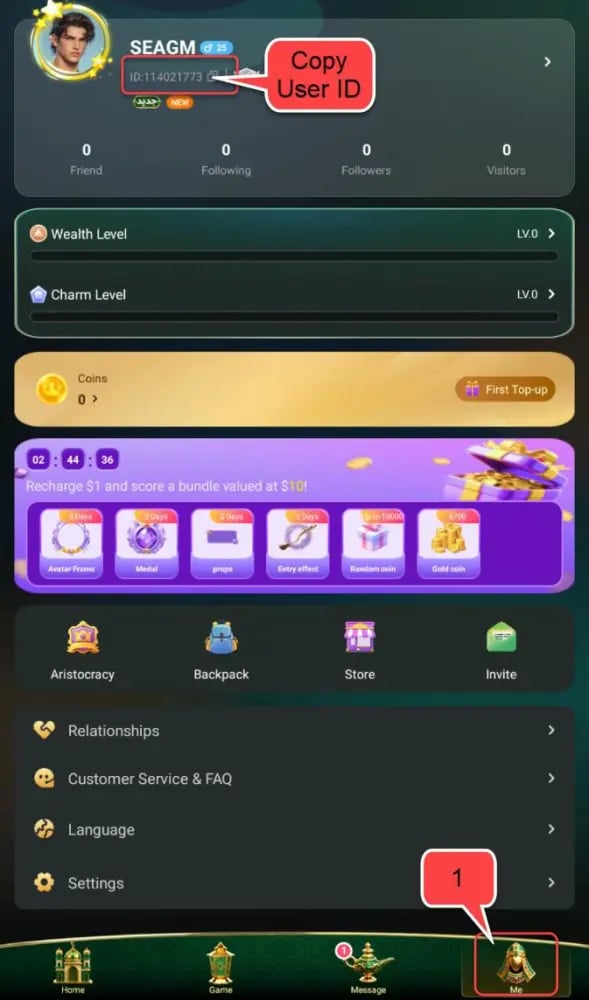
Step-by-Step Guide to Top Up Habi Coins on ArcTopup
Adding coins to your Habi balance through ArcTopup is straightforward. Follow these steps to complete your order:
- Select Your Coin Amount: Browse the available Habi Coin denominations displayed on the live checkout interface. Select the package that fits your gifting and room interaction needs.
- Input Your Habi UID: Type your numeric UID into the designated player input box. Double-check the numbers against your in-app profile to prevent misdelivery.
- Choose Your Preferred Payment Method: Select your favored localized payment option from the live checkout menu.
- Complete the Transaction: Confirm your details and process the payment through our secure checkout gateway.
- Check Your In-App Balance: Open your Habi app and check your wallet balance. Re-enter a voice room or refresh your profile page to see your updated coin balance.
Direct UID Recharge Security: 100% Password-Free Top Up
Account safety is a major priority when buying digital currency online. ArcTopup uses a direct UID delivery system, which means:
- No Password Required: You will never be asked for your Habi login password, phone verification codes, or two-factor authentication prompts.
- No Third-Party Account Linking: You do not need to share linked Google, Apple, or social media logins.
- Zero Risk of Account Takeover: Because authentication credentials are not shared, your personal messages, voice room ownership, and private profile data remain fully protected.
- Safe for Friends: Because only the public UID is required, you can send coin surprises directly to friends or family members without needing their private login credentials.
Cross-Platform Compatibility: iOS and Android Support
Habi users connect across different smartphone operating systems. The coins you purchase through ArcTopup attach directly to your central Habi account ID in the central database.
Whether you created your profile on an iPhone via the Apple App Store or on an Android device via Google Play, your recharged Habi Coins are fully accessible on any compatible phone or tablet once you log in with your credentials. Live prices, package sizes, and special coin offers are updated in real time on the ArcTopup product page.
Order Troubleshooting: What to Do If Habi Coins Are Delayed
Transactions on ArcTopup process quickly, but network fluctuations or incorrect information can sometimes cause brief interruptions. Here is how to handle common situations:
Refresh App Data
If your order has completed on ArcTopup but your balance has not visually updated in Habi, completely close the Habi app from your phone's background application list. Reopen the app and visit your profile wallet to force a balance sync with the server.
Verify Your Submitted UID
Check your ArcTopup receipt to confirm the numeric ID you entered matches your in-app UID. If you accidentally submitted a typo or included the "ID:" text prefix, the automated system may hold the transaction for verification.
Contact ArcTopup Support
If your coins have not arrived after a short period, keep your order reference number handy and reach out directly to the ArcTopup customer support team. Our support agents can review the transaction status and ensure your currency is credited properly.
Frequently Asked Questions About Habi Coins
What are Habi Coins used for in the Habi app?
Habi Coins are used to purchase animated virtual gifts for broadcasters, unlock exclusive microphone badges, obtain custom entrance effects, send lucky coin bags to voice chat rooms, and participate in competitive room ranking events.
Where can I find my Habi UID for top up?
Open the Habi app and tap the "Me" or "Profile" tab in the bottom navigation menu. Your numeric UID is displayed directly beneath your username and profile picture. Remember to copy only the numbers, leaving out the "ID:" label.
Do I need to share my Habi password to receive Habi Coins?
No. ArcTopup requires only your numeric Habi UID to credit coins to your account. You should never share your account password, email login, or authentication codes with anyone.
How long does it take for Habi Coins to arrive in my account?
Coin orders are processed directly after your payment is confirmed. Once completed, the currency is credited directly to your Habi account balance. You can verify the updated balance by checking your in-app wallet.
Can I top up Habi Coins for a friend using their UID?
Yes. Because the top-up process only requires a public numeric UID, you can enter your friend's Habi UID at checkout to send coins directly to their account as a gift.
What should I do if I entered an incorrect UID during checkout?
If you realize you entered an incorrect UID, contact ArcTopup customer support immediately with your order number. If the order has not yet been processed by the automated delivery system, our team can help update the destination ID.
Are Habi Coins compatible with both iOS and Android devices?
Yes. Habi Coins are tied directly to your unique Habi profile. As long as you log in with the same account, your coin balance is available across both iOS and Android devices.
Current packages and prices
Current base prices exclude Tax. Tax, payment fees and coupon adjustments are shown at checkout.
| Package | Price |
|---|---|
| 6,700 Habi Coins | USD 0.66 |
| 33,535 Habi Coins | USD 3.29 |
| 67,435 Habi Coins | USD 6.62 |
| 203,030 Habi Coins | USD 19.94 |
| 337,175 Habi Coins | USD 38.25 |
| 674,350 Habi Coins | USD 66.44 |
| 1,348,700 Habi Coins | USD 132.24 |






























































