
Fast and Secure LifeAfter Top Up for Credits and Membership
Surviving the post-apocalyptic wasteland of LifeAfter demands superior gear, fortified manor defenses, and continuous resource management. Whether you need LifeAfter Credits to roll formula shards in the Mall, purchase rare crafting polymers, acquire exclusive character outfits, or activate the Federation Membership for daily resource stipends, having direct access to in-game funds is essential.
ArcTopup provides a direct, automated system for your LifeAfter Credits and Membership recharge. Instead of dealing with slow manual trade chats or sharing sensitive account passwords, you only need to provide your numeric LifeAfter Account ID and select your server partition. Your credits and subscriptions credit directly to your character profile, allowing you to focus on camp defense, infected raids, and zone exploration without interruption.
How to Top Up LifeAfter Credits and Membership on ArcTopup
Completing a LifeAfter recharge on ArcTopup takes only a few quick steps. Follow this guide to ensure your order processes without delay:
- Select Your Package: Choose your required LifeAfter Credits denomination, special value bundle, or Federation Membership pass.
- Enter Your Account ID: Type your numeric in-game Account ID into the player verification field.
- Select Your Exact Server: Open the server dropdown and choose your server name. If your server name appears more than once (such as FallForest or SandCastle), verify the corresponding Server ID before confirming.
- Proceed to Checkout: Review your order summary and pick your preferred payment method on the live checkout screen.
- Receive Your In-Game Currency: Once payment confirmation completes, log into LifeAfter to receive your Credits or check your in-game mailbox for membership benefits.
How to Find Your LifeAfter Account ID and Server
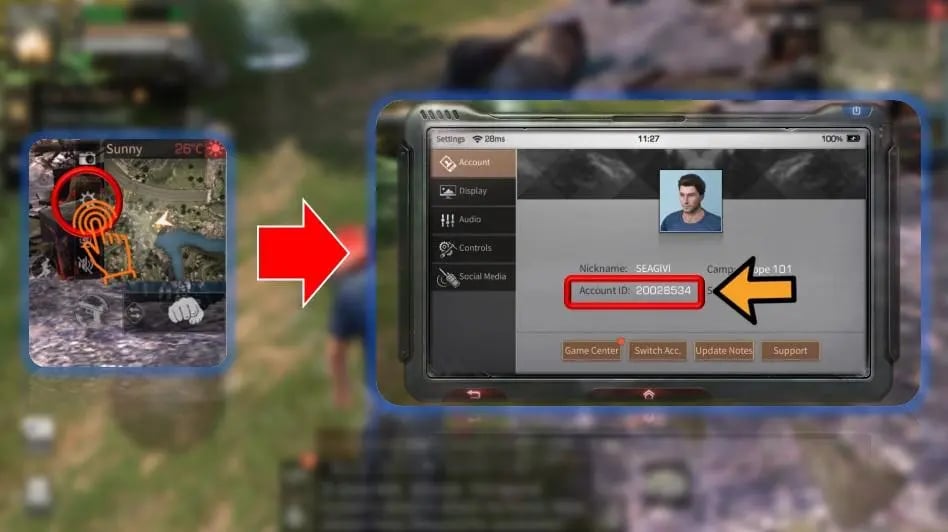
Your LifeAfter Account ID is a unique numeric string assigned to your character. You do not need to share your game login, social account link, or password to purchase credits.
- Launch LifeAfter on your mobile device or PC client.
- Log into the server where your primary survivor character resides.
- Tap your character avatar in the upper-left corner of the main game screen to open the Character Profile / Basic Info menu.
- Locate your numeric Account ID displayed below your character name and manor level.
- Note your current Server Name displayed at the server selection screen or inside your settings menu.
- Copy the numeric digits accurately and paste them into the ArcTopup input box.
LifeAfter In-Game Currencies: Credits, Suncoins, and Membership Perks
Understanding the distinct roles of LifeAfter currencies helps you select the right package for your survival goals:
LifeAfter Credits (Federation Checks)
Credits represent the primary premium currency across global and regional LifeAfter servers. They allow survivors to:* Purchase Formula Shards and R&D Data to modify weapon and armor blueprints.* Buy rare alloy, tactical parts, and advanced enhancement serums from the Mall.* Acquire exclusive weapon skins, collector outfits, vehicle packs, and Manor furniture.* Exchange directly for New Dollars and Gold Bars during critical crafting sessions.
Suncoins
Suncoins serve as the designated premium currency for specific regional Korean servers (such as 파플래닛 and 미스카대학). They offer the exact same buying power and Mall access as Credits on standard global servers.
Federation Membership (Monthly Pass)
Activating a Federation Membership grants immediate and recurring operational advantages for 30 days:* Instant Credit Grant: Receive an immediate allocation of Credits upon activation.* Daily Sign-In Stipends: Collect daily allowance packs containing Gold Bars, food supplies, and skill points.* Inventory Expansion: Gain extra permanent backpack slots and expanded storage lockers in your Manor.* Trade City Tax Reductions: Lower transaction commission rates when selling weapons, resources, and armor on the open market.* Exclusive Sign-In Privileges: Access special survival titles and bonus stamina recovery rates.
Supported LifeAfter Server List and Regional Selection Guide
LifeAfter operates across multiple regional clusters and partition ID blocks. Several servers share identical names across different regional launches (such as FallForest and SandCastle). When topping up on ArcTopup, cross-check your server name with the matching server ID code in the table below to prevent misdirected orders.
| Server Name | Server ID | Region / Cluster Type |
|---|---|---|
| MiskaTown | 500001 | Global NA / SEA Cluster 1 |
| SandCastle | 500002 | Global NA / SEA Cluster 1 |
| MouthSwamp | 500003 | Global NA / SEA Cluster 1 |
| RedwoodTown | 500004 | Global NA / SEA Cluster 1 |
| Obelisk | 500005 | Global NA / SEA Cluster 1 |
| NewLand | 500006 | Global NA / SEA Cluster 1 |
| ChaosOutpost | 500007 | Global NA / SEA Cluster 1 |
| IronStreet | 500008 | Global NA / SEA Cluster 1 |
| CrystalthornSea | 500009 | Global NA / SEA Cluster 1 |
| FallForest | 510001 | Global NA / SEA Cluster 2 |
| MountSnow | 510002 | Global NA / SEA Cluster 2 |
| NancyCity | 520001 | Global NA / SEA Cluster 3 |
| CharlesTown | 520002 | Global NA / SEA Cluster 3 |
| SnowHighlands | 520003 | Global NA / SEA Cluster 3 |
| Santopany | 520004 | Global NA / SEA Cluster 3 |
| LevinCity | 520005 | Global NA / SEA Cluster 3 |
| MileStone | 520006 | Global NA / SEA Cluster 3 |
| ChaosCity | 520007 | Global NA / SEA Cluster 3 |
| TwinIslands | 520008 | Global NA / SEA Cluster 3 |
| HopeWall | 520009 | Global NA / SEA Cluster 3 |
| LabyrinthSea | 520010 | Global NA / SEA Cluster 3 |
| 파플래닛 | 550001 | Korea Server Cluster |
| 미스카대학 | 550002 | Korea Server Cluster |
| 희망의골짜기 | 550003 | Korea Server Cluster |
| 다베트설산 | 550004 | Korea Server Cluster |
| 가을빛산림 | 550005 | Korea Server Cluster |
| 스노우힐 | 550006 | Korea Server Cluster |
| 사막의요새 | 550007 | Korea Server Cluster |
| FallForest | 560001 | Global Cluster 4 (Newer Partition) |
| HopeValley | 560002 | Global Cluster 4 |
| SandCastle | 560003 | Global Cluster 4 (Newer Partition) |
| MountSnow | 560004 | Global Cluster 4 (Newer Partition) |
| St.Rona | 560005 | Global Cluster 4 |
| Oasis | 560006 | Global Cluster 4 |
| SilentIsland | 560007 | Global Cluster 4 |
| ArkCity | 560008 | Global Cluster 4 |
| SimpleSurvival | 720001 | Specialized Survival Cluster |
| EasySurvival | 730001 | Specialized Survival Cluster |
Safe Top-Up Best Practices: Password-Free ID Recharge
Protecting your game account security is critical in survival games where hundreds of hours are invested in camp building, gear development, and manor defense. ArcTopup uses a direct API ID recharge protocol that eliminates the risks associated with third-party account sharing.
- Never Share Passwords: ArcTopup will never ask for your email login, Google Play credentials, Apple ID, Facebook auth tokens, or game password.
- No Account Handover: Your account remains completely in your control. You can stay logged in or top up while offline without risk of session hijack.
- Direct Balance Updates: Items, credits, and memberships route directly to your character record through official game distribution channels.
- Accurate Data Entry: Always double-check your numeric ID and exact server name before confirming payment to ensure the delivery reaches the correct survivor.
Troubleshooting Delivery and Account Verification Issues
If you experience any delay in receiving your LifeAfter Credits or Membership, follow these quick diagnostic checks:
- Restart the Game Client: Completely close the LifeAfter app and relaunch it to refresh your server balance cache.
- Check Your In-Game Mailbox: Special membership perks, bonus bundles, or initial credit receipts often arrive in your character mailbox located outside your Manor gate or in Hope 101.
- Verify Server ID Matches: If you play on FallForest, SandCastle, or MountSnow, verify whether your character belongs to the 510000/500000 block or the 560000 block.
- Review Payment Status: Check your order confirmation email from ArcTopup to verify that the transaction successfully processed.
- Contact ArcTopup Support: If your order shows completed but your balance has not updated after restarting, reach out to the 24/7 ArcTopup customer support team with your order number, numeric Account ID, and selected server.
Frequently Asked Questions
How do I find my LifeAfter Account ID and Server?
Open LifeAfter and log into your character. Tap your character avatar in the top-left corner of the screen to open the basic info profile. Your numeric Account ID is listed under your survivor name. Your server name is displayed on the main login screen or in the settings menu.
Do I need to share my LifeAfter game account password to top up?
No. ArcTopup only requires your numeric Account ID and Server selection. You never need to reveal your password, email address, or third-party login credentials.
What is the difference between LifeAfter Credits and Membership?
LifeAfter Credits are the game's premium currency used directly in the Mall for gacha formula rolls, blueprints, weapon skins, and items. Federation Membership is a 30-day subscription pass that provides an upfront credit grant, daily Gold Bar stipends, inventory expansions, and reduced market taxes.
Why are there duplicate server names like FallForest and SandCastle?
LifeAfter has released multiple server clusters over time. Older server partitions (such as FallForest 510001) share names with newer server partitions (such as FallForest 560001). Always confirm your server ID partition block in the ArcTopup dropdown menu before placing an order.
What should I do if my LifeAfter Credits do not arrive immediately?
First, close and reopen your LifeAfter application to refresh your account data. Next, check your in-game mailbox in your Manor. If your balance does not update within a few minutes, verify your payment receipt and contact ArcTopup customer support with your order details.
Can I buy LifeAfter Credits or Membership for a friend or campmate?
Yes. Because ArcTopup only requires a numeric Account ID and Server, you can recharge accounts for your friends, campmates, or secondary characters by entering their Account ID and matching server at checkout.
Current packages and prices
Current base prices exclude Tax. Tax, payment fees and coupon adjustments are shown at checkout.
| Package | Price |
|---|---|
| 65 Credits | USD 0.72 |
| Survival Expert Card | USD 2.44 |
| Trade VIP Card | USD 2.44 |
| 330 Credits | USD 3.36 |
| Federation Membership | USD 4.07 |
| 558 Credits | USD 5.13 |
| Lucky Star | USD 7.92 |
| 1108 Credits | USD 10.51 |
| LifeAfter Fund | USD 11.88 |
| 2268 Credits | USD 21.04 |
| 3468 Credits | USD 32.89 |
| 5768 Credits | USD 51.96 |
| 7768 Credits | USD 69.71 |






























































