Dragonheir: Silent Gods Top Up: Direct In-Game Recharge Guide
Dragon Crystals represent the primary premium currency in Dragonheir: Silent Gods. Adventurers rely on Dragon Crystals to acquire essential summons, purchase seasonal growth bundles, refresh daily stamina, and convert funds directly into Wyrmarrow. Obtaining your crystals promptly helps you stay competitive across seasonal dungeons, arena rankings, and tactical boss encounters.
ArcTopup offers a direct, secure method to top up Dragonheir: Silent Gods Dragon Crystals without requiring private login credentials. By providing only your numeric Player ID, your account receives the exact crystal pack selected straight to your in-game mailbox or balance. This eliminates account-sharing risks while ensuring your game progression continues uninterrupted.
What Are Dragon Crystals and Where to Spend Them in Dragonheir
Understanding the distinction between in-game currencies is vital for managing your resources effectively in Dragonheir: Silent Gods.
Dragon Crystals vs. Wyrmarrow
Dragon Crystals are acquired exclusively through direct purchases, whereas Wyrmarrow can be earned through gameplay achievements, quests, and events, or converted directly from Dragon Crystals at a 1:1 ratio. Dragon Crystals provide access to exclusive store offers that standard Wyrmarrow cannot buy.
Where to Spend Your Dragon Crystals
- Summoning Dice Purchases: Convert Dragon Crystals into Wyrmarrow to buy Heliolite Dice for legendary hero summoning banners and Starlight Dice for standard summons.
- Seasonal Growth & Progression Packs: Acquire limited-time leveling packs, skill scrolls, and elemental affinity materials available in the store.
- Stamina & Bread Refreshes: Exchange Wyrmarrow converted from Dragon Crystals to restore stamina for farming goblin lairs, domain dungeons, and equipment stages.
- Cosmetics and Battle Passes: Unlock premium seasonal battle pass tracks and character cosmetics directly from the in-game shop.
First-Time Purchase Double Bonus and Denominations Breakdown
In Dragonheir: Silent Gods, first-time purchases for specific crystal denominations often qualify for a first-time double bonus in the form of bonus Wyrmarrow or equivalent crystal rewards. If your account has not yet purchased a specific denomination in the current season, the in-game store activates this bonus automatically upon receiving the top-up.
| Dragon Crystals Pack | Primary In-Game Usage | First-Time Bonus Eligibility |
|---|---|---|
| 60 Dragon Crystals | Quick stamina refreshes & daily resource packs | Eligible if tier is unpurchased in-game |
| 300 Dragon Crystals | Starlight summons & basic progression items | Eligible if tier is unpurchased in-game |
| 980 Dragon Crystals | Multi-tier growth bundles & crafting materials | Eligible if tier is unpurchased in-game |
| 1,980 Dragon Crystals | Heliolite summons & event progression packages | Eligible if tier is unpurchased in-game |
| 3,280 Dragon Crystals | High-tier hero summons & rare artifact chests | Eligible if tier is unpurchased in-game |
| 6,480 Dragon Crystals | Maximum summon value & seasonal progression sets | Eligible if tier is unpurchased in-game |
Note: Final prices and local currency options are displayed on the live ArcTopup checkout screen.
How to Find Your Dragonheir: Silent Gods Player ID
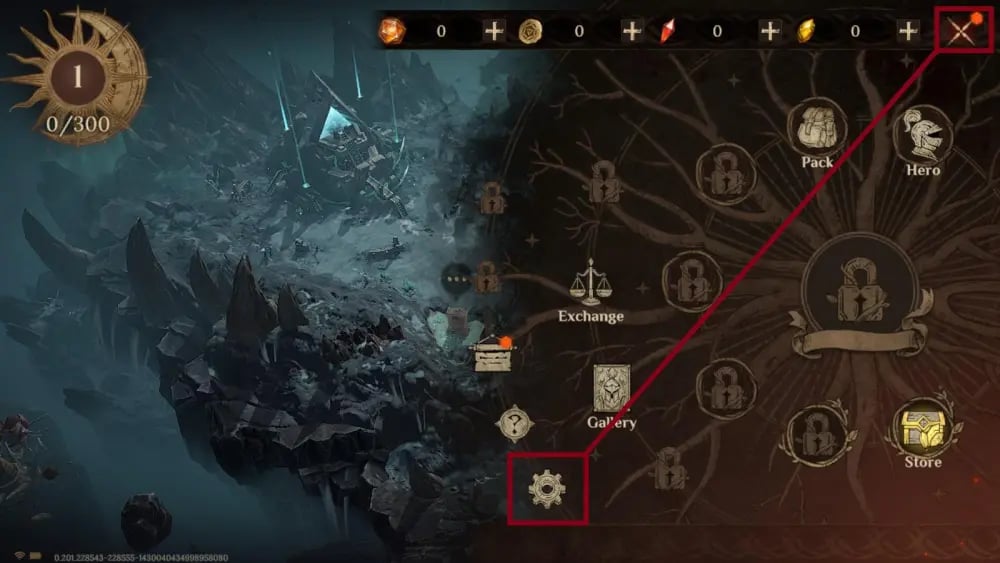
To ensure your Dragon Crystals arrive at the correct game profile, locate and copy your numeric Player ID using the following steps:
- Launch Dragonheir: Silent Gods on your mobile device or PC.
- Tap or click your Avatar icon in the upper-left corner of the main game screen.
- The Player Profile window will appear displaying your avatar, level, and account details.
- Find the Player ID (UID) line displayed beneath your nickname.
- Tap the Copy icon next to the number to copy your Player ID directly to your clipboard.
Always paste the copied ID directly into the ArcTopup order field to avoid manual typing errors.
How to Top Up Dragonheir: Silent Gods Dragon Crystals on ArcTopup
Recharging your Dragonheir account takes only a few straightforward steps on ArcTopup:
- Select Your Package: Choose your desired Dragon Crystals denomination from the product catalog.
- Enter Your Player ID: Paste your numeric Dragonheir Player ID into the designated input field.
- Review Order Details: Confirm that your Player ID and selected crystal amount match your intended purchase.
- Complete Checkout: Pick your preferred payment method on the live checkout page and finalize the transaction.
- Check In-Game Balance: Open Dragonheir: Silent Gods to verify your updated Dragon Crystal balance.
Cross-Platform Support: iOS, Android, and PC Account Sync
Dragonheir: Silent Gods uses unified account synchronization across mobile and PC versions. Because your profile and inventory are tied to your central game account and server, Dragon Crystals topped up through ArcTopup via Player ID reflect across all connected devices.
Whether you play on an iPhone, iPad, Android smartphone, or the official PC client, your purchased balance remains accessible regardless of which device you use to log in.
Safe and Direct Recharge: Why Player ID Only Is the Most Secure Method
Account safety is a major priority when buying digital game currencies. ArcTopup uses a direct Player ID fulfillment system, offering several security advantages:
- Zero Password Requirements: You never share passwords, verification codes, or third-party login credentials (Google, Apple ID, Facebook).
- No Account Sharing: Your profile stays securely in your hands without risking unauthorized account changes or third-party lockouts.
- Direct Server Delivery: Transactions are processed directly to your numeric game identifier, ensuring legitimate in-game credit fulfillment.
Frequently Asked Questions
Where do I spend Dragon Crystals in Dragonheir: Silent Gods?
You can spend Dragon Crystals directly in the in-game Shop to purchase exclusive bundles, seasonal growth packs, and cosmetics, or convert them 1:1 into Wyrmarrow to buy Heliolite Dice and Starlight Dice for hero summons.
How do I find my Dragonheir: Silent Gods Player ID?
Tap your character avatar in the upper-left corner of the main interface to open your Player Profile. Your numeric Player ID is displayed right beneath your character name with a copy icon beside it.
Do I need to share my game password to top up Dragon Crystals?
No. ArcTopup only requires your numeric Player ID to credit your account. Never disclose your game passwords or login credentials to anyone.
Will I receive the first-time double bonus when topping up on ArcTopup?
If your account is eligible for a first-time purchase bonus on a specific denomination in Dragonheir: Silent Gods, the in-game bonus credits automatically upon order delivery.
Are Dragon Crystals usable across both mobile and PC versions?
Yes. Because Dragonheir: Silent Gods supports cross-platform data synchronization, your Dragon Crystals balance is available on Android, iOS, and PC as long as you log into the same account and server.
What should I do if my Dragon Crystals do not reflect in-game right away?
Most deliveries arrive within moments of a completed transaction. If you do not see your balance update immediately, restart the game client to refresh your server connection. If the crystals still do not appear, check your in-game mailbox or contact ArcTopup customer support with your order number and Player ID for quick assistance.
Current packages and prices
Current base prices exclude Tax. Tax, payment fees and coupon adjustments are shown at checkout.
| Package | Price |
|---|---|
| Celebration Value Pack | USD 0.62 |
| 70 Dragon Crystals | USD 0.63 |
| Season Summons Pack I | USD 0.63 |
| Legendary Hero Special Pack (S1-S5) | USD 3.81 |
| 350 Dragon Crystals | USD 3.86 |
| Apprentice's Secret Collection | USD 3.86 |
| Monthly Apprentice Gift | USD 3.86 |
| Season Summons Pack II | USD 3.86 |
| Vow of Companionship | USD 3.86 |
| Wyrmarrow Mining Warrant | USD 3.86 |
| 700 Dragon Crystals | USD 6.44 |
| Hero's Anthem | USD 6.44 |
| Monthly Master Gift | USD 6.44 |
| Monthly Scholar Gift | USD 6.44 |
| Monthly Summons Pack I | USD 6.44 |
| Weekly Apprentice Gift | USD 6.44 |
| Daily Supply from Three Ears | USD 6.44 |
| 7-Day Daily Value Pack | USD 6.44 |
| Season Summons Pack III | USD 6.44 |
| Walker's Selection | USD 6.44 |
| Snowland Lament | USD 10.16 |
| Inferno Shadows | USD 10.18 |
| Crystal Echoes | USD 10.18 |
| Crucial Horn | USD 10.24 |
| Scholar's Secret Collection | USD 10.24 |
| Synarell Exclusive Skin Pack | USD 12.72 |
| Frostlands Whisper | USD 12.72 |
| Lunar Halo Radiance | USD 12.72 |
| Weekly Scholar Gift | USD 12.89 |
| Weekly Summons Pack I | USD 12.89 |
| Fey's Gift | USD 12.89 |
| Imperial Shadow | USD 12.89 |
| Season Summons Pack IV | USD 12.89 |
| Weekly Master Gift I | USD 12.89 |
| 1,400 Dragon Crystals | USD 12.93 |
| Monthly Summons Pack II | USD 12.93 |
| Whirling Shadows | USD 13.12 |
| Celebration Luxury Secret Collection | USD 31.71 |
| 3,500 Dragon Crystals | USD 32.14 |
| Master's Secret Collection | USD 32.14 |
| Monthly Summons Pack III | USD 32.14 |
| Season Summons Pack V | USD 32.14 |
| Weekly Master Gift II | USD 32.14 |
| Weekly Summons Pack II | USD 32.14 |
| Legendary Damage Dealer Option Pack (S1-S5) | USD 63.55 |
| Legendary Support Option Pack (S1) | USD 63.55 |
| Celebration Premium Secret Collection | USD 63.55 |
| Celebration Premium Summons Pack | USD 63.55 |
| 7,000 Dragon Crystals | USD 64.60 |
| Monthly Summons Pack IV | USD 64.60 |
| Weekly Summons Pack III | USD 64.60 |
| Season Summons Pack VI | USD 64.60 |
| Weekly Master Gift III | USD 64.60 |
| 14,000 Dragon Crystals | USD 129.32 |