
Watcher of Realms Gold Top Up on ArcTopup
Watcher of Realms requires strategic resource management to summon top-tier heroes, upgrade artifacts, and dominate challenging raid stages. W-Gold stands as the primary premium currency used across the game store to purchase exclusive value bundles, Rare and Ancient Summoning Crystals, stamina packs, and development resources. Completing a Watcher of Realms gold top up through ArcTopup gives you immediate access to W-Gold packs without needing to manage complex mobile app store payment hurdles.
ArcTopup delivers a secure, streamlined ordering experience designed for international players. All transactions require only your public account identifiers—your User ID and Sever ID—ensuring your personal login credentials remain completely protected. Select your preferred W-Gold denomination, complete checkout, and collect your currency straight from your in-game mailbox.
What is W-Gold and What Can You Purchase With It?
Understanding the currency system in Watcher of Realms helps you allocate your budget efficiently. The game features two distinct types of gold: standard in-game Gold and premium W-Gold.
- Standard In-Game Gold: A farmable currency acquired through Gold Raids, campaign stages, and daily missions. It is spent on gear enhancements, artifact forging, hero promotion fees, and black market items.
- W-Gold (Premium Gold): The paid currency purchased with real funds. W-Gold acts as universal credits inside the in-game shop, allowing you to acquire premium bundles, summoning passes, monthly stamina cards, and limited event packages.
| Currency Type | How to Obtain | Primary In-Game Uses |
|---|---|---|
| Standard Gold | Gold Raids, Campaign Stages, Quests | Gear upgrading, hero promotion, artifact forging, shop items |
| W-Gold | Direct Top Up via ArcTopup | Summoning packs, event bundles, stamina stamina potions, special skins |
| Diamonds | Quests, Achievements, W-Gold Conversion | Stamina refreshes, basic summons, arena tickets |
Using W-Gold provides maximum flexibility because it can be converted into Diamonds or used directly to purchase high-value limited-time event packages that offer far better resource returns than basic gem conversions.
How to Locate Your Watcher of Realms User ID and Sever ID
To ensure your W-Gold arrives at the correct account, you must provide your exact User ID and Sever ID during checkout. Follow these steps to find both numbers in your game client:
- Launch Watcher of Realms on your mobile device or PC client.
- Tap your Player Avatar / Profile Icon located in the upper-left corner of the main hub screen.
- The Profile Information window will open. Look directly under your player nickname to view your User ID (a string of numerical digits).
- Tap the small Copy icon next to your User ID to copy it to your clipboard.
- Look just below or beside your User ID to check your Sever ID (e.g., Server 50001 or Global-1).
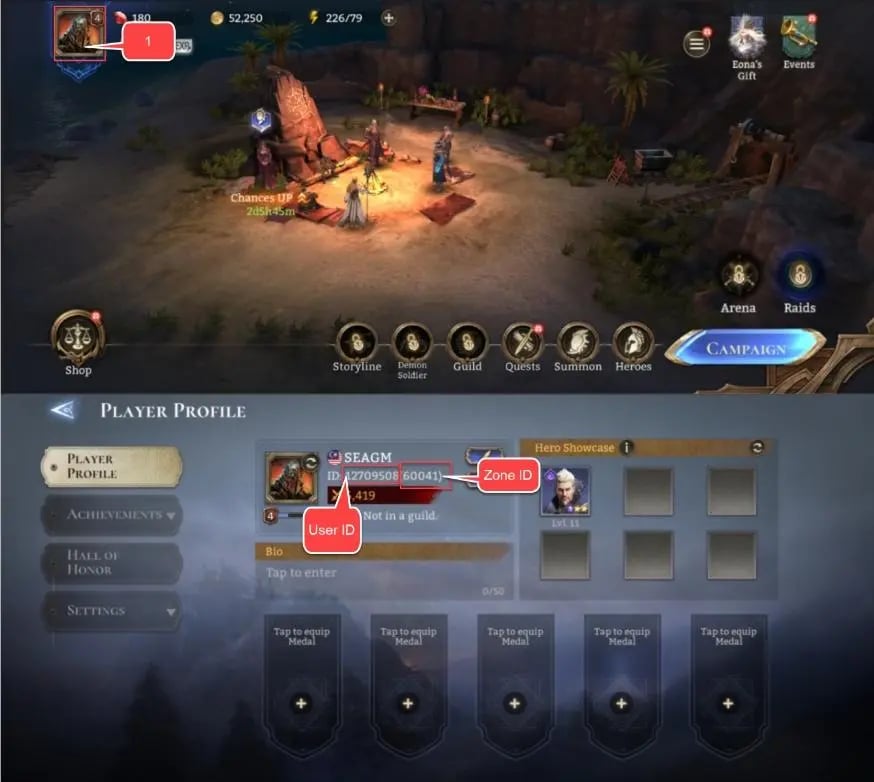
Always double-check both your User ID and Sever ID before confirming your order. Matching both fields guarantees your W-Gold is routed directly to your commander profile without delays.
How to Top Up Watcher of Realms Gold on ArcTopup
Ordering your W-Gold through ArcTopup takes less than two minutes. Follow this step-by-step guide:
- Select Your Package: Browse the available Watcher of Realms Gold denominations on this page and choose the amount of W-Gold or specific bundle you wish to purchase.
- Enter Account Details: Type or paste your User ID into the first input box and your Sever ID into the second input box.
- Review Current Pricing: Verify your selection and check the final price displayed on the live checkout selector.
- Complete Payment: Choose your preferred payment option and complete the secure transaction.
- Check In-Game Mailbox: Open Watcher of Realms, go to your in-game mailbox, and claim your delivered W-Gold.
Safety First: Why You Never Need to Provide Your Game Password
Account safety is essential for any long-term gacha game. ArcTopup uses direct system-level top-up routing that requires only your public User ID and Sever ID.
- No Password Required: You will never be asked for your Moonton password, Google login, Apple ID, or social media access credentials.
- No Account Sharing: Your account remains strictly in your hands. You never need to hand over control to third-party operators.
- Zero Risk of Unauthorized Access: Because login details are never requested, your linked payment methods, personal communications, and hero rosters remain 100% private and protected.
This method follows standard third-party top-up protocols, making it safe and compliant with developer guidelines.
How to Retrieve Your Delivered Gold from the In-Game Mailbox
Once your transaction on ArcTopup is confirmed, the W-Gold or bundle items are dispatched straight to your game account. Follow these steps to claim them:
- Log into your Watcher of Realms account.
- Look at the top-right corner of the main screen and tap the Mail / Envelope icon.
- Locate the new system mail containing your purchased W-Gold or package reward.
- Tap the mail message to view the attached contents, then click Claim or Claim All.
- Your W-Gold balance in the upper resource bar will update immediately.
Note: If you are actively logged in during checkout, allow a few moments for the game server to synchronize. If the mail does not appear right away, restart the game client to refresh your mailbox connection.
Maximizing In-Game Bundles and Summoning Events with W-Gold
W-Gold is the most versatile asset during competitive 2026 summoning banners and progression events. Here is how to get the most value out of your purchased W-Gold:
- Time Purchases with Rate-Up Banners: Save your W-Gold for 1+1 Legendary summoning events or limited-edition hero banner debuts. Purchasing summoning packs during rate-up periods significantly improves your pull efficiency.
- Prioritize High-Efficiency Resource Bundles: Instead of converting W-Gold directly to standard Diamonds, use it in the shop to purchase weekly energy packages, Ancient Summoning Crystal packs, and Mythic Skill Dust bundles.
- Trigger Recharge Milestones: In-game top-up events and milestone tracks often grant extra summoning crystals, stamina, and exclusive avatar frames when you reach cumulative W-Gold recharge thresholds.
- Maintain Stamina Reserves: Having a reserve of W-Gold lets you purchase stamina refills during double-drop equipment raid weekends, accelerating your gear progression.
Frequently Asked Questions
How do I find my Watcher of Realms User ID and Sever ID?
Open Watcher of Realms, tap your avatar in the top-left corner of the main screen, and view your profile. Your User ID is listed below your name with a quick-copy button. Your Sever ID is displayed right next to or below your User ID.
Do I need to share my Watcher of Realms password for a top-up?
No. ArcTopup only requires your User ID and Sever ID to complete the recharge. Never share your password, verification codes, or login credentials with anyone.
How long does it take for Watcher of Realms W-Gold to be delivered?
Top-ups are processed automatically after payment confirmation. Once the transaction completes, the items are sent straight to your in-game mailbox. In rare instances of server congestion, restarting your game app refreshes the delivery status.
Where will my purchased W-Gold or bundles appear in the game?
Your purchases are delivered directly to your in-game mailbox. Tap the envelope icon in the top-right corner of your screen, open the system notification, and tap Claim to credit the W-Gold to your balance.
Can I use W-Gold to buy summoning crystals and event packs?
Yes. W-Gold is the universal premium store currency in Watcher of Realms. You can spend it directly in the in-game shop on Rare Summoning Crystals, Ancient Summoning Crystals, progression packs, skins, and limited event bundles.
What should I do if I entered an incorrect User ID or Sever ID?
If you realize you submitted the wrong User ID or Sever ID, contact ArcTopup customer support immediately with your transaction order number. Because deliveries are automated, corrections must be made before the order is processed by the game server.
Current packages and prices
Current base prices exclude Tax. Tax, payment fees and coupon adjustments are shown at checkout.
| Package | Price |
|---|---|
| 499 Gold | USD 3.92 |
| 999 Gold | USD 7.79 |
| 1,999 Gold | USD 15.62 |
| 2,999 Gold | USD 23.47 |
| 4,999 Gold | USD 39.28 |
| 9,999 Gold | USD 78.25 |
| 29,999 Gold | USD 235.59 |
| 59,999 Gold | USD 473.83 |