
Crystal of Atlan SEA Top Up on ArcTopup
Crystal of Atlan SEA delivers an intense magic-punk action RPG experience filled with aerial combos, fleet battles, and challenging dungeon raids. To progress through higher-tier abyss stages, optimize your equipment ratings, and acquire limited class cosmetics, having a steady supply of in-game Vouchers is essential.
ArcTopup provides a direct top-up service for Crystal of Atlan SEA players. You can purchase Vouchers and resource bundles directly to your account using only your numeric Player ID. You do not need to share passwords or link third-party social logins. Browse the denominations available on the live checkout above, submit your character details, and receive your game balance instantly.
How to Top Up Crystal of Atlan SEA on ArcTopup
Completing a recharge takes less than two minutes. Follow these steps to top up your account:
- Select Your Voucher Package: Choose the amount of Crystal of Atlan Vouchers or bundle packs you want to purchase from the product catalog above.
- Enter Your Player ID: Input your Crystal of Atlan numeric Player ID into the required field. Make sure to double-check the digits to ensure delivery to the correct character.
- Select Your Payment Method: Choose your preferred payment option from the available local and international payment channels displayed at checkout.
- Review and Complete Payment: Check your order summary, confirm your player details, and complete the transaction through the secure payment gateway.
- Check In-Game Balance: Open Crystal of Atlan SEA on mobile or PC. Your purchased Vouchers will credit directly to your account or arrive in your system mailbox.
How to Find Your Crystal of Atlan Player ID
Your Player ID (UID) is the unique numeric identifier linked to your specific character profile. You need this number to direct your top-up to the right account.
Follow this menu path inside the game:
- Launch Crystal of Atlan on your mobile device or PC client.
- Tap or click on your Character Avatar in the top-left corner of the main HUD.
- In the Personal Information window that opens, locate your numeric Player ID listed near your character name and current level.
- Tap the Copy icon next to the number to copy your Player ID to your clipboard.
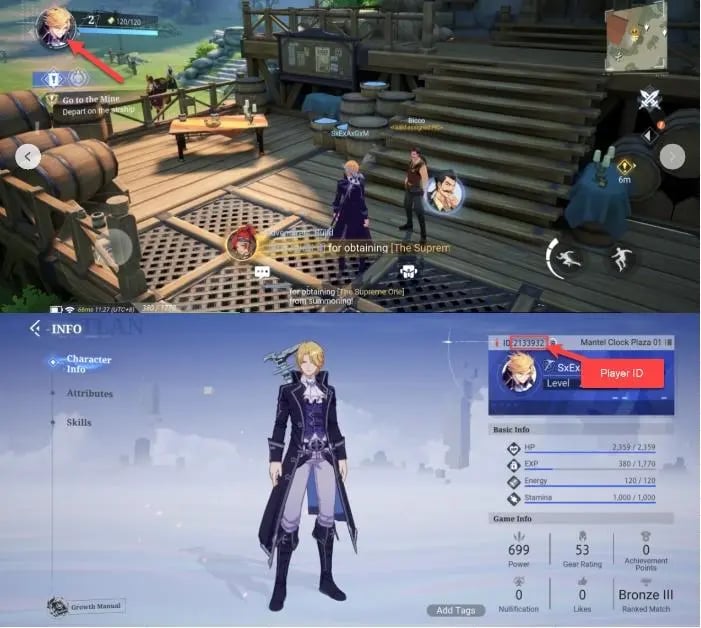
Tip: If you play multiple characters across different servers under one account, verify that you copy the Player ID of the exact character you wish to fund before submitting your order on ArcTopup.
Crystal of Atlan Currency Guide: Vouchers, Opals, and Battle Passes
Managing your in-game economy efficiently helps you get the most value out of every purchase. Crystal of Atlan uses several distinct currencies and progression passes:
In-Game Currencies Overview
| Currency / Item | Acquisition Method | Primary Uses |
|---|---|---|
| Vouchers | Direct store top-up via ArcTopup | Buying Phantasium Pass, monthly privilege cards, exclusive outfit sets, or converting 1:1 into Opals. |
| Opals | Converted from Vouchers or special milestones | Summoning pets/companions, purchasing energy restoration, buying refinement materials, and auction house bids. |
| Bound Opals | Quests, daily commissions, achievements, and events | Standard banner pulls, basic shop items, dungeon reward multipliers, and stamina recharges. |
| Gold / Bound Gold | Dungeon drops, trading post, daily challenges | Equipment enhancements, skill tree upgrades, crafting fees, and potion brewing. |
| Phantasium Pass | Direct purchase with top-up Vouchers | Unlocking seasonal cosmetic sets, exclusive weapon skins, extra summon tickets, and bulk upgrade items. |
Converting Vouchers to Opals
Vouchers serve as the premium foundation in Crystal of Atlan SEA. When you top up Vouchers on ArcTopup, you can hold them in reserve to buy limited-time seasonal bundles or convert them directly into Opals at a 1:1 ratio. Opals allow you to pull for high-tier companion pets and purchase critical upgrade catalysts for end-game Magitech weaponry.
The Phantasium Pass
The Phantasium Pass is the primary seasonal battle pass in Crystal of Atlan. Purchasing the pass with your topped-up Vouchers unlocks dual progression tracks: the standard free tier and the elite premium tier. Reaching higher pass levels yields rare insignias, enhancement safety charms, and exclusive class outfits that cannot be obtained through standard gameplay.
Safe & Secure Password-Free Top-Up Process
Account security is critical when purchasing game top-ups. ArcTopup uses a direct Player ID delivery system that protects your account:
- Zero Login Credentials Required: You never need to supply your password, email login, Apple ID, Google Play credentials, or social media bindings.
- No Account Sharing: Your account stays entirely in your hands. Transactions are processed externally and delivered directly to your UID through standard server credits.
- Anti-Ban Protection: Because all recharges are processed through verified payment channels directly to your Player ID, your account remains fully compliant with game terms of service.
Crystal of Atlan SEA Regional Server Compatibility
ArcTopup supports all Southeast Asian regional servers for Crystal of Atlan. Whether you connect from Singapore, Malaysia, Thailand, Indonesia, the Philippines, or other regional territories, your top-up will process accurately as long as your character is on an official SEA server.
Cross-Platform Account Sync
Crystal of Atlan supports seamless cross-play between mobile (Android and iOS) and the official PC client. Because your character progression and inventory are synchronized on the server side, Vouchers purchased on ArcTopup using your Player ID will appear on your account regardless of which platform you log in from.
Why Choose ArcTopup for Crystal of Atlan SEA Recharges
ArcTopup is designed to provide players with a straightforward, reliable top-up experience:
- Live Competitive Pricing: Real-time pricing is clearly displayed on the checkout interface without hidden surcharges or surprise fees.
- Local Payment Options: Access multiple local and international payment methods tailored to Southeast Asian gamers, including regional e-wallets, online banking, and bank cards.
- Fast Digital Delivery: Automated processing ensures your Vouchers are credited to your game account moments after payment verification.
- Dedicated Customer Service: If you have questions about your Player ID or transaction status, customer support is available to assist you promptly.
Order Tracking and Top-Up Troubleshooting
If your Vouchers do not appear immediately after completing payment on ArcTopup, follow these troubleshooting steps:
- Check Your In-Game Mailbox: Certain promotional packages, bonus items, or high-tier bundles arrive as in-game system mail. Open your mailbox and claim all attachments.
- Re-Log into the Game: Completely close the Crystal of Atlan app or PC client and relaunch it. A fresh login forces the client to synchronize with the server database.
- Verify Submitted Player ID: Check your order confirmation email from ArcTopup to ensure the Player ID submitted matches your character profile exactly.
- Contact Customer Support: If your balance has not updated after a short time, reach out to ArcTopup support with your Order ID and payment receipt for immediate verification.
Frequently Asked Questions
How do I find my Crystal of Atlan Player ID?
Open Crystal of Atlan, tap your character avatar in the upper-left corner of the main screen, and view your Personal Info window. Your numeric Player ID is displayed next to your character name with a one-tap copy button.
What are Vouchers and Opals used for in Crystal of Atlan?
Vouchers are the primary top-up currency used to buy the Phantasium Pass, monthly cards, and exclusive cosmetic bundles, or converted 1:1 into Opals. Opals are spent on pet summons, gear refinement materials, stamina refreshes, and trading house transactions.
Do I need to provide my account login password to top up Crystal of Atlan SEA?
No. ArcTopup only requires your numeric Player ID. You never need to share passwords, verification codes, or third-party account logins to complete a recharge.
Can I top up Crystal of Atlan SEA if I play on PC or Steam?
Yes. Crystal of Atlan shares server data across Android, iOS, and PC. Any Vouchers credited to your Player ID via ArcTopup will be available on your account across all platforms.
What should I do if my Crystal of Atlan vouchers do not arrive immediately?
First, check your in-game mailbox to claim any attached items. If nothing appears, log out of the game, restart the client, and log back in. If the balance remains unchanged, contact ArcTopup support with your Order ID for assistance.
Are there active Crystal of Atlan redeem codes in 2026?
Developers periodically release gift codes during 2026 major updates, fleet tournaments, and seasonal events. You can redeem active codes inside the game settings under the Redemption Code tab for free gold, bound opals, and consumable potions.
Current packages and prices
Current base prices exclude Tax. Tax, payment fees and coupon adjustments are shown at checkout.
| Package | Price |
|---|---|
| 60 + 9 Bonus Opals | USD 0.73 |
| 60 + 3 Bonus Vouchers | USD 0.73 |
| Phantasium Pass (15 Days) + 8 Opals | USD 2.02 |
| Phantasium Pass (30 Days) + 14 Opals | USD 3.44 |
| 300 + 60 Bonus Opals | USD 3.58 |
| 300 + 15 Bonus Vouchers | USD 3.58 |
| 980 + 229 Bonus Opals | USD 11.26 |
| 980 + 49 Bonus Vouchers | USD 11.26 |
| 1980 + 499 Bonus Opals | USD 21.60 |
| 1980 + 99 Bonus Vouchers | USD 21.60 |
| 3280 + 965 Bonus Opals | USD 36.00 |
| 3280 + 165 Bonus Vouchers | USD 36.00 |
| 6480 + 2126 Bonus Opals | USD 72.32 |
| 6480 + 326 Bonus Vouchers | USD 72.32 |