
State of Survival Diamonds Top Up: Direct Settlement Delivery
State of Survival requires constant resource management, building progression, and combat readiness to defend your settlement against infected hordes and rival alliances. Diamonds serve as the universal premium currency that allows players to purchase custom supply crates, special event bundles, speedups, and essential hero development materials. Getting a State of Survival Diamonds top up through ArcTopup provides direct in-game delivery using your account User ID, keeping your account protected while supplying the resources you need for your next state battle.
What Are State of Survival Diamonds and Their In-Game Utility
Diamonds are the primary transaction currency used across the State of Survival store to acquire high-tier items that cannot be purchased with standard resources like Food, Wood, Metal, or Gas. Unlike standard Biocaps earned through daily radar missions and intelligence posts, Diamonds give you flexible purchasing power across several key systems:
- Direct In-Game Bundle Redemption: Diamonds can be exchanged directly for value packs, chief gear enhancement chests, and tactical design plans inside the in-game mall.
- Plasma Core Acquisition: For settlements reaching HQ Level 30 and beyond, Plasma Cores are mandatory for Plasma Tier upgrades. Diamonds give you immediate access to daily and weekly plasma packs.
- Hero Precinct Stamina & Growth: Replenish chief stamina instantly during heavy infected hunting events, or buy legendary hero fragments to star-up combat leaders.
- Speedups and Shielding: Purchase 8-hour, 24-hour, or 3-day Peace Flares and construction or research speedups during emergency alliance defense calls.
Step-by-Step Guide: How to Find Your State of Survival User ID
To process your top up correctly, you only need to provide your unique in-game User ID (UID). Your settlement does not need to link third-party social credentials to external sites. Follow these exact steps inside the game client:
- Open State of Survival on your mobile device or official PC emulator.
- Tap your Chief Avatar icon located in the upper left corner of the main settlement screen.
- Inside the Chief Profile window, locate your User ID (a numerical string) displayed near your Chief Name and State Number.
- Tap the small Copy icon next to the number to copy your User ID directly to your clipboard.
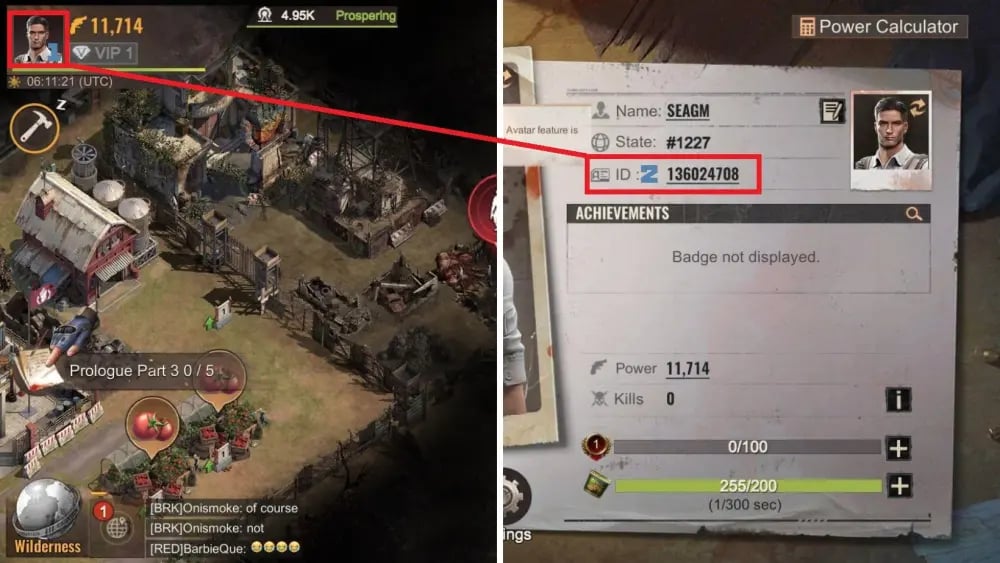
Always verify that you copied the complete numerical string before submitting your order on ArcTopup to prevent your Diamonds from landing in another Chief's account.
How to Top Up State of Survival Diamonds on ArcTopup Using Only User ID
ArcTopup uses an ID-based delivery system designed to get Diamonds into your game balance quickly and without unnecessary steps:
- Select your desired State of Survival Diamonds denomination from the available catalog on the product page.
- Enter your User ID into the designated player field.
- Double-check that your User ID matches your active game profile.
- Select your preferred payment method on the secure checkout screen and complete the transaction.
- Return to the game client. Your Diamonds will automatically credit to your in-game balance or arrive via your in-game system mail.
Prices, active promotional rates, and available pack sizes are displayed directly on the live checkout interface.
Strategic Diamond Spending: Capital Clash, SvS, and Plasma HQ Upgrades
Spending Diamonds efficiently separates top-ranking alliance leaders from struggling settlements. Managing your Diamond balance around the State schedule ensures maximum return on your investment.
| Game System / Event | Recommended Diamond Usage | Strategic Priority |
|---|---|---|
| State vs State (SvS) Preparation | Construction and Research Speedups during prep stage | High (Earns Stage Points & State Buffs) |
| Plasma Tier Upgrades (HQ 30+) | Direct Plasma Core bundle purchases | Essential (Unlocks Tier 11 Troop Formations) |
| Capital Clash & Reservoir Raid | Advanced March Relocates, Healing Speedups, Peace Flares | High (Battlefield Mobility & Troop Recovery) |
| Hero Precinct Development | Legendary Hero Fragment Chests & Skill Manuals | Medium (Rally Leader & Garrison Strength) |
| Daily Settlement Growth | VIP Points, Extra March Slots, Resource Shields | Low-Medium (Long-term Passive Production) |
During State vs State warfare, stockpiling Diamonds enables rapid troop revival and immediate war shelter shielding when your settlement is targeted by cross-state rallies.
Account Security: Why You Should Never Share Your Login Credentials for Recharges
Account safety is critical in strategy games where accounts represent hundreds of hours of coordination. ArcTopup operates on a strict UID-only fulfillment model, protecting your personal data:
- No Password Requests: Legitimate recharges only require your public User ID. ArcTopup will never ask for your Google Play, Apple ID, Facebook, VK, or FunPlus account login details.
- Zero Risk of Account Compromise: Sharing passwords with third parties exposes your account to unauthorized resource transfers, gear dismantling, or permanent account loss.
- Compliance with Safety Guidelines: Credential-sharing often triggers automated anti-cheat flags and location mismatch security locks. UID recharges process cleanly through standard credit channels without triggering account bans.
Troubleshooting Delivery Issues and Game Version Sync
If your Diamonds do not reflect in your balance immediately after completing your order on ArcTopup, review the following standard troubleshooting checks:
- Check In-Game System Mail: Some Diamond packages arrive as redeemable tokens or confirmation receipts inside your settlement's in-game mailbox. Check your System tab and claim attachments.
- Restart the Game App: Force close the State of Survival app and reopen it to trigger a fresh data sync between the game server and your local client.
- Verify Game Client Version: Ensure your game client is updated to version 1.17.50 or higher. Running outdated game versions can cause UI sync delays where items exist on the server but fail to display on screen.
- Verify User ID Accuracy: Check your order confirmation email from ArcTopup to ensure the User ID submitted matches your current Chief profile. If you mistyped your ID, contact ArcTopup customer support with your order number.
Frequently Asked Questions
How do I find my State of Survival User ID for top up?
Tap your Chief Avatar in the top-left corner of the settlement view. Your User ID is the number shown directly beneath your Chief name. Tap the copy button to copy it cleanly.
What can State of Survival Diamonds be used for in the game?
Diamonds function as the flexible universal currency in the State of Survival mall. You can use them to purchase value packs, Plasma Cores, speedups, stamina refills, hero gear, and emergency peace shields.
Do I need to provide my game password to top up State of Survival Diamonds?
No. ArcTopup only requires your in-game User ID. You will never be asked to share your game password, email login, or linked social media accounts.
Can I use Diamonds to buy limited-time event bundles in State of Survival?
Yes. Diamonds purchased through ArcTopup credit to your account balance, allowing you to redeem active limited-time event bundles, seasonal pass rewards, and holiday packs directly in the game store.
How long does it take for Diamonds to be credited to my settlement?
Orders submitted on ArcTopup process automatically through real-time systems. Once your payment is verified, the Diamonds are dispatched directly to your account.
What should I do if my State of Survival Diamonds do not show up after payment?
First, check your in-game system mail and claim any attached packages. If they have not arrived, restart your game client to refresh the server connection. If you still do not see them, contact ArcTopup support with your payment receipt and User ID for prompt assistance.
Current packages and prices
Current base prices exclude Tax. Tax, payment fees and coupon adjustments are shown at checkout.
| Package | Price |
|---|---|
| 100 Diamonds | USD 0.68 |
| 500 Diamonds | USD 3.40 |
| 1,000 Diamonds | USD 6.78 |
| 2,000 Diamonds | USD 13.55 |
| 5,000 Diamonds | USD 33.85 |
| 10,000 Diamonds | USD 68.86 |
| 20,000 Diamonds | USD 135.41 |
| 50,000 Diamonds | USD 338.51 |
| 100,000 Diamonds | USD 688.47 |