
How to Top Up Tamashi: Rise of Yokai Sycee on ArcTopup
Getting Sycee for your character on ArcTopup takes only a few moments. Direct top-ups require only your in-game User ID and the exact server where your character resides. No account passwords or login credentials are ever requested.
Follow these steps to recharge your account:
- Select the amount of Sycee or pack denomination you wish to purchase from the product catalog.
- Enter your User ID in the designated input field.
- Open the Server dropdown menu and choose the exact server matching your character (e.g., AP1-Kojiro, NA1-Kisaragi, or EU1-Tsuyemon).
- Review the selected items and your player details to verify everything is accurate.
- Click Buy Now or proceed to checkout, select your preferred payment method, and complete the transaction.
- Open Tamashi: Rise of Yokai on your mobile device or emulator to check your updated Sycee balance.
All real-time prices and active package options are displayed directly on the live checkout selector.
Where to Find Your Tamashi: Rise of Yokai User ID and Server
To ensure your purchased Sycee reaches the correct character, you need to locate your numeric User ID and server name inside the game client.
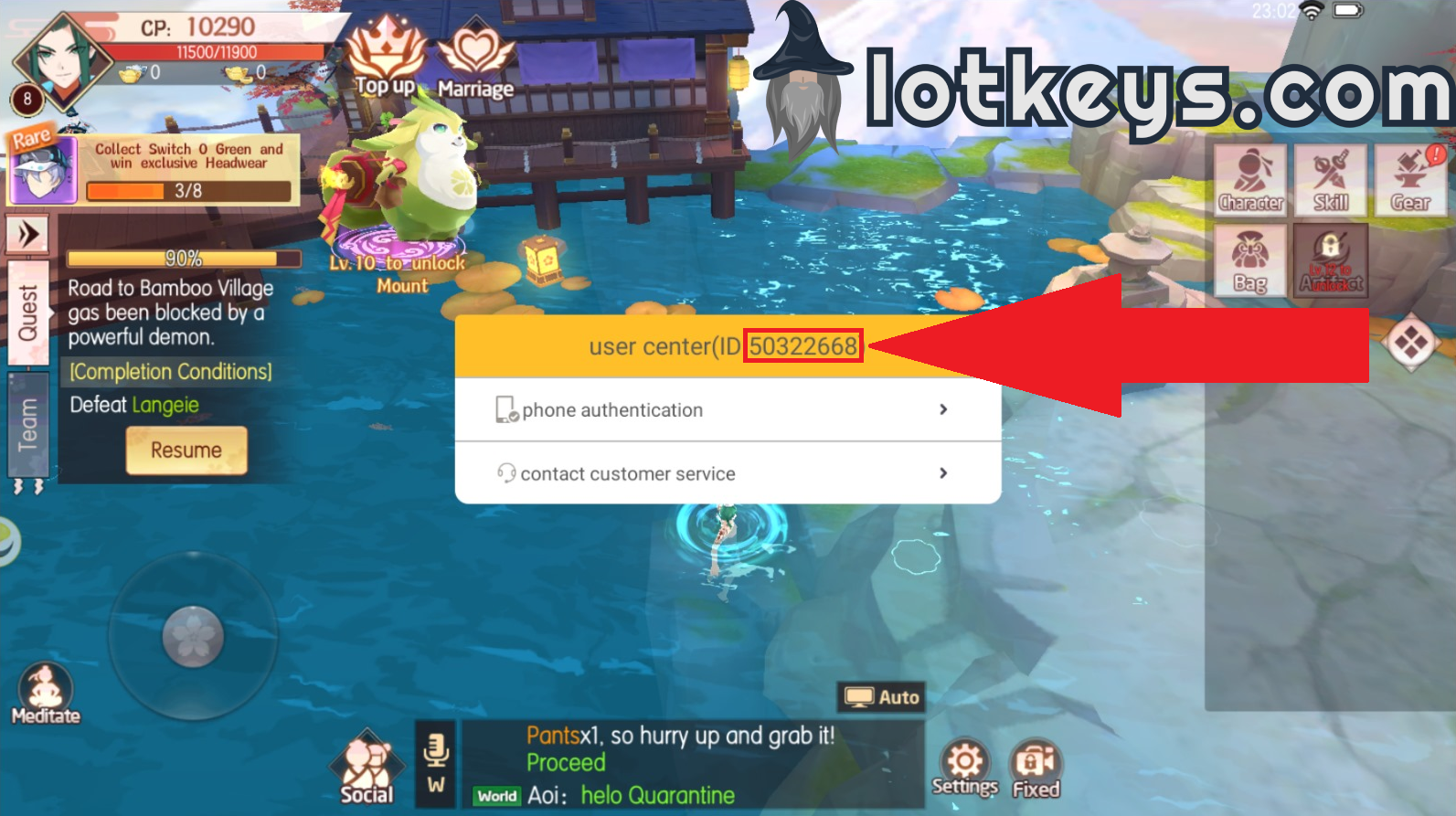
- Launch the Tamashi: Rise of Yokai application on your device.
- Log into your account and enter the game world with your active character.
- Tap your Character Avatar / Profile Icon located in the top-left corner of the main screen.
- In the profile overview window, locate your User ID (a string of numbers) displayed near your character name.
- Tap the copy icon next to your User ID to copy it to your clipboard.
- Check your server cluster name displayed on the login screen or under your profile settings (such as AP, NA, or EU followed by the server name).
Double-check that you paste your User ID accurately and select the matching server name from the ArcTopup server list before checking out.
Supported Server Regions: AP, NA, and EU Server Lists
Tamashi: Rise of Yokai hosts players across three major regional server clusters: Asia-Pacific (AP), North America (NA), and Europe (EU). ArcTopup supports character routing across all active server clusters, allowing you to select your exact server from the dropdown menu without third-party login handoffs.
| Region Cluster | Server ID Range | Common Server Name Examples |
|---|---|---|
| Asia-Pacific (AP) | AP1 to AP482+ | AP1-Kojiro, AP50-Nominosukune, AP100-Torite, AP300-Mana |
| North America (NA) | NA1 to NA154+ | NA1-Kisaragi, NA20-Bishamon, NA80-Yaiba, NA150-Aloh |
| Europe (EU) | EU1 to EU120+ | EU1-Tsuyemon, EU30-Nakai, EU60-Matsu, EU120-Rie |
Selecting the correct server prefix (AP, NA, or EU) alongside the server name ensures the delivery system routes your Sycee directly to the database instance where your slayer character is saved.
What Is Sycee and How to Spend It in Tamashi: Rise of Yokai
Sycee is the primary premium currency in Tamashi: Rise of Yokai. Having a supply of Sycee allows you to progress through the monster-hunting campaign, take down high-tier World Bosses, and build competitive PvP lineups.
Tamashi Partner Summons
Summoning rare Yokai spirits (Tamashi) is central to building your team's combat power (CP). Spending Sycee on summon tokens lets you draw high-grade SR and SSR Tamashi companions, each providing unique active skills, elemental affinities, and passive stat bonuses in battle.
Equipment Forging and Akuse Upgrades
Forging top-tier gear, refining equipment sockets, and enhancing specialized Akuse relics requires materials that can be purchased directly from the in-game mall with Sycee. Upgrading gear tiers gives massive defensive and offensive rating jumps.
Cosmetics, Mounts, and Wings
Visual customization items such as exclusive outfits, divine weapon skins, winged gliders, and mythical mounts provide both unique visual flair and permanent account stat boosts. Limited-time event banners frequently feature rare themed skins that require Sycee to purchase or unlock.
Daily Boss Resets and Stamina Refills
To maximize daily progression, Sycee can be used to purchase extra challenge attempts for high-yield boss dungeons, trail towers, and daily exp instances, helping you level up faster than standard daily cooldowns permit.
Direct Player ID Top-Up: Safety, Security, and Password-Free Delivery
ArcTopup uses direct API-level character delivery based purely on your public User ID and selected server. This method ensures optimal security for your gaming account:
- No Passwords Required: You never need to share your game password, Google Play login, Apple ID, or Facebook credentials.
- Zero Account Takeover Risk: Because your login information stays private, your account remains secure on your own device.
- Gift to Friends: You can recharge Sycee for friends, guildmates, or family members simply by asking for their User ID and server name.
- Protected Payments: All transactions on ArcTopup are processed through encrypted payment gateways to keep your financial information private.
Tamashi: Rise of Yokai Sycee Recharge FAQ
What is Sycee and what can it be used for in Tamashi: Rise of Yokai?
Sycee is the core premium currency used to acquire summon scrolls for Yokai spirits, buy enhancement materials from the mall, unlock exclusive mounts, outfits, and wings, and reset daily dungeon challenge limits.
How do I find my Tamashi: Rise of Yokai User ID and Server?
Tap your character avatar in the upper-left corner of the game screen. Your numerical User ID will be displayed near your character name. Note your server name (e.g., AP1-Kojiro or NA1-Kisaragi) from the game login screen or profile menu.
Do I need to share my account password to top up Tamashi: Rise of Yokai on ArcTopup?
No. ArcTopup only requires your User ID and your server selection. You should never share your account password or social login credentials with anyone.
Can I top up Sycee for a friend's Tamashi: Rise of Yokai account?
Yes. Enter your friend's User ID and select their correct server during checkout. The purchased Sycee will be delivered straight to their in-game account upon order completion.
Which servers (AP, NA, EU) are supported for Tamashi: Rise of Yokai top-ups?
ArcTopup supports all active Asia-Pacific (AP), North American (NA), and European (EU) servers listed in the server selector dropdown on this page.
What should I do if my purchased Sycee does not appear in my game account immediately?
First, restart your game client or switch character screens to force a server refresh. Check your in-game mailbox to see if items were sent via mail. If your Sycee has not arrived after a few moments, verify that your submitted User ID and server were correct and contact ArcTopup customer support with your order number for quick assistance.
Current packages and prices
Current base prices exclude Tax. Tax, payment fees and coupon adjustments are shown at checkout.
| Package | Price |
|---|---|
| 60 Sycee | USD 0.73 |
| 300 Sycee | USD 3.60 |
| 600 Sycee | USD 7.24 |
| 900 Sycee | USD 10.91 |
| 1200 Sycee | USD 14.98 |
| 1800 Sycee | USD 21.81 |
| 3000 Sycee | USD 36.38 |
| 6000 Sycee | USD 72.79 |






























































