Sky: Children of the Light Top Up on ArcTopup
Acquiring Candles in Sky: Children of the Light allows you to expand your cosmetic wardrobe, unlock expressions with friends, and progress through seasonal events. ArcTopup offers a direct, automated top-up service for Sky: Children of the Light players. You can select your required Candle pack or Season Candle bundle and complete your purchase using only your in-game Sky ID.
All transactions are processed without requiring your account password, linked third-party login credentials, or external chat coordination. You retain full custody of your account while receiving your purchased Candle balance directly in-game. Live prices, pack sizes, and regional currency options are displayed in the checkout selection panel above.
Step-by-Step Guide: How to Find Your Sky ID in Sky: Children of the Light
To ensure your purchased Candles reach the correct account, you must provide your unique Sky ID. This identifier is different from your display name or linked platform account names (such as your Steam ID, Apple ID, or Google Play profile).
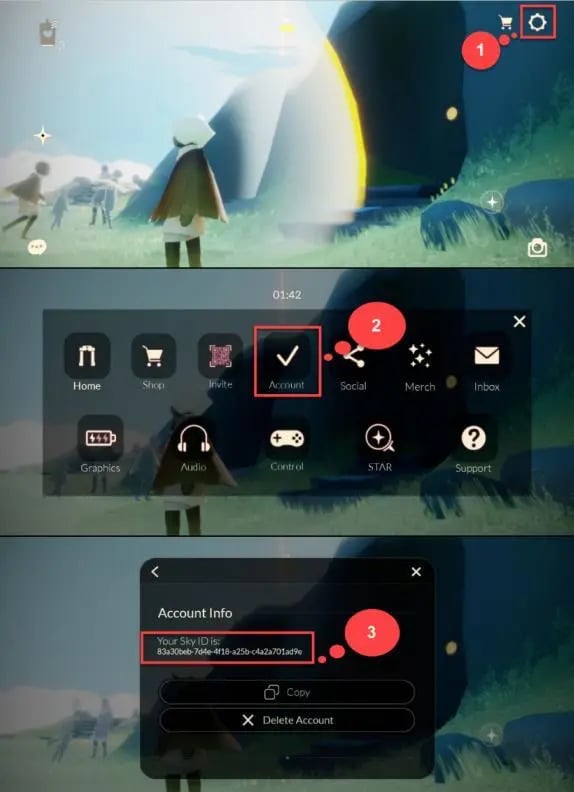
Follow these exact steps to copy your Sky ID:
- Launch Sky: Children of the Light on your mobile device, PC, or console.
- Tap or click the upper-right corner of the screen to reveal the main menu bar, then select the gear icon to open Settings.
- In the Settings wheel, select the Account tab.
- Select Account Info from the list of account options.
- Locate your alphanumeric Sky ID at the top of the window.
- Tap the copy icon next to your ID string to copy it directly to your device clipboard.
- Paste this code into the Sky ID input field on ArcTopup before completing your payment.
Double-check that you have pasted the complete string without accidental spaces at the beginning or end. This ensures the automated delivery pipeline credits the exact player profile.
Understanding Sky COTL Currencies: Candles, Hearts, and Seasonal Passes
Sky: Children of the Light utilizes several distinct currencies, each serving a specific progression purpose. Understanding these currencies helps you choose the right top-up package for your in-game goals.
| Currency Type | Primary Source | Primary Uses | Can Be Topped Up Directly? |
|---|---|---|---|
| Regular Candles (White Candles) | Forging daily light (wax), store purchase | Unlocking friendship trees, buying standard spirit cosmetics, converting to Hearts | Yes |
| Season Candles (Orange Candles) | Daily seasonal quests, seasonal top-up | Unlocking limited-time seasonal spirit cosmetics and seasonal expressions | Yes (during active seasons) |
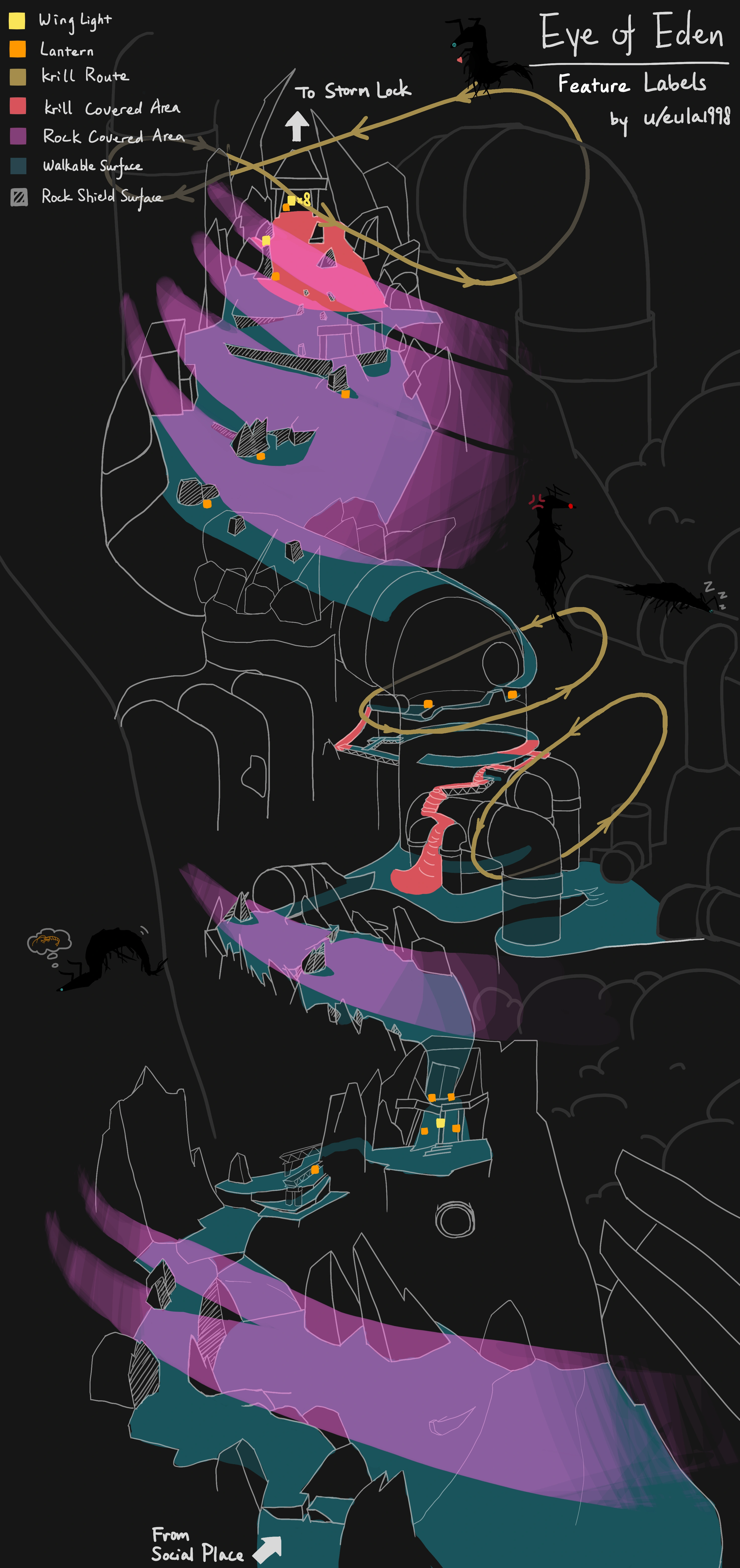
| Ascended Candles (Eden Candles) | Eye of Eden completion, Shard Eruptions | Unlocking permanent Wing Buffs, high-tier friendship actions | No (earned via gameplay only) |
| Hearts | Receiving gifts from friends, trading with Spirits | Purchasing capes, instruments, and high-end cosmetic props | No (traded using regular candles) |
Regular Candles
Regular Candles are the standard currency of Sky. They are forged by gathering wax across daily areas or purchased directly through top-up packs. You use them to progress through standard Spirit Constellations, interact with visiting Traveling Spirits, and send daily gifts to your friends.
Season Candles
Season Candles are active only during official seasonal events. They allow you to purchase seasonal cosmetics from the spirits stationed in the seasonal area. When a season concludes, any remaining Season Candle balance converts 1:1 into Regular White Candles automatically.
Ascended Candles
Ascended Candles are earned exclusively through gameplay mechanics by completing the Eye of Eden and clearing red shard events. They are required to break past Wing Buff locks on spirit trees. These cannot be bought directly through store top-ups.
Cross-Platform Candle Compatibility and Device Balance Rules
Sky: Children of the Light features full cross-play and cross-progression across iOS, Android, PC (Steam), PlayStation, and Nintendo Switch. However, platform-specific wallet rules apply to purchased currency:
- Farmed & Earned Candles: All regular Candles, Season Candles, and Ascended Candles earned through in-game light collection sync across every platform linked to your thatgamecompany account.
- Purchased Regular Candles: Due to console storefront policies, paid Candle balances purchased via mobile, PC, or PlayStation share an open balance across those devices, while the Nintendo Switch maintains a segregated purchased Candle wallet.
- Cosmetics and Unlocks: Any cosmetic items, capes, hairstyles, props, spells, or friendship tree interactions purchased using Candles immediately sync to all devices, including the Nintendo Switch.
If you play primarily on Nintendo Switch, you can safely top up your Sky ID on ArcTopup. Log in via your mobile or PC client linked to the same thatgamecompany account, spend the purchased Candles on your desired spirit trees or cosmetics, and those unlocked items will be available the next time you boot up on Switch.
Why Choose ArcTopup: Safe, Password-Free Sky ID Delivery
Using ArcTopup ensures a straightforward, secure transaction designed around player safety:
- Zero Account Sharing: You never share passwords, verification codes, or access to your underlying Google, Apple, Nintendo, or Steam accounts. You only provide your public Sky ID.
- Direct Automated Delivery: Orders are processed through automated account matching, removing the risks and delays associated with peer-to-peer marketplace chat sellers.
- Clear Status Tracking: You can view your order progress immediately upon payment confirmation.
- Account Integrity: Direct ID credit maintains full account safety without triggering location-mismatch security flags on your game client.
What You Can Unlock with Candles in Sky: Cosmetics, Expressions, and Friendship Trees
Having an adequate Candle balance ensures you never miss limited-time items or important social upgrades:
- Traveling Spirits: Every two weeks, a past seasonal spirit returns for four days. Unlocking their complete cosmetic tree—including rare capes, masks, and musical instruments—typically requires between 100 and 200 Regular Candles, plus Hearts.
- Friendship Progression: Deepening bonds with other players requires Regular Candles to unlock social interactions such as High-Five, Hug, Chat, Warp, and Piggyback.
- Days of Event Cosmetics: Special recurring events introduce exclusive event cosmetics purchasable with in-game Candles at the event shop.
- Heart Generation: You can exchange three Regular Candles at standard spirit nodes to forge individual Hearts, which are required for high-tier constellation capes.
Sky: Children of the Light Top-Up Troubleshooting & Support
If you have completed your top up and need to verify delivery, follow these standard check steps:
- Restart the App: Fully close the Sky: Children of the Light client on your device and launch it again. This forces the game to fetch the latest account data from the server.
- Check the Correct Client: If you play across multiple systems, check your balance on mobile or PC to ensure the platform wallet matches the purchase credit.
- Verify ID Accuracy: Review your ArcTopup order confirmation to verify that the Sky ID submitted matches your in-game Account Info screen.
- Contact Customer Support: If your balance does not update after restarting the game, reach out to ArcTopup customer support with your Order ID for immediate investigation.
Frequently Asked Questions
Where can I find my Sky ID to complete a top up?
Open Sky: Children of the Light, tap the top-right gear icon to open Settings, select Account, and tap Account Info. Your unique Sky ID is displayed at the top. Tap the copy icon to paste it into the ArcTopup order field.
Do I need to provide my game login password to buy Candles on ArcTopup?
No. ArcTopup requires only your public Sky ID. You should never share your login password, Apple ID, Google account, or verification codes.
Will purchased Candles appear on my Nintendo Switch or PlayStation account?
Purchased Candle balances sync across Mobile, PC, and PlayStation clients. Nintendo Switch maintains an isolated balance for purchased Candles due to platform eShop policies. However, any cosmetic, emote, or friendship upgrade you unlock using your Candles on Mobile or PC will immediately sync to your Nintendo Switch.
What is the difference between regular Candles and Seasonal Candles?
Regular Candles are the permanent base currency used for standard spirits, friendship trees, and Traveling Spirits. Seasonal Candles are limited-time orange candles used exclusively for current seasonal spirits. At the end of a season, all leftover Seasonal Candles convert into regular Candles automatically.
How to get more Candles in Sky: Children of the Light?
You can collect daily wax by running through the kingdom's areas and participating in daily events, complete daily seasonal quests, or buy Sky Children of the Light Candles directly through ArcTopup for fast balance replenishment.
What should I do if my Candles do not show up after a successful payment?
Force close your game application completely and reopen it to trigger a balance refresh with the server. If your Candles still do not appear, verify that your submitted Sky ID was accurate and contact ArcTopup customer support with your transaction details for assistance.
Current packages and prices
Current base prices exclude Tax. Tax, payment fees and coupon adjustments are shown at checkout.
| Package | Price |
|---|---|
| 15 Season Candles | USD 4.51 |
| 15 Season Candles | USD 4.51 |
| 30 + 5 Bonus Season Candles | USD 8.57 |
| 60 + 12 Bonus Season Candles | USD 17.69 |
| 150 + 40 Bonus Season Candles | USD 40.51 |