Haikyu!! Fly High Top Up: Direct Star Gems Recharge
Power up your volleyball squad with an instant Haikyu!! Fly High top up on ArcTopup. In Haikyu!! Fly High, building a competitive lineup of Karasuno, Nekoma, Aoba Johsai, and Shiratorizawa stars requires recruitment resources, training kits, and stamina refills. Star Gems serve as the premium currency needed to pull iconic players on limited banner recruitments, purchase daily training supplies, and secure seasonal rewards.
ArcTopup provides a direct-to-account top-up system that delivers Star Gems and special bundles straight to your game balance using only your numeric User ID. You never need to share account passwords or link third-party social profiles. Check live rates on the checkout selector and upgrade your roster in seconds.
How to Top Up Haikyu!! Fly High Star Gems via User ID
Adding Star Gems to your game account takes only a few quick steps:
- Enter Your User ID: Type your in-game numeric User ID into the input field above.
- Select Your Package: Choose the amount of Star Gems, a Monthly Pass, or a special bundle you wish to purchase.
- Proceed to Checkout: Select your preferred payment method and complete the payment through the secure ArcTopup gateway.
- Receive Star Gems: Once payment confirms, the Star Gems are injected directly into your Haikyu!! Fly High account. Open the game to verify your updated balance.
Where to Find Your In-Game Haikyu!! Fly High User ID
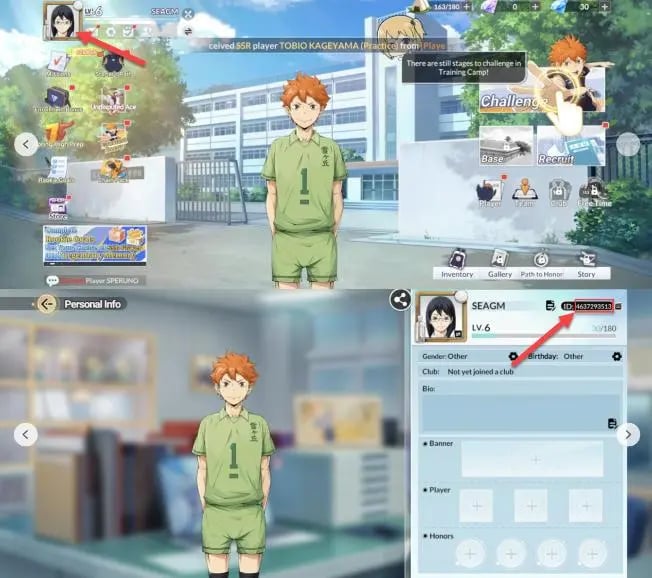
Locating your User ID requires only a few taps inside the game client:
- Launch Haikyu!! Fly High on your mobile device.
- Tap your Player Avatar / Profile Icon located in the top-left corner of the main lobby screen.
- Open the User Profile tab.
- Locate the numeric string labeled User ID (UID) beneath your character name.
- Tap the Copy button next to your ID to copy it to your clipboard, then paste it directly into the ArcTopup order field.
Double-check that your pasted ID matches your profile completely before finalizing payment to avoid crediting an incorrect profile.
Available Packs: Star Gems, Monthly Passes, and Special Bundles
ArcTopup supports the full catalog of official Haikyu!! Fly High in-game purchases. Select the item that matches your competitive goals:
| Item Category | Contents & Inclusions | Primary In-Game Purpose |
|---|---|---|
| Star Gems Tiers | Direct Star Gem packages ranging from small pouches to large vaults | Banner pulls, stamina refreshes, and store items |
| Monthly Supply Pass | Instant Star Gems upon purchase plus daily login Star Gems for 30 days | Long-term currency accumulation for upcoming rate-up banners |
| Growth Funds | Milestone Star Gem payouts as your player profile levels up | High-value return on account progression |
| Seasonal Bundles | Curated packs with recruitment tickets, skill materials, and upgrade tokens | Rapid team training during live events |
Note: Exact bundle pricing and promotional bonuses reflect current rates shown on the live checkout selector above.
Supported Payment Methods and Safe Checkout on ArcTopup
ArcTopup offers a secure checkout environment supporting diverse local and international payment methods. Whether you prefer digital e-wallets, credit or debit cards, bank transfers, or regional payment channels, transactions are processed through encrypted financial gateways. Every transaction generates an instant digital invoice and order tracking number, ensuring full transparency without unexpected fees.
Haikyu!! Fly High Server Regions and Global Availability
Haikyu!! Fly High is published across multiple regional servers, including Southeast Asia (SEA), Taiwan/Hong Kong/Macau, Japan, and expanded global regions. Top-ups made on ArcTopup process directly through official server distribution channels based on your User ID. As long as you submit the exact numeric ID generated by your game client, your order routes directly to your regional server profile without requiring region switching or VPN manipulation.
Account Security: Why You Never Need to Share Your Password
Protecting your game profile and personal data is essential. Unlike risky third-party account-piloting services, ArcTopup relies strictly on direct User ID delivery:
- No Login Credentials Needed: You never enter your game password, Google account, Apple ID, or social network logins.
- Zero Account Takeover Risk: Because your credentials stay private, your account cannot be compromised or transferred.
- Strict Terms of Service Compliance: Direct UID crediting operates through approved top-up routing, protecting your profile from penalty risks or unauthorized access.
Keep your passwords private and use only your public User ID when purchasing Star Gems online.
What to Do If Star Gems Are Not Received Immediately
Most orders process immediately upon transaction confirmation. If your Star Gems do not appear in your balance right away, follow these troubleshooting steps:
- Restart the Game App: Completely close Haikyu!! Fly High from your device app switcher and relaunch it to refresh server communication.
- Check the In-Game Mailbox: Some special promotional bundles and bonus Star Gems arrive inside your in-game mailbox rather than auto-crediting to the top bar.
- Verify Your User ID: Review your ArcTopup payment confirmation receipt to ensure there was no typo in the submitted User ID.
- Contact ArcTopup Support: If your order remains uncredited after several minutes, open a ticket with ArcTopup customer service. Provide your order number and in-game User ID for quick verification and manual balance resolution.
Frequently Asked Questions
How do I find my Haikyu!! Fly High User ID?
Open Haikyu!! Fly High, tap your profile avatar in the upper-left corner of the home screen, and locate the numeric User ID listed on your profile card. Tap the copy icon next to the number to copy your ID accurately.
Do I need to share my game login password to top up on ArcTopup?
No. ArcTopup requires only your in-game User ID. You never need to provide passwords, verification codes, or third-party account login information.
In which countries and regions is Haikyu!! Fly High available?
Haikyu!! Fly High is playable across Southeast Asia, East Asia, and select global regions. As long as you have an active account on an official server, entering your correct User ID on ArcTopup will credit your items directly to your profile.
How long does it take for Star Gems to arrive in my account?
Orders are processed promptly after payment confirmation. In most cases, Star Gems appear in your in-game balance within moments of completing checkout.
Where can I find and redeem Haikyu!! Fly High codes in 2026?
Official redemption codes are released during developer livestreams, tournament events, and community milestones. To redeem an active code, open the game settings menu, navigate to the Exchange Code section, paste the active promo code, and claim your rewards from your in-game mailbox.
What should I do if my top-up does not show up in-game?
First, restart your game client to refresh the server cache and check your in-game mailbox. If the balance has not updated, check your order status on ArcTopup and reach out to 24/7 customer support with your transaction ID for prompt assistance.
Current packages and prices
Current base prices exclude Tax. Tax, payment fees and coupon adjustments are shown at checkout.
| Package | Price |
|---|---|
| Recruit Ticket x1 | USD 0.65 |
| Ultra Recruit Ticket x1 | USD 0.65 |
| Starter Pack | USD 0.70 |
| 60 Star Gems | USD 0.71 |
| Memory Recruit Special I | USD 0.81 |
| Ultra Recruit Special I | USD 0.81 |
| Stamina Boost Pack I | USD 1.61 |
| Recruit Ticket x5 | USD 3.25 |
| Ultra Recruit Ticket x2 | USD 3.25 |
| 300 Star Gems | USD 3.60 |
| Memory Recruit Special II | USD 4.03 |
| Stamina Boost Pack II | USD 4.03 |
| Ultra Recruit Special II | USD 4.03 |
| First Cheer Bundle | USD 4.91 |
| Level Up Bonus Pack | USD 7.63 |
| Memory Recruit Special III | USD 8.09 |
| Ultra Recruit Special III | USD 8.09 |
| Recruit Ticket x10 | USD 8.45 |
| Ultra Recruit Ticket x3 | USD 8.45 |
| 980 Star Gems | USD 10.84 |
| Memory Recruit Special IV | USD 12.13 |
| Ultra Recruit Special IV | USD 12.13 |
| First Memory Bundle | USD 17.67 |
| Recruit Ticket x20 | USD 19.53 |
| Ultra Recruit Ticket x4 | USD 19.53 |
| First Growth Bundle | USD 21.22 |
| 1980 Star Gems | USD 21.68 |
| Recruit Ticket x30 | USD 32.53 |
| Ultra Recruit Ticket x5 | USD 32.53 |
| 3280 Star Gems | USD 36.14 |
| Recruit Ticket x55 | USD 65.08 |
| Ultra Recruit Ticket x6 | USD 65.08 |
| 6480 Star Gems | USD 72.30 |