Razer Pay Link Top Up on ArcTopup
A Razer Pay Link top up offers a direct, hassle-free way to settle in-game checkout sessions without entering personal banking details on gaming devices or linking permanent payment cards to individual apps. When a game or digital storefront creates a dynamic Razer Pay payment request, you receive a temporary checkout URL. Submitting this URL on ArcTopup enables you to complete the purchase through flexible local and international payment methods.
ArcTopup processes your payment session directly against the official billing endpoint. You avoid manual balance top-ups, account handovers, and regional payment gateway blocks. Live checkout pricing is displayed upfront across all supported currencies, making your transactions swift, clear, and secure.
How to Top Up via Razer Pay Link on ArcTopup
Completing a Razer Pay Link recharge on ArcTopup requires only a few clear steps. Follow this guide to ensure your payment session is processed without delay:
- Generate the Checkout Session: Open your game or publisher web shop, select the items or currency pack you want to buy, and choose Razer Pay as your checkout gateway.
- Copy the Payment URL: Once the payment window opens, copy the complete URL string from your browser address bar or payment prompt.
- Enter the Link on ArcTopup: Paste the complete URL into the designated Razer Pay Link input field at the top of this page.
- Select Your Denomination: Choose the denomination tier that matches your checkout cart value. Current rates and conversion fees are shown dynamically on the live checkout screen.
- Select Payment Method & Pay: Pick your preferred payment method and click Buy Now. ArcTopup settles the session balance immediately upon successful payment.
- Confirm in Your Game: Return to your game client or publisher web portal. Your purchase will reflect as completed immediately.
Locating and Submitting Your Razer Pay Link Correctly
Because payment links are generated dynamically by merchant systems, submitting the complete and unedited URL is critical for instant order fulfillment.
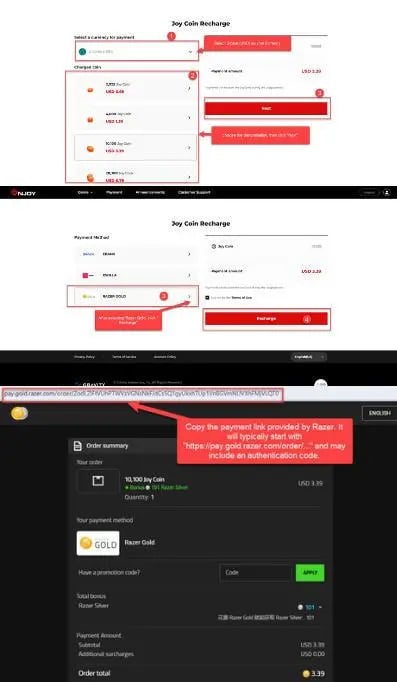
To capture your link without errors:
- Desktop Browsers: When the payment window redirects to the Razer Pay gateway, click the address bar, select the entire URL starting with
https://, and copy it. - Mobile In-App Browsers: Tap the three-dot menu or share icon in the payment webview and choose Copy Link. If your device opens a standalone browser tab, copy the URL straight from the top address bar.
- Check Link Validity: Ensure the URL contains the session parameters intact. Do not trim query strings or tracking tokens, as our automated system uses these tokens to locate your active transaction cart.
Available Denomination Tiers and Currency Conversion in 2026
Payment links are created with predetermined purchase values based on your in-game cart. Selecting the matching tier on ArcTopup ensures immediate verification and prevents settlement discrepancies.
| Session Parameter | System Specification | User Action Required |
|---|---|---|
| Link Type | Dynamic Single-Use Payment URL | Copy complete address string |
| Session Window | Standard 15 to 30 Minutes | Submit immediately on ArcTopup |
| Authentication | Encrypted Session Token | No account login required |
| Tier Selection | Value matched to game cart | Select equivalent tier on ArcTopup |
| Settlement Mode | Automated direct API capture | Check game client for delivered items |
All pricing, currency conversion calculations, and processing fees are calculated in real time on the ArcTopup live checkout screen. Check the live order summary before completing payment.
Differentiating Razer Pay Links from Razer Gold and Third-Party Gateways
Understanding the difference between payment mechanisms prevents ordering delays:
- Razer Pay Link: A temporary, single-use web checkout URL generated by a specific game publisher to collect payment for a pending order. It expires after a short period and does not require a static wallet balance.
- Razer Gold (PIN / Direct Top Up): A prepaid virtual credit system where users redeem 14-digit or 16-digit alphanumeric codes or top up a persistent wallet balance. ArcTopup provides separate product pages for standard Razer Gold PINs.
- Razorpay (India Gateway): An Indian domestic merchant payment aggregator. It is completely distinct from the Razer gaming payment ecosystem. Ensure your transaction URL originated from a gaming merchant using Razer's payment gateway.
Troubleshooting Expired or Failed Razer Pay Link Transactions
If your transaction encounters an error during processing, check the following common causes:
- Expired Payment Session: Most checkout links carry a validity timer of 15 to 30 minutes. If you generated the link earlier and left the tab open, the session token may have expired. Cancel the pending order in your game, generate a fresh payment link, and paste the new URL into ArcTopup.
- Single-Use Invalidation: If you clicked cancel or attempted payment on another payment page, the merchant system may mark the URL as spent. Always generate a fresh link before initiating checkout on ArcTopup.
- Truncated URL Strings: Ensure that no characters were clipped when copying from mobile screens. A valid link contains the full host domain and security query tokens.
- Value Mismatch: Verify that the denomination tier selected on ArcTopup matches the exact order total displayed on your game checkout prompt.
Safe and Secure Checkout: Why No Account Passwords Are Required
ArcTopup values buyer privacy and account security. Recharging via a Razer Pay Link is 100% password-free:
- Zero Account Sharing: You never need to hand over your game login credentials, email address, or third-party social logins. The session URL contains all necessary routing instructions.
- No Stored Banking Details: Your payment data is handled through encrypted processing channels. No permanent cards are tied to your game profile.
- Direct Verification: Items and currency are credited directly to the game account that generated the original session link, eliminating delivery errors.
Frequently Asked Questions
What is a Razer Pay Link and how does the top up work?
A Razer Pay Link is a temporary, secure URL generated when you choose Razer Pay at a game or merchant checkout. ArcTopup uses this URL to fulfill the payment on your behalf, automatically clearing your pending in-game purchase.
Do I need to share my gaming account login or password to recharge a Razer Pay Link?
No. You never need to provide your password, security questions, or 2FA codes. You only submit the checkout URL generated by the game shop.
What should I do if my Razer Pay Link expires before checkout is completed?
If a payment session expires before processing, return to your game client or web store, cancel the pending order, create a new checkout request, and paste the fresh link into ArcTopup.
How quickly is credit applied to my active Razer Pay Link session?
Once your payment is confirmed on ArcTopup, our automated billing integration settles the link session instantly. Your game will update the purchase status right away.
Can I use international payment methods to top up a Razer Pay Link?
Yes. ArcTopup supports a wide selection of regional and international payment options. View the live checkout page to see the methods available in your region.
What happens if I submit an incorrect or invalid Razer Pay Link?
If an invalid or malformed URL is submitted, the system will reject the link during order verification, preventing accidental charges. Check your link and re-submit the complete URL to proceed.
Current packages and prices
Current base prices exclude Tax. Tax, payment fees and coupon adjustments are shown at checkout.
| Package | Price |
|---|---|
| Razer Pay Link $0.99 | USD 0.82 |
| Razer Pay Link $2.99 | USD 2.45 |
| Razer Pay Link $4.99 | USD 4.08 |
| Razer Pay Link $9.99 | USD 8.14 |
| Razer Pay Link $19.99 | USD 16.27 |
| Razer Pay Link $29.99 | USD 24.41 |
| Razer Pay Link $34.99 | USD 28.48 |
| Razer Pay Link $49.99 | USD 40.67 |
| Razer Pay Link $59.99 | USD 48.81 |
| Razer Pay Link $74.99 | USD 61.01 |
| Razer Pay Link $86.99 | USD 70.78 |
| Razer Pay Link $99.99 | USD 81.35 |
| Razer Pay Link $199.99 | USD 162.68 |
| Razer Pay Link $299.99 | USD 244.03 |
| Razer Pay Link $599.99 | USD 488.05 |































































