
WeTV Top Up for Coins and VIP Membership
WeTV is Tencent Video's dedicated international streaming service, bringing Asian dramas, popular anime, variety programs, and original series to global audiences. Viewers can tailor their streaming experience by choosing between two distinct digital upgrades: WeTV VIP Membership and WeTV Coins.
WeTV VIP Membership is a recurring time-based plan that removes video ads, grants early access to newly broadcast episodes, and enables high-definition streaming up to 1080P and 4K Blu-ray resolution across multiple screens.
WeTV Coins function as an in-app digital currency. Coins give you the flexibility to purchase individual Express packages, binge drama finales ahead of the VIP schedule, rent premium movies, or read paid chapters in WeTV Comics. On ArcTopup, both Coins and VIP plans can be credited directly to your profile using only your WeTV Player ID.
WeTV VIP Membership vs. WeTV Coins: Features and Comparison
Choosing the right option depends on how you consume content on the platform. Review the core differences between VIP subscriptions and consumable Coins below:
| Feature | WeTV VIP Membership | WeTV Coins |
|---|---|---|
| Product Type | Recurring time-based subscription | Consumable virtual currency |
| Ad Experience | Ad-free viewing on all eligible content | Standard account ad rules apply |
| Episode Access | Watch ongoing series ahead of standard users | Buy Express packages for advanced episode releases |
| Streaming Quality | Up to 1080P Full HD and 4K Blu-ray | Standard account resolution limits |
| Additional Content | VIP-exclusive dramas and behind-the-scenes | Rent movies and unlock WeTV Comics chapters |
| Validity | Active for selected duration (e.g., 30/90/360 days) | Balance remains until spent on in-app content |
Core Benefits of WeTV VIP Membership
- Ad-Free Playback: Skip regular video interruptions and enjoy continuous streaming across all series.
- Early Access Schedules: Stream the newest episodes hours or days before free-tier viewers.
- High-Definition Streaming: Switch between 720P, 1080P, and 4K Blu-ray modes with advanced audio options.
- Multi-Device Support: Keep your watch history synchronized across mobile phones, tablets, smart TVs, and desktop browsers.
- Exclusive Content: Access special director cuts, VIP-only series, and behind-the-scenes extras.
Practical Uses for WeTV Coins
- Express Packages: Purchase advance access to drama finales and special episodes without waiting for regular weekly broadcasts.
- Live Fan Events: Buy admission passes for digital fan meetings, live actor interviews, and concert streams.
- Digital Comics and Webtoons: Unlock locked chapters and ongoing series inside the integrated WeTV Comics reader.
- Movie Rentals: Rent newly added Asian cinema releases on a pay-per-view basis.
How to Find Your WeTV Player ID
ArcTopup delivers digital items directly to your profile using your unique WeTV Player ID. You do not need to share your account password or social login credentials.
Follow these steps to find your Player ID:
- Launch the WeTV mobile application or visit the official WeTV website.
- Log in to your profile using your linked social account, email, or phone number.
- Tap the Account (or Me) icon located at the bottom-right corner of the interface.
- Locate your profile avatar and username at the top of the screen.
- Find the Player ID string displayed directly below your username.
- Tap the copy icon beside your numeric Player ID to copy it to your clipboard.
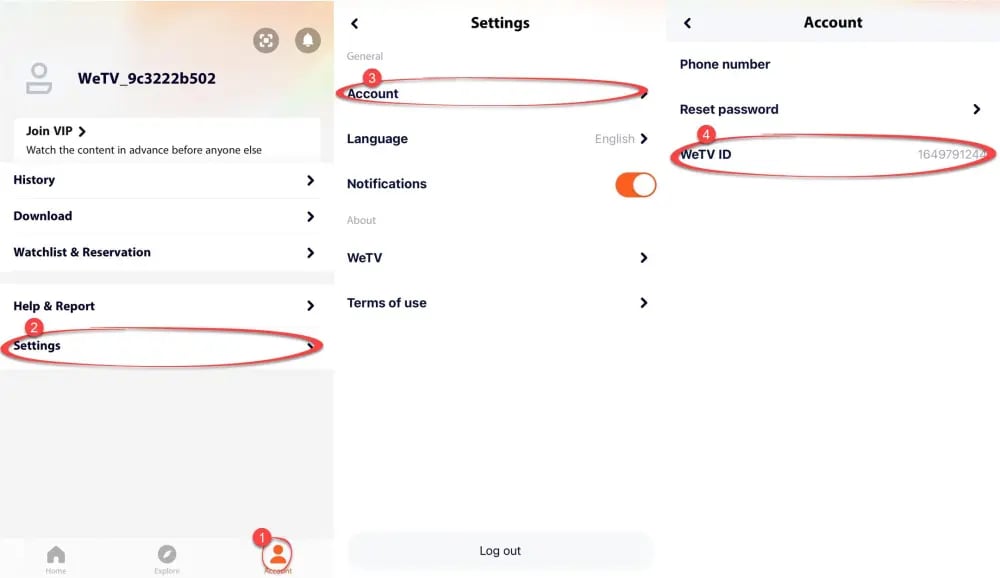
Tip: Ensure you copy the numeric Player ID shown under your avatar. Do not submit your login phone number, email address, or third-party nickname, as orders require the exact numeric ID to credit successfully.
How to Top Up WeTV Coins & VIP Membership on ArcTopup
Completing a WeTV top up on ArcTopup takes only a couple of minutes:
- Select Your Package: Pick your preferred WeTV Coins denomination or VIP Membership duration from the catalog.
- Enter Your Player ID: Paste your numeric WeTV Player ID into the required input field.
- Review Checkout Details: Verify your Player ID and review the live pricing directly on the checkout screen.
- Complete Payment: Select your preferred payment method and follow the on-screen instructions to finalize the order.
- Check Your Account: Open the WeTV application to confirm that your Coins balance or VIP status has updated.
Safe Direct Top-Up with Zero Password Sharing
Account safety is a top priority for digital purchases. ArcTopup credits your WeTV balance via direct profile ID routing, ensuring a completely secure transaction:
- No Passwords Requested: You never provide your WeTV password, Google login, Apple credentials, or SMS verification codes.
- No Device Sharing: Your account stays logged in only on your personal devices, eliminating the risk of session takeovers or profile tampering.
- Data Privacy: Your personal watching history, billing details, and watchlists remain private and accessible only by you.
Troubleshooting Balance Refresh and Account Syncing in 2026
If your WeTV Coins or VIP Membership do not appear immediately after completing checkout, use these troubleshooting steps:
- Force-Close and Relaunch: Completely close the WeTV app from your device background app switcher, then reopen it to force an account status sync.
- Verify Logged-In Profile: Check whether you are logged into the exact account corresponding to the Player ID entered during purchase.
- Clear App Cache: In the WeTV app, go to Account > Settings > Clear Cache, then restart the app.
- Check App Regional Version: Confirm that you are using the international WeTV application. Mainland China Tencent Video builds use a separate account system and cannot receive WeTV global credits.
- Contact ArcTopup Support: If your balance has not refreshed after checking these steps, contact ArcTopup customer support with your order number for prompt assistance.
Frequently Asked Questions About WeTV Top Up
What is the difference between WeTV Coins and WeTV VIP Membership?
WeTV VIP Membership is a subscription that gives you ad-free streaming, early access to new drama episodes, and high-definition viewing options for a set period. WeTV Coins are a virtual currency spent on specific on-demand items, such as Express episode packages, movie rentals, and comic chapters.
How do I find my WeTV Player ID for top-up?
Open the WeTV app, navigate to the Account tab in the bottom right, and look directly beneath your profile picture. Your Player ID is the number shown with a copy icon right next to it.
Can I use WeTV Coins to purchase a VIP subscription directly?
WeTV Coins are intended for on-demand media purchases such as Express releases and digital comics. To activate a VIP subscription, select and purchase a WeTV VIP Membership package directly on ArcTopup.
What is the WeTV Express package and how can I unlock it?
The WeTV Express package allows viewers to watch drama finale episodes before their regular broadcast date. When an Express event is active for a drama series, you can unlock these episodes in the WeTV app by spending your WeTV Coins.
Do I need to provide my WeTV account password to top up on ArcTopup?
No. ArcTopup processes orders using only your numeric WeTV Player ID. You do not need to share passwords, verification codes, or external account logins.
How long does it take for WeTV Coins or VIP status to activate after top-up?
Delivery is processed automatically once payment is confirmed. In most cases, your Coins balance or VIP tier updates almost instantly. Relaunching the WeTV app will show your updated subscription status and balance.
Current packages and prices
Current base prices exclude Tax. Tax, payment fees and coupon adjustments are shown at checkout.
| Package | Price |
|---|---|
| 99 WeTV Coins | USD 0.78 |
| 199 WeTV Coins | USD 1.56 |
| 299 WeTV Coins | USD 2.35 |
| 1 Month VIP Membership | USD 2.70 |
| 699 WeTV Coins | USD 6.28 |
| 3 Months VIP Membership | USD 7.86 |
| 1099 WeTV Coins | USD 9.43 |
| 1599 WeTV Coins | USD 12.58 |
| 12 Months VIP Membership | USD 28.32 |
| 4199 WeTV Coins | USD 31.33 |
| 9999 WeTV Coins | USD 78.70 |
| 29999 WeTV Coins | USD 236.14 |






























































