100 Diamonds

Total

USD 1.59

Skip to main content
Bigo Live Diamonds
Bigo Live Diamonds Top-Up

Bigo Live Diamonds

4.42· 501 reviews998sold
Recharge Information

Your first external Bigo Live Diamonds recharge takes less than two minutes

Is it really safe to purchase Bigo Live Diamonds outside the official app storefront? If you have never topped up your wallet through a third-party website before, feeling hesitant is completely normal. The good news is that recharging externally is straightforward, completely secure, and does not require sharing access to your streaming profile.

When you top up here, your order is sent straight to your app wallet using a simple numerical account number. Follow this step-by-step flow to complete your initial order with complete confidence:

  1. Select the Diamond bundle that best matches the gifts or badges you plan to send.
  2. Input your numeric BIGO ID in the dedicated checkout field.
  3. Choose your preferred payment option and review your details.
  4. Complete the transaction and open Bigo Live to check your updated balance.

Locating your numeric BIGO ID directly inside your profile tab

To ensure your transfer arrives without delay, you must provide your correct user identifier. Finding this number inside the application takes only a few seconds.

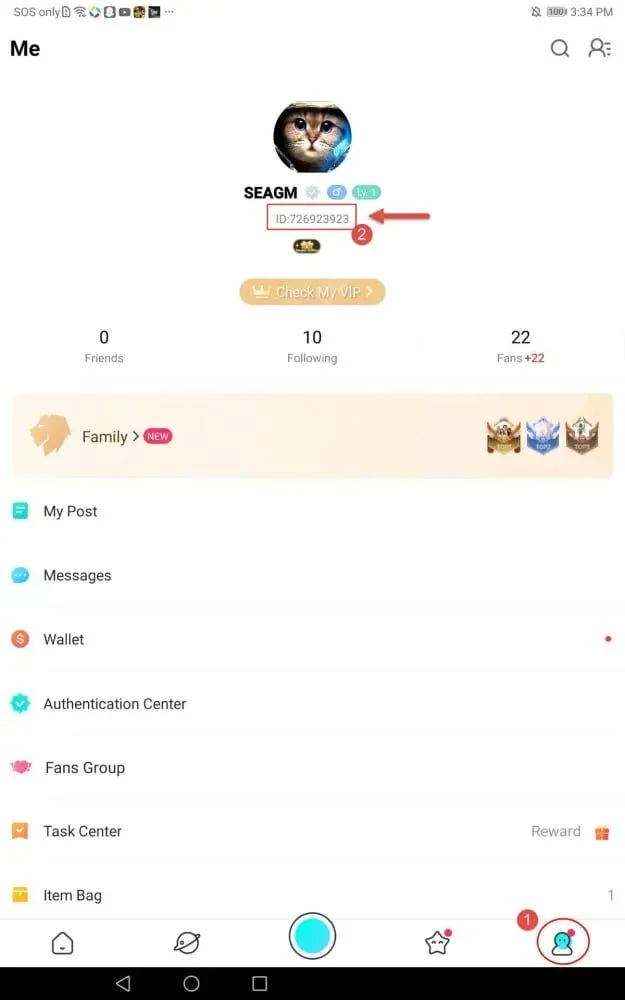
First, launch Bigo Live on your mobile device and tap the Me icon located in the bottom-right corner of the navigation bar. On your personal profile page, look directly underneath your display name. You will see the label ID followed by a series of 8 to 10 numbers. When entering this information during checkout, copy only the numerical digits and omit the ID prefix entirely.

Always double-check every digit before confirming payment. Because currency transfers are processed automatically to the account identifier you provide, delivered balance cannot be recalled or redirected to a different profile.

Choosing the right Diamond tier for your stream interactions

Whether you want to drop a quick reaction gift during a quiet stream or join a high-stakes broadcaster battle, having the right wallet balance keeps you part of the action. We carry a wide selection of top-up bundles to suit every level of viewer participation:

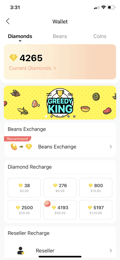
  • 100 Diamonds
  • 500 Diamonds
  • 1,000 Diamonds
  • 1,400 Diamonds
  • 2,000 Diamonds
  • 3,000 Diamonds
  • 4,000 Diamonds
  • 5,000 Diamonds
  • 6,000 Diamonds
  • 8,000 Diamonds
  • 10,000 Diamonds
  • 20,000 Diamonds
  • 30,000 Diamonds

Smooth order delivery directly to your account balance

Ordering through ARCTopup protects your privacy. We process recharges exclusively through public account identifiers, meaning we will never ask for your account password, security codes, or social media logins. Guest checkout is always available so you can place an order whenever you like without creating a separate storefront account.

We accept a broad selection of global and regional payment methods, including major credit cards like Visa and Mastercard, mobile options like Apple Pay and Google Pay, digital e-wallets, and popular cryptocurrencies. Most top-ups land in your Bigo Live wallet shortly after payment confirmation, typically taking between 1 to 3 minutes. During major live streaming events or peak server activity, fulfillment can occasionally take up to 10 minutes.

Common queries about topping up Bigo Live Diamonds

What are Bigo Live Diamonds used for?

Diamonds serve as the primary virtual currency within the Bigo Live ecosystem. Stream viewers use them to buy virtual gifts for content creators, unlock VIP status badges, access exclusive broadcast rooms, and participate in special community events during live shows.

Do I need to provide my Bigo Live password to complete an order?

No. You only need to share your numeric BIGO ID. ARCTopup will never request your app password, login credentials, or personal verification codes. If any service asks for your private login details to send you Diamonds, do not provide them.

How long should I wait if my Diamonds do not show up immediately?

Most orders fulfill within 1 to 3 minutes. If your balance does not update right away, give the app up to 10 minutes, then restart Bigo Live to refresh your wallet display. If the currency still does not appear, reach out to our support team with your order reference number so we can check the status of your transfer.

Can I send Diamonds to a friend or another broadcaster?

Yes. Because checkout only requires a public user number, you can enter any valid BIGO ID to send a Diamond top-up directly to a friend or broadcaster as a gift.

Recharge Process

Top-up Procedures

  1. 1

    Enter your Player ID

    Pick the amount you want and type in the ID the credit should reach. No password, and nothing to install.

  2. 2

    Pay the way you already pay

    Card, e-wallet, bank transfer or crypto. Checkout only shows the methods that work in your region.

  3. 3

    Credit lands in minutes

    Once the payment clears, the top-up goes straight to the ID you entered. The order page shows live status until it is done.

FAQs

Q1

How do I top up this product?

Pick the amount you want, enter the Player ID or UID the credit should go to, choose how you want to pay, and confirm. There is no app to install and no account to create first.

Q2

Do you need my game password?

No. A direct top-up only needs your public Player ID or UID, which is the same code you would share with a friend. We never ask for your password, and you should never give it to anyone who does.

Q3

How long does delivery take?

Most orders land in your account 1 to 2 minutes after the payment clears. If a publisher queue is busy it can stretch to a few minutes, and the order page shows the live status the whole time.

Q4

What happens if I enter the wrong ID?

We deliver exactly where you tell us to, and once value lands in someone else’s account neither we nor the publisher can pull it back. Check the ID before you pay. If the order has not been delivered yet, contact support immediately.

Q5

Which payment methods can I use?

Over 50 methods, including Visa, Mastercard and JCB cards, Apple Pay and Google Pay, regional e-wallets, direct bank transfers, and major cryptocurrencies. Checkout only shows what works in your region.

Q6

Can I get a refund?

Yes, if the order failed or was never delivered — there is no time window on that. Contact support and we refund to the original payment method; how fast the money arrives depends on your bank or wallet. Value that already reached an account cannot be reversed.

Q7

Is it safe to buy here?

Payments run over bank-level encryption and we buy through authorised supply channels, so nothing about the top-up puts your game account at risk. More than 500,000 customers have ordered through us.

Related Products

Customer Reviews

4.42
501 verified reviews

The service is very good.

SShuban Qadami

I use them all the time; they are very efficient.

Xxxtilll

Amazing! I've saved so much money using this service.

AAlijon

I loved the application.

BBryan Fluvio I Vallecer

I really love your prices.

MM. van Laarhoven

A truly trusted and legitimate service. The customer support is quick, and I will be using this for all my future in-app purchases.

AAr Za

Fast and professional. I haven't had any issues so far.

TTeleklincung

Great service, fast response, and quick delivery. A wonderful site.

PPhumudzo MUNYAI

Good service.

AAlfiva

They stopped offering the $2.99 and $4.99 packs. What a shame.

IIdayat Kamaldeen

Good price. Simple and efficient.

SSeyed Uguz

Efficient and fast. Efficient and kind.

FFaizul Osen

Payment Support

PMTossPM_WALLET_NAVERPAYPMKakaoPayPMGCASHAM_SBPPM_WALLET_PAOTANGPAYPM_TNGAW_BLIKPM_WALLET_PMPROMPTPAYAM_CARD_BYAM_CARD_KZAW_PIXPM_OXXOAM_TBANKAM_SBERPAYPM_FAMILYMARTPM_HILIFEPM_OKMARTPM_WALLET_GASHPM_KNETPMPAYMAYAPM_DANAPM_OVOPMPaycoPM_MADAPM_BAR_CODEPM_NAPSPM_BANK_TRANSFERPM_WALLET_LINEPAYAW_SPEIPM_WALLET_MERCADOPAGOPM_7_ELEVENPMGRABPAYPHPMGRABPAYMYPM_WALLET_SAMSUNGPAYPM_PAY_BOLETO_FASTPM_WALLET_JKOPAYAW_PAYUAW_boostPM_REALTIME_PAYMENTAW_dragonpayAW_duitnowPM_BNIAM_CARDPMMAYBANKPM_WALLET_TRUEMONEYPM_WALLET_SSGPAYPM_AlipayHKPM_WECHATAW_OCTOPUSBINANCE_PAYGATE_IO_PAYAW_TNGPM_BANK_TRANSFER_YUSHANBANKAW_FPSPM_APPLEPAYAW_APPLEPAYPM_GOOGLEPAYAW_GOOGLEPAYPM_CARDAW_CARDAW_TRUSTLYAW_PAYSAFECARDAW_MYBANKAW_multibancoVG_WALLETAW_EPS