Complete your first Poppo Live top-up step by step
How can you acquire Poppo Live Coins quickly without sharing your private account login? Ordering through an external storefront for the first time is straightforward and requires only public profile information. Coins serve as the primary digital currency inside the Poppo Live video platform, enabling users to send creative virtual gifts to hosts, join VIP tiers, and activate special interaction tools during live broadcasts.
To make your first recharge, follow this straightforward pathway:
- Review the available Coin packages on this page and click the tier you want.
- Enter your numeric User ID into the designated account field.
- Proceed to checkout and select your preferred payment method.
- Finalize the payment and check your updated wallet balance inside Poppo Live.
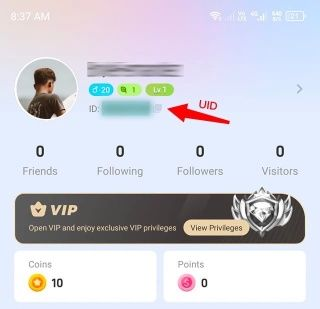
Locate your numeric User ID inside the app
Finding your account details takes only a few seconds within the mobile app interface. Your User ID ensures that the purchased bundle reaches your specific profile without delay.
Follow these simple steps to retrieve your details:
- Launch the Poppo Live app on your device.
- Tap the Profile icon located in the navigation bar at the bottom or top corner.
- Look directly beneath your avatar picture and username for the sequence labeled ID.
- Press and hold the number sequence to copy it directly to your clipboard.
- Paste the exact digits into the User ID box on our order page.
Double-checking this number before confirming your purchase prevents delivery delays or misdirected credit transfers.
Select the ideal Coin bundle for your activity
Whether you want to support a favorite streamer with small tokens or maintain a high VIP tier, choosing the right package depends on your planned usage. We offer a wide range of volume options:
- 10,000 Coins
- 21,000 Coins
- 50,000 Coins
- 100,000 Coins
- 150,000 Coins
- 210,000 Coins
- 270,000 Coins
- 300,000 Coins
- 420,000 Coins
- 460,000 Coins
- 490,000 Coins
- 560,000 Coins
- 700,000 Coins
- 920,000 Coins
- 1,250,000 Coins
- 1,780,000 Coins
- 2,730,000 Coins
- 3,640,000 Coins
Smaller packages work well for occasional tipping during streams, while larger tiers provide ample funds for high-tier virtual gifting and extended community features.
Pay securely and receive your balance
Completing your order on ARCTopup is built around buyer convenience and data privacy. You never need to supply your personal password or link your social media credentials to purchase Coins. Processing begins as soon as your payment clears through our secure gateway.
We accept a broad array of global payment solutions to suit your preferences:
- Major credit and debit cards, including Visa and Mastercard.
- Digital mobile wallets such as Apple Pay and Google Pay.
- Popular regional e-wallets and cryptocurrency payment channels.
Once your transaction is processed, the system dispatches the virtual currency directly to your Poppo Live account. Simply refresh the app or reopen your personal wallet tab to view the updated total.
Resolve common questions about your order
How do I check if my Coins arrived?
Open the Poppo Live mobile application, navigate to your personal profile tab, and select the wallet or balance menu. Your updated Coin tally will reflect the newly credited funds.
What happens if I enter an incorrect User ID?
Transfers are processed based strictly on the identifier you submit during checkout. Because balance transfers are executed automatically to the submitted profile, double-check every digit before placing your order to avoid sending funds to the wrong user.
Do I need to provide my account password to purchase?
No. You only need to enter your public numeric User ID. Your account login credentials remain entirely private and are never requested at any point during checkout.
What should I do if my Coin balance does not update immediately?
In rare instances, network congestion may cause a slight delay in wallet updates. Try closing the app completely and re-launching it. If your Coins do not appear after a short period, contact our customer support team with your order confirmation number for assistance.