Avoid typical recharge errors on SuperLive
SuperLive Coins serve as the primary digital currency across the SuperLive streaming platform, letting viewers send animated gifts, stand out in creator chats, and support broadcast hosts during live streams. Most digital top-up headaches happen when services demand your full account login credentials or fail to confirm your account ID, leading to locked accounts or misdirected balances. On ARCTopup, you skip all login prompts entirely by entering only your public UID, eliminating account security risks and ensuring your Coins arrive straight into your app balance without unnecessary hold-ups.
Follow these steps to complete your order
- Choose the Coin pack size that fits your spending plans from the options listed on this page.
- Enter your account UID into the required field exactly as shown in your app profile.
- Select your preferred payment option and complete the guest checkout process.
- Open the SuperLive app to check your updated Coin total and start tipping your favorite streamers.
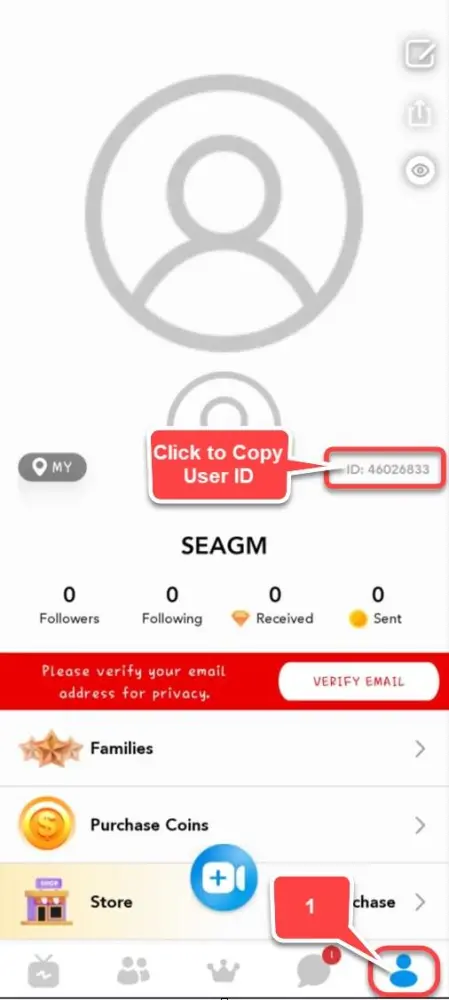
Locate your SuperLive account UID
- Launch the SuperLive app on your mobile device.
- Tap the Profile icon or the Me tab situated in the bottom-right corner of the main screen.

- Look directly beneath your profile avatar image and display name to find your 7 to 10-digit account UID.

- Copy or write down the exact sequence of numbers before placing your order.
Choose from available SuperLive Coin quantities
- 605 Coins
- 1,230 Coins
- 3,125 Coins
- 6,250 Coins
- 10,000 Coins
- 13,800 Coins
- 20,850 Coins
- 43,000 Coins
- 50,050 Coins
- 71,500 Coins
- 100,000 Coins
Review payment options and delivery expectations
Your order processes through a direct transfer system that sends Coins straight to your numeric profile identifier. You can complete your transaction using Visa, Mastercard, Apple Pay, Google Pay, major cryptocurrencies, or regional e-wallets. Once your transaction receives authorization, the balance transfers directly into your SuperLive account, allowing you to react immediately during active live streams without missing critical broadcasting moments.
Get quick answers before placing your SuperLive order
What happens if I make a typo in my UID?
Transactions sent to a numeric identifier are processed automatically. Because transfers to valid account numbers finish almost instantly, funds routed to an incorrect UID cannot be reversed or retrieved. Double-check every single digit in your profile before finalizing your purchase.
Do I need to share my SuperLive password?
No. The entire process requires only your public account UID. You never need to supply your password, social login details, or temporary security codes to receive your Coins.
Can I place an order without creating a site account?
Yes, guest checkout is fully supported. You can enter your UID, pick a payment method, and complete your purchase without creating a registered site profile.
How do I check if my Coins arrived?
Open the SuperLive app, tap your profile tab in the bottom-right corner, and check your digital wallet balance. The total updates as soon as the fulfillment process finishes.