
Soul Chill Crestal Top Up: In-App Voice Room Currency Explained
Soul Chill Crestal (frequently referred to as Crystals) serves as the primary premium virtual currency within the SoulChill social entertainment app. Users across global voice chat rooms use Crestal to actively participate in community events, support their favorite room hosts, and stand out in group interactions.
When you top up Soul Chill Crestal, you gain direct access to a wide variety of interactive features:
- Send Virtual Gifts: Send animated 2D and 3D gifts to room broadcasters and friends to boost room hype and show appreciation.
- Unlock Avatar Decorations: Purchase exclusive profile frames, entry banners, chat bubbles, and microphone badges.
- Level Up Your Profile: Spending Crestal increases your wealth level, displaying higher-tier badges next to your nickname across all public rooms.
- Participate in Room Games and Events: Join official community challenges, ranking battles, and interactive lucky draws inside voice lounges.
Recharging your balance ensures you never run out of gifts during live audio parties, PK battles, and community streams.
How to Top Up Soul Chill Crestal on ArcTopup
Adding Crestals to your SoulChill account takes only a few moments. Follow this simple walkthrough to complete your purchase:
- Select Your Crestal Package: Browse the available denominations on the ArcTopup product page and pick the amount of Crestal you wish to buy.
- Enter Your SoulChill UID: Input your numeric SoulChill User ID accurately in the provided field. ArcTopup only needs your UID to process delivery.
- Choose Your Payment Option: Select your preferred local or international payment method displayed on the checkout screen.
- Confirm and Pay: Review your order details and complete the secure payment.
- Receive Your Crestals: The top up is processed directly to your account. Open your SoulChill app to verify your updated balance.
Recharge Process Summary
| Order Step | Action Required | Information Needed |
|---|---|---|
| 1. Selection | Pick the desired Crestal package amount | Denomination choice |
| 2. Identification | Enter your SoulChill User ID | Numeric UID only |
| 3. Checkout | Select your preferred payment channel | Payment method |
| 4. Fulfillment | Complete checkout and check wallet balance | In-app verification |
How to Find Your SoulChill UID in the App
Your SoulChill UID is a unique numeric identifier linked directly to your account profile. Because the recharge system uses this number to credit your balance, you must copy it correctly.
Follow these steps to find your UID:
- Open the SoulChill application on your mobile device.
- Tap the Me icon located in the bottom-right corner of the main navigation bar.
- Look directly below your profile picture and nickname at the top of your profile screen.
- Locate the line labeled UID (a sequence of numbers).
- Tap the copy icon next to the number or write it down carefully before placing your order.
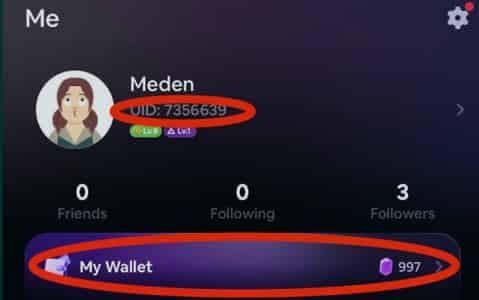
Always double-check the digits before submitting your order to prevent sending crystals to another user.
Password-Free UID Recharge and Account Safety
Account safety is a top priority when purchasing digital currencies online. The ArcTopup direct top-up system operates entirely on public player identification.
- No Passwords Required: You never have to share your SoulChill login password, email access, phone number, or SMS verification codes.
- Zero Account Sharing: Your profile stays securely logged in on your personal device at all times.
- Direct Server Delivery: Crestal packages are dispatched directly to the account tied to the submitted UID, eliminating any risk of credential interception.
Protect your personal data by never disclosing your login credentials to third-party services. With ArcTopup, all you need is your UID.
Why Choose ArcTopup for Soul Chill Crestal Recharge
ArcTopup provides a straightforward, user-friendly platform for international social app users looking to purchase in-app currencies smoothly.
- Transparent Pricing: Check current, live product prices directly on the checkout screen without hidden platform fees.
- Global and Local Checkout Methods: Pay with confidence using familiar local and international checkout solutions suited to your region.
- Direct Delivery: Orders are processed automatically to deliver your Crestal balance as quickly as possible.
- Dedicated Customer Support: If you ever have a question about an order status, the ArcTopup customer service team is available to assist you with order tracking.
- Multi-Language Interface: Enjoy a clear purchasing experience tailored for international users.
Checking Your Balance and Troubleshooting Delivery Issues
Once your order status marks as completed on ArcTopup, follow these steps to verify your currency balance and resolve common issues.
How to Check Your In-App Balance
- Open the SoulChill app.
- Go to the Me profile section.
- Tap on Wallet or My Crystals / Crestal.
- View your updated total balance.
Troubleshooting Delivery Delays
If your Crestals do not appear immediately after completing payment:
- Restart the App: Close the SoulChill app completely from your background applications and reopen it to force a server data refresh.
- Check Order Status: Log into your ArcTopup account and check whether your transaction shows as completed or pending payment confirmation.
- Verify the UID: Review your receipt email to confirm that the UID entered matches your actual in-app account number.
- Contact Customer Support: If your payment went through but your balance has not updated after a short period, reach out to ArcTopup support with your order number and UID for quick assistance.
Frequently Asked Questions
What is Soul Chill Crestal and what can I spend it on?
Soul Chill Crestal is the official premium currency used in the SoulChill app. You can spend it to send virtual gifts to room hosts, purchase premium avatar frames, unlock dynamic entrance effects, increase your profile wealth ranking, and participate in special voice room activities.
Where can I find my SoulChill UID for top up?
Open the SoulChill app, tap the Me tab in the bottom-right corner, and locate your numeric UID displayed right below your avatar and nickname. Tap the copy icon next to the number to copy it to your clipboard.
Do I need to provide my SoulChill password or account login?
No. ArcTopup never asks for your password, phone number, or login credentials. You only need to provide your SoulChill UID to complete the recharge.
How long does it take for Soul Chill Crestal to be credited to my account?
Delivery occurs shortly after your payment is successfully verified. In most cases, the Crestals are credited directly to your in-app wallet within moments.
Can I top up Soul Chill Crestal for a friend using their UID?
Yes. Because the top-up process only requires a UID, you can easily surprise a friend by entering their SoulChill UID at checkout. The Crestals will be delivered straight to their account balance.
What should I do if I entered an incorrect UID during top up?
Top-up transactions are processed automatically to the UID provided at checkout. Because digital currency orders are credited instantly, errors cannot be reversed once processed on the server. Always verify that your UID digits match your profile exactly before finalizing payment.
Current packages and prices
Current base prices exclude Tax. Tax, payment fees and coupon adjustments are shown at checkout.
| Package | Price |
|---|---|
| Soul Chill Crestal*2160 | USD 3.42 |
| Soul Chill Crestal*4450 | USD 7.04 |
| Soul Chill Crestal*13700 | USD 21.67 |
| Soul Chill Crestal*23500 | USD 37.17 |
| Soul Chill Crestal*48300 | USD 76.40 |
































































