Farlight 84 Diamonds Top Up: Direct In-Game Currency Delivery
Farlight 84 Diamonds serve as the premium currency used across the hero-centric battle royale. Whether you compete on mobile or PC, Diamonds let you purchase exclusive cosmetics, hero releases, high-tier weapon skins, and seasonal passes. ArcTopup provides a direct Farlight 84 Diamonds top up service that credits your balance straight to your in-game profile using only your User ID (UID).
With direct UID delivery, you enjoy a smooth purchasing experience without sharing account passwords or third-party logins. Choose your denomination, provide your player ID, and prepare your loadout for your next match.
What Are Farlight 84 Diamonds and In-Game Uses
Diamonds give players full access to the premium store in Farlight 84. Unlike regular gold earned through playing matches, Diamonds are strictly required for rare seasonal content, premium event draws, and advanced customization items.
Primary uses for Farlight 84 Diamonds include:
- Battle Pass Activation: Purchase the seasonal Battle Pass track to claim exclusive character outfits, weapon wraps, emotes, and banner frames.
- Hero Acquisition: Unlock the newest playable heroes immediately without waiting to grind match currency.
- Lottery and Lucky Wheel Events: Spend Diamonds on limited-time event spins to score legendary character skins and evolving weapon cosmetics.
- Direct Store Cosmetics: Buy character skins, vehicle camos, jetpack trails, death boxes, and profile cards directly from the rotating daily shop.
- Name Change and Profile Items: Update your player display name or obtain premium avatars and borders to personalize your identity on the leaderboards.
Farlight 84 Battle Pass, Hero Skins, and Weapon Cosmetics in 2026
The 2026 seasonal updates in Farlight 84 bring expanded reward tracks, new tactical heroes, and visual overhauls for weaponry. Maintaining a ready balance of Diamonds ensures you never miss time-limited event banners or seasonal rank resets.
| In-Game Item / Feature | Diamond Application | Benefit to Player |
|---|---|---|
| Seasonal Battle Pass | Standard or Premium Bundle unlock | Unlocks 80+ tiers of progressive rewards and rebate currency |
| Hero Store | Instant hero unlock | Access new heroes on launch day for competitive ranked play |
| Lucky Roulette / Event Spins | Multi-spin Diamond pulls | Chance to obtain legendary character models and mythic gun skins |
| Weapon Reskins | Direct cosmetic purchase | Upgraded visual effects, muzzle flashes, and reload animations |
| Customization Bundles | Pack purchases | Bundled vehicle skins, jetpack trails, and exclusive kill broadcasts |
How to Find Your Farlight 84 User ID (UID)
Your User ID is a unique numeric identifier linked directly to your account. ArcTopup uses this UID to route your Diamond purchase to your profile without accessing your login details.
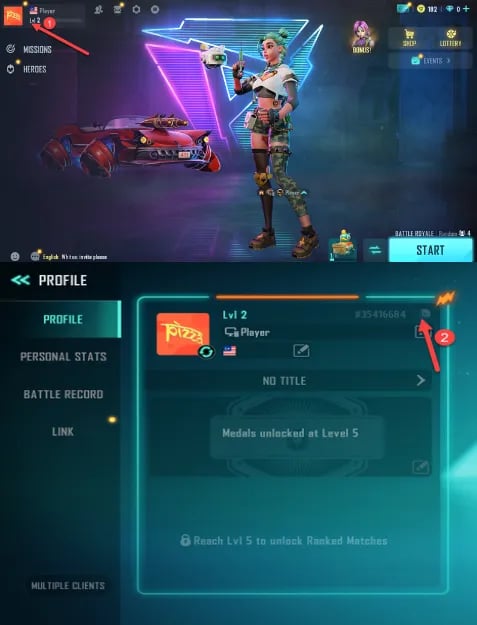
Follow these simple steps inside the game client to locate and copy your UID:
- Open Farlight 84 on your mobile device or PC client.
- Log into your active gaming profile.
- Tap or click on your Avatar / Profile icon in the top-left corner of the main lobby screen.
- Stay on the Overview tab of your profile.
- Locate the numeric string labeled ID / UID displayed below your player name.
- Tap the small Copy icon next to the number to copy your UID directly to your clipboard.
How to Top Up Farlight 84 Diamonds on ArcTopup
Ordering your Farlight 84 Diamonds recharge takes only a few moments. ArcTopup provides a clear checkout interface where you select your Diamond denomination and submit your order:
- Select Your Diamond Pack: Browse the available Diamond denominations on the ArcTopup product catalog and choose the quantity you need.
- Enter Your User ID (UID): Paste your copied Farlight 84 UID into the designated player input box. Double-check the digits to ensure accurate delivery.
- Review Order Details: The checkout page displays the exact order total and available regional payment methods upfront.
- Complete Payment: Select your preferred payment option and finalize the transaction through our secure payment gateway.
- Receive Diamonds: Once your payment completes, the Diamonds process directly to your Farlight 84 account balance.
UID Top-Up Security: Why No Password Is Required
Account security is a critical priority when purchasing digital currencies. The UID top up system on ArcTopup operates on direct game-server routing.
- Zero Login Information Required: You never need to enter passwords, Google account credentials, Apple IDs, or Steam login details.
- No Account Takeover Risk: Because third parties never access your login credentials, your account remains secure on your personal device at all times.
- Safe for Friends and Teammates: Since only a UID is needed, you can safely send Diamonds to clan mates, friends, or family members by simply entering their numeric ID at checkout.
- Encrypted Checkout: ArcTopup processes every transaction through secure payment channels, protecting your financial details during checkout.
Global Server Availability and Delivery Timelines
Farlight 84 operates on a unified global infrastructure, enabling cross-play between mobile and PC players worldwide. Diamond top-ups on ArcTopup support all standard global server regions.
- Cross-Platform Compatibility: Whether you play primarily on Android, iOS, or Steam PC, Diamonds recharged using your UID credit straight to your account balance across all linked devices.
- Immediate Processing: Digital order delivery starts immediately after your payment verification clears.
- Live Pricing: Up-to-date pricing and available denominations are reflected directly on the live ArcTopup checkout page.
Troubleshooting Delayed Diamonds and Order Support
In the majority of transactions, Diamonds arrive within moments of completing payment. If your in-game balance has not updated immediately, use the following troubleshooting checklist:
- Restart the Game Client: Completely close Farlight 84 on your device and launch it again. This forces the client to sync with the server database and refresh your wallet balance.
- Check In-Game Mail: Certain bonus Diamonds or promotional pack items are delivered directly to your in-game mailbox rather than auto-credited to the wallet counter. Check the Mail tab in the main lobby.
- Verify Your UID Submission: Check your ArcTopup order confirmation receipt to verify that the submitted UID matches your profile digits exactly.
- Check Payment Status: Ensure your payment provider completed the deduction and you received an order confirmation receipt.
- Contact ArcTopup Support: If your balance does not update after restarting the game, reach out to ArcTopup customer support with your Order ID and UID. Our support team is available to verify the transaction status and assist you.
Frequently Asked Questions
What information is needed to top up Farlight 84 Diamonds on ArcTopup?
You only need your Farlight 84 User ID (UID). You do not need to provide passwords, email accounts, or phone verification codes.
Where can I find my Farlight 84 User ID (UID)?
Open Farlight 84, click your profile avatar in the upper-left corner of the lobby, and look at the Overview tab. Your UID is the numeric code located directly beneath your player nickname. Click the copy icon to copy it.
Do I need to share my Farlight 84 password or social login credentials?
No. ArcTopup never asks for your Farlight 84 password, Steam credentials, or social media logins. Recharging requires only your public UID.
How quickly will the Diamonds appear in my Farlight 84 account?
Diamonds are dispatched directly to your account immediately after payment confirmation. In most cases, the balance updates right away. Simply restart the game if you are currently logged into an active match.
Can I top up Farlight 84 Diamonds for a friend using their UID?
Yes. You can buy Farlight 84 Diamonds for any player by entering their UID into the input field at checkout. Once payment is complete, the Diamonds are delivered directly to their profile.
What should I do if my purchased Diamonds do not appear after payment?
First, close and restart your game client to refresh server data. Next, check your in-game mailbox for delivered rewards. If the Diamonds still do not reflect, verify the UID on your order invoice and contact ArcTopup customer support with your Order ID for prompt assistance.
Current packages and prices
Current base prices exclude Tax. Tax, payment fees and coupon adjustments are shown at checkout.
| Package | Price |
|---|---|
| 80 Diamonds | USD 0.66 |
| 100 Diamonds | USD 0.80 |
| 165 Diamonds | USD 1.22 |
| 220 Diamonds | USD 1.83 |
| 330 Diamonds | USD 2.38 |
| 880 Diamonds | USD 6.31 |
| 2,240 Diamonds | USD 16.38 |
| 4,700 Diamonds | USD 32.79 |