Paid for currency and saw an empty balance? Learn how to fix Farlight 84 diamonds not received after payment issues, check server lag, and file tickets.
You tap purchase, confirm the bank prompt, and wait. The funds leave your account, but your in-game wallet stays at zero.
Diamonds fund everything from hero unlocks to Battle Passes and weapon skins. When delivery stalls, the issue usually boils down to three things: a temporary server bottleneck, an uncaptured payment authorization hold, or a typo in your User ID (UID).
Here is how to isolate the problem across platforms, verify billing records, and contact support to get missing currency credited.
Why Your Farlight 84 Top-Up Is Delayed
Direct digital currency top-ups rely on an automated three-way handshake between your payment provider, the merchant platform, and the game's authentication servers:
- Payment Processor Settlement: Your bank or digital wallet authorizes the charge and generates a transaction reference ID.
- Merchant Billing Gateway: The store reconciles the payment and signals the server API with your player User ID (UID).
- Game Account Database: The central game server credits the specific numerical balance and pushes an update notification to your active client.
During server maintenance or traffic surges around major patch releases, delivery signals can queue up. A farlight 84 top up pending status usually clears on its own once the queue catches up. Wait 15 to 30 minutes, then restart your game client to force a fresh server check before submitting tickets.

80 Diamonds
 80 DiamondsUSD 0.67Buy Now
100 Diamonds
100 DiamondsUSD 0.80Buy Now165 Diamonds
165 DiamondsUSD 1.24Buy Now220 Diamonds
220 DiamondsUSD 1.83Buy Now330 Diamonds
330 DiamondsUSD 2.39Buy Now880 Diamonds
880 DiamondsUSD 6.37Buy Now2,240 Diamonds
2,240 DiamondsUSD 16.54Buy Now4,700 Diamonds
4,700 DiamondsUSD 33.10Buy Now
Immediate Verification: Did the Money Actually Clear?
Before filing a support claim, confirm whether your purchase was captured or merely held as a pending authorization. A common scenario is a farlight 84 diamonds transaction failed but charged alert, where funds leave your bank while the storefront marks the transaction as incomplete.
To check farlight 84 payment order history, inspect the receipt generated by your billing provider rather than your banking app balance alone:
- Android (Google Play): Open Google Play, tap your profile icon, select Payments & subscriptions, and open Budget & history. Check whether the order status shows as "Completed" or "Pending".
- iOS (Apple App Store): Open Settings, tap your name, select Media & Purchases, and view Purchase History. Check the invoice status and order number.
- PC (Steam / Web): Check your Steam purchase history under Account Details or your web order confirmation email for an official invoice code.
If your bank shows a deduction but the storefront marks the order as failed or void, your bank placed a temporary authorization hold. These funds reverse automatically within one to three business days without developer intervention.
Cross-Platform Sync and Refreshing Game Data
Account data in Farlight 84 persists across Android, iOS, and Steam PC on the same linked account. Currency bought on mobile syncs to your PC client once the server updates.
If the client cache fails to render new balances, force a profile refresh with these steps:
- Close the game completely. Do not leave it running in the background.
- Clear your mobile app cache through device settings (avoid clearing user data or uninstalling unless your credentials are bound).
- Relaunch the game and log in.
- Enter a practice match or open the hero menu to trigger a state update.
If your balance stays unchanged across all linked devices after 30 minutes, your payment requires manual verification from support.
Submitting an In-Game Support Ticket Step-by-Step
When standard wait times expire, contact farlight 84 customer service missing diamonds teams through the built-in ticketing pipeline. The in-game client includes a support chat system to resolve billing and profile discrepancies.
Follow this path to open a ticket:
- Launch the game and enter the main lobby.
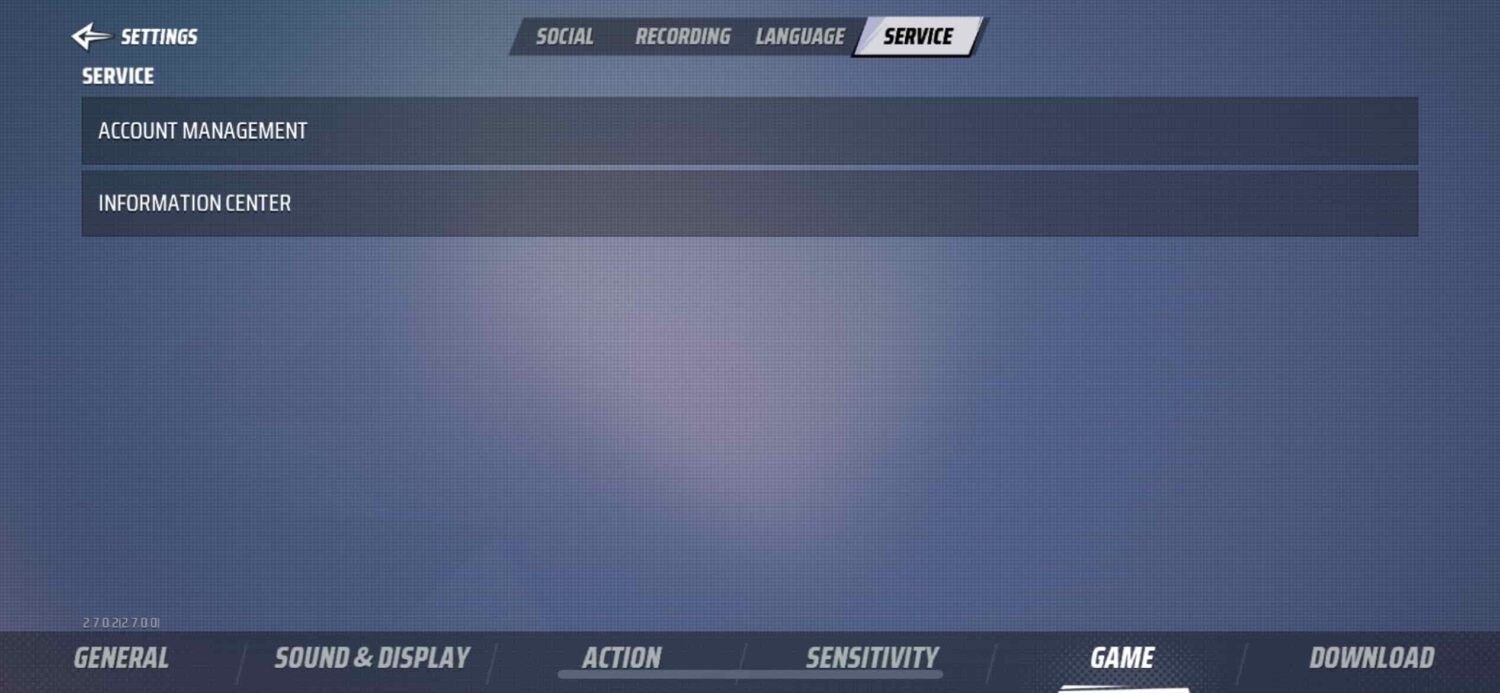
- Tap the circular support icon next to the Settings gear in the upper corner.
- Tap Game, then select Service.
- Choose Account Management to enter the automated routing system.
- Select the missing payment topic to start live chat or escalate to an agent.
Lobby Screen -> Circular Support Icon -> Game -> Service -> Account Management -> Live Chat / Support
Player support operates between 08:00 and 24:00 GMT. You can submit your ticket at any hour; agents investigate claims during this operational window.
Attach a full, uncropped screenshot of your purchase receipt showing the order ID, transaction date, currency amount, and total price paid. Keep your description direct: provide your numerical UID, purchase date, and the exact Diamond pack selected.
If in-game support is unavailable due to maintenance, contact the developers through the verified @Farlight84 Twitter handle, the official Facebook page, or the community Discord server.
Platform-Specific Refund and Dispute Rules
Each storefront enforces distinct guidelines for digital currency disputes:
- Google Play: Processes Android billing disputes through automated purchase support tools. If an item fails to arrive and support cannot credit it, file a request through your Google Play purchase history.
- Apple App Store: Directs users to
reportaproblem.apple.com. Apple reviews unreceived digital items and issues decisions within 24 to 48 hours. - Epic Games Store: Limits refunds on virtual goods. Base PC/Mac games can be refunded within 14 days and under 2 hours of playtime, but virtual currencies and in-game consumables are non-refundable. Missing Epic balances must be credited by developer support.
- Amazon Appstore: Uses a closed billing database. Game developers cannot access Amazon transaction records directly, so failed purchases on Amazon builds require contacting Amazon customer care.
When buying Farlight 84 Diamonds through direct top-up routes, server crediting pushes currency straight to your numerical UID without storefront intermediary holds.
Official Currency Bundles and Delivery Expectations
Standard store tiers, base prices, and product options include:
| Pack Tier | Value / Price Range | Description & Notes |
|---|---|---|
| $0.99 Diamond Pack | $0.99 | Standard micro-tier currency pack |
| $4.99 Diamond Pack | $4.99 | Basic tier diamond purchase |
| $9.99 Diamond Pack | $9.99 | Mid-tier diamond pack |
| $19.99 Diamond Pack | $19.99 | Standard competitive top-up tier |
| $29.99 Diamond Pack | $29.99 | High-tier currency bundle |
| $49.99 Diamond Pack | $49.99 | Premium bulk diamond tier |
| Weekly Card Subscription | $1.99 - $2.49 | Recurring 7-day reward pass |
| Monthly Card Subscription | $9.99 - $11.99 | Recurring 30-day reward pass |
Note: Subscription card pricing varies slightly between regions and platform storefronts, with Weekly Cards listed between $1.99 and $2.49, and Monthly Cards between $9.99 and $11.99.
Matching your bank charge to the specific pack tier confirms whether you bought an individual bundle or an automatically renewing subscription card.

Diagnosing Transaction Statuses and Failure Modes
Identify the transaction state before choosing a troubleshooting path:
| Failure Scenario | Primary Root Cause | Recommended Action |
|---|---|---|
| Bank charged, store shows "Pending" | Payment gateway clearing delay | Wait 30 minutes; do not re-purchase to avoid double charges. |
| Bank charged, store shows "Failed" | Authorization hold / Gateway timeout | Wait for automatic bank reversal within 1-3 business days. |
| Store shows "Completed", balance 0 | In-game sync lag or client display error | Restart game; clear app cache; verify cross-platform login. |
| Order successful, wrong account credited | Incorrect numerical UID entered | Contact support with receipt; UID misdelivery is usually irreversible. |
| Support ticket submitted, no response | Operating hours offline | Wait for GMT operational window (08:00 to 24:00 GMT). |
Checking this matrix prevents chargeback errors on pending authorizations that are already clearing.
Platform Support Channels and Resolution Windows
Different billing channels operate under specific dispute windows and authorities:
| Support Channel | Operational / Review Window | Primary Authority | Refund Policy on Currency |
|---|---|---|---|
| In-Game Support Live Chat | 08:00 - 24:00 GMT | Game Developer | Credits missing items to UID directly |
| Apple App Store | 24 - 48 Hours | Apple Customer Care | Evaluated per customer account history |
| Google Play Store | 1 - 3 Business Days | Google Billing Support | Submitted via automated dispute tools |
| Epic Games Store | Ticket Queue | Epic Games | Virtual currency excluded from standard refunds |
| Direct UID Web Top-Up | Real-time / Varies by gateway | Merchant / Gateway API | Non-refundable once delivered to target UID |
Note: Virtual currencies are generally treated as final-sale consumables across all platforms once delivered to an active game database.
For purchases inside an app store, contact in-game support first to credit the items before escalating to store billing.
UID Verification: Avoiding the Most Common Top-Up Mistake
Typing an incorrect User ID (UID) causes the vast majority of missing top-ups.
Direct web top-ups rely entirely on the numerical UID to route Diamonds to your profile. The system locates the matching account on the server and transfers the balance automatically without asking for login credentials.
If you mistype a single digit, the balance goes to whichever player owns that ID. Once processed, server transactions are permanent. Third-party top-up providers and game support cannot retract virtual currency from an unintended account to credit yours.
To find your UID accurately:
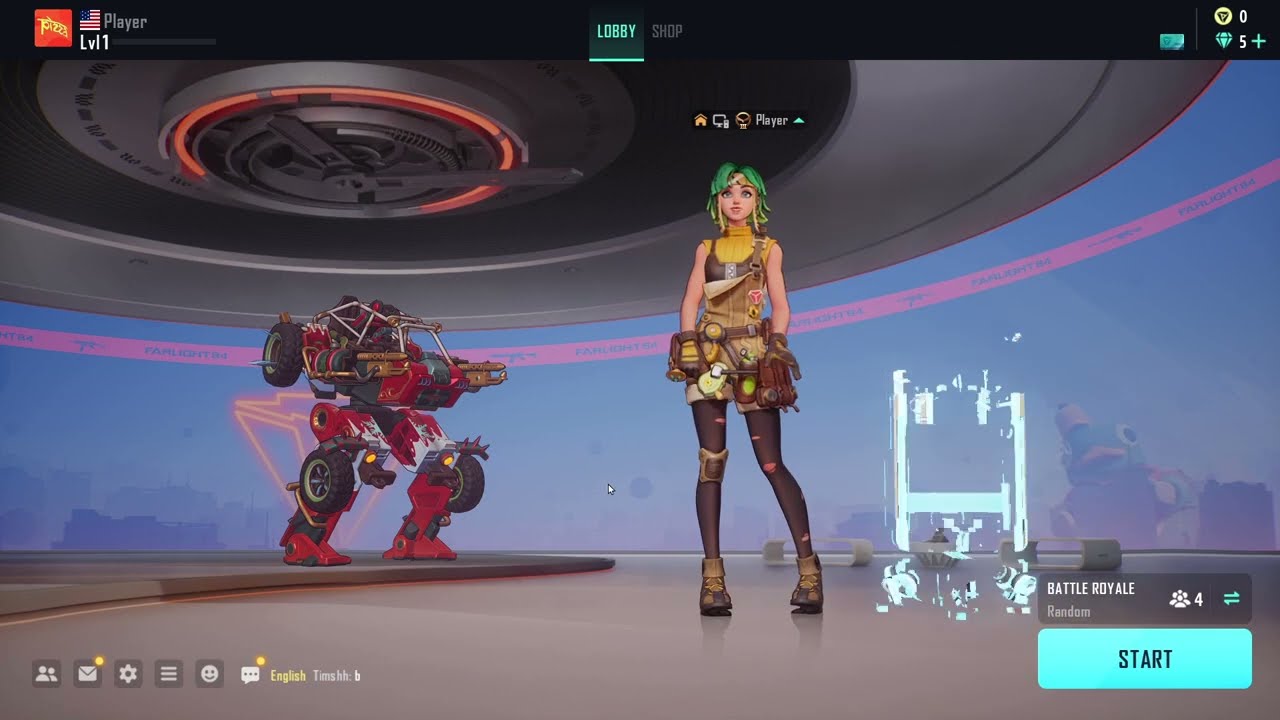
- Open Farlight 84 and tap your profile avatar in the top left corner of the lobby.
- Look directly below your character nickname for the numerical ID string.
- Tap the copy icon next to the number instead of writing it down manually.
- Paste the string into the top-up order field.
Verifying this number before checkout eliminates accidental misdelivery.
Spender Strategies: Managing Diamond Purchases Safely
Match your purchasing approach to your budget to protect your balance and prevent transaction issues.
F2P & Budget Players
If you spend occasionally, choose the $0.99 Diamond Pack or the Weekly Card ($1.99 - $2.49) for steady login rewards. Avoid rapid, repeated micro-transactions, as banking fraud filters often flag multiple consecutive $0.99 charges and freeze delivery.
Mid-Tier Spenders
Players picking up Battle Passes and seasonal cosmetics get the most value from the Monthly Card ($9.99 - $11.99) or the $19.99 Diamond Pack. When you buy Farlight 84 Diamonds for limited events, order at least 24 hours in advance so unexpected gateway lags do not cause you to miss shop deadlines.
Heavy Spenders & Collectors
For high-tier cosmetic crates and full skin sets, use the $29.99 and $49.99 Diamond Packs. Execute large transactions over a stable connection on your primary device, and save all digital invoices until the balance appears in-game.
Account Security: Legitimate UID Recharge vs Scam Red Flags
Farlight 84 automated security systems issue permanent bans and zero out balances if account sharing or payment fraud is detected.
Protect your profile by recognizing the difference between safe billing and phishing attempts:
- Legitimate Top-Up Services Require: Numerical User ID (UID) and server region only. Legitimate Farlight 84 Diamond packs credit accounts via server APIs without requesting private login details.
- Scams and Phishing Sites Demand: Account passwords, Facebook/Google login credentials, email verification codes, or two-factor authentication (2FA) SMS tokens.
Never share login details or OTP codes with third parties offering cheap or free currency. If an external site asks for a password to deliver currency, exit the page immediately.
FAQ
Why have my Farlight 84 Diamonds not arrived after payment?
Delivery delays typically result from payment gateway processing lags, server queues during peak hours, or an incorrect numerical User ID (UID). Restart your client and wait 30 minutes before checking your bank statement.
How do I contact Farlight 84 customer support for missing Diamonds?
Open the lobby, tap the circular icon next to Settings, go to Game > Service > Account Management, and select Live Chat. Have your full receipt screenshot ready to attach.
What are the operational hours for Farlight 84 customer service?
The in-game support team handles tickets daily between 08:00 and 24:00 GMT. Tickets submitted outside this window are reviewed once the next shift starts.
Can I get a refund if my Diamonds never arrived on mobile?
Refund eligibility depends on Google Play or Apple App Store billing rules, as developers do not process direct app store chargebacks. File a ticket through your platform's purchase history if in-game support cannot credit the items.
What happens if I entered the wrong UID during a top-up?
Diamonds credit permanently to the submitted numerical ID. Third-party platforms and game developers cannot reverse completed database deliveries or transfer balances between accounts.
Are virtual currencies refundable through the Epic Games Store?
Virtual currency and consumables bought via Epic checkout are non-refundable under store policy. You must contact in-game support with proof of purchase to credit missing items rather than requesting an automated store refund.
Resolution Timeline: What to Do in the First 24 Hours
Do not panic or place duplicate orders if currency fails to arrive immediately.
Spend the first 30 minutes verifying the basics: restart your client, clear the app cache, and confirm whether your bank transaction posted or remains pending.
If two hours pass with no balance update, capture an uncropped screenshot of your store receipt showing the order number, date, and pack tier. Open the in-game support menu under Game > Service > Account Management and submit a live chat ticket. If submitting outside 08:00 to 24:00 GMT, allow agents until the next operational window to review transaction logs.
Following this sequence resolves delivery errors cleanly while keeping your account and payment records secure.






Comments