Wondering where your redeemed Roblox funds vanished? Here is where to find Roblox gift card balance on mobile web browsers and account settings screens.
Locate Your Roblox Gift Card Balance on Mobile in 3 Steps
Redeeming a gift card on a phone does not update the mobile app's in-game wallet. The standard Roblox app simply does not display credit balances.
To view your actual balance on any iOS or Android device:
- Open your mobile web browser (Safari or Chrome) and go to
roblox.com/redeem. - Log into the player account where the code was redeemed.
- Look directly below the dark Redeem button. Your dollar balance appears on the line labeled Available Credit.
Alternatively, tap the gear icon in the mobile browser interface, select Settings, and tap the Billing tab. Your total balance sits directly beside the Roblox Credit label.
Redeeming a standard currency card adds money as Roblox Credit rather than instant Robux. Because the mobile app does not interface with this cash pool, the top-bar counter will never display it. You must check it through a web browser.
Why the Native Mobile App Hides Your Account Credit Balance
App store commerce rules explain this missing balance. Standard app stores require mobile purchases to route through their native billing systems so they can collect platform fees. Because web-based Roblox Credit bypasses those platform payment channels, the mobile app strips out both the redemption field and the credit readout.
One hardware exception exists: the specific build distributed on Samsung Galaxy devices features a dedicated Redeem tile on the More screen (the three dots icon). On standard iOS and Android devices, the native app remains completely blind to account credit.
Below is a breakdown of where credit balances can and cannot be accessed across mobile environments.
| Mobile Interface Platform | Credit Balance Visibility | Gift Card Redemption Support | Primary Platform Note |
|---|---|---|---|
| Standard Mobile App (iOS & Android) | Hidden / Unavailable | Not Supported | Routes billing through device app store; cannot view or spend web credit |
| Samsung Galaxy App Build | Visible on More Page | Supported via Redeem Tile | The only native mobile build featuring a built-in redemption tile |
Mobile Web Browser (roblox.com/redeem) | Fully Visible | Supported via Web Form | Displays Available Credit directly below the primary Redeem action button |
Mobile Web Settings (roblox.com/my/account) | Visible in Billing Tab | Redirects to Redeem Page | Shows precise dollar credit alongside account membership statuses |
Checking your balance requires switching from the app to a browser unless you are on a specific Samsung build that retains the native tile.
If you attempt to buy avatar items or game passes inside the standard mobile app, the checkout prompt routes straight to Apple or Google billing. It will never pull from unspent web credit until you convert those funds first.
How to Check Roblox Credit on Mobile Browser Step by Step
Checking funds via mobile web takes less than a minute. Avoid third-party balance checkers or search engine pop-ups. Roblox does not offer a balance inquiry tool for unredeemed cards, making external PIN verification sites unauthorized phishing risks.
Follow this browser workflow to check your redeemed balance:
Step 1: Launch Safari or Chrome
Open your preferred mobile browser. Use a standard tab rather than private browsing if you want the device to save your login session.
Step 2: Navigate to the Official Redeem Endpoint
Type roblox.com/redeem directly into the address bar. Sign into the account that holds the redeemed funds.
Step 3: Check the Available Credit Line
Look below the code entry box. Directly beneath the dark Redeem button, the page displays:
Available Credit: $XX.XX
This field is also where you input new codes. When you buy a verified Roblox gift card and submit the digital code, the Available Credit line updates immediately.
If multiple family members share a device, verify the username in the upper-right corner before submitting a new PIN. Credit locks permanently to whichever profile redeems it.
Roblox Billing Settings Credit Balance Location and Verification
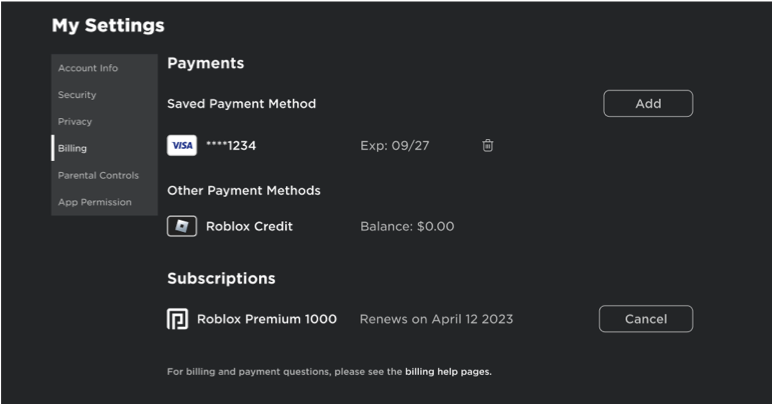
Account settings provide an alternate balance check on mobile web. This view is useful when reviewing your cash balance alongside active subscriptions or payment methods.
To view your balance in account settings on mobile:
- Open your mobile browser and log in at
roblox.com. - Tap the Gear icon in the upper-right corner.
- Tap Settings to open
roblox.com/my/account. - Select Billing from the menu.
- The top section displays your Roblox Credit balance in your local currency.
Here is how the mobile web settings layout organizes financial and profile information:
| Account Settings Section | Path / Menu Selection | Visible Financial Details | Core Functionality on Mobile Browser |
|---|---|---|---|
| Account Info | Settings > Account Info | Username, display name, verified email/phone | Update credentials and basic profile parameters |
| Security | Settings > Security | 2-step verification, authenticator apps | Protect account balance from unauthorized access |
| Privacy | Settings > Privacy | Communication filters, trading permissions | Control who can interact with or message your profile |
| Billing | Settings > Billing | Roblox Credit total, payment cards on file | View exact cash balance and active subscription status |
| Notifications | Settings > Notifications | Email alerts, desktop push toggles | Manage account activity alerts and promotional notices |
The Billing screen is the official administrative record of your available cash credit, separate from your in-game token balance.
If your Billing tab displays $0.00 after a successful redemption, check whether the card delivered direct Robux rather than credit.
Converting Roblox Credit to Robux on a Mobile Device
Roblox Credit represents real-world currency. You must convert it into virtual tokens or Premium tiers on the web before using it in games.
You have two conversion options on a mobile browser:
Method 1: The Quick-Convert Button
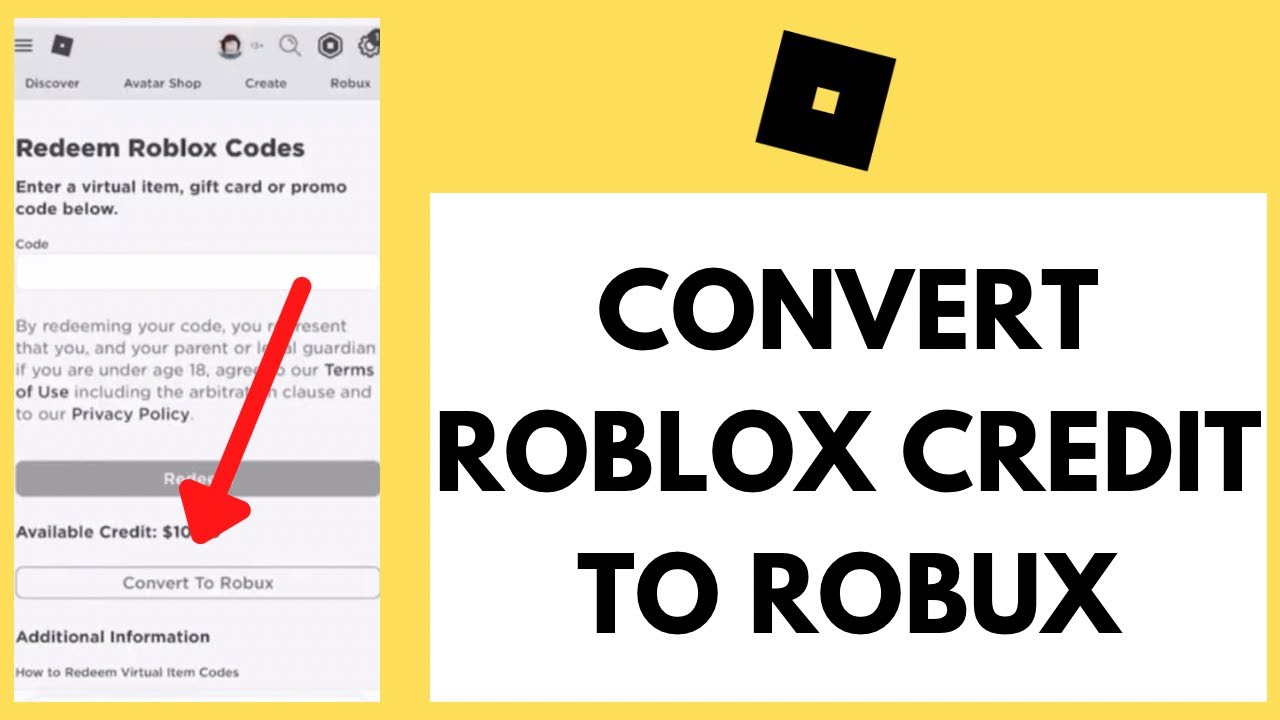
On roblox.com/redeem, look below your Available Credit line. With an active balance, a button labeled Convert Credit to Robux appears.
Tapping this converts your entire remaining cash balance into Robux at the standard exchange rate. This option helps clear out uneven balances—like $2.43—that fall below standard pack prices.
Method 2: Purchasing Preset Packs or Premium
To select a specific package or recurring membership:
- Log into your mobile browser and go to
roblox.com/upgrades/robux. - Pick your Robux pack or Premium tier.
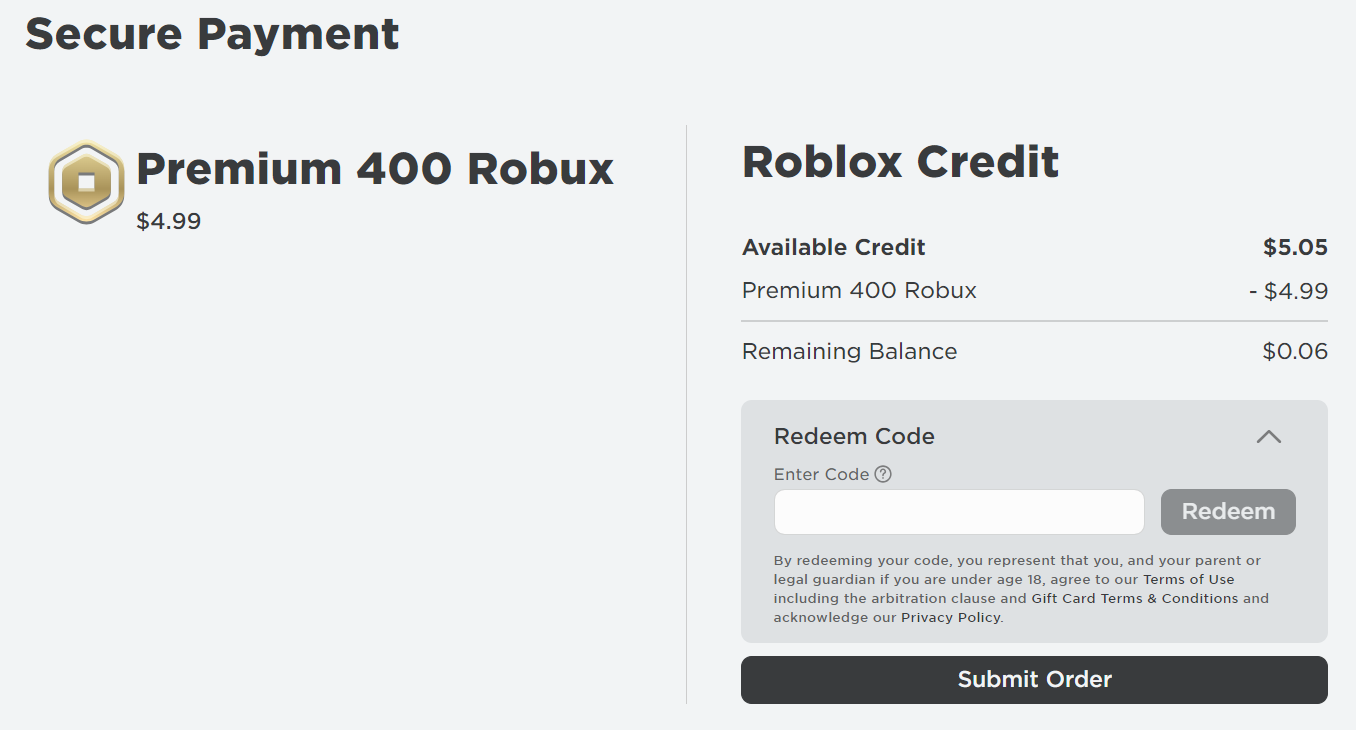
- On the payment selection screen, choose Roblox Credit.
- Tap Submit Order.
Keep three rules in mind during checkout:
- No Split Payments: Roblox does not support combining credit balances with an external card. If you have $8.00 in Credit and want a $9.99 package, you cannot charge the $1.99 difference to a card. You must choose an $8-or-less pack or add another card.
- The 5-Minute Propagation Window: New Robux totals take approximately 5 minutes to synchronize across servers. The balance inside the mobile app will not always refresh instantly.
- Web-Only Checkout: Complete purchases inside the mobile browser. Switching back to the mobile app routes checkout through device store billing instead of your credit balance.
Why Your Redeemed Gift Card Balance Might Read Zero
If both the redemption page and Billing tab show $0.00, one of four common issues occurred.
1. The Code Gave You Direct Robux (No Credit Generated)
Certain digital retail cards and Party Pack cards skip the Roblox Credit balance entirely.
These codes add virtual tokens directly to your main Robux counter rather than cash to your Billing page. Check the Robux icon at the top of your screen; an increased total indicates the card worked as designed.
2. Point-of-Sale Activation Failed at the Register
Physical plastic cards purchased in brick-and-mortar stores carry zero balance until scanned at checkout. If the register encountered a network glitch, the card remains inactive.
Unactivated physical cards trigger an invalid code error on the redemption page. Resolving this requires taking the card and purchase receipt back to the retail store. When you order a digital Roblox gift card, digital codes are pre-activated upon delivery, eliminating checkout activation issues.
3. Character Substitution Typos
Roblox PIN codes use alphanumeric combinations where specific characters look identical, particularly under scratch-off material.
| Character on Card | Often Confused With | How to Resolve the Error |
|---|---|---|
0 (Number Zero) | O (Letter O) | Roblox codes rarely use the letter O; replace with the digit 0 |
1 (Number One) | I (Uppercase i) or L (Lowercase L) | Swap for numeral 1 if an alphabetical letter fails to submit |
2 (Number Two) | Z (Letter Z) | Check the baseline of the character for a flat shelf vs diagonal stroke |
5 (Number Five) | S (Letter S) | Look closely at whether the top bar is flat or rounded |
6 (Number Six) | G or Q (Letters) | Verify whether the bottom loop closes completely into a circle |
8 (Number Eight) | B (Uppercase B) | Inspect the left vertical stem; curved stems indicate the number 8 |
Carefully swapping ambiguous characters resolves the vast majority of 'code invalid' error prompts on the redemption screen.
4. You Logged into the Wrong Account
When family members share a mobile device, browsers often remain logged into a sibling's account. Entering a code permanently links that credit to the active profile. Check the displayed username on roblox.com/redeem before submitting a PIN.
Managing Stacked Balances, Expiration Rules, and Region Contradictions
Multiple gift cards stack into a single cumulative credit pool. Submitting a $10 card, a $25 card, and a $15 card back-to-back updates your Available Credit line to $50.00, ready for a single checkout.
Balance Lifespan and Account Lock Rules
Under official platform terms, gift card codes and redeemed credit balances do not expire. They carry no inactivity, dormancy, or maintenance fees. A $20.00 credit balance left untouched for years remains fully available.
Balances are strictly non-transferable and non-refundable. You cannot move funds between family accounts or withdraw them as cash.
Regional Conversion and Legal Terms
Online documentation contains conflicting information regarding two primary policies:
- Region Locking: Older platform guides claim gift cards are region-locked. Current systems convert most major currencies automatically at monthly XE exchange rates, though buying cards matching your home account's currency prevents exchange deductions.
- Expiration Terms: United States federal rules establish a five-year minimum lifespan for retail gift cards. Roblox's service terms exceed this standard by granting indefinite validity with no expiration dates.
When topping up an account, choosing a secure Roblox gift card code delivers a clean alphanumeric PIN ready for instant browser redemption.
Frequently Asked Questions
Where can I find my Roblox gift card balance on my phone?
Open a mobile web browser, go to roblox.com/redeem, and sign into your account. Your remaining balance is displayed on the Available Credit line directly below the dark Redeem button.
Why is my gift card balance not showing up in the Roblox mobile app?
The standard mobile app routes all in-game billing through your device's native app store checkout system and hides web-based credit. Your funds are safely stored on the website, but you must access them via Safari or Chrome.
Can I check the balance of an unredeemed Roblox gift card?
No, Roblox does not provide a balance inquiry tool for unredeemed cards. The full face value of the card loads onto your account only after you submit the code at roblox.com/redeem.
What is the difference between Roblox Credit and Robux?
Roblox Credit is a real-currency cash balance used to purchase Robux packages or Premium memberships on the website. Robux is the in-game virtual token used to buy avatar items, cosmetics, and experience passes.
Why didn't my gift card add any Roblox Credit to my account?
Certain digital retail codes and party pack cards deliver direct Robux instead of cash credit. Check your main Robux counter at the top of the app or website to confirm the virtual currency was added.
Do Roblox gift cards or redeemed balances expire?
No, Roblox gift cards and redeemed credit balances do not expire. They also do not carry any monthly maintenance, dormancy, or inactivity fees under Roblox platform terms.
Can I split a purchase between my Roblox Credit and a credit card?
No, the checkout system does not support split payments across multiple payment methods. If your credit balance is insufficient for a specific package, you must add another gift card or pay the entire total with an external payment method.
How long does it take for converted Robux to appear on my phone?
Once you convert your credit or complete a web checkout, the resulting Robux or Premium subscription takes approximately 5 minutes to synchronize across the servers and appear in your mobile app.
Summary of Mobile Roblox Credit Management
Do not search through mobile app menus for missing gift card funds. Standard mobile builds omit cash balances due to native app store billing constraints.
Launch your mobile browser, navigate to roblox.com/redeem or your account Billing tab, and convert your credit to Robux on the web before returning to the app.






Comments