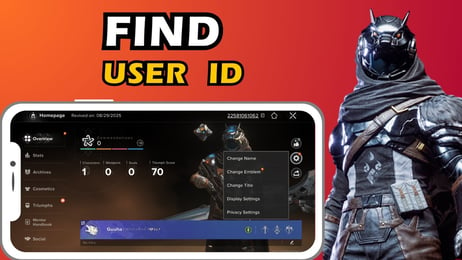
Destiny: Rising Top Up: Direct Silver Delivery via UID
Silver is the premium currency in Destiny: Rising, allowing players to purchase character customization items, weapon ornaments, Battle Passes, and premium requisition packs. To keep your Guardians geared up without delays, ArcTopup provides an efficient Destiny: Rising top up service that credits Silver directly to your game profile.
Every recharge requires only your public User ID (UID) and Server selection. You never need to share sensitive login credentials or account passwords. Once your order is processed on ArcTopup, the purchased Silver bundle sends straight to your in-game account balance or mailbox.
How to Top Up Destiny: Rising Silver on ArcTopup
Completing a Destiny: Rising recharge on ArcTopup takes four simple steps:
- Select Your Silver Package: Browse the available Silver bundles and pick the denomination you need for your in-game purchases.
- Enter Character Information: Fill in your Destiny: Rising UID and select your active Server region in the designated player fields.
- Review and Choose Payment: Check your order summary. ArcTopup provides transparent checkout totals based on your selected payment option.
- Complete Payment and Receive Silver: Finalize your transaction. Your Silver will credit directly to your Destiny: Rising account immediately after payment confirmation.
How to Find Your Destiny: Rising UID and Server
To ensure your Destiny: Rising Silver top up arrives without delay, verify your UID and Server before submitting your order. Follow these steps inside the game client:
- Open Destiny: Rising on your mobile device or compatible gaming setup.
- Complete the initial login and arrive at the main hub lobby screen.
- Tap your Player Avatar / Profile icon located in the upper-left corner of the screen.
- In your Player Profile menu, locate your numeric UID displayed beneath your Guardian name.
- Tap the Copy icon next to your UID to copy the exact string to your clipboard.
- Check the top of the login screen or server status indicator in settings to confirm your assigned Server (such as North America, Europe, or Asia).
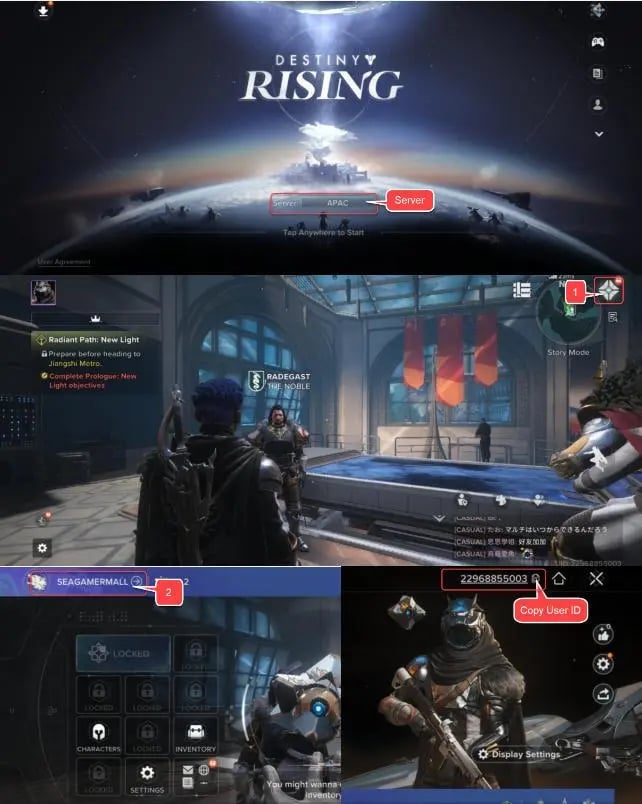
Always paste the copied UID directly into the ArcTopup player field to eliminate typing errors.
Destiny: Rising Silver Bundles and In-Game Items
Silver functions as the core currency for unlocking premium store content across all game modes. Below is an overview of how Silver tiers align with standard in-game purchases:
| Silver Package Tier | Primary In-Game Purpose | Target Unlocks |
|---|---|---|
| Starter Pack (60 - 300 Silver) | Small cosmetic additions, consumable boosts | Shaders, weapon charms, inventory expansion slots |
| Standard Tier (980 - 1980 Silver) | Season Pass & Battle Pass access | Premium Pass track, exclusive seasonal armor sets, exotic emblems |
| Advanced Tier (3280 - 6480 Silver) | Bundled cosmetics & character skins | Legendary character skins, exclusive vehicle ornaments, weapon bundles |
| Premium Bundle (6480+ Silver) | Full seasonal collections & summon requisitions | Premium store bundles, multiple gacha pulls, collector cosmetic packs |
Note: Final prices, local currency conversions, and available bundle bonuses are displayed directly on the live ArcTopup checkout screen.
What You Can Buy With Silver in Destiny: Rising
- Seasonal Battle Passes: Unlock both the standard and premium reward tracks featuring exotic gear, upgrade materials, and rare currency drops.
- Character & Weapon Skins: Equip distinct visual designs for your heroes, exotic weapons, and gear sets without altering base combat stats.
- Sparrow & Ship Ornaments: Customize your mounts and transmat effects across diverse patrol zones.
- Requisition & Summoning Currency: Convert Silver into in-game summon tokens to recruit new heroes and expand your roster capabilities.
First Top-Up Bonuses and Purchase Rewards
Destiny: Rising frequently features first-time top-up incentives and cumulative purchase milestones within the game client:
- Double Silver First Recharge: Many standard Silver packs grant bonus Silver on your very first purchase of that specific tier.
- First-Recharge Welcome Bundles: Topping up any amount often unlocks a special starter package inside the game, granting bonus weapons, XP boosters, and upgrade materials.
- Cumulative Event Rewards: Purchasing Silver during special seasonal campaigns contributes toward in-game spending milestone rewards, granting rare cosmetic rewards and upgrade mats.
All first-time recharge bonuses provided by the game system apply automatically when you top up via UID on ArcTopup, provided your account meets the in-game eligibility criteria.
Safe and Password-Free Top-Up Guarantees
ArcTopup prioritizes account security and transaction privacy. Here is how your transactions are protected:
- Zero Password Requirement: We only request your public UID and Server. ArcTopup never asks for your password, email login, third-party authentication codes, or recovery questions.
- Secure Payment Processing: All transactions are shielded with modern SSL encryption standards, keeping your financial information secure.
- Live Price Transparency: The price shown on the checkout page is exactly what you pay, with no surprise processing fees added at checkout.
- Dedicated Support: If you encounter issues matching your UID or tracking an order, ArcTopup customer support is available to assist you.
Destiny: Rising Delivery and Troubleshooting FAQs
How do I find my Destiny: Rising UID and Server?
Open Destiny: Rising, tap your profile avatar in the upper-left corner of the screen, and locate your numeric UID displayed under your player name. Tap the copy button to copy it. Your active server region is shown on the game start screen or account settings menu.
Do I need to provide my account password to top up Destiny: Rising Silver?
No. ArcTopup only requires your numeric UID and Server region. You should never share your account login credentials or passwords with anyone.
Is Destiny: Rising free to play or pay to play?
Destiny: Rising is a free-to-play mobile shooter RPG. Players can experience the campaign, strikes, and multiplayer activities without paying. In-game Silver purchases are optional and primarily cover cosmetics, Battle Passes, and progression conveniences.
What items can I buy with Silver in Destiny: Rising?
You can spend Silver on seasonal Battle Passes, character cosmetics, weapon skins, vehicle ornaments, transmat effects, inventory expansion, and summoning currencies for hero recruitment.
Is Destiny: Rising worth playing in 2026?
Yes. In 2026, Destiny: Rising offers a comprehensive mobile sci-fi shooter experience with expanding narrative arcs, cooperative strikes, competitive arenas, and continuous seasonal updates tailored for touch controls and mobile controllers.
What should I do if my Destiny: Rising Silver top-up has not arrived?
If your Silver has not credited after completing payment, follow these steps:1. Restart the Destiny: Rising client completely to refresh your server connection.2. Check your in-game mailbox or store balance.3. Verify that the UID and Server entered on your ArcTopup receipt match your in-game profile.4. If the Silver is still missing, contact ArcTopup customer support with your Order ID and UID for assistance.
Current packages and prices
Current base prices exclude Tax. Tax, payment fees and coupon adjustments are shown at checkout.
| Package | Price |
|---|---|
| 60 Silver | USD 0.83 |
| 300 Silver | USD 4.20 |
| 600 Silver | USD 8.40 |
| 1500 Silver | USD 21.01 |
| 3000 Silver | USD 42.03 |
| 6000 Silver | USD 84.07 |