Master your Destiny Rising top up in 2026. Find your UID, verify your regional server, claim double bonuses, and get Silver sent straight to your mailbox.
Topping up in NetEase's sci-fi hero shooter takes two minutes, yet preventable mistakes happen daily: copying the wrong profile digits, selecting the wrong server, or burning first-purchase double bonuses on alternate characters.
Safe delivery requires your exact account identifiers and a clear view of how the fulfillment pipeline works. Here is how to route Silver and bundles straight to your in-game mailbox without delay.
How to Find Your UID and Server Region in Destiny: Rising
Your User Identification number (UID) routes all external currency deliveries. Miss a single digit, and your Silver lands in another player's inventory or gets stuck in billing limbo.
Finding your UID takes four taps inside the client:
- Launch Destiny: Rising and log in.
- Tap the menu icon in the upper-left corner of the main screen.
- Tap your player avatar in the top-left corner.
- Locate your UID printed across the top header of your profile screen.
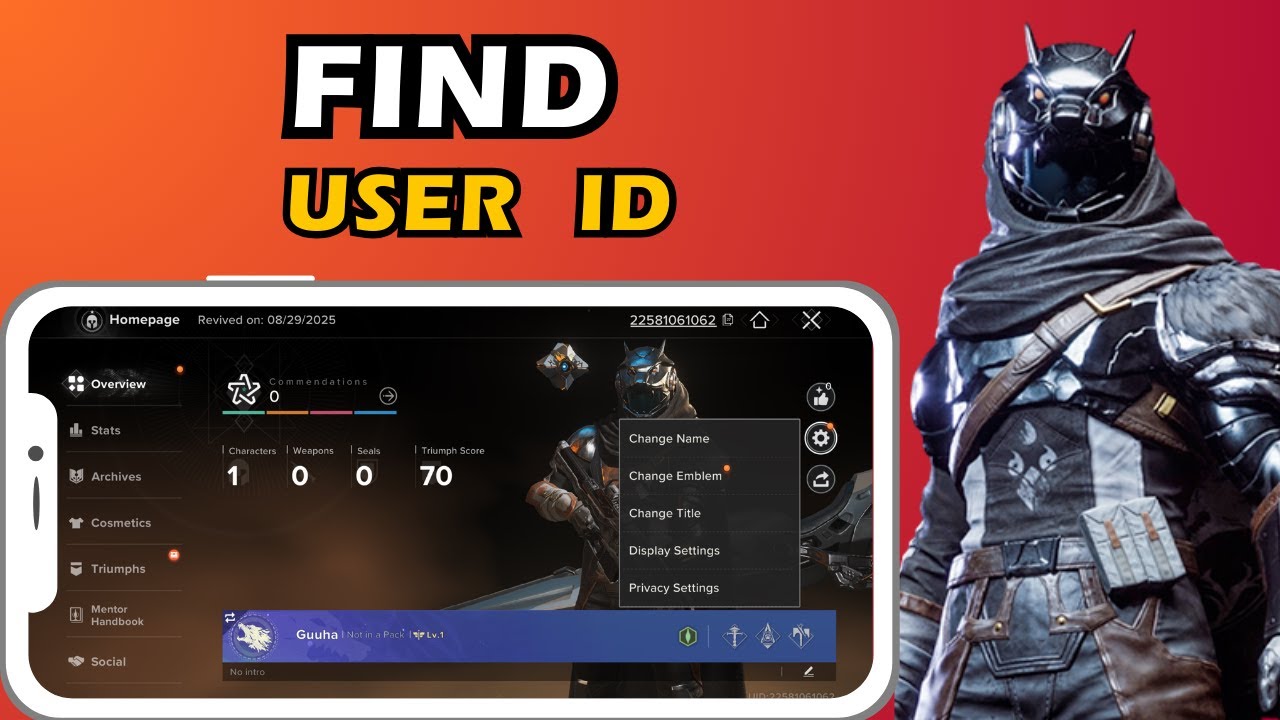
Never transcribe this number by hand; tap the copy button beside the text string.
Before leaving the client, check your server region on the initial title screen. Destiny: Rising splits players across four regions: North America (NA), Europe (EMEA), Asia-Pacific (APAC), and Latin America (LATAM). Select the exact region matching your profile during checkout. An NA order will not route to an EMEA character profile.


Step-by-Step: Recharging Silver on Mobile in 2026
Binding your account before spending is mandatory. If you recharge an unsecured guest profile, a cache wipe or app reinstall will destroy your access.
To link your profile, open Settings, select Other, enter the Player Center, and tap Bind Account. You can link via Google, Facebook, X, or Discord.
With your account secured, open the destiny rising top up portal. Paste your UID into the account field and pick your server region from the dropdown menu.
Choose your Silver denomination or bundle. The store queries live game servers to display your character handle. Confirm that this name matches your in-game Lightbearer, then finish checkout.
| Top-Up Step | Required Action | Verification Checkpoint |
|---|---|---|
| 1. Account Binding | Link guest account in Player Center | Ensure Google, X, Discord, or Facebook is active |
| 2. UID Extraction | Copy UID from profile header | Verify digit count against top-left profile banner |
| 3. Server Selection | Match regional deployment (NA/EMEA/APAC/LATAM) | Confirm server matches title screen login label |
| 4. Pack Selection | Pick Silver amount or specific bundle | Verify Silver equivalent tier value |
| 5. Character Check | Review pre-checkout validation name | Match character handle exactly before payment |
| 6. Mailbox Claim | Log in and open in-game system mail | Verify item attachment and claim balance |
Following these sequential checkpoints eliminates order routing errors and prevents accidental delivery to abandoned accounts.
Once payment clears, open Destiny: Rising and tap the mailbox icon. Your purchased Silver, tokens, or bundle items arrive as system mail attachments. Tap Claim to credit the funds to your balance.
Understanding Premium Currencies: Silver vs. Lumia Leaves
Destiny: Rising splits its premium economy into two distinct assets: paid Silver and gacha Leaves. Mixing them up leads to wasted cash.
Silver is the direct-purchase currency. You buy it with real money to unlock hero cosmetics, weapon skins, seasonal progression tracks, and limited-time bundles. Silver never drops from story missions or patrol zones.
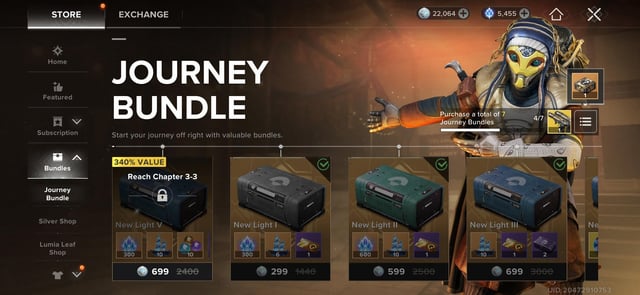
Lumia Leaves fuel character and weapon draws on standard and limited-time banners. You earn Leaves from daily sign-ins, achievements, milestone events, or by converting Silver at a 1:1 ratio.
Limited banners—like the Gwynn banner—enforce a strict 60-draw guarantee. If you miss the featured Mythic Lightbearer on pulls 1 through 59, pull 60 guarantees the drop. Always budget around this 60-pull ceiling so banner rotations do not catch you short.
Pinnacle Energy governs daily endgame drop quality. Spending Pinnacle Energy boosts drop rates for high-tier weapons and armor. Running out does not lock you out of activities, but your premium loot acceleration stops until the daily reset.
Direct Purchase Packs and Equivalent Silver Value
Every pre-packaged bundle in the store carries a fixed Silver equivalent valuation. These ratings dictate your rebate eligibility and cumulative spending progress.
Instead of buying loose Silver, you can purchase direct supply packs and battle passes. Each item maps to an exact currency tier:
| Store Package Name | Silver Equivalent Value | Package Focus & In-Game Profile |
|---|---|---|
| Peacemaker's Gifts | 60 Silver | Entry-level daily starter bundle with quick progression items |
| Tree of Light's Blessing | 300 Silver | 30-day recurring daily login supply delivering steady resources |
| Premium Battle Pass | 300 Silver | Unlocks the seasonal reward track and exclusive cosmetic tier |
| Premium Battle Pass Plus | 600 Silver | Unlocks seasonal track plus instant tier skips and bonus items |
| Hero's Vault | 600 Silver | Mid-tier resource cache packed with character upgrade materials |
| Founder Bundle | 1,200 Silver | Top-tier pack featuring exclusive cosmetics and hero gear |
For pure cosmetics, buying raw Silver is optimal. When you need upgrade materials alongside character growth, bundles like the Hero's Vault offer faster progression. You can buy Silver for Destiny: Rising to cover these pack costs or grab passes at season launch.
Destiny: Rising runs on a 2-month seasonal cycle, dropping new hero banners every four weeks. Buying your pass on day one gives you the full two months to clear every tier before the track resets.
First-Purchase Bonuses, Refund Rebates, and Critical Rules
First-time buyers receive a 100% bonus on standard Silver tiers. Buying a qualifying pack grants an equal amount of bonus currency once per account tier.
Key restrictions apply to all transactions:
- First-purchase double bonuses apply only to standard Silver packs.
- Converted refund balances and promotional grants do not trigger double bonuses.
- Rebate Silver and launch compensation are locked to the very first character created on an account. Secondary alts on that server cannot claim historical rebate mail.
- Currency is server-locked. Silver bought for an NA profile cannot transfer to EMEA or APAC.
Never create a throwaway test character on a fresh account before claiming major top-ups. Make sure your primary Lightbearer occupies the first character slot so rebates and promotional distributions land correctly.
Regional Server Linking, Reset Times, and Hardware Specs
Destiny: Rising pairs its four regional servers on the backend to broaden matchmaking pools and cross-server friend lists.
North America (NA) links with Latin America (LATAM), while Europe (EMEA) links with Asia-Pacific (APAC). Players on paired servers can run strikes and competitive modes together while keeping their own regional profiles.

Daily resets align with regional mornings. Weekly maintenance runs every Thursday from 2:00 AM to 5:00 AM PDT across all clusters. Avoid recharging during this three-hour window to prevent mailbox delivery delays.
| Regional Server | Linked Server Partner | Daily Reset Time | Weekly Maintenance Window |
|---|---|---|---|
| North America (NA) | Latin America (LATAM) | 04:00:00 UTC-8 | Thursdays 2:00 AM – 5:00 AM PDT |
| Latin America (LATAM) | North America (NA) | 09:00:00 UTC-3 | Thursdays 2:00 AM – 5:00 AM PDT |
| Europe (EMEA) | Asia-Pacific (APAC) | 04:00:00 UTC+1 | Thursdays 2:00 AM – 5:00 AM PDT |
| Asia-Pacific (APAC) | Europe (EMEA) | 11:00:00 UTC+8 | Thursdays 2:00 AM – 5:00 AM PDT |
Hardware requirements: Destiny: Rising demands Android 8.0 (Snapdragon 835 or Dimensity 700 minimum) or an iPhone 7 running modern iOS. Account progression syncs between Android and iOS if you bind to a universal social login.
Spender Tier Breakdown: Maximizing Your Budget
Spending strategy should match your goals. Here is how to allocate funds across three common budget profiles:
Free-to-Play (F2P)
- Primary Focus: In-game achievements and daily login streaks.
- Strategy: Bank all Lumia Leaves from campaign and daily milestones. Ignore standard banners and hold your stash until a featured Mythic character arrives, ensuring a 60-draw reserve.
Low to Mid-Spender
- Primary Focus: Tree of Light's Blessing (300 Silver equivalent) + Premium Battle Pass (300 Silver equivalent).
- Strategy: This pairing yields the highest resource yield per dollar. The Blessing delivers daily materials and currency across 30 days, while the 300 Silver Battle Pass covers the two-month seasonal track. Skip the Battle Pass Plus unless you fall weeks behind on tier progression.
Heavy Spender
- Primary Focus: Founder Bundle (1,200 Silver equivalent) + Premium Battle Pass Plus (600 Silver equivalent) + Targeted Silver Packs.
- Strategy: For immediate power and cosmetic completion, grab the Founder Bundle for exclusive gear, then recharge your Destiny: Rising account to clear limited skin sets. Pick up the 600 Silver Battle Pass Plus at the start of the 2-month season for instant tier skips.
Account Security: Safe Recharge Verification vs. Scams
Third-party recharge scams target mobile players through fake discount sites and login phishing. Legitimate top-up infrastructure requires only two public data points: your numeric UID and your Server Region. Billing APIs use these to deliver items straight to in-game mail without accessing your credentials.
Never share:
- Your account password.
- Login credentials for linked Google, Discord, X, or Apple IDs.
- One-Time Passwords (OTP) or 2FA codes.
- Screen-sharing or remote access permissions.
Any service asking for login access to "deposit currency" is phishing. Recharges happen server-side.
Always bind your account in Settings > Other > Player Center. Guest accounts risk permanent data loss from OS updates, cache clears, or device changes.
Troubleshooting Missing Silver and Mailbox Delays
If purchased Silver does not appear immediately, follow this checklist before contacting support:
- Check Your In-Game Mailbox: Top-ups do not credit the currency counter directly. Open the envelope icon in your menu and claim the attached items.
- Perform a Clean Relog: Force-close Destiny: Rising, clear app memory, and relaunch to refresh the inventory query from the server.
- Verify Maintenance Windows: Recharges submitted during Thursday maintenance (2:00 AM – 5:00 AM PDT) queue until servers come back online.
- Check Character Creation Order: Promotional rebate balances only deliver to the first character ever created on the account.
- Confirm Receipt Details: Check your invoice to verify you did not mistype a digit in your UID or pick the wrong server region.
If 30 minutes pass after a clean relog outside maintenance hours and your mail is empty, take a screenshot of your receipt showing the transaction ID, UID, and server region, then submit a support ticket.
FAQ
Where do I find my Destiny: Rising UID and Server ID?
Your server region is listed on the title login screen. To view your numeric UID, log in, tap the top-left menu, and select your profile header. Use the copy button next to the UID string to avoid typos.
What is the primary premium currency in Destiny: Rising?
Silver is the direct-purchase paid currency used for cosmetic skins, bundles, and battle passes. Lumia Leaves are the gacha currency used for character and weapon banner draws.
How many draws are required to guarantee a Mythic character?
Limited-time banners guarantee the featured Mythic character on the 60th draw if you do not pull them in the first 59 attempts.
Will topping up on a guest account preserve my purchases?
Unbound guest accounts are vulnerable to data loss. Go to Settings > Other > Player Center to bind your account to Google, Facebook, X, or Discord before buying currency.
Do bonus or refunded Silver packages trigger first-purchase double bonuses?
No. First-purchase double multipliers apply exclusively to standard, direct Silver purchases. Converted refunds and promotional grants do not qualify.
Can I transfer Silver or characters between different server regions?
No. Characters, inventory items, and Silver balances are locked to their originating regional server and cannot be transferred across regions.
Strategic Verdict for Destiny: Rising Top Ups
Smooth top-ups require basic account hygiene: copy your UID directly from the profile banner, confirm your server match, and always bind guest accounts before spending.
For optimal efficiency, combine the Tree of Light's Blessing with the 300 Silver Premium Battle Pass at the start of each two-month season. Save converted Lumia Leaves until you hold 60 draws for guaranteed Mythic pity. Skipping maintenance hours and double-checking your UID prevents delivery delays and keeps your Lightbearer geared.






Comments