StarMaker Top Up: How to Recharge Coins on ArcTopup Using SID
Topping up your StarMaker account on ArcTopup is straightforward and requires only your public StarMaker User ID (SID). Follow these steps to complete your StarMaker Coins recharge:
- Select Your Coin Package: Choose the amount of StarMaker Coins you need from the product selection grid on the checkout page.
- Enter Your StarMaker SID: Type or paste your numeric StarMaker SID into the account input field. Double-check the number to avoid sending currency to the wrong profile.
- Review Order Details: Confirm your selected coin pack and verify that the SID corresponds to your active singing profile.
- Choose Payment Method: Pick your preferred payment option from the available options shown on the live checkout screen.
- Complete Payment and Receive Coins: Finalize your transaction. Once processed, your StarMaker Coins are credited directly to your in-app balance without manual code redemption.
Where to Find Your StarMaker SID (User ID)
Your StarMaker SID is a unique numeric identifier assigned to your profile. You do not need to share your login email, phone number, or password to recharge.
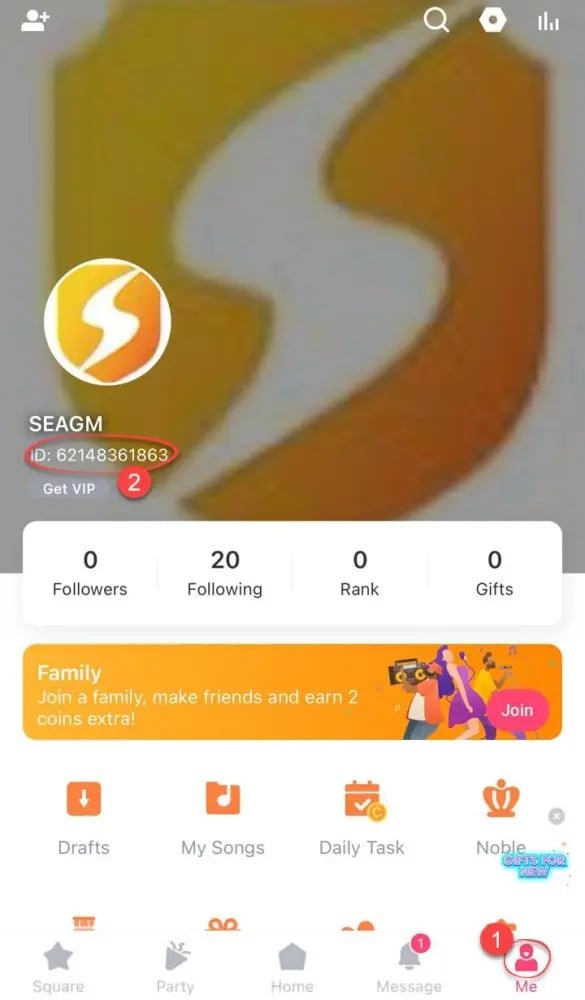
Follow this visual guide to locate your SID inside the app:
- Launch the StarMaker or StarMaker Lite application on your mobile device.
- Tap the Me icon located in the bottom right corner of the primary navigation bar.
- View your profile header. Your SID is displayed directly beneath your username and profile picture.
- Tap the small copy icon next to the SID number to copy it to your clipboard, then paste it directly into the ArcTopup order form.
What Are StarMaker Coins and How to Use Them
StarMaker Coins are the primary premium currency across the StarMaker ecosystem. They allow singers, stream hosts, and music fans to access exclusive perks, support performers, and customize their virtual party spaces.
| Feature Category | In-App Use Case | Primary Coin Benefit |
|---|---|---|
| Virtual Gifting | Send animated gifts, flowers, and stage effects | Boosts host popularity, ranking on leaderboards, and duet recognition |
| VIP Memberships | Purchase VIP badges, exclusive frames, and profile banners | Unlocks high-tier profile styling and entry animations in rooms |
| Audio Production | Access studio-grade audio filters and reverb presets | Enhances recorded vocal clarity, tone quality, and pitch balancing |
| Party Rooms | Buy room decorations, song queue boosts, and mini-games | Keeps room audiences engaged and increases room visibility |
Virtual Gifting in Live Streams and Duets
When listening to a live broadcast or joining a karaoke party room, you can convert your coins into animated digital gifts. Sending gifts increases the creator's popularity score and helps them climb the weekly talent charts. Gifting also displays special broadcast banners that acknowledge your support to everyone in the room.
VIP Status and Profile Customization
Coins allow you to subscribe to StarMaker VIP tiers. VIP members receive distinct colored usernames, animated avatar frames, custom entrance effects when entering party rooms, and ad-free browsing throughout the app.
Pro Audio Filters and Recording Tools
StarMaker provides audio processing tools to make your recordings sound polished. Coins can be used to unlock advanced voice effects, spatial audio settings, custom equalizers, and real-time pitch correction tools for both solo and duet tracks.
Why Choose ArcTopup for StarMaker Recharge in 2026
ArcTopup offers a direct, secure, and user-friendly platform for international vocalists and room hosts looking to recharge their StarMaker balance in 2026:
- Direct SID Delivery: You only need your numeric SID. ArcTopup never asks for your login credentials, passwords, or linked social media accounts.
- Global Currency Support: ArcTopup accommodates singers worldwide by supporting multiple regional currencies and international payment methods.
- Transparent Live Checkout: Coin quantities and current rates are displayed clearly before you pay, ensuring full pricing transparency with no hidden checkout fees.
- Dedicated Support Assistance: If you have questions about your SID, order status, or payment confirmation, ArcTopup customer support is available to assist you.
StarMaker Coins Safety: No Password Required
Account safety is essential when buying in-app currency online. ArcTopup operates exclusively through direct SID top-ups. This means your account remains completely under your control at all times.
- Zero Password Sharing: Legitimate coin recharges only require your public account SID. Never share your password, OTP codes, or linked Google/Facebook/Apple login details with any third-party service.
- Encrypted Payment Channels: All checkout transactions on ArcTopup use modern SSL encryption protocols to protect your personal and payment details.
- Official In-App Balance Update: Coins purchased through ArcTopup are delivered directly to the StarMaker server balance linked to your SID, protecting your account against policy violations.
Troubleshooting Delayed StarMaker Coin Delivery
Coin deliveries are usually completed quickly once payment clears. If your balance does not update right away, use the following troubleshooting checklist:
- Restart the StarMaker App: Close StarMaker completely on your phone, clear the app from your background tasks, and reopen it. This forces the client to sync with the server.
- Verify the Submitted SID: Check your order confirmation email from ArcTopup to ensure the SID entered matches the exact numbers on your StarMaker profile.
- Check Network Connection: Switch between Wi-Fi and mobile data to ensure a stable connection to StarMaker servers.
- Check ArcTopup Order Status: Log into your ArcTopup account or check your transaction receipt to verify that your payment was fully processed.
- Contact ArcTopup Support: If your balance has not refreshed after 15 to 30 minutes, provide your transaction ID and StarMaker SID to ArcTopup support for rapid order tracking.
Frequently Asked Questions About StarMaker Top Up
How do I find my StarMaker SID for a coin top up?
Open StarMaker, tap the Me icon in the bottom right corner, and look right below your profile photo and display name. Your SID is the 8-to-10 digit number shown there. Tap the copy icon next to it to copy the ID directly.
Is StarMaker express recharge safe to use on third-party stores?
Yes, using ArcTopup for your StarMaker express recharge is safe because the transaction requires only your public SID. Your login details, passwords, and private messages are never accessed or requested.
Do I need to provide my StarMaker password to recharge coins?
No. You should never provide your password for a coin recharge. ArcTopup processes top-ups using only your public SID.
How long does it take for StarMaker Coins to arrive after payment?
Coins are processed promptly after payment verification. In most cases, your coins appear in your in-app wallet within a few minutes. Relaunching the app will refresh your balance.
What can I purchase with StarMaker Coins inside the app?
StarMaker Coins can be used to buy virtual gifts for live streamers and party room hosts, unlock VIP memberships, purchase audio tuning filters, obtain avatar frames, and access interactive party room games.
Can you earn or withdraw real money from StarMaker gifts?
When creators receive virtual gifts bought with coins, StarMaker converts a portion of those gifts into creator diamonds or points according to platform rules. Eligible creators who meet StarMaker host criteria can withdraw their earned rewards through the official in-app withdrawal system.
Current packages and prices
Current base prices exclude Tax. Tax, payment fees and coupon adjustments are shown at checkout.
| Package | Price |
|---|---|
| 60 + 5 Bonus Coins | USD 0.63 |
| 300 + 25 Bonus Coins | USD 3.15 |
| 1,000 + 110 Bonus Coins | USD 10.74 |
| 1,200 + 150 Bonus Coins | USD 13.06 |
| 1,600 + 200 Bonus Coins | USD 17.42 |
| 2,100 + 300 Bonus Coins | USD 23.23 |
| 2,700 + 400 Bonus Coins | USD 30.00 |
| 3,000 + 450 Bonus Coins | USD 33.39 |
| 3,400 + 550 Bonus Coins | USD 38.22 |
| 5,000 + 850 Bonus Coins | USD 56.61 |
| 6,000 + 1,100 Bonus Coins | USD 68.71 |
| 6,500 + 1,200 Bonus Coins | USD 74.51 |
| 7,000 + 1,300 Bonus Coins | USD 80.32 |
| 10,000 + 1,900 Bonus Coins | USD 115.16 |
| 14,000 + 2,800 Bonus Coins | USD 162.58 |