Once Human Top Up: Fast Crystgin Delivery via UID
Crystgin serves as the primary premium currency in Once Human, allowing meta-humans to customize their survivors, expand building aesthetics, and unlock premium reward tiers. Recharging Crystgin allows you to acquire exclusive weapon skins, vehicle paint jobs, character outfits, furniture formulas for your territory, and seasonal Battle Pass access.
ArcTopup provides direct Once Human top up processing straight to your game account. By utilizing official character identification protocols, transactions process quickly without requiring account sharing, passwords, or personal credentials.
Step-by-Step Once Human Crystgin Top-Up Guide on ArcTopup
Follow these steps to complete your Once Human recharge on ArcTopup:
- Select Your Crystgin Pack: Browse the available Crystgin amounts and bundles on the product page. Live prices and active volume options appear on the checkout screen.
- Enter Character Information: Input your Once Human User ID (UID), select your Server Region, and choose your specific Server ID.
- Select Payment Method: Choose from the available payment channels at checkout.
- Confirm Your Order: Review your UID and server details carefully to ensure accurate delivery, then click buy.
- Receive Your Crystgin: Once the transaction completes, open Once Human. Your updated Crystgin balance reflects directly on your character account.
How to Locate Your Once Human UID, Server ID, and Server Region
To ensure your Crystgin reaches the correct character, verify your account details using the in-game interface:
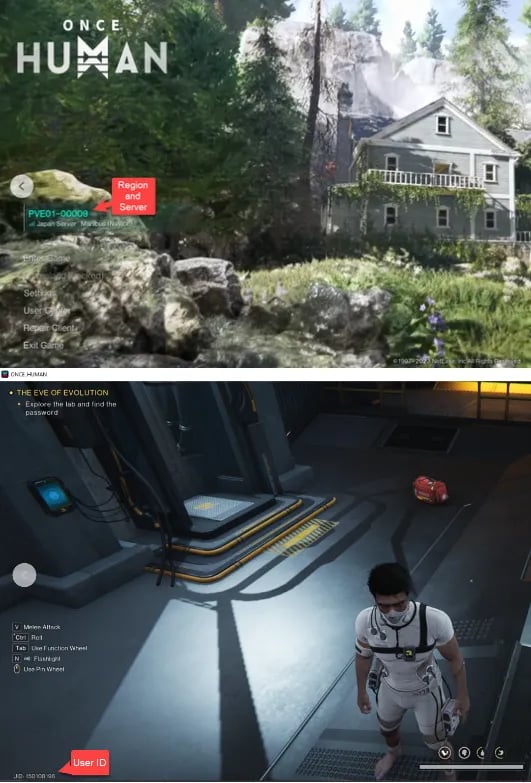
- Locate your UID: Log into Once Human and enter the game world. Your UID is visible in the bottom-left corner of the HUD. Alternatively, press Esc to open the main system menu; your UID is displayed directly beneath your character name and avatar.
- Identify your Server Region: Before entering the server, check the login screen. Server regions are designated as North America (NA), Europe (EU), Asia, South America (SA), or Southeast Asia (SEA).
- Find your Server ID: Each game world has a specific identifier (such as Manibus 01-00012 or Evolution Call 01-00005). You can check your active server name on the main launch menu or inside the ESC menu under server settings.
Available Once Human Products: Crystgin Packs, Battle Pass, and Cosmetics
Understanding how currencies and store items function helps you plan your purchases effectively:
| Item / Currency | Primary Use | In-Game Impact |
|---|---|---|
| Crystgin | Direct shop purchases, gacha crates, currency exchange | Cosmetic outfits, weapon skins, territory decor |
| Battle Pass (Meta Pass) | Unlocks premium seasonal reward tracks | Exclusive seasonal gear skins, emotes, blueprints |
| Lightforge Crates | Seasonal themed gacha system | Rare character skins, vehicle wraps, special effects |
| Territory Packs | Structural skins and decor blueprints | Aesthetic base customization |
Crystgin can also be exchanged for Crystchrome inside the game shop, which is used for rolling on specialized Lightforge crates or acquiring limited-time seasonal bundles.
Account Safety: Passwordless UID Direct Recharge Explained
ArcTopup uses a direct UID delivery system, meaning you never need to share your game password, Steam login, Epic Games account, or third-party authentication tokens.
- Zero Account Sharing: You only supply public identifiers (UID, Server Region, and Server ID). Your login credentials remain secure on your personal device.
- No Risk of Account Compromise: Direct server top-ups do not trigger unauthorized location flags or automated security bans associated with third-party logins.
- Official Delivery Protocol: The purchased Crystgin is routed straight to the official game servers linked to your player UID.
Supported Payment Methods and Server Regions in 2026
ArcTopup supports all active Once Human global servers in 2026, including:
- North America (NA)
- Europe (EU)
- Asia (including Japan and Korea servers)
- Southeast Asia (SEA)
- South America (SA)
At checkout, you will find localized and international payment options suited to your region. Because exchange rates and processing channels update regularly, live checkout displays exact rates and regional currency conversions before you pay.
Troubleshooting Delivery and Resolving Missing Crystgin Orders
If your Crystgin does not appear immediately after completing payment, follow these diagnostic steps:
- Restart the Game Client: Completely close Once Human and restart the game. This forces the client to synchronize with the server database.
- Check the In-Game Mailbox: Certain bundle items, bonus currencies, or event rewards arrive as attached system mail rather than direct balance additions.
- Verify Your Server Selection: If you have characters across multiple servers, log into the specific Server ID you submitted during checkout.
- Verify UID Accuracy: Compare the UID on your payment confirmation receipt with your in-game profile.
- Contact ArcTopup Support: If your balance does not update after 15 minutes and your UID was entered correctly, provide your Order ID and UID to ArcTopup customer support for manual verification.
Frequently Asked Questions
Where can I find my Once Human UID, Server ID, and Server Region?
Your UID is displayed in the bottom-left corner of the gameplay HUD and in the main ESC menu beneath your character avatar. Your Server Region and Server ID are displayed on the main start screen before entering the game world.
Do I need to provide my account login password to top up Once Human?
No. ArcTopup only requires your public UID, Server ID, and Server Region. Never share your account passwords or login codes.
How fast will the Crystgin arrive in my Once Human account?
Top-ups are processed automatically. Once your payment clears, Crystgin is delivered directly to your character server profile within minutes.
What can I purchase with Crystgin in Once Human?
Crystgin purchases character outfits, weapon skins, vehicle customization wraps, territory building formulas, Lightforge crate tokens, and premium Battle Pass upgrades.
Is Once Human pay-to-win?
No. Once Human designs its cash shop around visual customizations, territory decorations, and convenience items. Crystgin does not provide combat stat boosts, weapon damage multipliers, or direct PvP advantages.
What should I do if my Crystgin does not show up after payment?
First, restart your game client to refresh account data. If the balance remains unchanged, check your in-game mailbox, confirm your submitted UID and Server ID on your order receipt, and contact ArcTopup customer support with your Order ID for assistance.
Current packages and prices
Current base prices exclude Tax. Tax, payment fees and coupon adjustments are shown at checkout.
| Package | Price |
|---|---|
| 62 Crystgin | USD 0.85 |
| Meta Pass (30 Days) | USD 4.28 |
| 339 Crystgin | USD 4.29 |
| Battle Pass Advanced Edition | USD 8.57 |
| 1120 Crystgin | USD 12.77 |
| 2340 Crystgin | USD 25.54 |
| 3979 Crystgin | USD 42.57 |
| Battle Pass Deluxe Edition | USD 57.77 |
| 8075 Crystgin | USD 85.15 |