
In Once Human, you cannot freely teleport an active character between separate servers on demand, but you do not lose your unlocked blueprints, cosmetics, or story gear when moving to a new server or grouping up with friends. Seasonal character transfers execute at the end of a scenario run through the Season Sign-Up menu—or mid-season via a Scenario Exit Card—moving your items into an Eternaland Spacetime Backpack that gives you a starting budget of 20,000 Resource Points to import gear onto your new destination server.
Missing Characters: How to Find Your Avatar Across Regional Lists
If you logged into the game and your high-level survivor appears missing, the client likely pointed you toward a default server in a different region. Once Human does not delete characters during routine logins or minor client updates.
Matchmaking and visibility rely on a strict three-tier hierarchy: Region → Server → World (TimeSaver). If any of those three tiers fail to match, you will not see your avatar or your friends.
- Return to the main title screen and open the server selection menu.
- Cycle through the geographic region tabs (such as North America, Europe, or Asia).
- Check each regional list for an indicator showing an existing character count next to specific server names.
- Select the matching server tag to repopulate your original avatar.
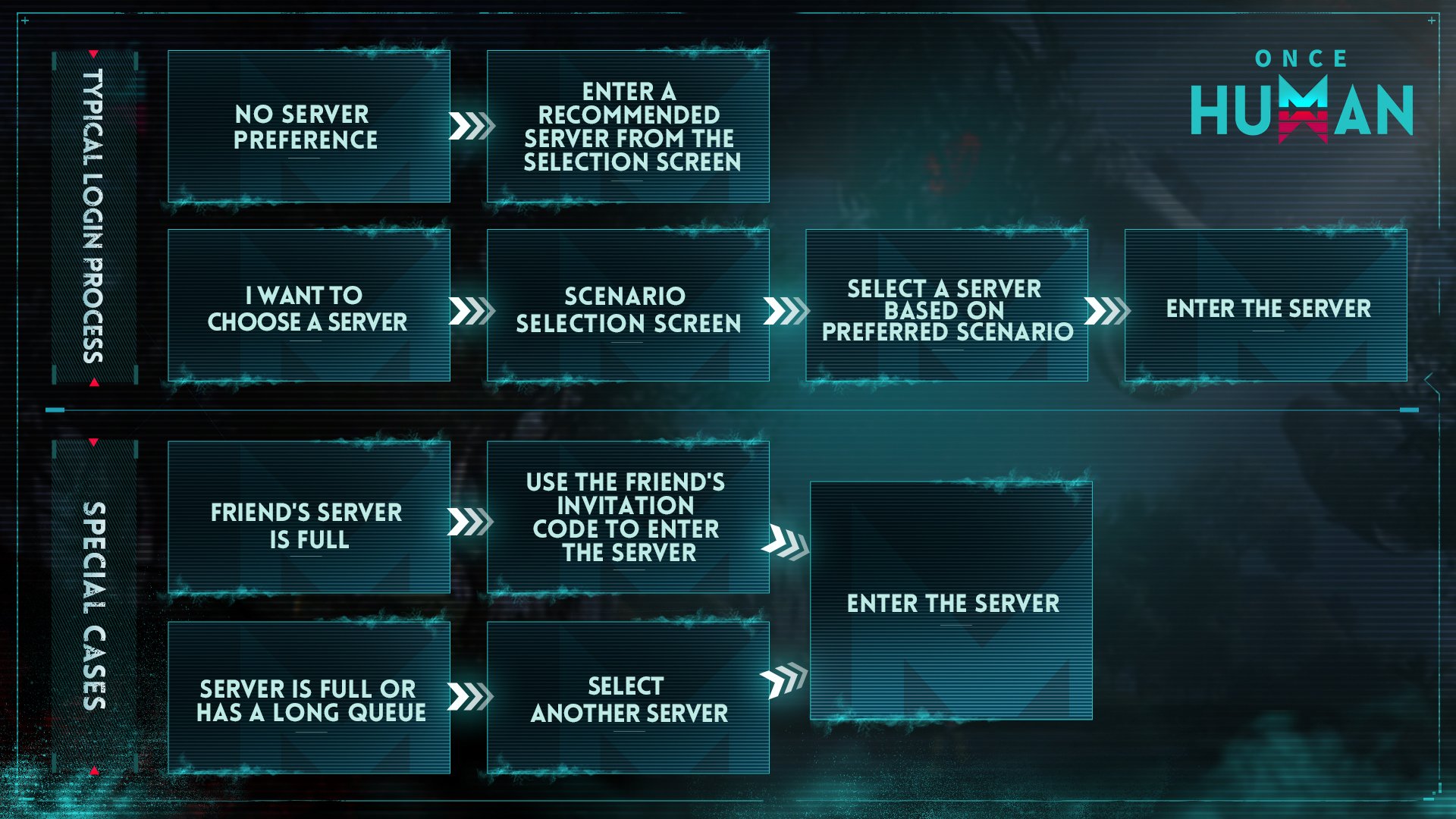
Crossplay connects PC, mobile, PS5, and Xbox players across untagged servers (TimeSaver). However, crossplay does not bridge separate regional directories. If your squad plays on North America while your client boots into Europe, you must switch regions on the login menu before you can join their lobby.

62 Crystgin
 62 CrystginUSD 0.85Buy Now
339 Crystgin
339 CrystginUSD 4.29Buy NowMeta Pass (30 Days)
Meta Pass (30 Days)USD 4.28Buy NowBattle Pass Advanced Edition
Battle Pass Advanced EditionUSD 8.57Buy Now1120 Crystgin
1120 CrystginUSD 12.77Buy NowBattle Pass Deluxe Edition
Battle Pass Deluxe EditionUSD 57.77Buy Now2340 Crystgin
2340 CrystginUSD 25.54Buy Now3979 Crystgin
3979 CrystginUSD 42.57Buy Now8075 Crystgin
8075 CrystginUSD 85.15Buy Now
Switching Parallel Worlds on the Same Server
Often, players think they rolled on the wrong server when they are simply standing in parallel sub-instances called Worlds. Each individual server divides its concurrent population across numbered Worlds to minimize lag and territory crowding.
You do not need to abandon your character or re-roll to meet someone on another World within the same server. You can swap sub-instances on foot at zero cost:
- Open your map and locate an unlocked Teleportation Tower, represented by a radio tower icon.
- Walk directly up to the base of the tower.
- Press G on your keyboard to reveal the list of other Worlds on that server—there are typically up to 10 parallel Worlds available (Windows Central).
- Highlight the World number where your team is gathered.
- Hold F to confirm and switch shards instantly.
Your entire character inventory travels with you. Your base territory remains anchored in its original World, but you can pack up and relocate your territory anytime using the build menu.
Joining Full Servers With a Special Invitation Code
Servers cap their registered population between 6,000 and 8,000 players (TimeSaver). If your friends play on an older shard that displays as full, standard registration is blocked to prevent overpopulation.
You can bypass this cap during initial character creation if someone already on the shard generates a bypass key:
- The established player opens their in-game profile.
- They select View Special Invitation Code and copy the string (TimeSaver).
- You enter this code on the server selection screen during setup.
The game grants access through the player cap, allowing you to deploy your character directly onto their locked server.
Scenario Transfers: Carrying Progress Into New Servers
When a server completes its scheduled phases and hits the final settlement period, you do not lose your accumulated account progression. Instead, you sign up for your next destination scenario.
The End-of-Season Migration Process
- From the main menu, open the server details window and click on the Phase tab (IGN).
- Review available seasonal scenarios, checking their specific combat rules, difficulty modifiers, and slot capacity.
- Complete the sign-up prompt to lock in your slot for the incoming season.
Phase Tab (Server Details) -> Choose Scenario -> Confirm Sign-Up -> Character Migrates
Crafted weapons, loose building ingredients, ammunition, and captured Deviations automatically head to your private domain, Eternaland (IGN). When you wake up on the new server, you can pull items out of your Spacetime Backpack using an allotment of 20,000 Resource Points (IGN). High-tier equipment consumes a sizable chunk of points, so take essential tools first and leave bulk generic materials in storage.
Mid-Season Transfers via Scenario Exit Cards
Players who need to migrate before a scenario reaches settlement can do so without losing character progress. During scenario reselection special events, visit the Season Shop to purchase a Scenario Exit Card for 1x Mitsuko's Mark (RPG Gamers).
Using this card pulls your character out of the active scenario immediately. Your gear and resources route through seasonal transfer protocols into Eternaland just as they would at the end of a campaign. Activating a card triggers a 60-day cooldown before you can execute another early exit (RPG Gamers).
What Carries Over vs. What Resets
Early launch guides from mid-2024 claimed characters faced total progress wipes every six weeks. Official mechanics tell a different story: core unlocks stay bound to your account, while baseline survival stats reset to keep new scenarios competitive.
| Item or System Category | Seasonal Transfer Status | Mechanic Details |
|---|---|---|
| Blueprints, Mods, Accessories, and Star Ratings | Kept permanently | Unlocks persist across all scenario server transitions (TimeSaver). |
| Premium Currencies (Starchrom, Crystgin, Mitsuko's Marks) | Kept permanently | Balances carry over entirely between seasons and characters (TimeSaver). |
| Character Level and Memetic Skills | Reset to Level 1 | Levels re-zero in new seasonal scenarios; stay intact on permanent servers (TimeSaver). |
| Crafted Weapons, Materials, Deviations | Moved to Eternaland | Sent to Spacetime Backpack; imported using up to 20,000 Resource Points (IGN). |
| Energy Links | Converted to Astral Sand | Liquid funds convert into building currency for Eternaland construction (TimeSaver). |
To outfit an avatar quickly, Crystgin top-ups supply the premium currency required for vehicle wraps, cosmetic armor sets, and seasonal Battle Pass tracks.
Permanent Servers: The No-Wipe Fallback
Not every player wants to repeat the early-game survival progression in a fresh seasonal scenario. For continuous play, the game runs permanent, no-wipe servers for major scenarios: Manibus, Evolution's Call, Prismverse's Clash, and The Way of Winter (TimeSaver).
If your seasonal server completes its 3-to-4-week settlement phase and you do not sign up for a fresh scenario, the system automatically merges your character data into the matching permanent server shard (TimeSaver). Your level, scenario resources, unlocked cosmetics, and achievements remain intact.
The only maintenance requirement: log into that character at least once every 30 days to keep the permanent slot active (TimeSaver).
Rolling an Alternate Character on Another Server
Starting an alternate character on a friend's server bypasses seasonal phases and exit cards entirely.
Global updates implemented on March 29, 2025, established cross-character asset synchronization (Once Human Official). When you log into an alternate character, the system checks your profile history:
- The character with your account's highest Blueprint Collection level automatically shares all blueprints, fragments, and Wish Machine progress to your other characters (Once Human Official).
- Furniture formulas, cosmetic outfits, and vehicle skins sync across every profile linked to that master account upon login (Once Human Official).
- Paid store items synchronize across all your characters, ensuring premium investments are not locked to your first server choice (Once Human Official).
You will need to raise your character level and unlock Memetic nodes again on that specific server, but you will not have to re-gamble for weapon schematics or repurchase your store skins.
Frequently Asked Questions
Can I send items from Eternaland back to an old server?
No. The Spacetime Backpack withdrawal mechanism works only when onboarding into a new seasonal scenario server, drawing from the 20,000-point seasonal allowance (IGN).
What happens to my Hive or Warband if I use a Scenario Exit Card?
Using a Scenario Exit Card pulls your individual character out of the scenario, breaking your active territory claim and leaving your previous Hive or Warband roster behind on that shard (RPG Gamers).
Do weapon accessories and weapon mods carry over between servers?
Yes. Accessories, mods, blueprints, and blueprint star levels stay permanently bound to your account profile and do not consume Spacetime Backpack transfer points (TimeSaver).






Comments