One Punch Man: The Strongest Coupons Top Up on ArcTopup
Coupons serve as the universal premium recharge currency in One Punch Man: The Strongest (SEA). When you top up Coupons, you gain direct access to elite recruitment events, character evolution resources, stamina refreshes, and limited-time value packs.
ArcTopup provides a direct-to-account top-up service that delivers Coupons straight to your in-game mailbox using only your User ID and Server ID. With no login credentials required, your account remains secure throughout the entire purchase process. Live pricing and bundle options are updated directly on the checkout screen so you always see current rates before completing your transaction.
How to Top Up One Punch Man: The Strongest Coupons on ArcTopup
Recharging your account takes just a few moments. Follow these straightforward steps to place your order:
- Select Your Package: Choose the denomination of One Punch Man: The Strongest Coupons you want to purchase from the list above.
- Enter Your Account Details: Type your User ID into the first field and select or input your Server ID in the second field.
- Confirm Details: Double-check your numbers to ensure the Coupons reach the correct profile.
- Complete Payment: Select your preferred checkout method and finalize your transaction.
- Claim In-Game: Open One Punch Man: The Strongest on your device, check your mailbox, and collect your newly credited Coupons.
How to Find Your One Punch Man: The Strongest User ID and Server ID
Finding your exact account identifiers is quick and takes place directly inside your game profile menu:
- Launch One Punch Man: The Strongest on your mobile device or emulator.
- Tap your Character Avatar in the top-left corner of the main lobby screen.
- Locate your User ID (a numeric string) displayed clearly in the profile window.
- Identify your Server ID or server name shown in the same area or on your initial login screen.
- Copy or write down the numbers carefully before entering them on ArcTopup.
What Are Coupons and Funds in One Punch Man: The Strongest?
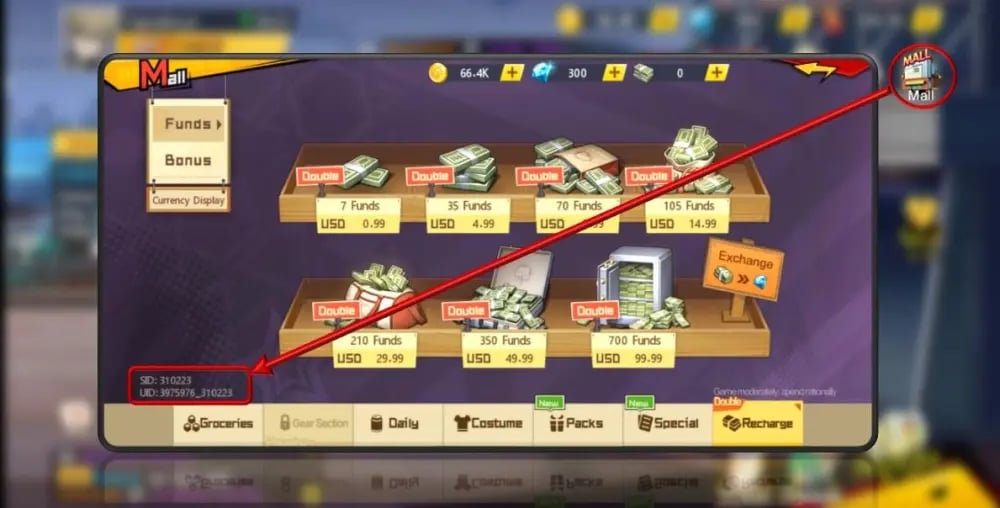
Understanding the relationship between in-game currencies helps you maximize the value of every recharge. One Punch Man: The Strongest uses a dual-currency structure for premium transactions:
| Currency | How It Is Acquired | Primary In-Game Purpose |
|---|---|---|
| Coupons | Direct web/third-party top-up via ArcTopup | Buying exclusive store packs, event triggers, and converting to Funds |
| Funds | 1:1 conversion from Coupons or in-game rewards | Regular banner pulls, stamina resets, daily mall purchases |
| Gems | Quest rewards, arena ranking, and progression | Basic recruitment, supply resets, daily gameplay activities |
The 1:1 Coupon to Fund Conversion
Coupons can be exchanged for Funds inside the game at a direct 1:1 ratio. Holding Coupons is advantageous because certain limited-time events and high-value discount packages can only be bought directly with Coupons, while standard store items accept Funds. Keeping your balance in Coupons gives you total spending flexibility.
How to Claim Coupons from the In-Game Mailbox After Recharge
Coupons purchased through ArcTopup are processed automatically and sent directly to your server mailbox. Here is how to collect and activate them:
- Open One Punch Man: The Strongest and log into the server matching your order.
- Tap the Friends/Mail icon on the main menu interface.
- Open the System Mail tab.
- Look for the system message containing your purchased Coupon pack.
- Tap Claim (or Claim All) to transfer the Coupons into your active inventory.
- Check your total balance in the top bar of the in-game shop to verify delivery.
Tip: If you are logged into the game while completing your payment, restart the application or switch scenes to refresh your mailbox status.
Coupons vs Funds: Best Value Uses for Packs and Hero Recruitment
To build a competitive lineup featuring top-tier SSR and SSR+ characters, efficient currency allocation is essential. Here are the top ways to deploy your Coupons:
- Black Support Tickets & Limited Vouchers: The most critical items for recruiting featured limited-time heroes during banner rotations. Prioritize purchasing discount ticket packs using Coupons over raw Fund conversion.
- Growth and Evolution Bundles: Special promotion packs containing character shards, badge chests, and keepsake materials often require direct Coupon purchases.
- Recharge Milestone Rebates: Buying Coupons triggers top-up rebate events in-game, granting bonus rewards, exclusive frames, and extra summon tickets without additional spending.
- Vitality & Stamina Refreshes: Converting small amounts of Coupons into Funds to buy daily stamina packs accelerates player level progression, unlocking vital gear stages earlier.
Safe and Direct Top-Up Process Without Account Passwords
ArcTopup uses direct player UID routing, which means you never need to share your game password, Google account, Apple ID, or social logins.
- Zero Account Takeover Risk: Because no login credentials are exchanged, your account security remains completely under your control.
- Official Mailbox Routing: Top-ups credit through standard server protocols, preserving your account standing.
- Reliable SEA Compatibility: Supports regional servers across Southeast Asia with accurate server routing.
Always verify your User ID and Server ID before confirming payment on ArcTopup to guarantee instant delivery to your profile.
Frequently Asked Questions
How do I find my User ID and Server ID in One Punch Man: The Strongest?
Tap your character avatar in the upper-left corner of the main lobby. Your User ID is the numeric code listed under your character name, and your Server ID is the server number displayed on your profile card or login screen.
How do I claim my One Punch Man: The Strongest Coupons after recharging?
After completing your purchase on ArcTopup, open the game and tap the mailbox icon in the main interface. Open the top-up confirmation mail and press Claim to add the Coupons to your inventory.
What is the conversion rate between Coupons and Funds in One Punch Man: The Strongest?
Coupons convert to Funds at a 1:1 ratio. One Coupon equals one Fund. However, some limited-time store bundles can only be bought with Coupons directly, so convert them only when needed.
Do I need to provide my game account password to top up Coupons?
No. ArcTopup only requires your numeric User ID and Server ID. You should never share your account passwords or login credentials with anyone.
Are there active One Punch Man: The Strongest gift codes for 2026?
Developers release promotional gift codes during major 2026 update milestones, holidays, and live events. You can redeem active codes inside your player profile settings menu under the Gift Code button to receive free Gems and materials.
What can I purchase using Coupons in One Punch Man: The Strongest?
You can use Coupons to purchase limited recruitment tickets, monthly privilege cards, character evolution packs, exclusive keepsake supplies, or convert them directly into Funds for daily banner summons.
Current packages and prices
Current base prices exclude Tax. Tax, payment fees and coupon adjustments are shown at checkout.
| Package | Price |
|---|---|
| 13 Coupons | USD 1.23 |
| 22 Coupons | USD 1.72 |
| 23 Coupons | USD 2.30 |
| 54 Coupons | USD 4.29 |
| 61 Coupons | USD 6.14 |
| 107 Coupons | USD 8.59 |
| 91 Coupons | USD 9.21 |
| 214 Coupons | USD 17.17 |
| 227 Coupons | USD 23.01 |
| 321 Coupons | USD 25.76 |
| 2669 Coupons | USD 214.63 |
| 8007 Coupons | USD 654.24 |
| 16013 Coupons | USD 1308.47 |