
Sausage Man Candy Top Up: Fast, Safe Direct Recharges
Sausage Man Candy is the premium in-game currency used to unlock premium content in the competitive, cartoon-style battle royale game Sausage Man. Players use Candies to acquire custom cosmetics, high-tier weapon wraps, silly action emotes, and seasonal battle passes that distinguish them on Sausage Island. ArcTopup provides a fast and secure direct recharge service, allowing players worldwide to top up Candies instantly using only their Character ID.
Recharging through ArcTopup bypasses the need for complicated gift card redemptions or linking third-party accounts. By entering your numerical Character ID and completing your transaction, your Candies are sent directly to your game balance. Check the live checkout interface for current denominations, regional pricing, and available local payment methods.
What Sausage Man Candies Are and What In-Game Items They Unlock
Candies provide access to the full variety of items in the Sausage Man shop and supply depot. In the 2026 battle royale seasons, having Candies gives you immediate access to exclusive drops and time-limited events:
- Golden Season Pass: Unlock the premium reward track of each season to earn exclusive legendary outfits, weapon finishes, dance emotes, and seasonal title badges as you level up your pass.
- Rainbow Supply Boxes: Open specialty loot crates containing animated gun skins, themed sets, and mythic cosmetics.
- Exclusive Vehicle and Glider Cosmetics: Customize party cards, sports cars, UFO mounts, and giant mecha suits with distinct visual finishes and effects.
- Direct Store Outfits and Accessories: Purchase curated character bundles, hats, backpacks, and tactical melee skins directly from the in-game shop catalog.
- Name Change Cards and Utilities: Update your in-game identity or acquire utility cards to customize your player profile.
Step-by-Step Guide to Finding Your Sausage Man Character ID
To ensure your Candies arrive without delay, you must provide your exact Character ID. You do not need to share your account username or login details.
- Open the Sausage Man app on your mobile device and log in to your account.
- Tap your Avatar Profile Icon located in the top-left corner of the main lobby screen.
- On your personal profile page, locate your numerical Character ID displayed directly below your player nickname.
- Tap the Copy icon next to the number to copy your Character ID directly to your clipboard.
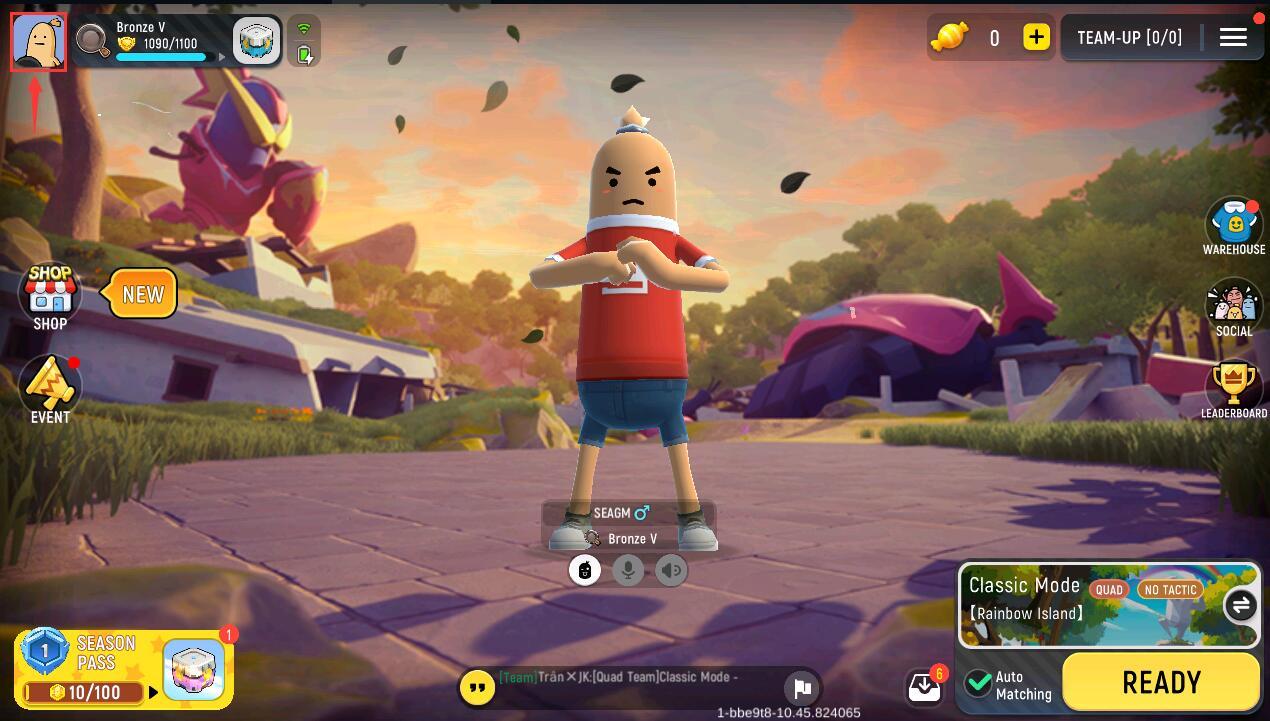
Always double-check your copied ID before submitting your order to prevent crediting the wrong account.
How to Top Up Sausage Man Candies on ArcTopup
To complete your Sausage Man Candy recharge on ArcTopup, follow these simple steps:
- Select the Candy denomination package you wish to purchase from the product catalog.
- Paste your Character ID into the required input field.
- Click the purchase button to proceed to the secure ArcTopup checkout page.
- Select your preferred local or international payment method from the available options.
- Confirm and complete your payment.
- Return to Sausage Man to verify that your Candy balance has been updated.
Direct Character ID Recharge Benefits: Zero Password Sharing
Account security is the top priority when purchasing digital currencies. Direct top-up via Character ID provides the safest possible recharge experience:
- Zero Login Credentials Required: You never need to provide passwords, verification codes (OTP), or link third-party social media profiles (Google, Apple, TapTap, or Facebook).
- Account Protection: Because login access is never shared, your account remains secure against unauthorized access, credential theft, or unauthorized item spending.
- Instant Server Delivery: The recharge system connects directly to the game server infrastructure to credit Candies to your Character ID immediately after payment approval.
Sausage Man Season Pass and Supply Box Candy Requirements
Planning your Candy purchase helps you manage seasonal upgrades efficiently. The table below outlines typical Candy expenditures for common in-game systems:
| Item / Feature | Candy Requirement | Primary Utility & Benefits |
|---|---|---|
| Standard Season Pass | 300 - 360 Candies | Unlocks the premium progression track and base seasonal outfits |
| Golden Season Pass Bundle | 720 - 900 Candies | Unlocks premium track + instant tier level skips & exclusive item |
| Single Supply Box Draw | 60 - 90 Candies | One attempt at high-tier seasonal cosmetics and skins |
| 10x Supply Box Bundle | 540 - 810 Candies | Bulk crate draw with guaranteed rarity milestones |
| Direct Store Weapon Wraps | 300 - 1,200 Candies | Instant purchase of featured legendary weapon cosmetics |
Note: Exact Candy costs may vary during special limited-time promotional events or specific regional updates. Refer to the in-game shop for real-time item costs.
Delivery Verification and Balance Check in Sausage Man
Once your transaction on ArcTopup is confirmed, follow these steps to verify your Candy balance:
- Open or return to Sausage Man on your device.
- Look at the top-right corner of the main lobby screen, where your current Candy count is displayed next to your Gold balance.
- If your balance does not update immediately, completely close the Sausage Man application and restart it to refresh the server connection.
- In rare cases of high server traffic, play one quick training match or clear the game cache to force the profile counter to synchronize.
If your Candies do not appear after restarting your game, contact ArcTopup customer support with your order number and Character ID for immediate assistance.
Frequently Asked Questions About Sausage Man Candies
How do I find my Sausage Man Character ID?
Open Sausage Man, tap your profile avatar in the upper-left corner of the main lobby, and locate the numeric ID beneath your nickname. Tap the copy icon next to the number to copy your Character ID.
What items can I buy with Sausage Man Candies?
Candies are used to purchase the Golden Season Pass, unlock Supply Box crates, buy exclusive character costumes, obtain vehicle finishes, and purchase direct weapon cosmetics in the shop.
Do I need to share my Sausage Man login password to top up?
No. ArcTopup uses a direct Character ID top-up method. You only need to provide your public Character ID. You never need to disclose passwords, emails, or verification codes.
How long does it take to receive Sausage Man Candies after purchase?
Recharges are processed automatically. Once your payment is verified on ArcTopup, the Candies are sent directly to your character account on the game server within moments.
How do I check my Sausage Man Candy balance in-game?
Your Candy balance is displayed permanently in the top-right corner of the Sausage Man main menu interface, right alongside your Gold currency.
What should I do if my Sausage Man Candies do not show up immediately?
Restart the Sausage Man game app to trigger a server refresh. If the balance remains unchanged after a few minutes, verify that the submitted Character ID was correct and contact ArcTopup support with your transaction details for prompt resolution.
Current packages and prices
Current base prices exclude Tax. Tax, payment fees and coupon adjustments are shown at checkout.
| Package | Price |
|---|---|
| 61 Candy | USD 0.61 |
| 186 Candy | USD 1.87 |
| 318 Candy | USD 3.12 |
| 686 Candy | USD 6.25 |
| 1378 Candy | USD 12.50 |
| 2118 Candy | USD 18.64 |
| 3548 Candy | USD 31.14 |
| 7108 Candy | USD 62.40 |