How to Complete a Mobile Legends: Bang Bang Top Up on ArcTopup
To get diamonds or passes into your MLBB account quickly, ArcTopup offers a direct reload service requiring only your in-game user credentials. You never need to share login details, passwords, or authentication codes.
Follow these steps to complete your order:
- Enter Your User Information: Type your MLBB Player ID in the designated field, followed by your 4-digit or 5-digit Server ID (found inside the parentheses in your game profile).
- Select Your Package: Choose from regular diamond denominations, the Weekly Diamond Pass, or the Twilight Pass. The dynamic interface displays real-time pricing for every item.
- Proceed to Checkout: Confirm your Player ID and Server ID on the verification step to prevent misdirected deliveries.
- Complete the Payment: Finalize your transaction through the available payment methods shown on the secure checkout screen.
- Check Your Account: Open Mobile Legends: Bang Bang on your mobile device. Your diamonds or pass activation will reflect in your balance right away.
How to Find Your MLBB Player ID and Server ID
Entering the right Player ID and Server ID ensures that your top up credits directly to your profile without delay. Mobile Legends formats these two values together inside your in-game profile, but you must enter them into separate boxes on ArcTopup.
Here is how to locate them:
- Launch Mobile Legends: Bang Bang on your phone or tablet.
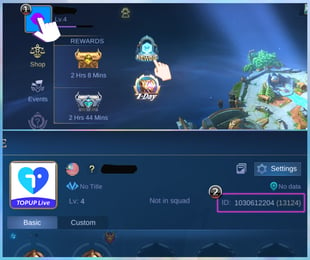
- Tap your Avatar icon in the top-left corner of the main home screen to open the User Profile menu.
- Stay on the Basic Info tab.
- Look below your nickname on the right side of your avatar. You will see a string of numbers formatted like this:
ID: 123456789 (1234). - The longer string outside the brackets (for example,
123456789) is your Player ID. - The 4-digit or 5-digit number inside the brackets (for example,
1234) is your Server ID (often referred to as your Zone ID).
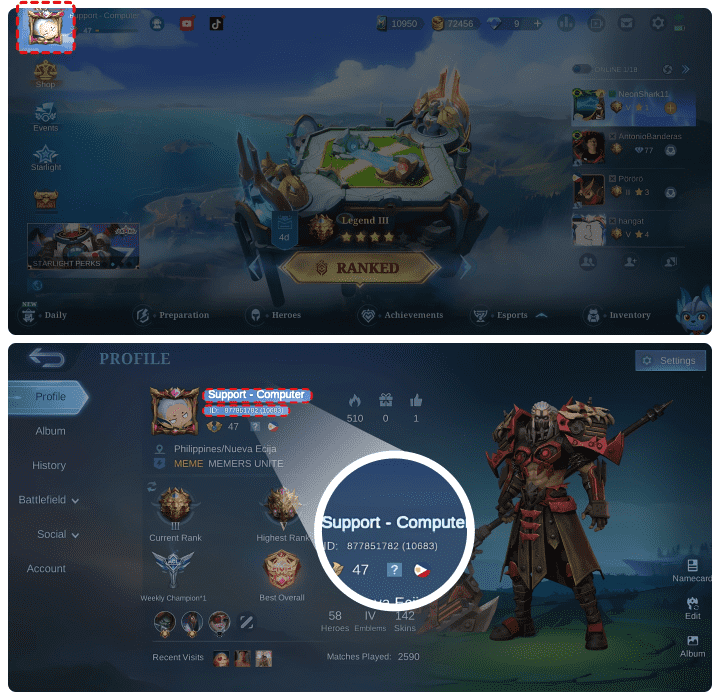
Make sure you do not include the parentheses when typing your Server ID into the checkout field.
Base Diamonds vs Bonus Diamonds: What Counts Toward In-Game Events
When topping up for 2026 limited-time events, collaboration draws, and Premium Supply recharge phases, understanding how diamonds register in your account is essential.
Top-up packages often contain a combination of Base Diamonds and Bonus Diamonds:
- Base Diamonds: The core amount of currency attached to the package tier. In-game event tasks (such as Recharge 100 Diamonds or Recharge 250 Diamonds for bonus event tokens) calculate your progress strictly using Base Diamonds.
- Bonus Diamonds: Extra complimentary diamonds bundled into specific top-up denominations. These diamonds are fully spendable in the in-game shop, skin draws, and hero purchases, but Moonton recharge event trackers do not count bonus amounts toward milestone completion.
If an event task requires 250 diamonds to unlock free draw tickets, pick a bundle whose base diamond count meets or exceeds 250 diamonds rather than relying on promotional bonus additions.
Weekly Diamond Pass and Twilight Pass: Value & Stacking Rules
ArcTopup supports direct recharges for specialized MLBB subscriptions and progression passes. Each pass serves different progression goals and operates under specific activation rules.
Weekly Diamond Pass Rules
The Weekly Diamond Pass provides an immediate batch of diamonds upon purchase, followed by daily claimable diamonds, Starlight points, and bonus choice bundles over a 7-day period.- Stacking Cap: You can purchase and stack up to 10 Weekly Diamond Passes at a time (extending your total active pass duration to a maximum of 70 days).- Purchasing Beyond the Cap: If your remaining pass duration exceeds 70 days, the game will reject further pass recharges or convert them to standard diamond values without the subscription bonus. Keep track of your remaining days in-game before ordering multiples.- Event Credit: In most 2026 MLBB recharge events, purchasing a Weekly Diamond Pass counts as recharging 100 Base Diamonds toward recharge milestone tasks.
Twilight Pass Rules
The Twilight Pass is a level-progression track tailored for account leveling rewards.- One-Time Purchase: The Twilight Pass can only be purchased once per account. If your account already owns the pass, attempting a repeat purchase will fail or cause delivery errors.- Reward Claiming: Unlocking the pass grants instant cosmetic items and enables premium reward tiers as you increase your MLBB account level up to Level 50.
| Product Type | Instant Rewards | Ongoing / Milestone Rewards | Event Recharge Credit | Stacking Limit |
|---|---|---|---|---|
| Direct Diamonds | Full bundle amount | None | Base diamond amount | Unlimited |
| Weekly Diamond Pass | 80 Diamonds | 20 Diamonds/day (7 days) + Choice Chests | Counts as 100 Base Diamonds | Max 10 passes (70 days) |
| Twilight Pass | Exclusive skin & badges | Tickets, skins, and fragments to Lv 50 | Counts base value once | 1 purchase per account |
Safe & Passwordless MLBB Top-Ups: Protecting Your Account
Account safety is the top priority when purchasing mobile game currency. ArcTopup uses a direct API direct-credit model that eliminates common account vulnerabilities:
- Zero Password Requirement: You only provide your public Player ID and Server ID. ArcTopup will never ask for your Moonton account password, email login, Facebook connection, Google Play login, or one-time verification codes (OTP).
- No Account Sharing: Because the recharge routes directly through your public identifier, you never have to hand over account access to third parties or risk automated security bans from irregular IP address logins.
- Direct In-Game Delivery: Purchased items credit straight to your official MLBB inbox and diamond wallet, complying with standard server transaction protocols.
Troubleshooting Delivery Delays and Incorrect Server ID Submissions
Most transactions on ArcTopup finish within moments, but occasional network lag or input errors can require verification:
- Diamonds Not Showing Up: Force-close the Mobile Legends application completely and restart it. Diamonds frequently update only after the client re-establishes a fresh connection with the game server.
- Checking the In-Game Mailbox: Special items, bonus chests, and pass activation tokens sometimes arrive via the system mail tab rather than adding straight to your wallet indicator. Look inside your in-game mailbox for confirmation messages.
- Mistyped Server ID: If you submitted the wrong Server ID, the transaction may fail at the gateway or deliver to a different account associated with that number. Double-check your numbers before payment. If you suspect an error, contact ArcTopup customer support with your order number, correct Player ID, and correct Server ID to inspect the order status.
- Server Region Conflicts: Some regional servers require an exact match between your account location and your Server ID. Always copy the exact 4 or 5 digits displayed in your profile window.
Frequently Asked Questions
How to recharge in Mobile Legends: Bang Bang?
To recharge in Mobile Legends: Bang Bang, find your Player ID and Server ID in your in-game profile. Enter these details on ArcTopup, choose your desired diamond package or Weekly Diamond Pass, and complete the payment on the live checkout screen. The diamonds will credit to your account immediately.
Where do I find my MLBB Player ID and Server ID?
Open Mobile Legends: Bang Bang and tap your profile avatar in the upper-left corner of the screen. In the Basic Info tab, look under your nickname to find your ID string, formatted as ID: XXXXXXXXX (XXXX). The main number is your Player ID, and the numbers inside the parentheses represent your Server ID.
Do bonus diamonds count toward MLBB recharge benefit event tasks?
No. In-game recharge milestone events, such as Premium Supply tasks and collector skin draws, only register the Base Diamonds included in a pack. Bonus diamonds give you extra spendable balance but do not count toward event progression bars.
Is it safe to top up Mobile Legends using only Player ID and Server ID?
Yes. Topping up with only your Player ID and Server ID is the safest way to buy diamonds. Because your password, email login, and security codes are never requested, your account cannot be compromised or accessed by third parties.
How many times can I purchase the Weekly Diamond Pass?
You can stack up to 10 Weekly Diamond Passes at one time, giving you a total duration of 70 active days. If your active subscription timer is already above 70 days, wait until the duration drops before purchasing another pass on ArcTopup.
What should I do if diamonds do not appear in my MLBB account immediately?
First, restart your Mobile Legends client to refresh your balance with the game server. Next, check your in-game mailbox for any unclaimed delivery messages or pass vouchers. If your balance does not update after several minutes, reach out to ArcTopup customer support with your order ID and profile details for immediate assistance.
Current packages and prices
Current base prices exclude Tax. Tax, payment fees and coupon adjustments are shown at checkout.
| Package | Price |
|---|---|
| 70 Diamonds | USD 1.09 |
| 112 Diamond ( 102 + 10 Bonus ) | USD 1.60 |
| Weekly Diamond Pass | USD 1.67 |
| 140 Diamonds | USD 2.17 |
| 168 Diamonds | USD 2.58 |
| Weekly Diamond Pass x2 | USD 3.35 |
| Malaysia-278 Diamonds ( 254 + 26 Bonus ) | USD 3.93 |
| Monthly Epic Bundle | USD 4.04 |
| 284 Diamonds | USD 4.16 |
| 278 Diamonds | USD 4.23 |
| Weekly Diamond Pass x3 | USD 5.01 |
| 355 Diamonds | USD 5.22 |
| 429 Diamonds | USD 6.29 |
| Weekly Diamond Pass x4 | USD 6.69 |
| 571 Diamonds ( 521 + 53 Bonus ) | USD 7.84 |
| 569 Diamonds | USD 7.84 |
| Weekly Diamond Pass x5 | USD 8.35 |
| Twilight Pass | USD 9.09 |
| 716 Diamonds | USD 10.26 |
| 1085 Diamonds | USD 15.40 |
| 1192 Diamonds | USD 15.70 |
| 1048 Diamonds (940 + 108 Bonus) | USD 16.31 |
| 1136 Diamonds (1016 + 120 Bonus) | USD 17.17 |
| 1220 Diamonds (1092 + 128 Bonus) | USD 18.59 |
| 1446 Diamonds | USD 19.30 |
| 1358 Diamonds (1221 + 137 Bonus) | USD 20.75 |
| 1412 Diamonds (1270 + 142 Bonus) | USD 21.60 |
| 1506 Diamonds (1348 + 158 Bonus) | USD 22.91 |
| 1788 Diamonds | USD 23.61 |
| 1730 Diamonds | USD 23.84 |
| 1584 Diamonds (1409 + 175 Bonus) | USD 24.01 |
| 1669 Diamonds (1493 + 176 Bonus) | USD 25.29 |
| 1704 Diamonds (1522 + 182 Bonus) | USD 25.95 |
| 1841 Diamonds (1649 + 192 Bonus) | USD 28.08 |
| 1875 Diamonds (1635 + 240 Bonus) | USD 28.70 |
| 1926 Diamonds (1720 + 206 Bonus) | USD 29.19 |
| 2010 Diamonds (1760 + 250 Bonus) | USD 30.19 |
| 2380 Diamonds (2089 + 291 Bonus) | USD 35.83 |
| 3005 Diamonds | USD 39.23 |
| 2976 Diamonds | USD 40.05 |
| 3606 Diamonds | USD 46.79 |
| 3692 Diamonds ( 3134 + 558 Bonus ) | USD 54.05 |
| 4810 Diamonds | USD 62.77 |
| 4416 Diamonds ( 3781 + 635 Bonus ) | USD 64.60 |
| 4422 Diamonds ( 3753 + 669 Bonus ) | USD 64.80 |
| 4851 Diamonds ( 4136 + 715 Bonus ) | USD 71.29 |
| 6012 Diamonds ( 5066 + 956 Bonus ) | USD 78.46 |
| 5952 Diamonds ( 5002 + 950 Bonus ) | USD 79.69 |
| 6668 Diamonds (5635 + 1033 Bonus) | USD 97.29 |
| 7502 Diamonds | USD 99.04 |
| 112 Diamonds ( 102 + 10 Bonus ) | USD 1.53 |
| Weekly Diamond Pass | USD 1.56 |
| 150 + 150 Bonus | USD 2.30 |
| 168 Diamonds ( 153 + 15 Bonus ) | USD 2.30 |
| Weekly Diamond Pass x2 | USD 3.04 |
| 223 Diamonds ( 203 + 20 Bonus ) | USD 3.08 |
| Monthly Elite Bundle | USD 3.80 |
| 250 + 250 Bonus | USD 3.83 |
| 279 Diamonds ( 254 + 25 Bonus ) | USD 3.95 |
| 301 Diamonds ( 274 + 27 Bonus ) | USD 4.28 |
| 336 Diamonds ( 303 + 33 Bonus ) | USD 4.46 |
| Weekly Diamond Pass x3 | USD 4.56 |
| Weekly Diamond Pass x4 | USD 6.08 |
| 570 Diamonds ( 504 + 66 Bonus ) | USD 7.44 |
| Twilight Pass | USD 7.56 |
| Weekly Diamond Pass x5 | USD 7.60 |
| 500 + 500 Bonus | USD 7.72 |
| 626 Diamonds ( 555 + 71 Bonus ) | USD 8.45 |
| 682 Diamonds ( 606 + 76 Bonus ) | USD 9.23 |
| 669 Diamonds ( 609 + 60 Bonus ) | USD 9.23 |
| 738 Diamonds ( 657 + 81 Bonus ) | USD 9.98 |
| 849 Diamonds ( 758 + 91 Bonus ) | USD 11.52 |
| 906 Diamonds ( 807 + 99 Bonus ) | USD 12.29 |
| 1018 Diamonds ( 909 + 109 Bonus ) | USD 13.83 |
| 1163 Diamonds ( 1007 + 156 Bonus ) | USD 14.87 |
| 1733 Diamonds ( 1511 + 222 Bonus ) | USD 23.05 |
| 2398 Diamonds ( 2015 + 383 Bonus ) | USD 29.72 |
| 3561 Diamonds ( 3022 + 539 Bonus ) | USD 46.08 |
| 4131 Diamonds ( 3526 + 605 Bonus ) | USD 53.77 |
| 5132 Diamonds ( 4333 + 799 Bonus ) | USD 66.05 |
| 6042 Diamonds ( 5035 + 1007 Bonus ) | USD 74.28 |
| 7205 Diamonds ( 6042 + 1163 Bonus ) | USD 92.17 |
| 8440 Diamonds ( 7050 + 1390 Bonus ) | USD 107.53 |
| 9010 Diamonds ( 7554 + 1456 Bonus ) | USD 115.20 |
| 10173 Diamonds ( 8561 + 1612 Bonus ) | USD 130.56 |
| 12084 Diamonds ( 10070 + 2014 Bonus ) | USD 153.60 |
| 15052 Diamonds ( 12589 + 2463 Bonus ) | USD 192.01 |
| 20524 Diamonds ( 17120 + 3404 Bonus ) | USD 261.14 |
| 50 + 5 Diamonds | USD 0.86 |
| Weekly Pass | USD 1.72 |
| 150 + 15 Diamonds | USD 2.53 |
| 250 + 25 Diamonds | USD 4.22 |
| 500 + 65 Diamonds | USD 8.48 |
| 1000 + 155 Diamonds | USD 16.99 |
| 1500 + 265 Diamonds | USD 25.41 |
| 2500 + 475 Diamonds | USD 42.38 |
| 5000 + 1000 Diamonds | USD 84.66 |
| 71 Diamonds (64 + 7 Bonus) | USD 1.07 |
| 74 Diamonds (67 + 7 Bonus) | USD 1.20 |
| 85 Diamonds (77 + 8 Bonus) | USD 1.24 |
| 110 Diamonds (100 + 10 Bonus) | USD 1.49 |
| Weekly Diamond Pass | USD 1.55 |
| Weekly Diamond Pass | USD 1.55 |
| 113 Diamonds (102 + 11 Bonus) | USD 1.67 |
| 132 Diamonds (120 + 12 Bonus) | USD 1.94 |
| 144 Diamonds (130 + 14 Bonus) | USD 2.12 |
| 148 Diamonds (134 + 14 Bonus) | USD 2.17 |
| 300 Diamonds (150 + 150 Bonus) Frist Topup | USD 2.43 |
| 170 Diamonds (154 + 16 Bonus) | USD 2.48 |
| 2x Weekly Diamond Pass | USD 3.10 |
| Weekly Diamond Pass 2x | USD 3.10 |
| 229 Diamonds (207 + 22 Bonus) | USD 3.36 |
| 240 Diamonds (217 + 23 Bonus) | USD 3.50 |
| 255 Diamonds (231 + 24 Bonus) | USD 3.73 |
| 277 Diamonds (250 + 27 Bonus) | USD 4.07 |
| Monthly Elite Bundle | USD 4.13 |
| 284 Diamonds (254 + 30 Bonus) | USD 4.15 |
| 296 Diamonds (256 + 40 Bonus) | USD 4.31 |
| 301 Diamonds | USD 4.39 |
| 3x Weekly Diamond Pass | USD 4.64 |
| Weekly Diamond Pass 3x | USD 4.64 |
| 340 Diamonds (308 + 32 Bonus) | USD 4.96 |
| 370 Diamonds (333 + 37 Bonus) | USD 5.50 |
| 408 Diamonds (367 + 41 Bonus) | USD 5.90 |
| 4x Weekly Diamond Pass | USD 6.18 |
| 436 Diamonds (392 + 44 Bonus) | USD 6.34 |
| 466 Diamonds (410 + 56 Bonus) | USD 6.80 |
| 493 Diamonds (444 + 49 Bonus) | USD 7.15 |
| 510 Diamonds (462 + 48 Bonus) | USD 7.44 |
| 5x Weekly Diamond Pass | USD 7.72 |
| 536 Diamonds (473 + 63 Bonus) | USD 7.82 |
| 568 Diamonds (503 + 65 Bonus) | USD 8.06 |
| 1000 Diamonds (500 + 500 Bonus) Frist Topup | USD 8.14 |
| Twilight Pass | USD 8.37 |
| 648 Diamonds (584 + 64 Bonus) | USD 9.40 |
| 704 Diamonds (623 + 81 Bonus) | USD 10.22 |
| 720 Diamonds (651 + 69 Bonus) | USD 10.50 |
| 789 Diamonds (700 + 89 Bonus) | USD 11.45 |
| 816 Diamonds (734 + 82 Bonus) | USD 11.81 |
| 875 Diamonds (774 + 101 Bonus) | USD 12.35 |
| 903 Diamonds (799 + 104 Bonus) | USD 12.77 |
| 934 Diamonds (827 + 107 Bonus) | USD 13.22 |
| 960 Diamonds (851 + 109 Bonus) | USD 13.58 |
| 1000 Diamonds (879 + 121 Bonus) | USD 14.53 |
| 1045 Diamonds (928 + 117 Bonus) | USD 14.83 |
| 1115 Diamonds (991 + 124 Bonus) | USD 15.85 |
| 1136 Diamonds (1006 + 130 Bonus) | USD 16.11 |
| 1171 Diamonds (1030 + 141 Bonus) | USD 16.66 |
| 1283 Diamonds (1141 + 142 Bonus) | USD 18.25 |
| 1368 Diamonds (1218 + 150 Bonus) | USD 19.49 |
| 1453 Diamonds (1295 + 158 Bonus) | USD 20.74 |
| 1523 Diamonds (1358 + 165 Bonus) | USD 21.75 |
| 1704 Diamonds (1509 + 195 Bonus) | USD 24.16 |
| 1691 Diamonds (1508 + 183 Bonus) | USD 24.16 |
| 1750 Diamonds (1548 + 202 Bonus) | USD 24.69 |
| 1835 Diamonds (1625 + 210 Bonus) | USD 25.93 |
| 2010 Diamonds (1708 + 302 Bonus) | USD 26.84 |
| 2625 Diamonds (2322 + 303 Bonus) | USD 32.18 |
| 4020 Diamonds (3416 + 604 Bonus) | USD 53.67 |
| 4830 Diamonds (4003 + 827 Bonus) | USD 64.69 |
| 6030 Diamonds (5124 + 906 Bonus) | USD 80.51 |
| 8040 Diamonds (6832 + 1208 Bonus) | USD 107.34 |
| 9660 Diamonds (8006 + 1654 Bonus) | USD 129.38 |
| 14490 Diamonds (12009 + 2481 Bonus) | USD 194.07 |
| 20100 Diamond | USD 240.51 |
| 20130 Diamond | USD 241.56 |
| 21330 Diamond | USD 254.53 |
| 27864 Diamond | USD 334.25 |
| 30990 Diamonds | USD 361.44 |
| 70 Diamonds | USD 1.09 |
| Weekly Diamond Pass | USD 1.67 |
| 140 Diamonds | USD 2.03 |
| 168 Diamonds | USD 2.58 |
| 182 Diamond (165 + 17 Bonus) | USD 2.62 |
| Weekly Diamond Pass x2 | USD 3.35 |
| 278 Diamonds ( 254 + 26 Bonus ) | USD 3.93 |
| Monthly Epic Bundle | USD 4.04 |
| 284 Diamonds | USD 4.16 |
| Weekly Diamond Pass x3 | USD 5.01 |
| 355 Diamonds | USD 5.22 |
| 429 Diamonds | USD 6.29 |
| Weekly Diamond Pass x4 | USD 6.69 |
| 571 Diamonds ( 521 + 53 Bonus ) | USD 7.84 |
| 569 Diamonds | USD 7.84 |
| 716 Diamonds | USD 10.26 |
| 1085 Diamonds | USD 15.20 |
| 1446 Diamonds | USD 21.46 |
| 1788 Diamonds (1599 + 189 Bonus) | USD 23.61 |
| 1730 Diamonds | USD 23.84 |
| 3005 Diamonds (2648 + 357 Bonus) | USD 39.23 |
| 2976 (2501+475) Diamonds | USD 40.05 |
| 3606 Diamonds (3073+ 533 Bonus) | USD 46.79 |
| 6012 Diamonds ( 5066 + 956 Bonus ) | USD 78.46 |
| 7502 Diamonds | USD 99.04 |
| Turkey-55 Diamonds ( 50 + 5 Bonus ) | USD 0.84 |
| Turkey-88 Diamonds ( 80 + 8 Bonus ) | USD 1.15 |
| Turkey-Weekly Diamond Pass | USD 1.65 |
| Turkey-133 Diamonds ( 121 + 12 Bonus ) | USD 1.73 |
| Turkey-165 Diamonds ( 150 + 15 Bonus ) | USD 2.48 |
| Turkey-221 Diamonds ( 201 + 20 Bonus ) | USD 2.87 |
| Turkey-275 Diamonds ( 250 + 25 Bonus ) | USD 4.13 |
| Turkey-494 Diamonds ( 449 + 45 Bonus ) | USD 6.36 |
| Turkey-565 Diamonds ( 500 + 65 Bonus ) | USD 8.41 |
| Turkey-1041 Diamonds ( 897 + 144 Bonus ) | USD 12.75 |
| Turkey-2645 Diamonds ( 2242 + 403 Bonus ) | USD 31.83 |
| Turkey-6146 Diamonds ( 5122 + 1024 Bonus ) | USD 72.64 |
| 86 Diamonds | USD 0.92 |
| Weekly Diamond Pass (Brazil) | USD 1.18 |
| 172 Diamonds | USD 1.85 |
| Weekly Diamond Pass 2x | USD 2.37 |
| 257 Diamonds | USD 2.75 |
| Weekly Diamond Pass 3x | USD 3.54 |
| 344 Diamonds | USD 3.69 |
| 429 Diamonds | USD 4.61 |
| Weekly Diamond Pass 4x | USD 4.72 |
| 516 Diamonds | USD 5.54 |
| 600 Diamonds | USD 6.46 |
| 706 Diamonds | USD 7.37 |
| 792 Diamonds | USD 8.29 |
| 878 Diamonds | USD 9.22 |
| 963 Diamonds | USD 10.13 |
| 1050 Diamonds | USD 11.06 |
| 1135 Diamonds | USD 11.97 |
| 1220 Diamonds | USD 12.97 |
| 1346 Diamonds | USD 13.82 |
| 1412 Diamonds | USD 14.73 |
| 1669 Diamonds | USD 17.49 |
| 1.825 Diamonds | USD 18.42 |
| 1.926 Diamonds | USD 20.26 |
| 2014 Diamonds | USD 21.19 |
| 2195 Diamonds | USD 22.10 |
| 2901 Diamonds | USD 29.47 |
| 3.688 Diamonds | USD 36.84 |
| 5.532 Diamonds | USD 55.25 |
| 9.288 Diamonds | USD 92.08 |
| Global-86 Diamonds (78 + 8 Bonus) | USD 1.04 |
| Global-70 Diamonds ( 64 + 6 Bonus ) | USD 1.04 |
| Global-Weekly Pass | USD 1.29 |
| Global-112 Diamonds ( 102 + 10 Bonus ) | USD 1.76 |
| Global-150+150 Diamonds | USD 1.96 |
| Global-172 Diamonds (156 + 16 Bonus) | USD 2.04 |
| Global-140 Diamonds | USD 2.16 |
| Global-Weekly Pass x2 | USD 2.58 |
| Global-257 Diamonds (234 + 23 Bonus) | USD 2.98 |
| Global-250+250 Diamonds | USD 3.14 |
| Global-Monthly Epic Bundle (Available Once a Month) | USD 3.29 |
| Global-223 Diamonds ( 203 + 20 Bonus ) | USD 3.49 |
| Global-Weekly Pass x3 | USD 3.87 |
| Global-344 Diamonds (312 + 32 Bonus) | USD 4.09 |
| Global-284 Diamonds | USD 4.16 |
| Global-429 Diamonds ( 390 + 40 Bonus ) | USD 5.12 |
| Global-Weekly Pass x4 | USD 5.16 |
| Global-355 Diamonds | USD 5.22 |
| Global-336 Diamonds ( 303 + 33 Bonus ) | USD 5.31 |
| Global-514 Diamonds(468 + 46 Bonus) | USD 5.96 |
| Global-Weekly Pass x5 | USD 6.44 |
| Global-500+500 Diamonds | USD 6.45 |
| Global-Twilight Pass | USD 6.75 |
| Global-Weekly Pass x6 | USD 7.73 |
| Global-570 Diamonds ( 504 + 66 Bonus ) | USD 7.84 |
| Global-706 Diamonds (625 + 81 Bonus) | USD 8.05 |
| Global-716 Diamonds | USD 10.26 |
| Global-963 Diamonds(859 + 104 Bonus) | USD 11.03 |
| Global-1050 Diamonds(937 + 113 Bonus) | USD 12.13 |
| Global-1084 Diamonds | USD 15.20 |
| Global-1446 Diamonds ( 1296 + 150 Bonus ) | USD 16.98 |
| Global-1163 Diamonds ( 1007 + 156 Bonus ) | USD 18.25 |
| Global-1770 Diamonds (1589 + 181 Bonus) | USD 21.00 |
| Global-2195 Diamonds (1860 + 335 Bonus) | USD 24.36 |
| Global-2539 Diamonds(2172 + 367 Bonus) | USD 28.45 |
| Global-2901 Diamonds(2485 + 416 Bonus) | USD 32.41 |
| Global-2976 Diamonds (2655 + 321 Bonus) | USD 34.18 |
| Global-2398 Diamonds ( 2015 + 383 Bonus ) | USD 36.49 |
| Global-3688 Diamonds (3099 + 589 Bonus) | USD 40.64 |
| Global-4165 Diamonds(3527 + 635 Bonus) | USD 46.60 |
| Global-4394 Diamonds(3724 + 670 Bonus) | USD 48.69 |
| Global-5532 Diamonds (4649 + 883 Bonus) | USD 61.37 |
| Global-6046 Diamonds(5117 + 929 Bonus) | USD 67.33 |
| Global-6238 Diamonds(5274 + 964 Bonus) | USD 69.42 |
| Global-7182 Diamonds(6132 + 1050 Bonus) | USD 80.50 |
| Global-7502 Diamonds (6429 + 1073 Bonus) | USD 84.16 |
| Global-7727 Diamonds(6509 + 1218 Bonus) | USD 85.73 |
| Global-9288 Diamonds (7740 + 1548 Bonus) | USD 101.93 |
| Global-12189 Diamonds(10225 + 1964 Bonus) | USD 134.33 |
| Global-12976 Diamonds(10839 + 2137 Bonus) | USD 142.57 |
| Global-14820 Diamonds(12389 + 2431 Bonus) | USD 163.30 |
| Global-18576 Diamonds(15483 + 3096 Bonus) | USD 203.85 |