PUBG Mobile UC Top Up Online Using Player ID
Unknown Cash (UC) is the primary in-game currency used in PUBG Mobile. It allows players to unlock exclusive weapon finishes, character cosmetics, vehicle skins, and Royale Pass tiers. Purchasing UC through ArcTopup is straightforward and requires only your numeric Player ID.
To complete your PUBG Mobile UC top up on ArcTopup, follow these steps:
- Select the specific UC package you want to add to your account from the catalog above.
- Locate your numeric PUBG Mobile Player ID inside the game client.
- Paste your Player ID into the required input field on the order screen.
- Review your order details, select your preferred payment method on the live checkout interface, and confirm the transaction.
- Open PUBG Mobile to verify that your UC balance has updated.
ArcTopup processes orders directly to the account tied to the entered Player ID. Because the system transfers credits automatically based on this numerical identifier, double-checking your number before submitting payment prevents delivery delays.
How to Find Your PUBG Mobile Numeric Player ID
Your PUBG Mobile Player ID is a distinct sequence of numbers (typically 8 to 11 digits) assigned to your game profile. It is separate from your custom character nickname.
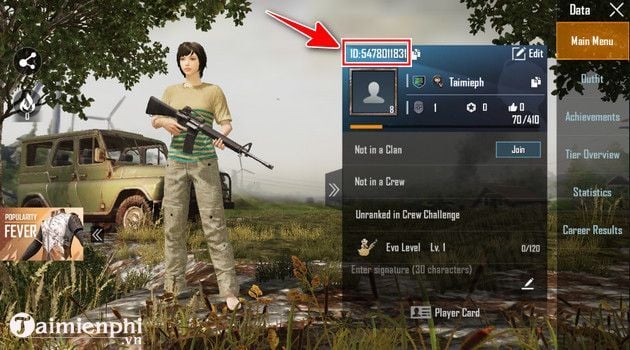
Follow these exact in-game steps to locate and copy your Player ID:
- Launch PUBG Mobile on your mobile device and log in to your account.
- Tap your profile avatar icon located in the top-left corner of the main lobby screen.
- Stay on the Main Page tab of your profile overview.
- Look directly below your character nickname and avatar frame. You will see your numeric identifier labeled as ID.
- Tap the copy icon (overlapping rectangular icons) directly next to the numbers to copy your Player ID to your clipboard.
- Paste this number directly into the Player ID field on ArcTopup to avoid typing errors.
What You Can Buy with PUBG Mobile UC in 2026
Acquiring UC gives you direct access to premium customization systems and progression tracks throughout the 2026 competitive seasons. Here are the primary systems where UC is spent:
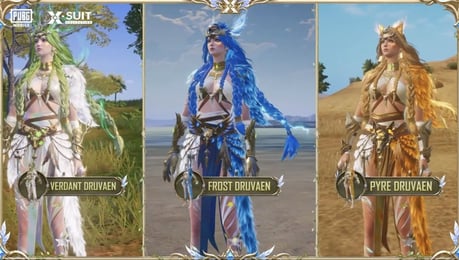
- Royale Pass (RP): Unlock monthly and seasonal reward tracks featuring exclusive outfit sets, weapon finishes, emotes, and rebate rewards.
- Lucky Spins & Themed Draws: Participate in limited-time prize pools containing upgradable firearms, Mythic Forge materials, and luxury vehicle collaborations.
- In-Game Crates: Open Classic Crates, Premium Crates, and Supply Crates for permanent gear cosmetics and character modifications.
- Lab Upgrades: Purchase materials like Paint and Modification Material Pieces required to level up dynamic weapon skins with elimination broadcasts and loot box transformations.
- Treasures & Shop Bundles: Buy daily discount packs, rename cards, room cards, and companion pet items directly from the in-game shop.
Royale Pass Upgrades and In-Game Crates Overview
The table below outlines the primary ways players utilize their PUBG Mobile UC across different reward tracks:
| Feature Category | Base UC Requirement | Typical Unlocks & In-Game Benefits |
|---|---|---|
| Elite Pass | 360 UC | Standard premium track, exclusive outfits, weapon skins, and full UC return upon reaching max rank |
| Elite Pass Plus | 960 UC | Elite Pass access, 12 instant rank advances, exclusive avatar frame, and bonus emote |
| Classic / Premium Crates | Variable UC per open | Mythic outfits, legendary firearm finishes, helmet and backpack skins |
| Gun Craft & Lab Materials | Variable UC | Paint items and upgrade materials to level up progressive firearm finishes |
| Shop Consumables | Variable UC | Character Rename Cards, Custom Room Cards, and companion food |
Account Safety: Why No Password or Account Login Is Needed
Security is a fundamental requirement when buying game credits online. ArcTopup uses direct ID-based fulfillment protocols, meaning you never need to share your account login credentials, social media bindings, or passwords.
Key safety protections include:
- Zero Password Requests: You only provide your public numeric Player ID. Legitimate top-up transactions do not require your password, verification codes, or linked Facebook/Twitter/Google logins.
- No Account Handover: Your account remains completely in your hands. You do not need to log out or allow third parties access to your game client.
- Protected Payment Flow: Transactions are processed through encrypted checkout channels, ensuring your financial information remains private.
Never share your password or two-factor authentication codes with anyone offering top-up services.
Why Choose ArcTopup for PUBG Mobile UC Recharge
ArcTopup provides a clear, reliable environment for gamers seeking UC recharges:
- Direct Numerical Delivery: Input your Player ID, pick your pack, and receive your balance straight to your in-game wallet.
- Transparent Live Checkout: Check live pricing and choose from available regional payment methods directly at the checkout stage without hidden fees.
- Clean Interface: Designed for quick mobile and desktop orders, allowing you to get your currency and jump straight back into the match.
- Multi-Region Support: Catered to global players, supporting accounts across standard international servers.
Troubleshooting Delivery Sync and UC Recharge Issues
If your UC does not reflect in your account immediately after completing your order, use the following troubleshooting steps:
- Restart the Game App: Completely close the PUBG Mobile app from your background tasks and launch it again. This forces the client to sync with the central server and refresh your wallet balance.
- Check In-Game System Mail: Some seasonal packs, bonus tokens, or promotional items are sent directly to your in-game mailbox rather than credited straight to the top balance counter. Check the mail tab in the bottom-right corner of the lobby.
- Verify Player ID on Receipt: Review your order confirmation receipt to verify that the numeric Player ID submitted matches your in-game account. A single incorrect digit can route credits to a different user.
- Allow Server Processing Windows: During major seasonal updates, server maintenance windows, or high-traffic events, slight sync delays can occur across game networks.
- Contact Support with Order Details: If your balance does not update after restarting your app, contact ArcTopup customer support with your transaction ID, order timestamp, and Player ID for rapid verification.
Frequently Asked Questions
How can I top up my PUBG Mobile game credit?
To top up your PUBG Mobile game credit, select the amount of UC you wish to purchase on ArcTopup, enter your numeric Player ID in the designated field, and proceed to checkout. Once the payment is confirmed on the live checkout interface, the UC is credited directly to your PUBG Mobile account balance.
How do I recharge UC for PUBG Mobile using my Player ID?
Recharging UC with your Player ID requires only three actions: copy your 8-to-11-digit numerical ID from your in-game profile, paste it into the Player ID input field on ArcTopup, select your desired UC package, and finish your payment. You do not need to log in to your social media or game credentials.
Where do I find my PUBG Mobile Player ID?
Open PUBG Mobile, tap your avatar icon in the top-left corner of the main lobby, and view the Main Page tab. Your numeric Player ID is displayed right below your character name. Tap the overlapping square icon next to the number to copy it directly.
Do I need to provide my PUBG Mobile account password to top up?
No. You never need to provide your password, secondary verification codes, or linked social media accounts to recharge UC on ArcTopup. Only your public numeric Player ID is required for delivery.
What should I do if my PUBG Mobile UC top-up does not appear immediately?
First, restart the PUBG Mobile client to force a server balance refresh. Next, check your in-game mail tab for system notifications or vouchers. Finally, verify the Player ID on your order receipt. If the balance remains unchanged, contact ArcTopup support with your order number for immediate assistance.
Can I buy the Royale Pass with PUBG Mobile UC?
Yes. Once the UC arrives in your game balance, open the RP section in the PUBG Mobile lobby and choose either the Elite Pass (360 UC) or Elite Pass Plus (960 UC) to activate the seasonal reward track.
Current packages and prices
Current base prices exclude Tax. Tax, payment fees and coupon adjustments are shown at checkout.
| Package | Price |
|---|---|
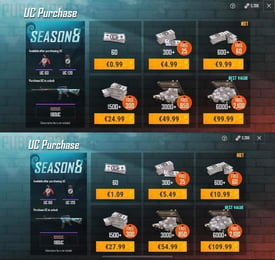
| 60 UC | USD 0.78 |
| 300 + 25 Bonus UC | USD 3.93 |
| 600 + 60 Bonus UC | USD 7.87 |
| ELITE PASS | USD 8.65 |
| 1500 + 300 Bonus UC | USD 19.68 |
| ELITE PASS PLUS | USD 21.24 |
| 3000 + 850 Bonus UC | USD 39.37 |
| 6000 + 2100 Bonus UC | USD 78.74 |
| 12000 + 4200 Bonus UC | USD 157.49 |
| 18000 + 6300 Bonus UC | USD 236.24 |
| 24000 + 8400 Bonus UC | USD 314.99 |
| 30000 + 10500 Bonus UC | USD 393.74 |